
RushHour vs Truckbase
Pallet and multi-stop freight, or truckload dispatch?
Truckbase is trucking dispatch software for asset-based carriers, which it describes as turnkey at 5 trucks and powerful enough for 50: AI import of rate confirmations, a dispatch calendar, driver settlements, invoicing, EDI, 30+ ELD connections and QuickBooks sync. RushHour is an order-to-invoice platform for small and mid-size freight operators: multi-stop dispatch with route optimization, BOLs and labels, rate cards, invoicing and card payments on the same order, plus hubs and warehouse inventory.
The short answer
You deliver pallets, cartons or full loads on multi-stop routes and want route optimization, you price from pallet, zone or international rate cards, you want your customers to book, track and pay by card in a portal that comes with every plan, you hold freight in your own warehouses or move it through hubs, or your office works in Hebrew.
You are an asset-based truckload carrier that books loads from brokers' rate confirmations, your brokers and shippers tender over EDI, you want ELD positions and hours of service on the dispatch calendar, driver and owner-operator settlements with seven pay rate types, factoring and fuel-card connections, or IFTA mileage reporting.
Where each one is stronger
Both cover dispatch, invoicing, QuickBooks, a driver app with signatures and status emails to customers. They differ on the kind of freight and on what plugs into dispatch.
- Card payments from your customers: saved cards, Customer Portal payments and invoice pay links through your Cardknox account, plus per-stop COD payment requests. We did not find card payments or pay links on Truckbase's pages.
- A Customer Portal on every plan, where shippers book orders, track them, download documents and pay invoices. Truckbase's help center lists its customer portal as a Pro-tier feature that may incur additional charges, for order requests and load status.
- Route optimization that re-orders a route's stops by distance or priority, on every plan. Truckbase documents PC*MILER mileage and routing, with the stop order set by hand.
- Pallet-by-mileage grids, zone-to-zone rates, per-customer cards and international Ocean, Air and Ground rate cards, on every plan. Truckbase's release notes label its customer rate tables and fuel surcharge tables Pro tier.
- A Warehouses menu for the freight you hold, with receiving and repack, and a Hubs menu that consolidates orders into air, sea, truck or LCL manifests. We did not find warehouse inventory or hub consolidation on Truckbase's pages.New in the November 2026 release
- Background AI agents that ask before they change anything and an MCP server for AI clients, next to an AI assistant that answers questions, drafts orders and imports lists. Truckbase documents AI import of rate-confirmation PDFs; we found no chat assistant, AI agents or MCP server.New in the November 2026 release
- Company Portal and Customer Portal in Hebrew (right to left) as well as English. We found no Hebrew interface on Truckbase's pages.
- EDI with brokers and shippers: 204 load tenders arrive in an EDI inbox, and 990, 214 and 210 are listed too. RushHour has no EDI.
- Connections to 30+ ELDs, with truck positions refreshed about every five minutes and hours of service on the dispatch calendar. RushHour connects Samsara only.
- Driver settlements with seven pay rate types (percentage, per mile, per hour, flat, per load, per stop and per diem), recurring deductions and settlement PDFs in the driver app. RushHour's Payouts page settles the route pay you enter.
- QuickBooks Online sync in which invoices paid in QuickBooks come back marked Paid, and a QuickBooks Desktop connection for Pro users. RushHour sends to QuickBooks Online one way.
- Connections to factoring companies, and EFS, WEX and FleetOne fuel-card imports.
- IFTA mileage by month and jurisdiction from ELD data, on its Premier tier, and customs manifests for US-Canada loads through BorderConnect for Pro users.
- AI that builds orders from rate-confirmation PDFs, with email forwarding in early access.
- Onboarding and support in the price: its pricing page lists free live virtual onboarding and unlimited US-based 24-hour support. RushHour charges a one-time onboarding fee on its paid plans.
In RushHour
What RushHour's side looks like
RushHour's own screens behind the wins above. We never show Truckbase's product.
Customer payments
Shippers pay their invoices in the Customer Portal
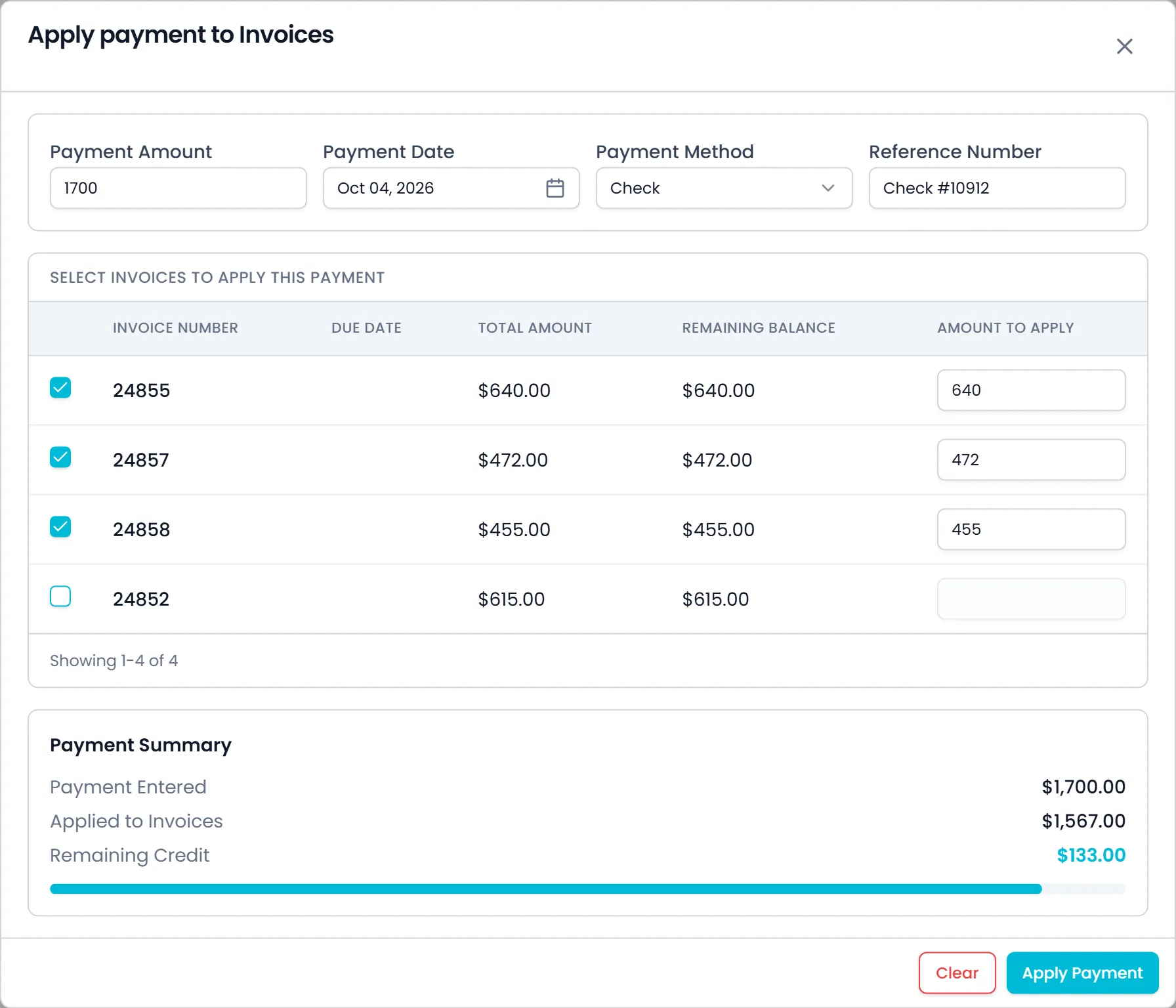
Your customers sign in, see their invoices and balances, and, once you connect Cardknox, pay with a saved card that runs through your Cardknox merchant account.
- Invoice statuses such as paid, unpaid, overdue and partly paid, with the balance on each
- One payment spread over several open invoices: tick an invoice to apply its full balance, then change any amount
- Any amount left over is recorded as customer credit
- Cards are saved through Cardknox's hosted card fields
Pallet pricing
Pallet-by-mileage grids with per-customer contracts
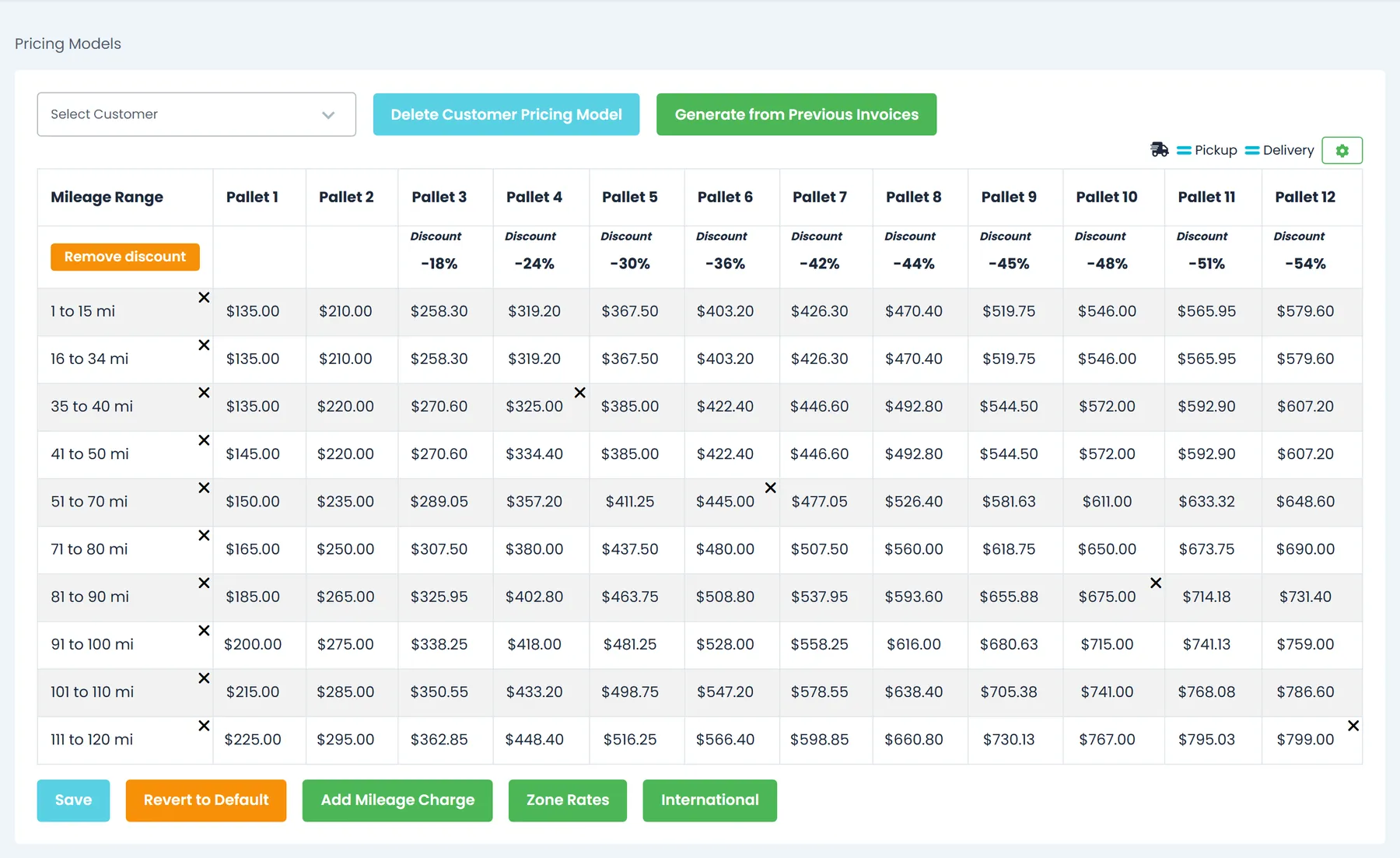
A grid of pallet counts by mileage range, with a discount per pallet count and a separate grid for any customer that has its own contract.
- Pallet counts across, mileage ranges down, with a discount row per pallet count
- Pick a customer to give them their own grid, or build one with Generate from Previous Invoices
- Zone rates and international cards open from the same screen
International pricing
Price ocean, air and cross-border ground freight per lane
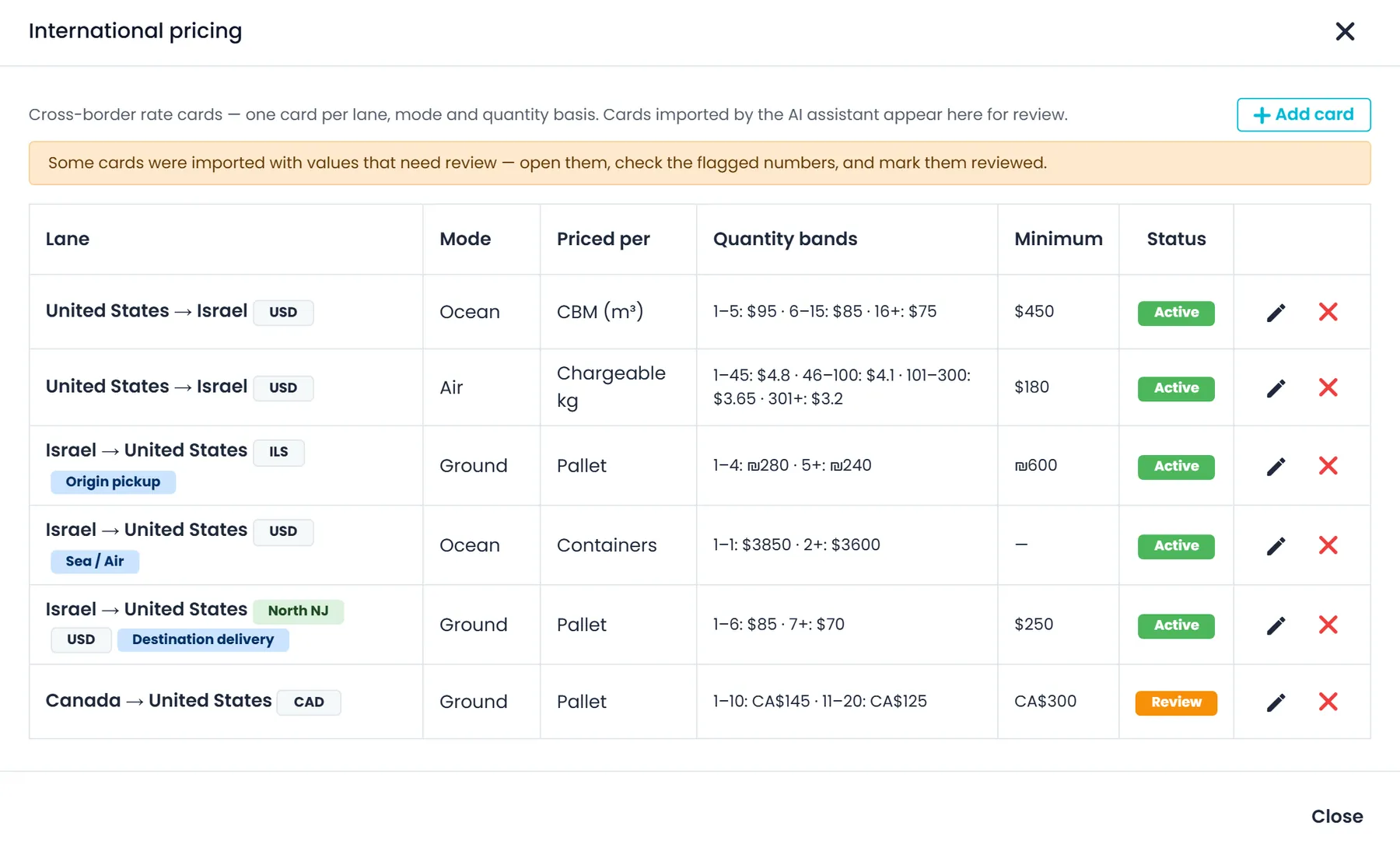
Each card covers one country lane, mode and quantity basis, and international cards are checked before your domestic zone rates and pallet grids. Split a lane into origin pickup, the sea or air leg and destination delivery, and RushHour adds the legs into one price.
- Ocean, Air or Ground, priced per pallet, chargeable kg, piece, CBM or container
- Quantity bands, a minimum charge, and a fuel percentage applied after the minimum
- Chargeable weight is the greater of actual and volumetric weight, with a divisor you set per card
- Valid-from and valid-to dates, and customer-specific cards next to your company defaults
Hebrew and English
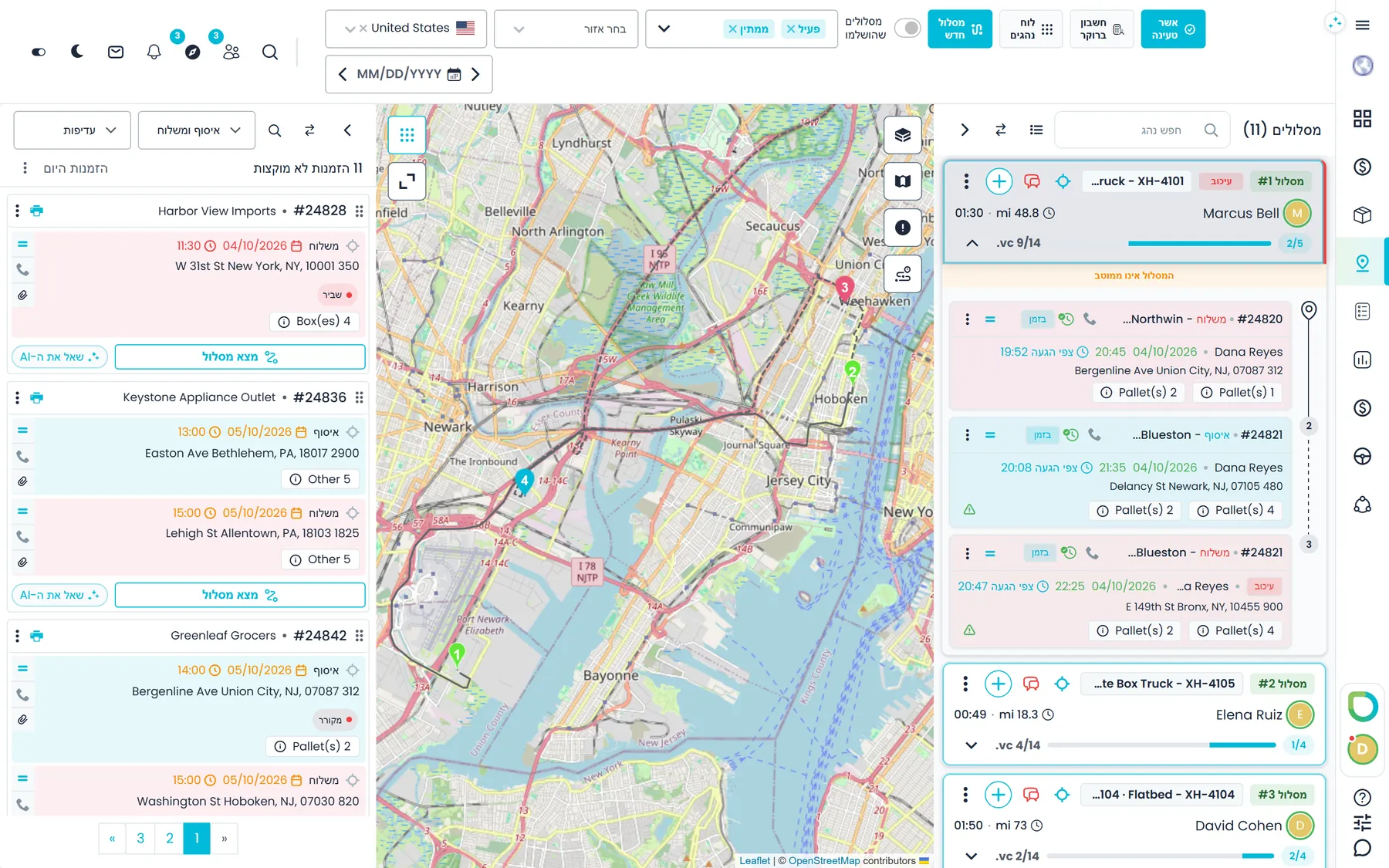
The office portal in Hebrew, right to left
Office teams work in Hebrew or English. The layout, date pickers and validation messages follow the language, and most error messages from the server are translated too.
- Switch language on the sign-in page, in Settings > Systems or in the setup wizard
- The Customer Portal your shippers use also works in Hebrew and English
- The driver app and the documentation site are in English only
Row by row
RushHour marks reflect production today. Truckbase marks come from its own site and help center, linked below.
Swipe sideways to see every column.
| Capability | RushHour | Truckbase |
|---|---|---|
| Edit orders and routes after dispatch | Built inAdd, remove or re-order stops; the driver gets a push notification | Built inEdit trips, move stops between trips and reassign on the calendar; changes re-sent by text or email |
| Invoicing, payments and AR | Built inInvoices from the closed order, payments, AR aging | Built inInvoices, full and partial payments, AR aging and customer statements |
| QuickBooks | Limited, add-on or third-party integrationOne way to QuickBooks Online; export file for QuickBooks Desktop | Built inQuickBooks Online sync with payment status back; Desktop for Pro users |
| Card payments | Built inYour Cardknox account: saved cards, Customer Portal and invoice pay links without login; per-stop COD requests on your customer's own Cardknox account | Not available or not foundCard payments and pay links not found |
| Driver and carrier settlements | Limited, add-on or third-party integrationPayouts page: route pay for drivers and outsource carriers, entered per route and settled in full or in part | Built inSeven pay rate types, recurring deductions, owner-operator settlements |
| Rate cards and quoting | Built inPallet grids, zone-to-zone rates, per-customer cards | Built inCustomer and global rate tables, fuel surcharge tables and quotes; release notes label them Pro tier |
| Cross-dock transfers between drivers | Built inTransfer stops at a warehouse or hub | Built inSplit trips: one driver picks up, another delivers |
| Warehouse inventory and receiving | Built inWarehouses menu: stock by order and place, receiving and repack; unit labels, scan check-in and pallet building when you switch them onNew in the November 2026 release | Not available or not foundNot found |
| Hubs and international manifests | Built inHubs menu: manifests for air, sea, truck or LCL shipments, container planning, receiving and driver pickupNew in the November 2026 release | Not available or not foundNot found; its trip manifest is a document for one trip |
| BOL, labels and dispatch paperwork | Built inBOL, pallet labels with QR code, dispatch sheet | Built inBOL, rate confirmation and trip manifest; label printing not found |
| Proof of delivery | Built inSignature and photos from the driver app | Built inFinger signature with the signer's name; photo and document upload |
| Customer portal | Built inBook orders, track, download documents, pay invoices by card | Limited, add-on or third-party integrationA Pro-tier feature that may incur additional charges: order requests, load status and location; payments not found |
| Email linked to customers and orders | Built inCompany inbox with its own inbound address | Not available or not foundAn address that imports emailed loads; no shared inbox found |
| AI assistant | Built inReports, order drafts and spreadsheet or PDF imports you confirm | Limited, add-on or third-party integrationAI builds orders from rate-confirmation PDFs; no chat assistant found |
| Background AI agents and messenger channels | Built inBackground agents that keep working after you close the browser and ask before they change anything; staff and customers reach the assistant from messengers you connect with your own keysNew in the November 2026 release | Not available or not foundNot found |
| Route optimization | Built inRe-order a route's stops by distance or priority, on every plan | Not available or not foundNot found; PC*MILER mileage and routing, with the stop order set by hand |
| Live location on the map | Limited, add-on or third-party integrationTruck pins for companies that connect Samsara; stop ETAs and customer tracking links also use the driver app's location | Built inTruck positions from ELD and telematics connections, about every 5 minutes |
| SMS notifications and tracking links | Limited, add-on or third-party integrationNo SMS; tracking links without login, and arrival and departure emailsNext releaseArrival and departure notifications by SMS, WhatsApp and Telegram | Limited, add-on or third-party integrationAutomatic status emails with a status link, and live tracking links; customer SMS not found |
| Load tendering and carrier bill audit | Not available or not foundAssign routes to outsource carriers; no tendering or carrier compliance records | Limited, add-on or third-party integrationBrokered trips, carrier rate confirmations and payables as a Pro-tier feature that may incur additional charges |
| ELD and telematics connections | Limited, add-on or third-party integrationSamsara only, for truck positions on the dispatch map | Built in30+ ELDs, including Samsara, Motive and Geotab |
| EDI | Not available or not foundNot available | Built in204, 990, 214 and 210, with an EDI inbox for tenders |
| Public API and webhooks | Limited, add-on or third-party integrationDocumented REST API and API tokens; no webhooks | Limited, add-on or third-party integrationOpen API in early access, read-only at launch; webhooks not found |
| MCP server for AI clients | Built inMCP server at mcp.rushhourapp.com; you approve the connection in the Company Portal and it works within your own permissionsNew in the November 2026 release | Not available or not foundNot found |
| Hebrew interface | Built inCompany and Customer Portals in Hebrew and English | Not available or not foundNo Hebrew interface found; its App Store listing shows English |
| Published starting price | From $299/month plus one-time onboarding | From $290/month, billed annually; plans quoted per truck, driver or load |
What we checked on Truckbase's side
RushHour marks reflect production today. Competitor marks are based on the public pages below, checked in November 2026. Products change, so check the vendor's current pages before you decide.
- truckbase.com: who it is for
- Truckbase pricing page
- Product page: dispatch software
- Product page: ELD and truck tracking
- Product page: driver settlements
- Product page: customer portal
- Product page: EDI
- Help center: How to dispatch a trip to a driver
- Help center: QuickBooks Online integration
- Help center: Rate tables (customer and global)
- Help center: Order notifications
- Help center: Customer portal access (Pro-tier feature)
- Help center: Stop signature
- Help center: How to generate a bill of lading
- Help center: How to accept load tenders (204s)
- Product update, October 8, 2026 (payments, AR aging)
- Product update, May 12, 2026 (open API)
- App Store listing (languages)
Spotted something out of date? Email [email protected] and we will check it and correct the page.
Truckbase or RushHour: common questions
How do the prices compare?
RushHour's Starter plan is $299 a month for up to 3 office users and 5 drivers, plus one-time onboarding. Truckbase's pricing page says its minimum price is $290 a month, billed annually, and quotes plans per truck, per driver, per load or as a flat annual rate (checked November 2026). Its help center marks several features, such as the customer portal and the QuickBooks Desktop connection, as Pro-tier features, some of which may incur additional charges.
Does RushHour support EDI?
No. RushHour has no EDI. Truckbase receives EDI 204 load tenders in an EDI inbox, where you accept or reject them, and lists 990, 214 and 210 as well.
Which ELDs connect?
RushHour connects Samsara: connected trucks show on the dispatch map, and the driver app's own location feeds stop ETAs and customer tracking links. Truckbase says it integrates with over 30 ELDs and shows hours of service on its dispatch calendar.
Can customers pay by card?
In RushHour, yes: saved cards, payments in the Customer Portal and invoice pay links that need no login run through your own Cardknox merchant account, and a stop can carry a COD card payment request. We did not find card payments or pay links on Truckbase's pages; its invoicing records the payments you receive and syncs them to QuickBooks Online.
Which kind of freight does each one fit?
Truckbase describes itself as trucking dispatch software for asset-based carriers, turnkey at 5 trucks and powerful enough for 50, and has pages for long-haul, cross-border and heavy-haul carriers. RushHour is built for pallets, cartons and full loads on multi-stop routes, with route optimization, pallet labels, a customer portal, hubs and warehouse inventory.
Set up with you, not handed a login
Onboarding is a one-time fee on every plan. It covers importing your customers, rates and drivers, configuring your pricing and billing, and training your team, done with you rather than handed over as a manual.
See both sides on your own orders
Bring a real order to the demo. We will dispatch it, change it after dispatch, invoice it, charge the card and send it to QuickBooks Online.