
Your customers book,
track and pay themselves.
Give every shipper their own login. They raise the order, follow each package from pickup to delivery, open the BOL and the invoice, and pay it (by card when you take cards through Cardknox), while you keep the pricing, the approval and the final say.
From their login to your invoice
What your shippers can do without calling you
Each shipper signs in to the Customer Portal with their own login and sees only their own account. Optional features are marked as such.
Dashboard
Their freight and their bill on one screen
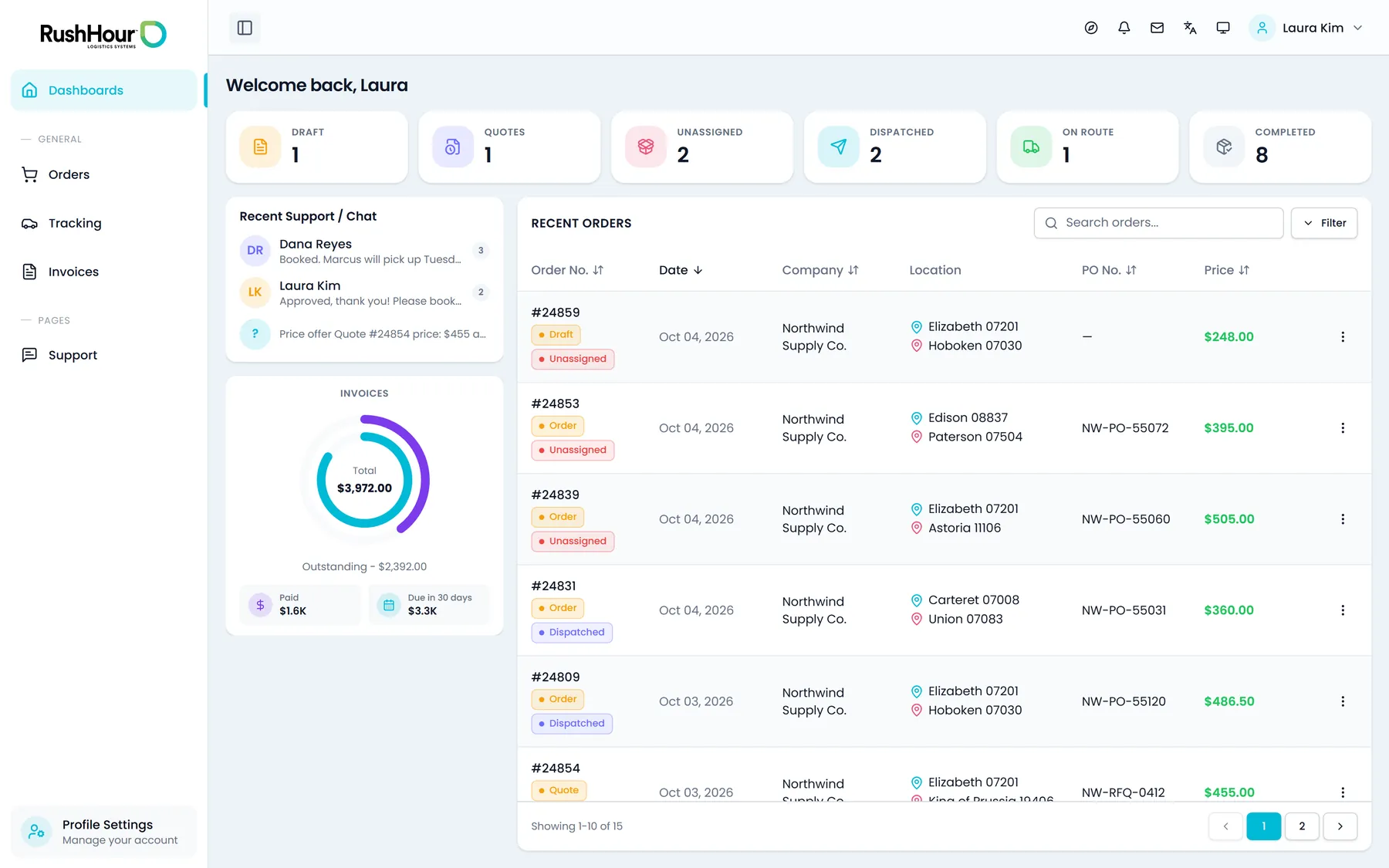
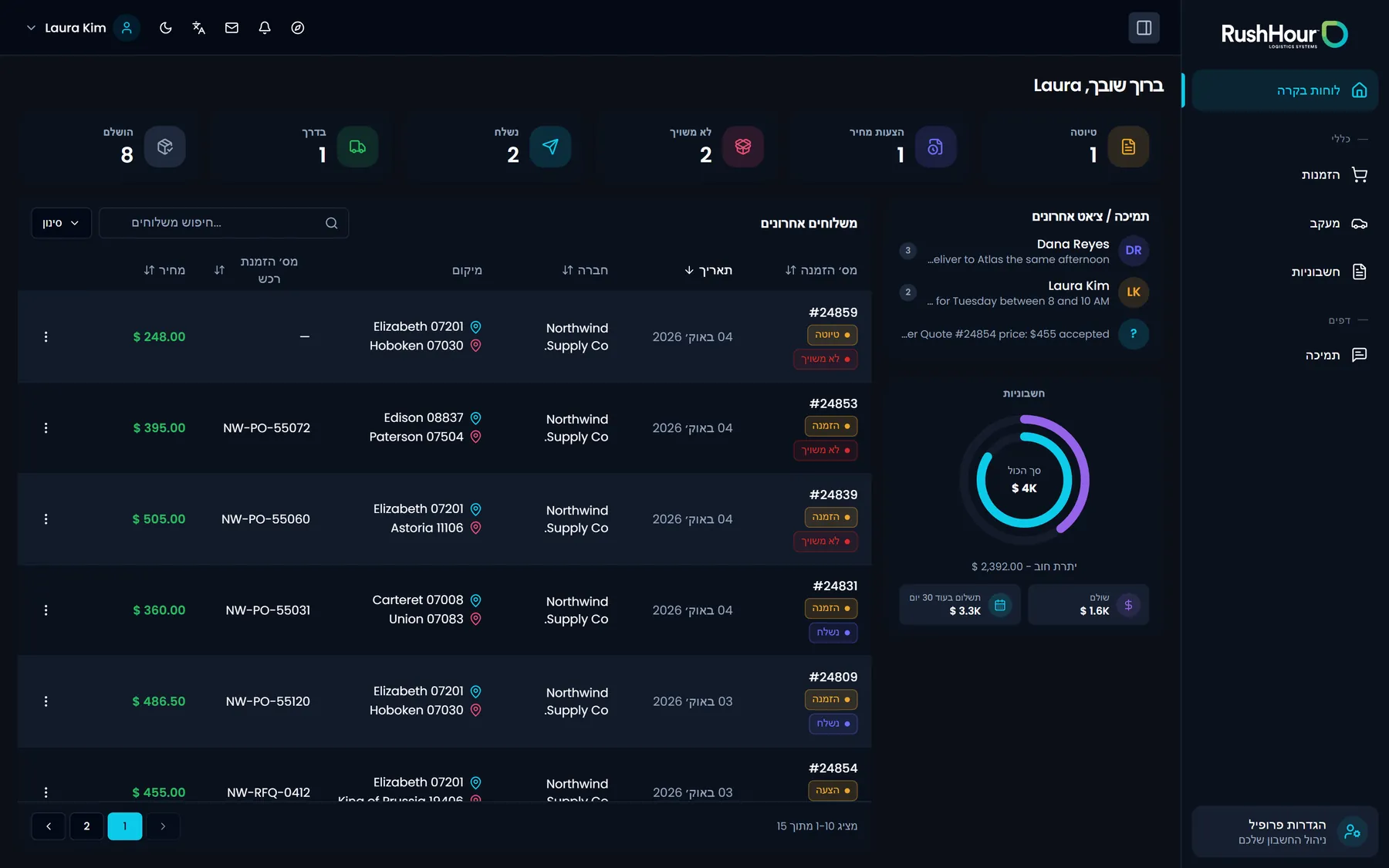
The first screen after sign-in counts the shipper's orders by status: Draft, Quotes waiting for your approval, Unassigned, Dispatched, On Route and Completed. Beside the counts sit their invoice totals, a searchable list of recent orders and the latest messages with your team, so "where is my order" and "what do I owe" are answered before anyone picks up the phone.
- Order counts: Draft, Quotes, Unassigned, Dispatched, On Route, Completed
- Invoice totals: outstanding, paid and due in the next 30 days
- Recent orders with search, plus the latest support messages
Self-service booking
Shippers raise the order, you keep the approval
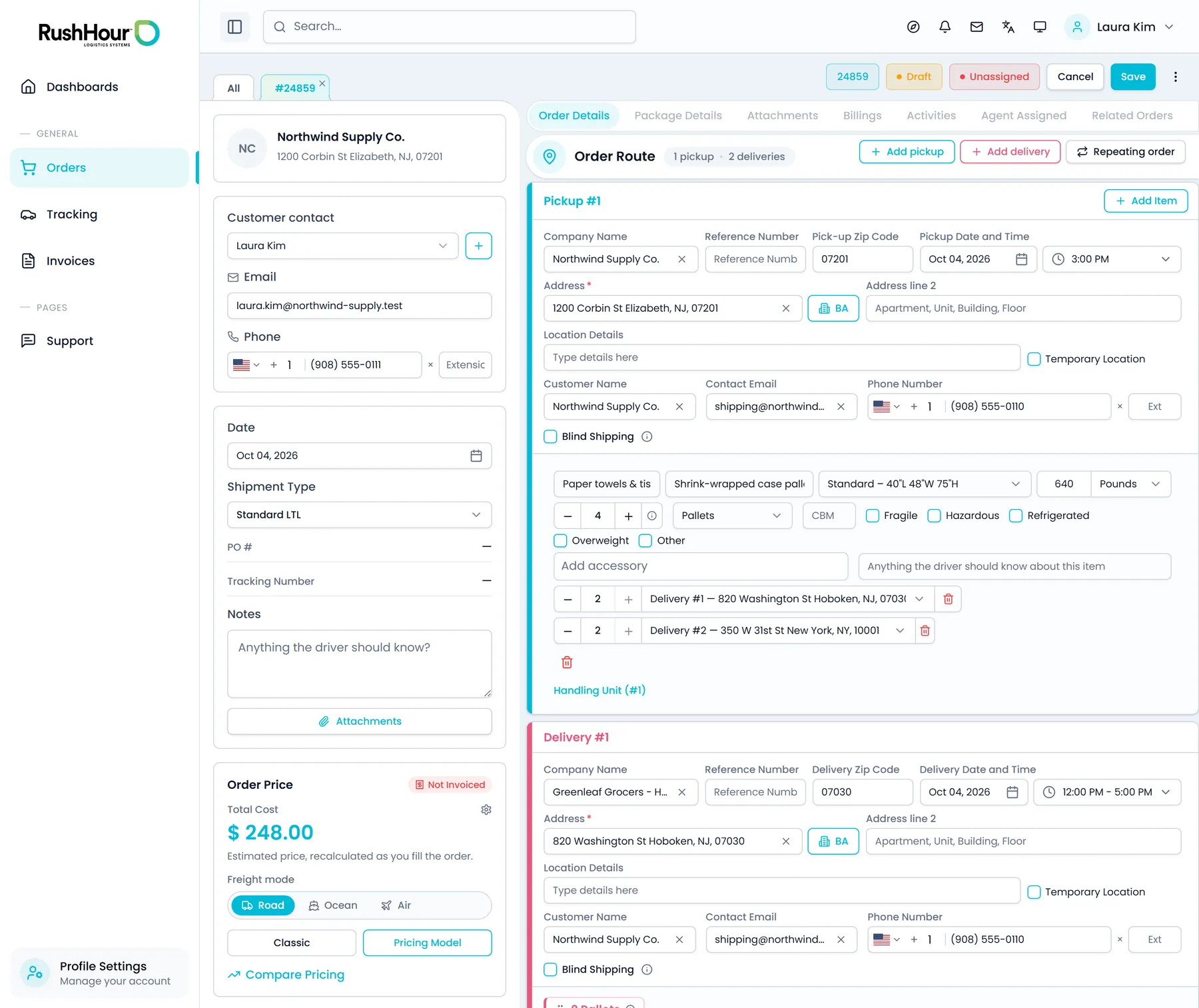
A shipper builds the order from their own login: as many pickups and deliveries as it needs, a date and time window for each stop, and the freight itself. The price comes back from your own pricing rules as they edit. They can keep it as a draft or submit it, and a submitted order waits with you as a quote until your staff approve it. Shippers can repeat a past order in one step, and cancel an order, even an approved one, until one of its stops is completed.
- Pickups, deliveries and freight entered once
- Live price from your own pricing rules
- Repeat a past order, or cancel one until a stop on it is completed
- Time window per stop: Morning, Noon, Evening or a set time
- Blind shipping per stop, and a Road, Ocean or Air freight mode
- Editable, or withdrawn back to a draft, until you approve it
Tracking and paperwork
Each package, and the paperwork that goes with it
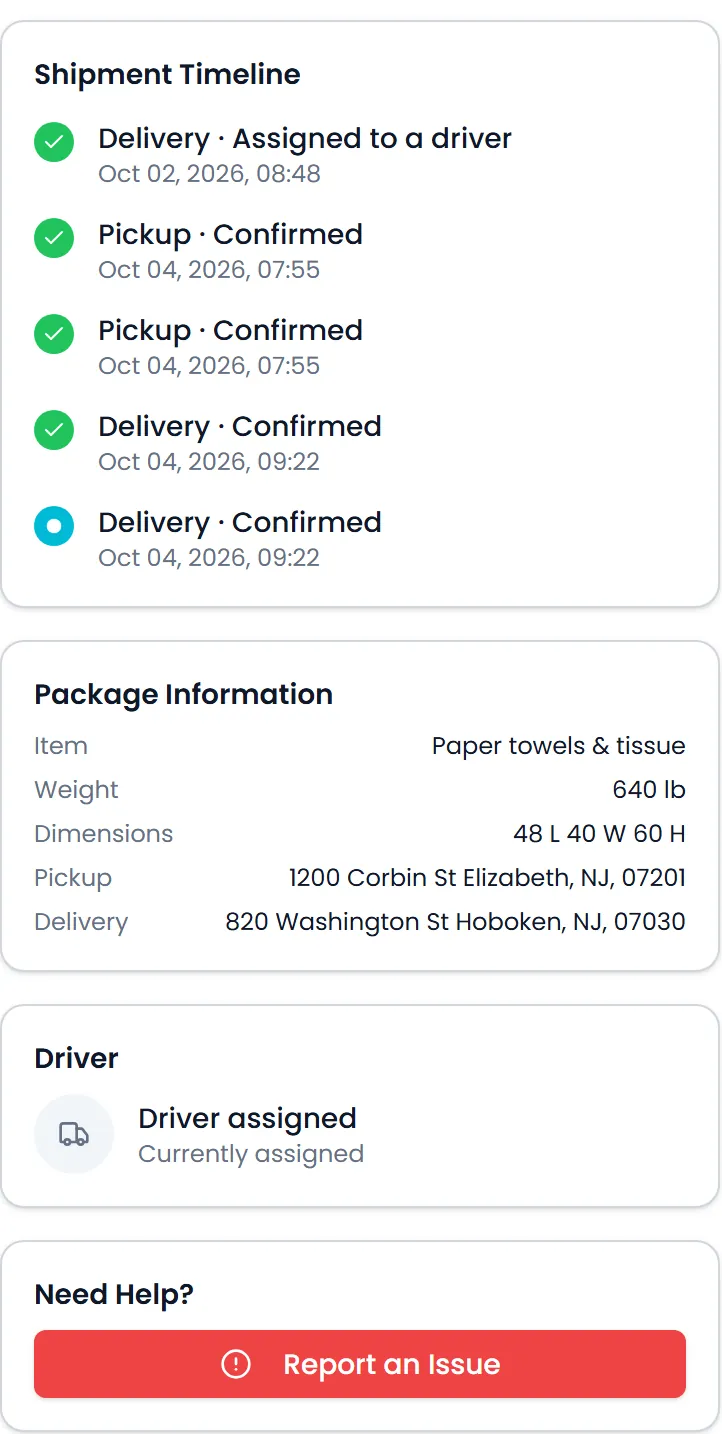
The Tracking list holds every approved shipment, with status and shipment-type filters, an ETA column and an Excel export of the rows a shipper ticks. Track Live opens one package: its route from pickup to delivery on a map, its event timeline, and whether a driver is assigned yet. Staff-only details stay out of it, and it does not show a live truck position. From the same login, shippers preview, print or download the bill of lading and the order sheet as PDFs (the BOL can split items per stop), upload files while the order is a draft or waiting for approval, and download every file on it, including stop photos and paperwork your drivers add.
- Route map and event timeline per package
- Tracking list with filters and Excel export
- BOL and order sheet PDFs
- Order attachments, both ways
- Report an Issue from Track Live goes straight to your team
Invoices and payments
Invoices and card payments in their login
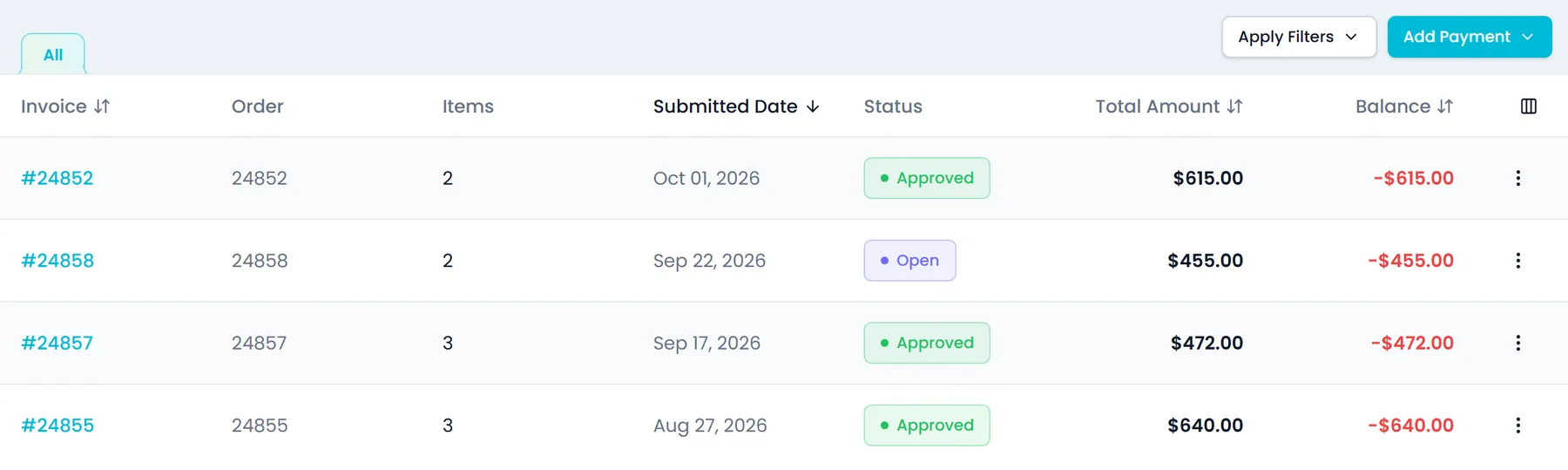
Shippers see their unpaid invoices with the total and balance of each, filter them by date or invoice type and keep a filter as its own tab, and preview or print an invoice in the same layout your office sends (the browser print dialog saves it as a PDF), next to its payment history. They record a payment against an invoice with its method and reference, or split one payment across several unpaid invoices, choosing how much goes to each, with any amount left over recorded as credit. When you take cards through Cardknox, they can also save a card and pay: the card number is typed into secure fields served by Cardknox, not into the portal's own form, and the payment is charged through your Cardknox account. Without a Cardknox account, the card option does not appear, and shippers can still record cash or check payments.
- Open invoices, totals and payment history
- Filters by date and invoice type, saved as tabs
- Cash or check payments recorded with a reference
- One payment split across several unpaid invoices
- Card entered in Cardknox's hosted fields
Support chat
One running conversation with your office
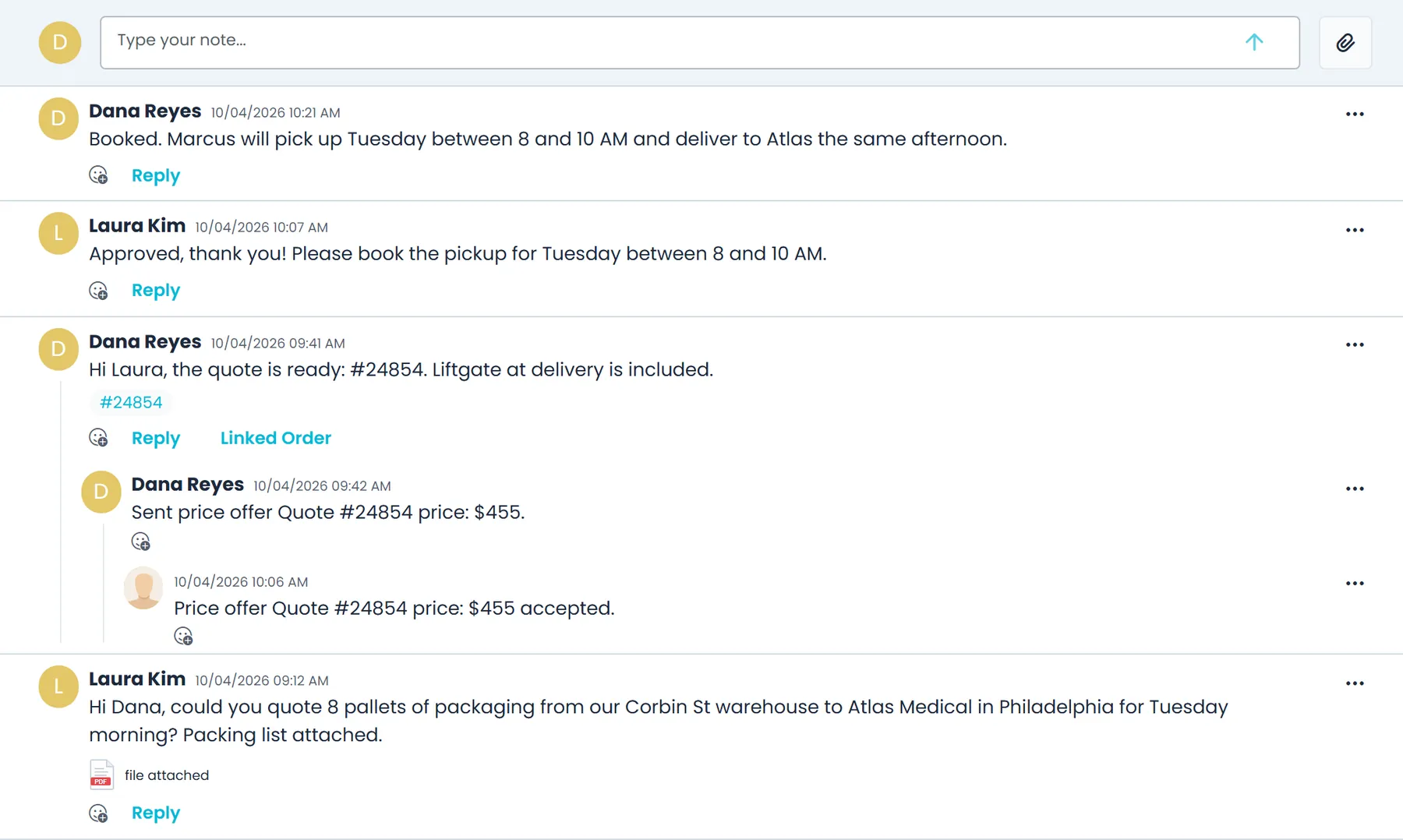
The Chat tab under Support holds one running conversation between the shipper's company and your team, shared by all of their portal users. They can attach images, PDFs, Word, Excel, CSV or text files of up to 10 MB each. A problem reported from Track Live, or a Compare Pricing request with a price they were quoted elsewhere, lands in the same thread with its order number, and price offers and appointment requests from your team appear there too. Your team answers from the customer's Inbox tab in the Company Portal.
- One thread per customer, shared by their portal users
- Files up to 10 MB: images, PDF, Word, Excel, CSV, text
- Issue reports and price-match requests carry the order number
- The latest messages also show on the dashboard
Questions and updates
Tickets and a notification bell instead of a phone queue
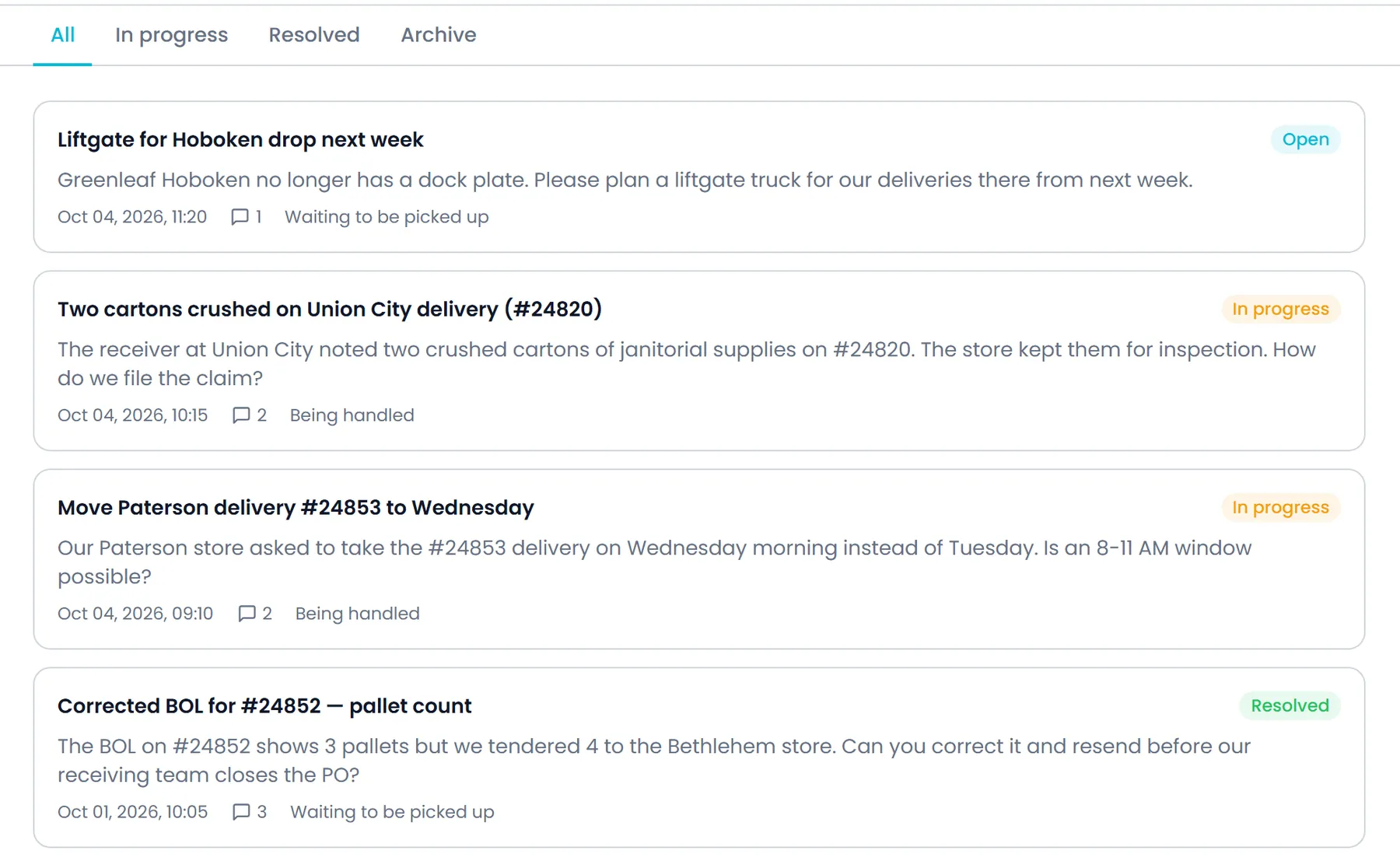
A shipper opens a support ticket from the portal with a priority (Low, Normal, High or Urgent) and a needed-by date, follows it under All, In progress, Resolved and Archive, and both sides reply on the same thread. The shipper sees whether the ticket is being handled, not who on your team has it. Your team answers from the customer's record in the Company Portal (in the classic customer view), takes the ticket and changes its status. In the notification bell, shippers get late-delivery alerts when they switch them on, plus RushHour announcements. They can mark notifications read, hide or snooze them, and choose in-app, email or both for each category.
- One ticket thread, both sides reply
- Priority, needed-by date and status tabs
- Your team takes the ticket and sets the status
- Late-delivery alerts, snooze and email preferences
See each part in detail
Two pages walk through the screens shippers use most, and two more cover what your office does on its side.
Access and options
You choose who gets in and what they can use
Portal access starts with an invitation from your office, and the optional assistant stays off until your admin turns it on.
Access
You decide who gets in, and they bring their own team
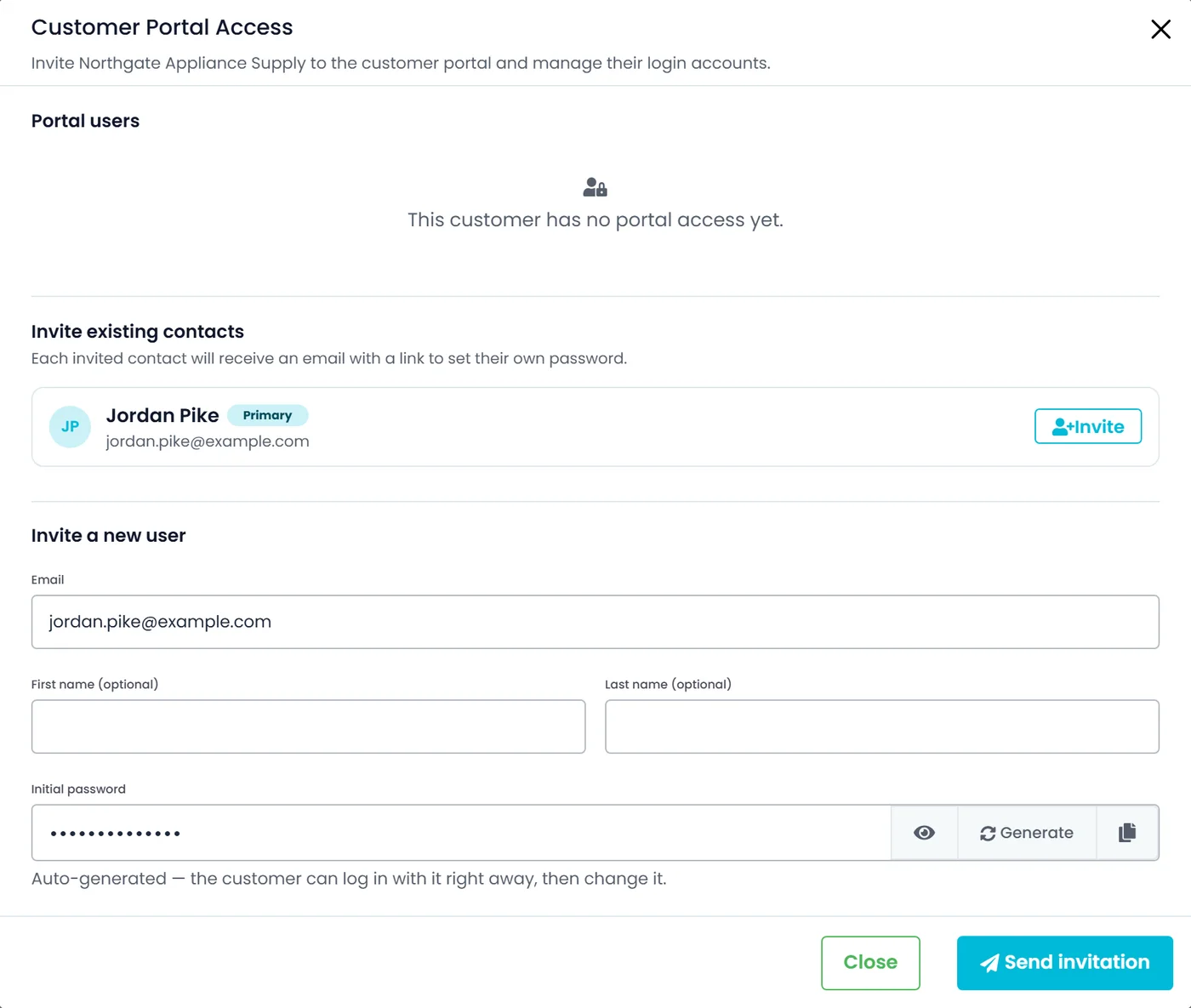
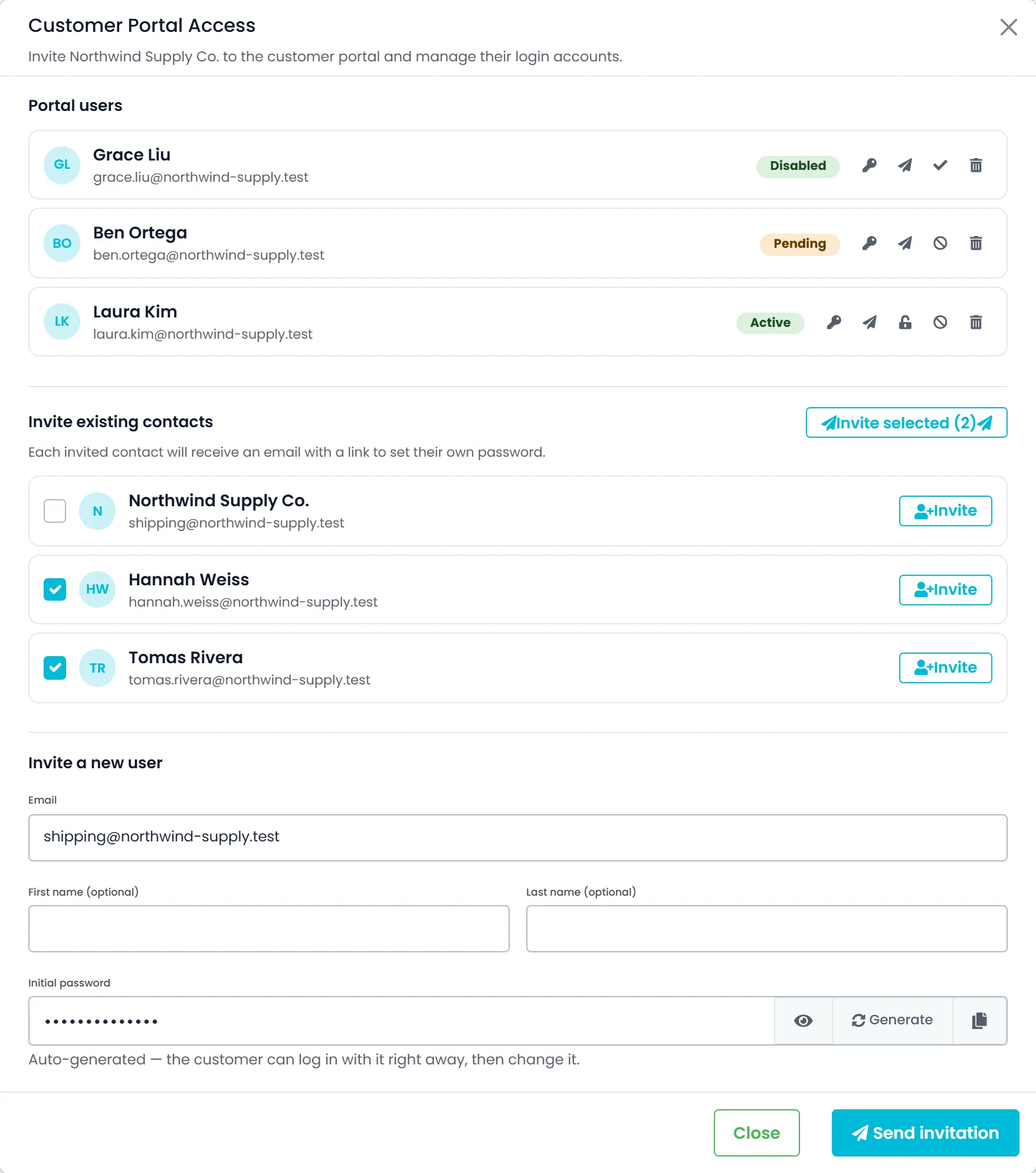
Invite a customer contact to the portal, or invite several or all of a customer's existing contacts at once; each one gets an email with a link to set their own password. An admin can also set or generate a password for a login and copy the sign-in details to hand over directly, and any login can be disabled, re-enabled, removed or sent a fresh invite. Shippers who hold the invite permission can also invite their own colleagues and resend those invites from Settings → Account access, within limits.
- Invite one contact, several or all
- Disable, re-enable, remove or re-invite any login
- Active, Pending or Disabled shown for every login
- Shippers invite their own colleagues
- On your side, only company admins manage portal access
AI assistant (optional)
Questions answered without a call
Turn it on and shippers get an assistant in a corner of the portal that answers questions about their own orders, order status, quotes and invoices. It only reads and cannot change an order. It works from that customer's data alone, keeps past conversations to reopen or delete, and stops at a daily message limit per user. It stays off until a company admin ticks Customer Portal AI Assistant in Company Portal Settings → Profile; portal users also need the Use AI assistant permission, which the Customer Portal role has by default.
- Their own orders, order status, quotes and invoices
- Read-only, limited to the signed-in customer
- Conversation history and a daily message limit
- Off until an admin enables it in Settings → Profile
Language and devices
Hebrew or English, light or dark, desk or phone
Shippers switch between English and Hebrew, and between light and dark mode, from the top bar. In Hebrew the whole portal runs right to left while numbers, emails and addresses stay readable, and on a phone the lists turn into cards. A guided tour opens on a shipper's first visit and can be restarted from Settings.
- English and Hebrew, right to left in Hebrew
- Light and dark mode from the top bar
- Lists turn into cards on a phone
Where the Customer Portal earns its place
Their account, at your price
A portal login reaches only the screens opened to customers, and the portal shows each shipper only their own orders, invoices, payments, locations and contacts. Shippers see the price you charge them, not your costs or margins.
You decide what the portal can do
The Customer Portal role comes with ordering, cancelling and repeating orders, invoices and payments, inviting colleagues and the assistant. A company admin can take any of these away on the Roles screen, for every portal user at once.
The same paperwork your office sends
The BOL, the order sheet and the invoice a shipper opens are built from the same templates your office uses for BOLs, quotes and invoices, so what they file matches what you send.
Their locations, their people
Shippers add and correct their own delivery locations and representatives, so your records stop going stale.
English or Hebrew, light or dark
The portal runs right-to-left in Hebrew, and a guided tour walks a new shipper through their first visit.
Included on every plan
Shipper logins come with your subscription. The portal is not a paid add-on.
Their account, without the phone call
Under Settings and Profile, shippers look up what your team has set for their account and keep their own details current. Charges, zones and terms stay read-only for them.
Recently added
See who can get into the portal, and let shippers subscribe to tracking links
These Customer Portal changes are in production now. The changelog lists what each release added.
Access status
Each customer's status shows its portal accessNew in the October 2026 release
A customer's status follows its Customer Portal logins: Open with no login, Pending while its invites wait to be accepted, and Active once a login can sign in. The status updates as you invite people, as invites are accepted and as logins are disabled, re-enabled or removed. Existing customers are updated to match, so those without a login show Open.
- Open, Pending or Active on the customer list and profile
- Updates as invites go out, get accepted or logins change
- Existing customers without a login show Open
Switch access off
Lock out all of a customer's portal logins at onceNew in the October 2026 release
Users whose role has the Delete Customers permission can Disable a customer from its profile, in both the new and classic layouts. After a confirmation the customer shows Disabled, all of its portal logins are refused at sign-in, and sessions that are already open stop working. The logins themselves are kept, so selecting Enable lets the same logins sign in again.
- Disable and Enable from the customer profile, after a confirmation
- Sign-in refused and open sessions stop working
- Logins are kept, and Invite to Portal is hidden while disabled
Password resets
Reset a portal user's password from the customer's pageNew in the October 2026 release
Company admins can reset a Customer Portal user's password from the … menu on the Customers list, the new Actions menu on a customer's page or the Customer Portal Access window. The user is signed out of every session and emailed a link to set a new password. A login that has not joined yet, or is disabled, cannot be reset. These menus also offer Resend invite and Disable or Activate portal access, and Invite to Portal reads Manage portal access once a customer has portal logins.
- From the Customers list, the customer's Actions menu or the access window
- Signed out of every session and emailed a set-password link
- Resend invite and Disable or Activate portal access in the same menus
Tracking link updates
Shippers subscribe to tracking links in their portalNew in the October 2026 release
Turn on tracking links in Settings → Tracking Links and Tracking link emails in Settings → Customer Notifications, and your customers' portal users get a Tracking links option in their notification settings, by email, in the portal's notification bell, or both. The Customer Portal role needs View Orders from own account (Settings > Roles). Each subscriber then gets the tracking link for each of their orders once, at the point you choose: when the order is booked, when a driver is assigned or when the driver picks up. Only orders that reach that point after you switch it on are sent.
- Off until you switch on tracking links and Tracking link emails
- Each portal user opts in to email, the bell, or both
- Send to the order contact and subscribers, or subscribers only
Also for your customers
Some of what is new reaches customers who never sign in to the portal. These pages cover what they see.
Customer Portal questions
Do my shippers pay for their portal logins?
No. The Customer Portal is included on every plan, and there is no charge for the shippers you invite to it.
Can a shipper see other customers' orders or my costs?
No. Each portal login belongs to one customer account, and the portal shows only that customer's orders, invoices, payments, locations and contacts. Shippers see the price you charge them, not your costs or margins.
Can shippers sign themselves up?
Access starts with an invitation. Your office invites one contact, several or all of a customer's contacts, or creates a login with a password you set, and shippers who hold the invite permission can invite colleagues to their own account.
Does an order a shipper books go straight to dispatch?
Not one they build themselves. A shipper can keep an order as a draft, and once they submit it, it reaches your team as a quote and waits for your staff to approve it. After approval the shipper can no longer edit it, though they can still cancel it until one of its stops is completed. The exception is Repeat Order: a copy of an order you already approved is created as an approved order.
Can shippers pay by card?
Yes, when you take cards through Cardknox: shippers save a card in fields served by Cardknox and pay through your Cardknox account. Without Cardknox the card option does not appear, and they can still record cash or check payments against their invoices.
Does Track Live show where the truck is right now?
No. Track Live shows the package's route from pickup to delivery on a map, its event timeline and whether a driver is assigned. It does not show a live truck position.
Can I keep the AI assistant away from my shippers?
Yes. It is off until a company admin ticks Customer Portal AI Assistant in Company Portal Settings → Profile, and you can also remove the Use AI assistant permission from the Customer Portal role on the Roles screen.
Is the portal available in Hebrew?
Yes. Shippers switch between English and Hebrew from the top bar, and in Hebrew the portal runs right to left. Light and dark mode are available too.
See the portal next to your dispatch board.
In the demo we open a sample shipper's login beside the Company Portal: the order they raise, the price they see and the invoice they pay.