
Re-order the day's stops,
without rebuilding the route.
Re-order a route's open stops by distance, by priority or with AI, starting from the truck's Samsara position or a stop you choose. Completed stops keep their place and every pickup stays ahead of its delivery. The optimizer is built in, so there is nothing to connect before you use it.
Step by step
How AI rerouting works
Open Reroute on a route, clear anything that needs attention, pick how to optimize, and the AI Assistant re-orders the stops. These are the screens your dispatchers see, in order.
Step 1 · Open Reroute
Start from the route card's menu
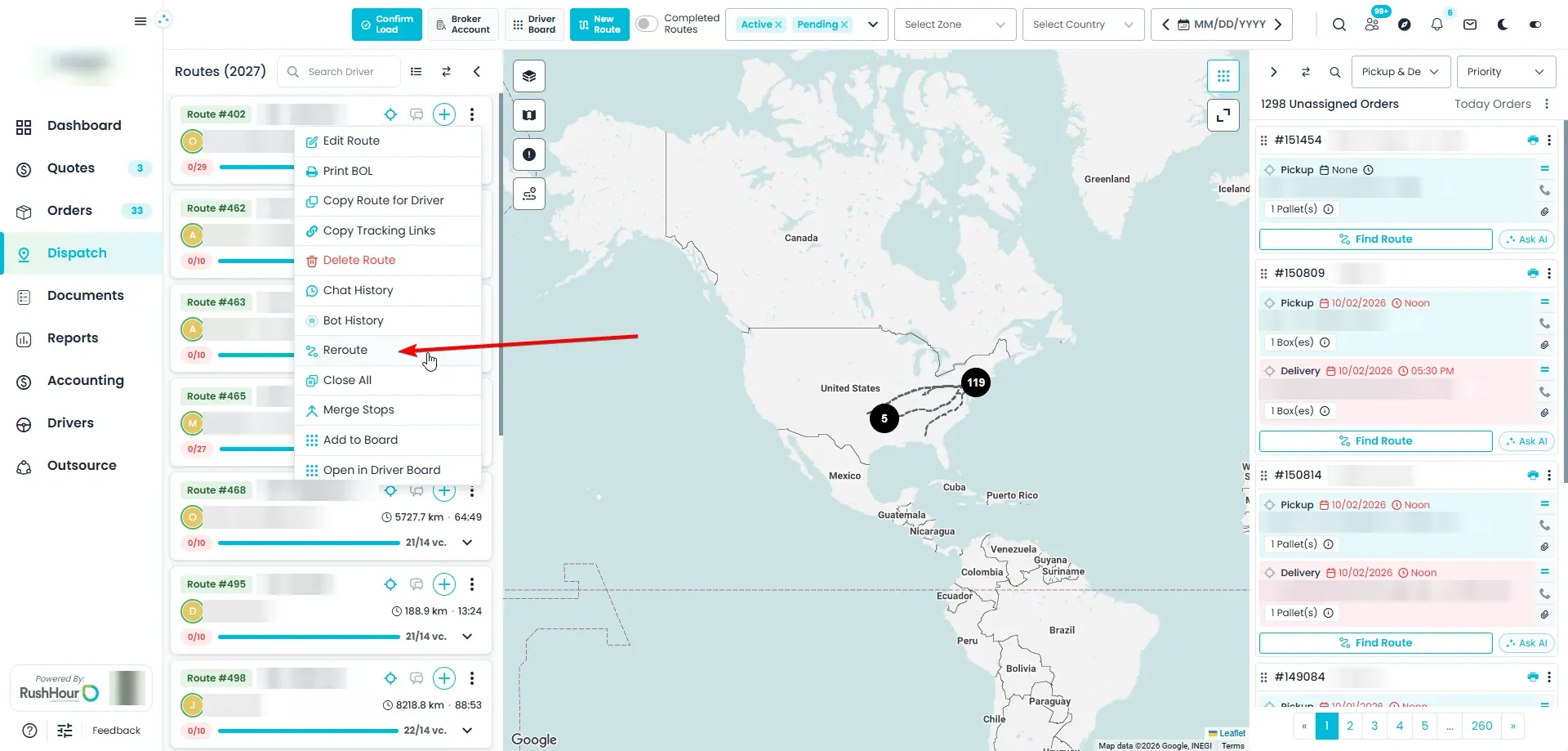
On the Dispatch board, open the ⋮ menu on any route card and choose Reroute. Only open stops are re-ordered: stops the driver has already completed keep their place.
- On every route card, on the new and the classic board
- Open stops are re-ordered; completed stops keep their place
Step 2 · Check issues
Problem stops come first, but only if there are any
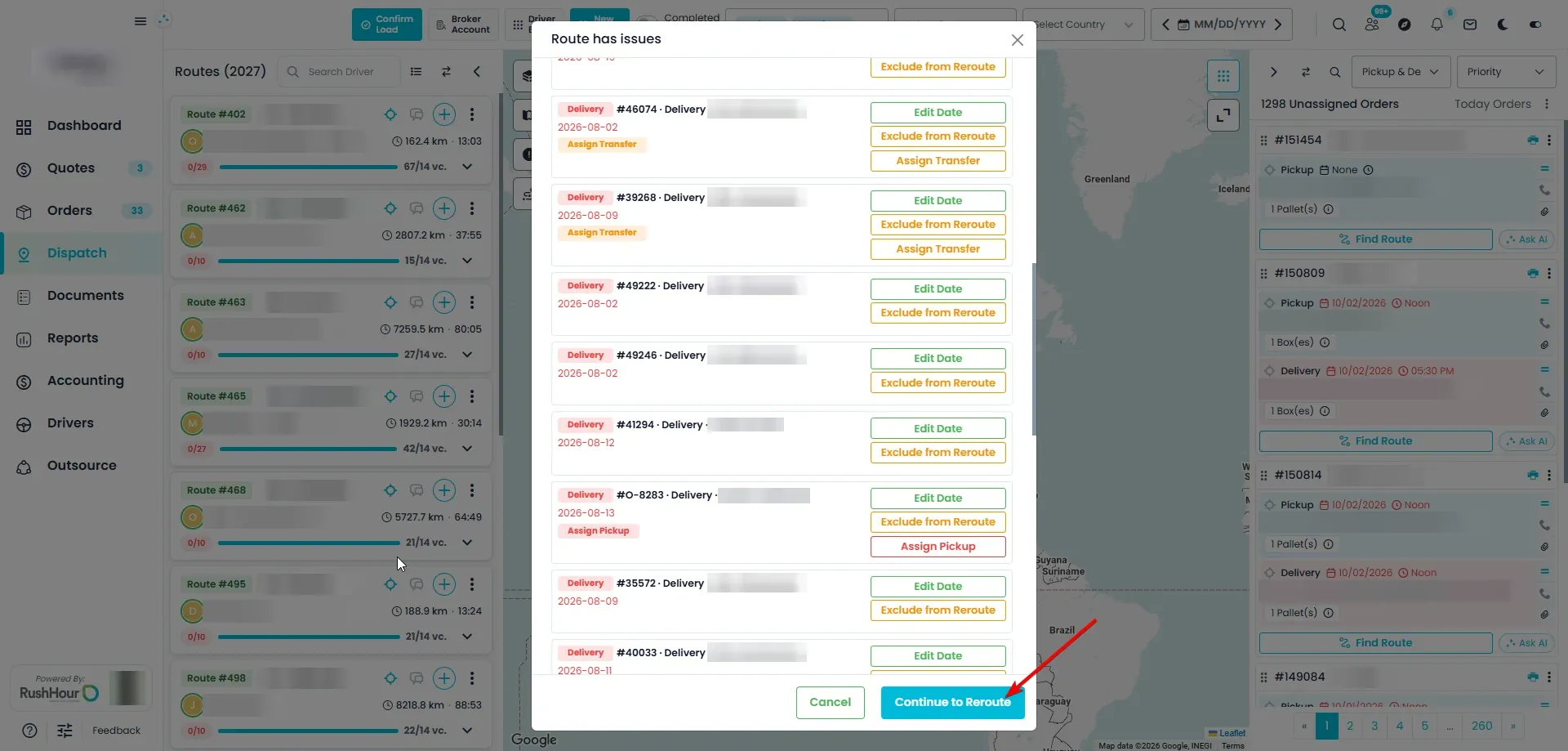
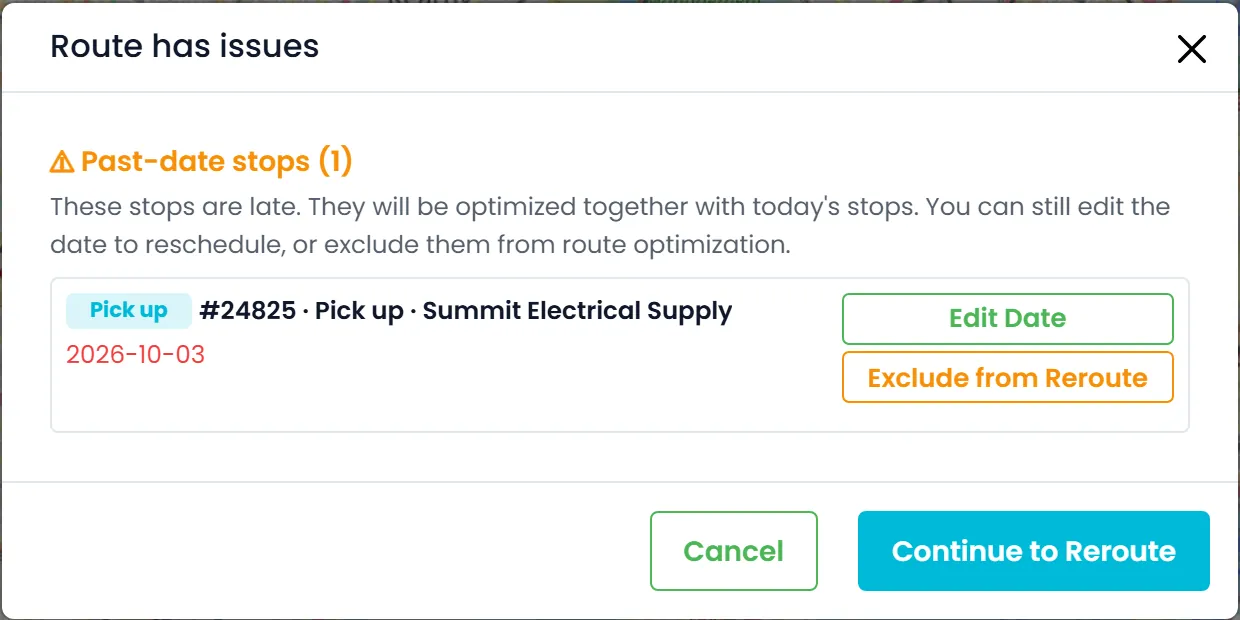
If the route has problems, the Route has issues window opens before anything moves. It lists two kinds of stops. Past-date stops were scheduled before today: change the date with Edit Date, or click Exclude from Reroute so the stop stays where it is. Stops with unresolved issues include a delivery whose pickup isn't assigned yet, a missing delivery, a transfer that is still needed and items that still need to be allocated, and each one has a button that takes you straight to the fix. Fix what you want, or just click Continue to Reroute.
- Opens only when the route has an issue to look at
- Fix buttons: Assign Pickup, Assign Delivery, Create Delivery, Assign Transfer and Allocate Items
- Exclude from Reroute switches to Include in Reroute if you change your mind
- Late stops are optimized together with today's stopsNew in the October 2026 release
Step 3 · Choose the options
Optimize with AI is selected for you
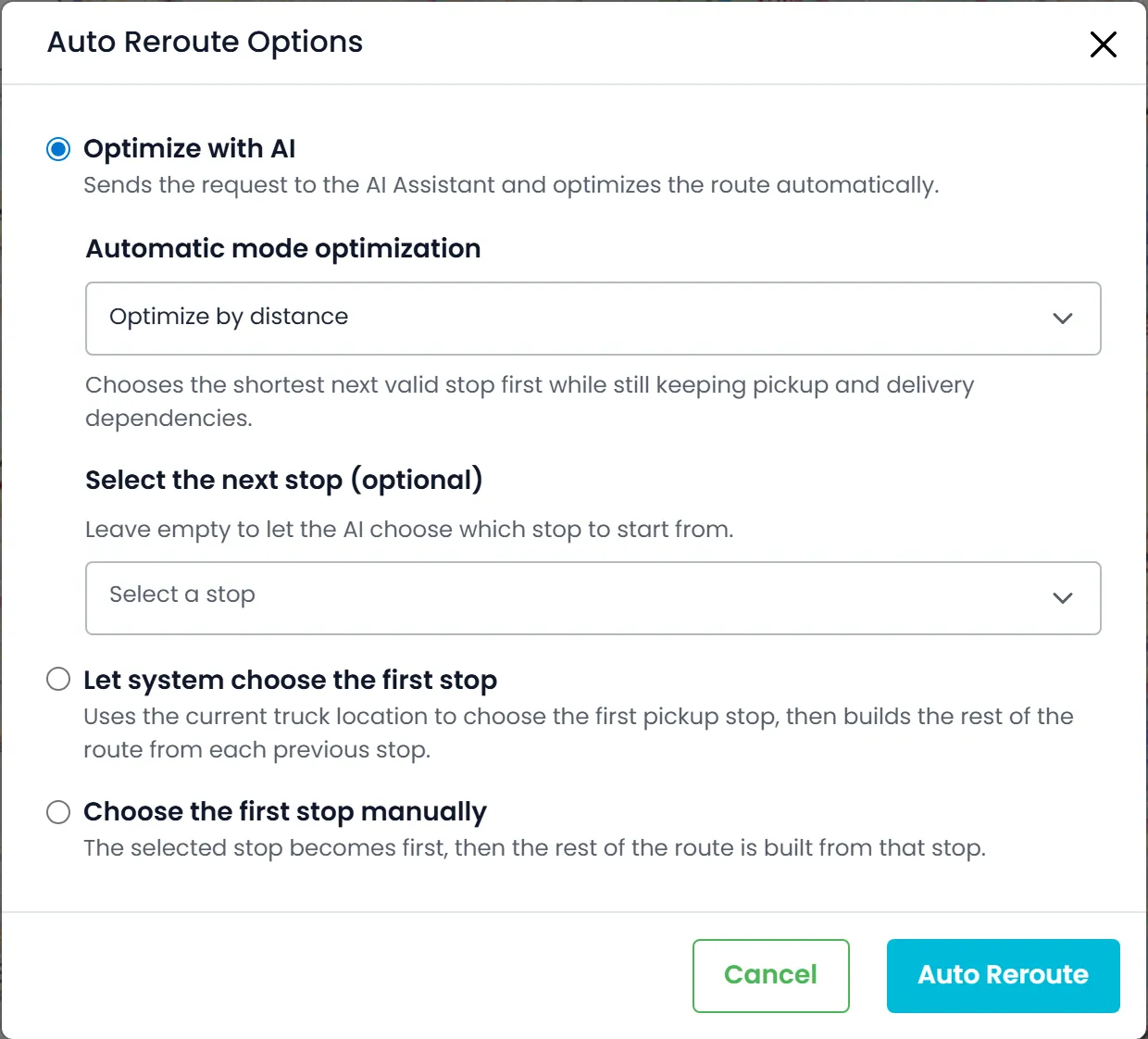
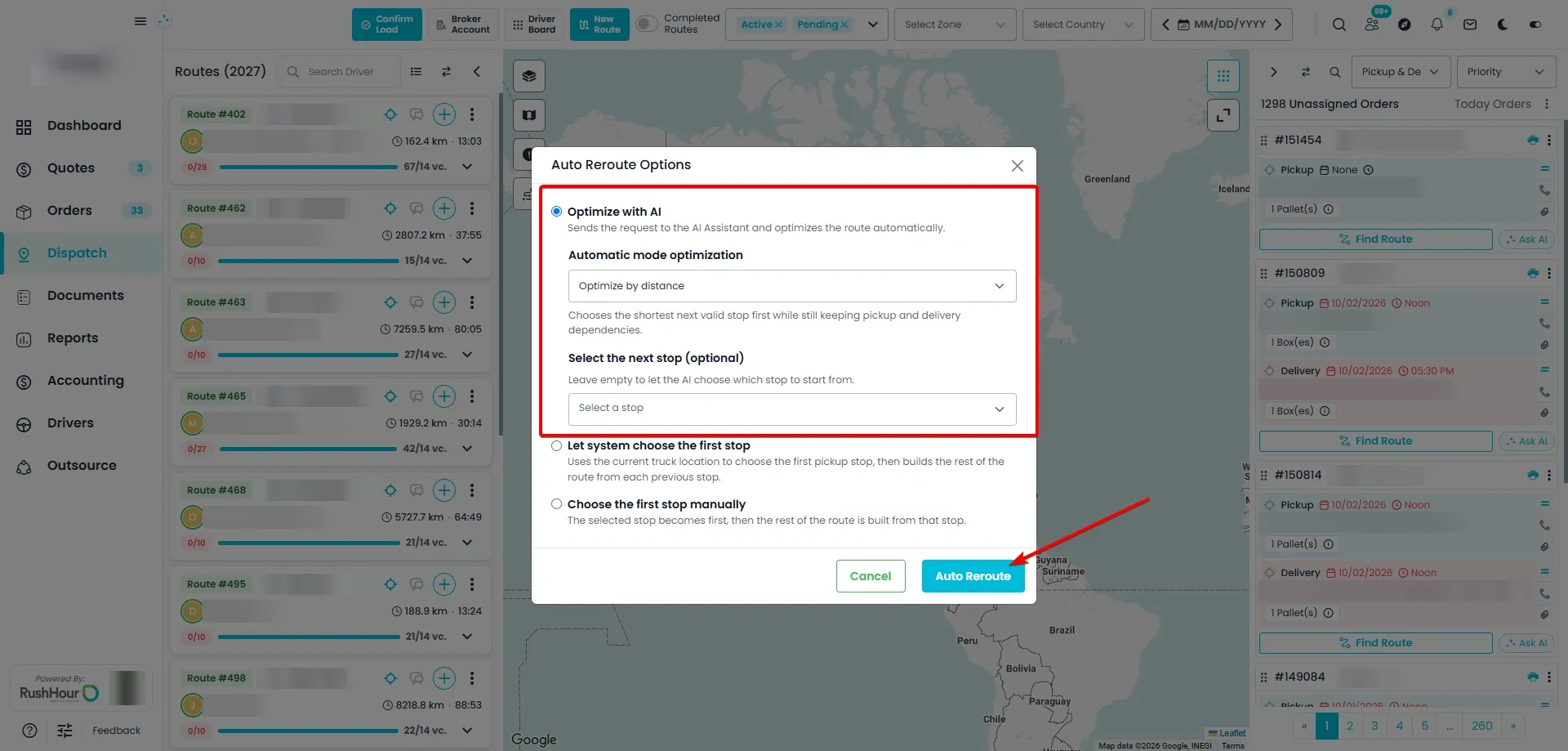
In Auto Reroute Options, Optimize with AI is selected by default. Under Automatic mode optimization, choose Optimize by distance, the default, where the next stop is always the nearest one that can sensibly come next, or Optimize by priority, where higher-priority stops come first and stops with the same priority are ordered by distance. Choosing the first stop is optional: pick it yourself, or leave it empty and the AI chooses, starting from the truck's current location when the truck is linked to Samsara.
- Optimize by distance (the default) or Optimize by priority
- Select the next stop yourself, or leave it empty for the AI
- Starts from the truck's live position when the truck is linked to Samsara
- Let system choose the first stop and Choose the first stop manually use the built-in optimizer instead
Step 4 · The AI re-orders the route
Watch it work in the assistant chat
Click Auto Reroute and the AI Assistant opens. It says it has started and repeats the options you chose, for example by distance, starting from the truck's current location. The AI orders the stops by a fixed set of rules, and when it is done the assistant confirms and the route refreshes on the board in its new order.
- A pickup always comes before its delivery
- Stops stay in their day: earlier days first, then each later day in date order
- Shortest distance or highest priority first, depending on the option you chose
- It tries to reach each stop before its scheduled time
- When an order's delivery is within about 10 km of its pickup, it prefers to do that delivery right after the pickup
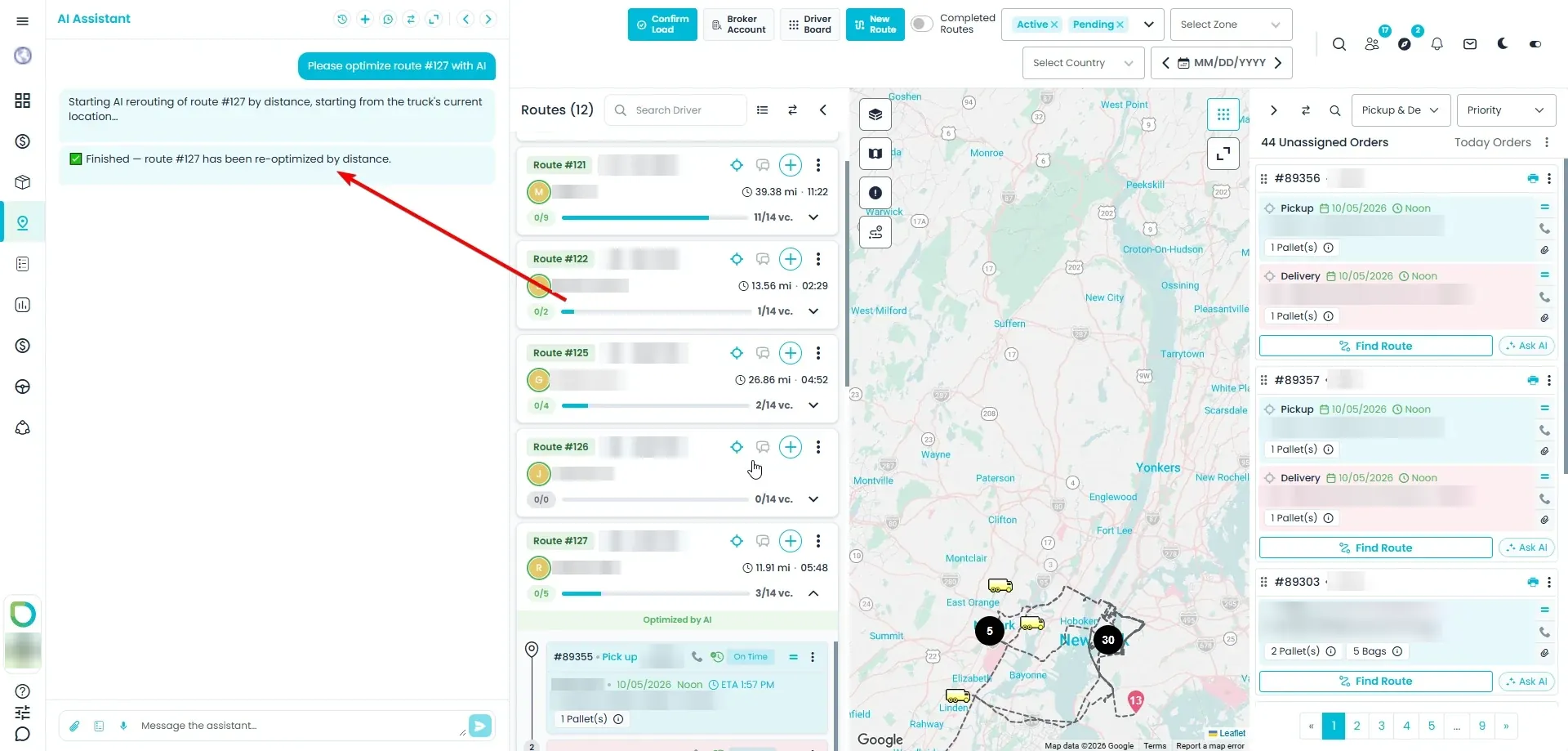
Step 5 · Checked, then saved
Nothing is saved until the result passes the checks
RushHour checks the AI's order before saving it: every open stop has to appear exactly once, and every pickup has to come before its delivery. If something is wrong, or the AI isn't available at that moment, the route is left unchanged and the assistant tells you why. AI rerouting works on routes with up to 60 open stops. Afterwards you can ask questions in the same chat, for example why a particular stop is first on the route.
- Up to 60 open stops per AI run
- A result that breaks a rule is rejected and the route stays as it was
- Ask follow-up questions, such as why a stop comes first
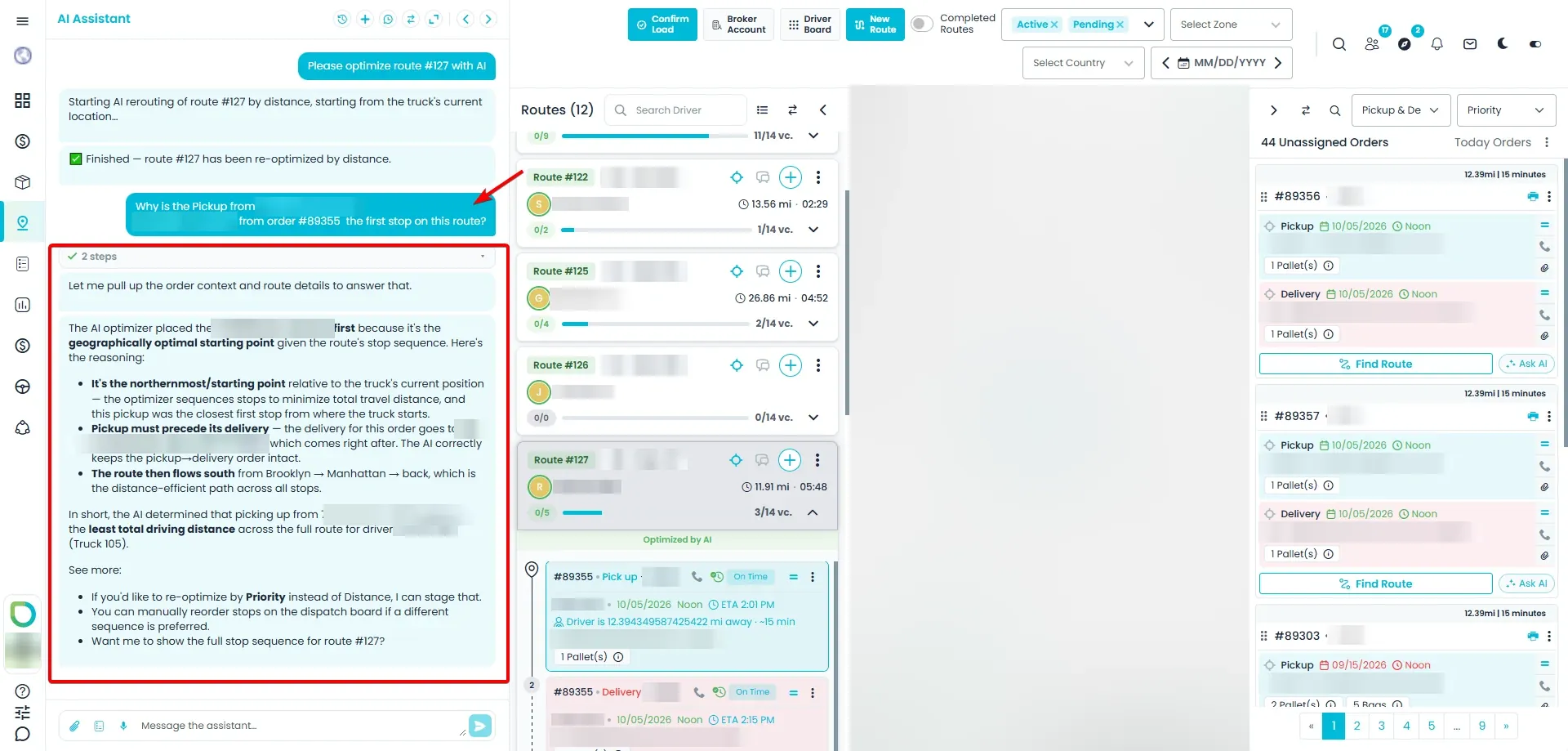
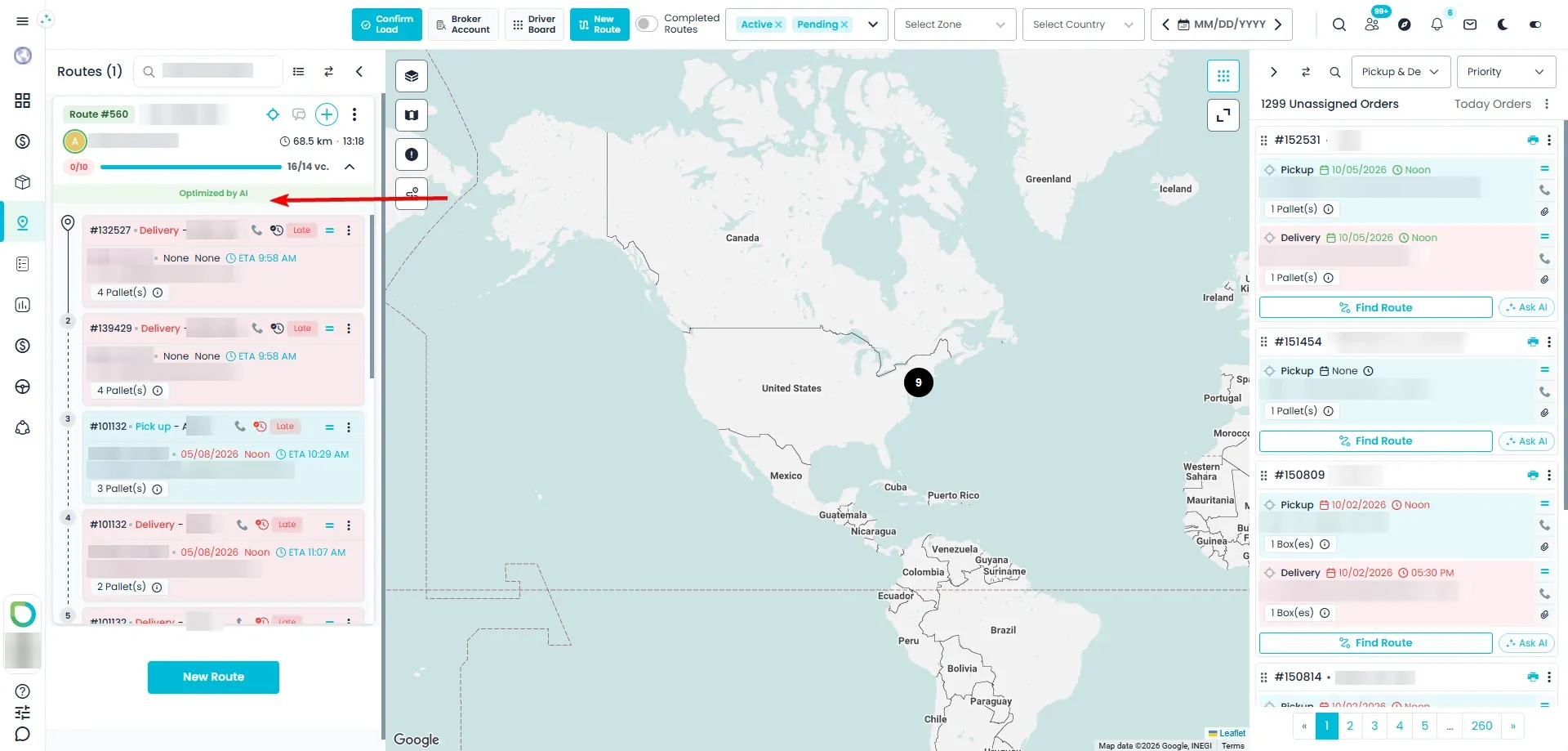
Optimized by AI
See which routes the AI ordered
After an AI reroute, the expanded route card shows Optimized by AI. The label stays while the driver completes stops. Once someone changes the route by hand, for example by adding a stop or moving one, the label disappears, so you know the route is ready for another reroute.
- Stays while the driver completes stops
- Disappears when a stop is added, removed or moved, or a stop's date, time, priority or address changes
- Shown when you expand a route card
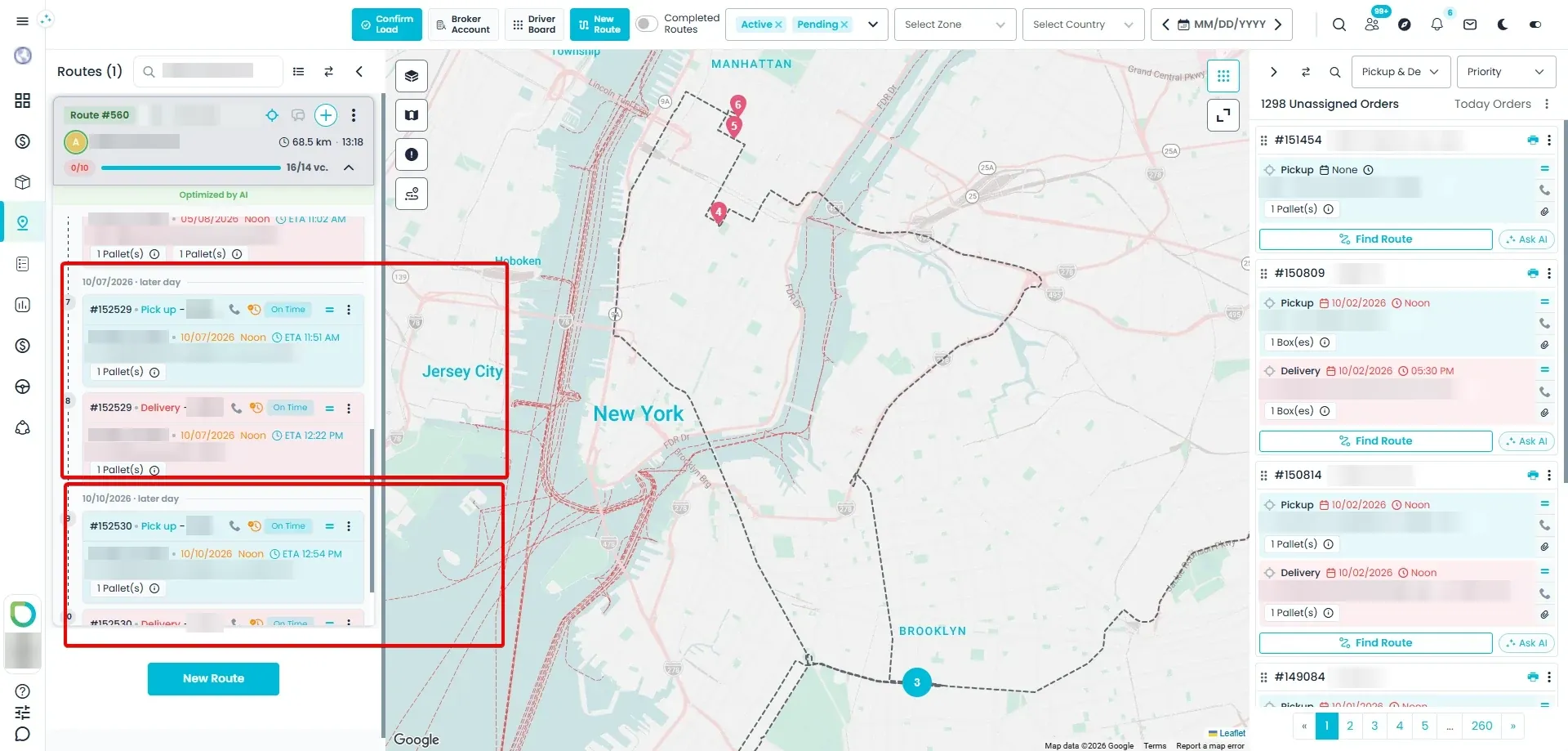
Later day
Later-day stops sit under their own dividerNew in the October 2026 release
When a route has stops for a later day, they appear after today's stops under a small later day divider with their date. That makes it clear why they aren't visited before the others: they are simply for a later day.
- Each later day gets its own divider, in date order
- Hover the divider to see how stops are grouped by day
- Dates never change; use Edit Date to reschedule a stop
Day groups
How stops are grouped by day
Every reroute, including Optimize with AI, splits a route's open stops into groups by day, and today means the dispatcher's own day, in their time zone.
Today and late stops togetherNew in the October 2026 release
Today's stops and any late stops from earlier days are in one group, because all of them are expected to be done today.
Later days stay separateNew in the October 2026 release
Stops for a later day stay in their own day group, so they never get mixed in with today's work.
It moves forward on its ownNew in the October 2026 release
A stop planned for tomorrow joins today's group the next day, and gets ordered together with the rest of that day's work.
Ask AI
Ask AI which route should take an unassigned stop
Every order card in the Unassigned panel can ask the AI Assistant where it belongs. You get a recommendation with the reasons, and nothing changes until you apply it.
Ask AI
Ask AI on every unassigned orderNew in the October 2026 release
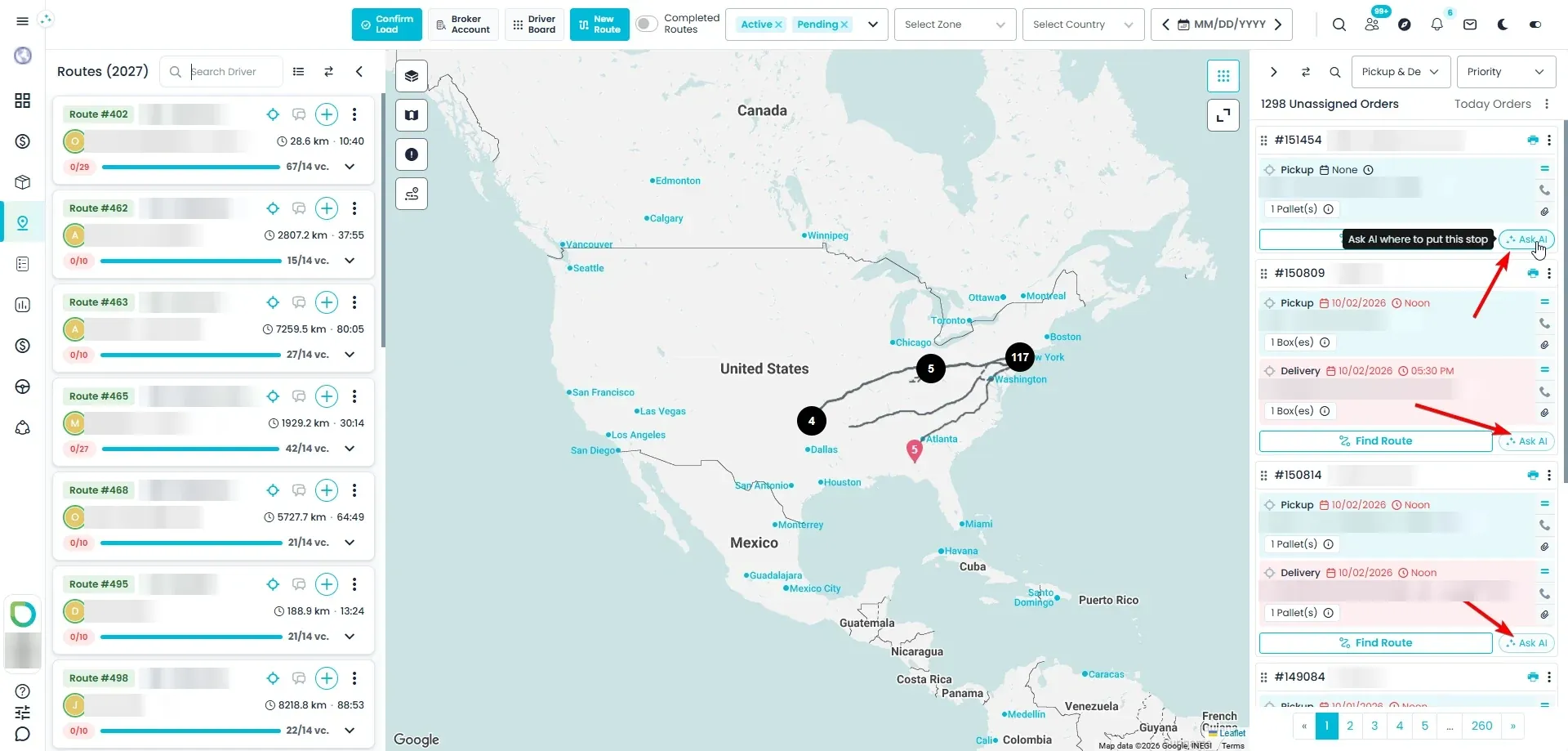
Each order card in the Unassigned panel on the Dispatch board gets an Ask AI button next to Find Route. Hover it to see Ask AI where to put this stop; click it and the AI Assistant opens and asks which route should take that order.
- Next to Find Route; in the classic board's list view it's in the card's … menu
- Turned off, with the reason on hover, when the order has more stops than your route limit or more pallets than one truck can carry
Best route
A clear recommendation, applied only when you say soNew in the October 2026 release
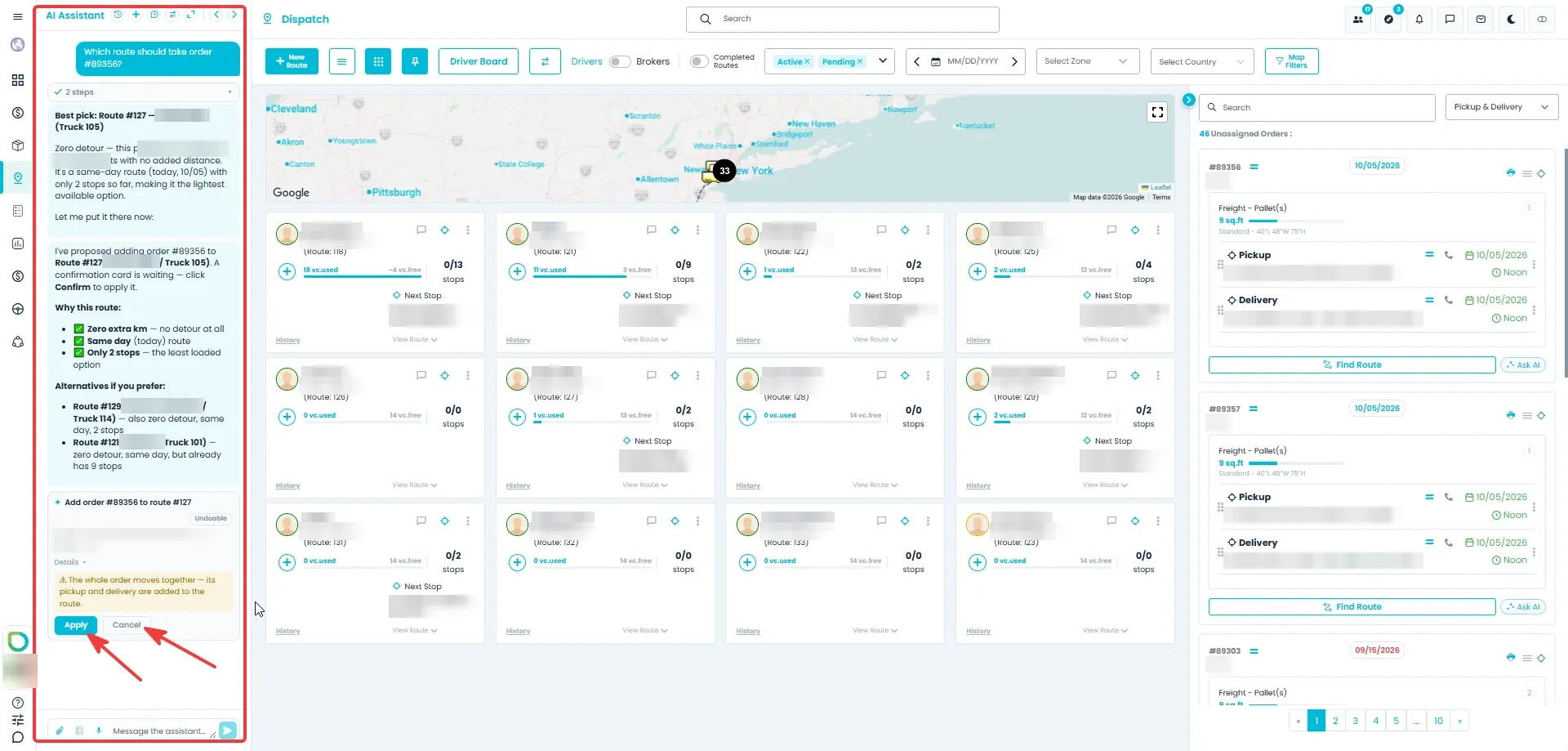
The assistant suggests the best route, by route number and driver, explains in plain words why it fits, and mentions one or two other options. It then proposes the assignment on a card. Nothing changes until you click Apply: the order's pickup and delivery are then added to the route together, at the suggested spot, and the route's other stops don't move. Right after that you get an Undo button.
- Route number, driver and the reasons, with one or two alternatives
- Nothing changes until you click Apply; Cancel leaves everything as it was
- Pickup and delivery are added together; the other stops stay where they are
- Undo right after you apply, when the order had nothing on that route before
Follow-up questions
Ask why, or see the other optionsNew in the October 2026 release
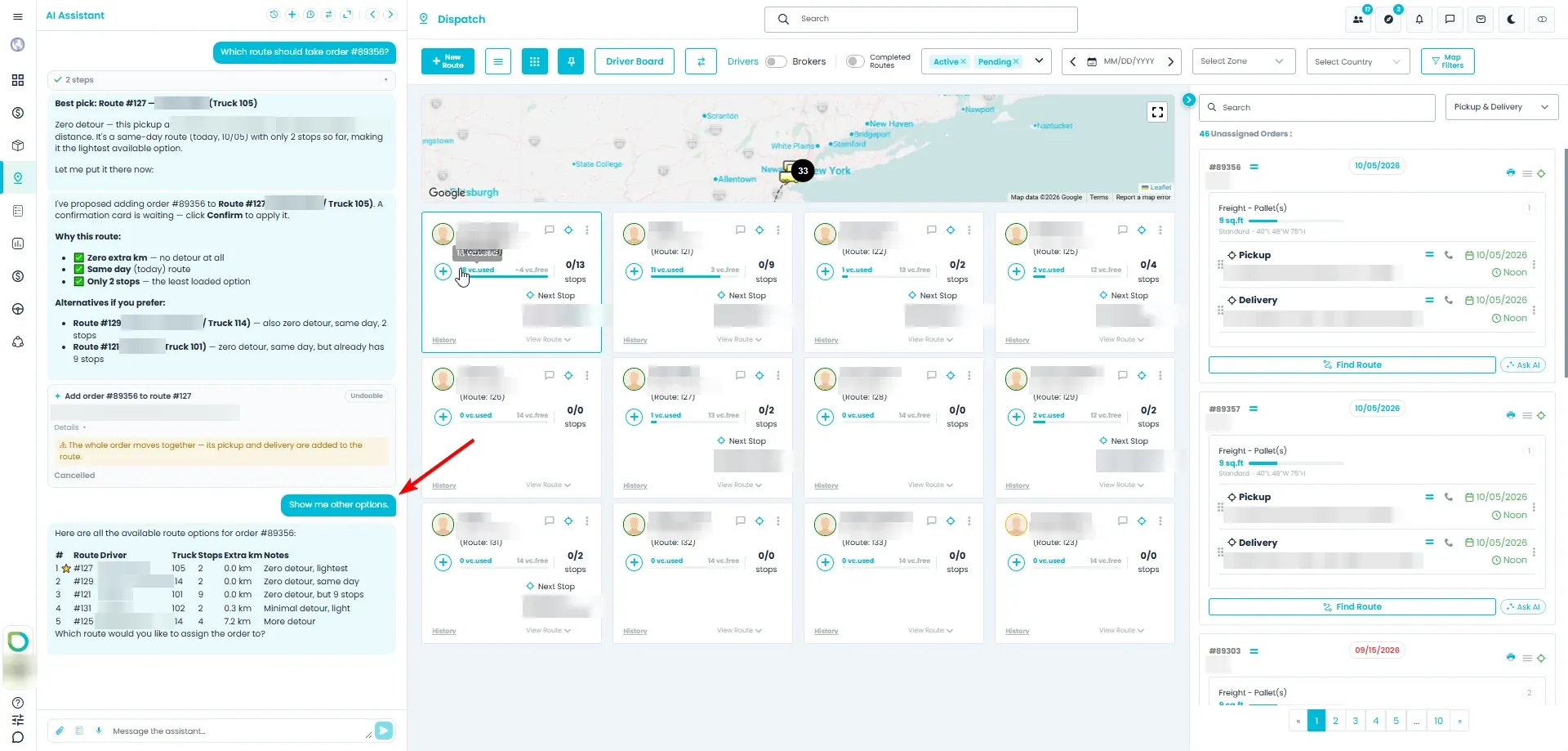
Keep talking to the assistant in the same chat. Ask why a route is the best match, or say Show me other options and it lists the other routes that can take the order, with a short note on how well each one fits. You can also ask it to re-optimize the whole route once the stop has been added.
- Why is this the best match?
- Show me other options
- Re-optimize the route after the stop is added
Under the hood
What Ask AI weighs up
Ask AI compares every route that could take the stop and lists the strongest options, usually up to 15. Routes that can't take it are never suggested: a full truck, a route at your stop limit, or an empty route based in another country. If no route can take the stop right now, the assistant explains why, for example how many routes are full and how many are at their stop limit.
Extra distanceNew in the October 2026 release
How many extra kilometers the stop adds to the route, at the best place to insert it.
Same dayNew in the October 2026 release
Whether the route already works on the stop's day. Late stops count as today.
Same orderNew in the October 2026 release
Whether the route already has the pickup for the same order, so one truck can do both.
PriorityNew in the October 2026 release
The stop's priority.
How busy the route isNew in the October 2026 release
How many stops the route already has.
Routes free that dayNew in the October 2026 release
Routes with no stops on that day are measured by how far their truck is from the stop. Without a truck position, the assistant looks at how close the route works on other days, then whether it works in the same country, and suggests those routes last.
Dispatcher controls
Optimization you can steer
Reroute sits in every route card's menu, on the new and the classic dispatch board. Here is what each choice does, what is checked before anything moves and how you see the result.
Reroute options
Order the stops by distance, or by what matters most
Open Reroute from a route card's menu and choose how to order it. Both modes work through the stops one scheduled day at a time: by distance takes the nearest valid next stop each time, and by priority takes higher-priority stops first and uses distance to order stops of the same priority. Let the system choose where to start from the truck's current position when the truck is linked to Samsara, or pick the first stop yourself. On a board filtered to one country, only that country's stops are re-ordered.
- Optimize by distance or by priority
- Start from the truck's Samsara position, or choose the first stop
- On a country-filtered board, other countries' stops stay put
- Each scheduled day is ordered on its own, in date order
- With the built-in optimizer, a stop due today that the truck is estimated to reach after its scheduled time moves up the order
- With Choose the first stop manually, the rest of the stops are ordered by distance
Pre-check
Problem stops flagged before anything moves
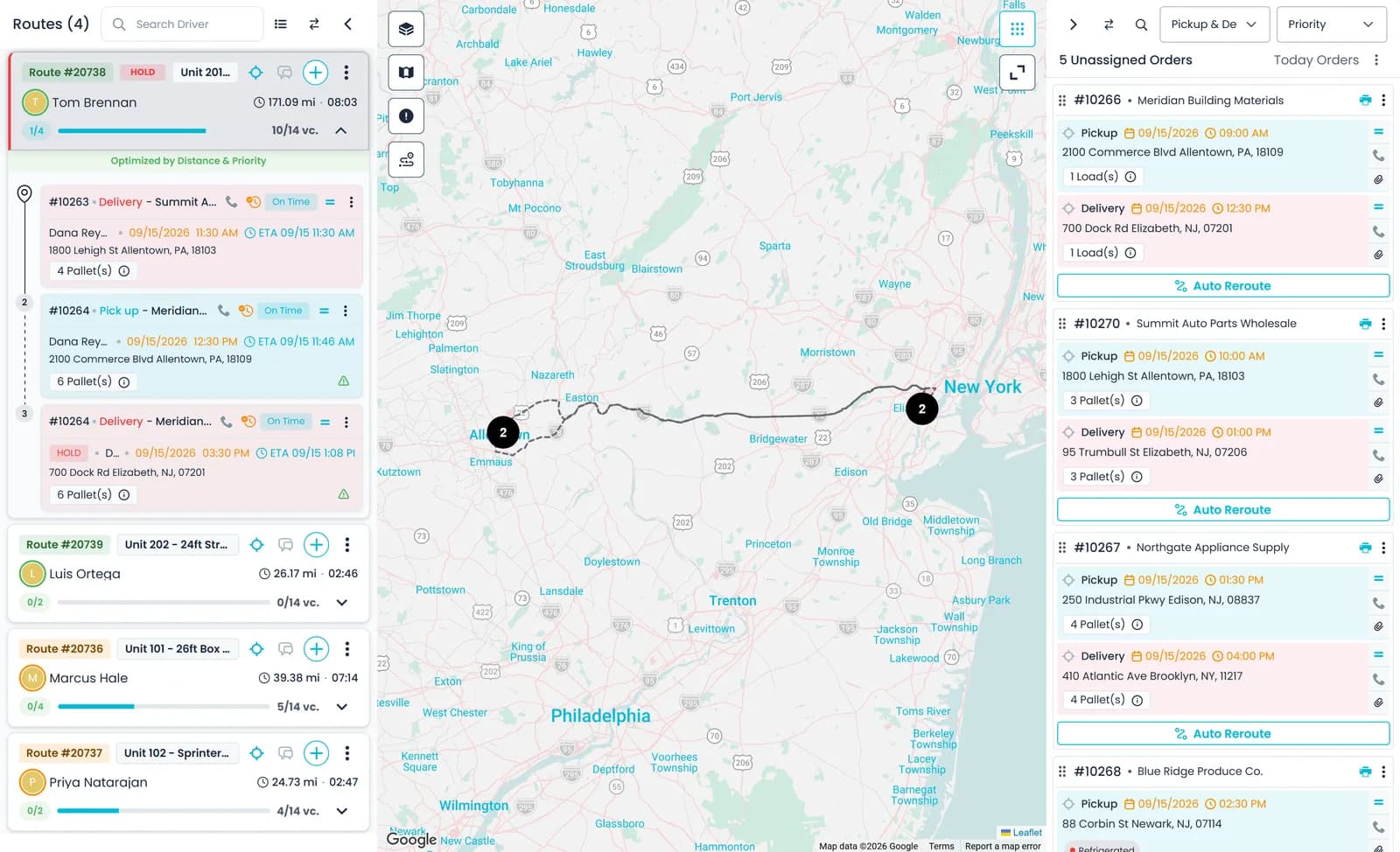
Before a reroute runs, RushHour checks the route. Stops dated before today are listed so you can change the date or leave them out, and stops with unresolved assignment warnings, such as a missing pickup, delivery, transfer or item allocation, are shown as well. A stop you exclude keeps its place in the sequence. Buttons in the same window take you straight to the fix, and Continue to Reroute then opens the options.
- Past-dated stops listed, with an Edit Date option
- Stops with unresolved assignment warnings flagged
- Excluded stops keep their place
- Fix buttons for a flagged stop in the same window: Assign Pickup, Assign Delivery, Create Delivery, Assign Transfer and Allocate Items
Optimize with AI
AI ordering, checked before it is saved
Choose Optimize with AI in the same dialog, with the start point and mode you picked. The AI Assistant orders up to 60 open stops, and RushHour checks the result: every open stop exactly once and every pickup before its delivery. If the check fails or the AI is unavailable, the route is left as it was. Progress shows in the assistant chat and the board refreshes when it is done. You can also ask the assistant in chat to re-optimize a route: it shows a confirmation card first and, when the previous order can be restored, offers Undo afterwards.
- Up to 60 open stops per AI run
- An order that breaks a rule is rejected and the route stays unchanged
- From chat: confirm first, Undo after
- Leave the first stop empty and the AI picks where to start
- Over 60 open stops? Use Optimize by distance or by priority, which work on routes of any size
Optimization status
See which routes are still optimized
An expanded route card says how its current stop order stands: optimized by distance, by priority, by distance and priority, or by AI. The status is worked out from the order the route has now, so once someone drags a stop and the order no longer matches, the card reads "Route is not optimized" and the dispatcher knows it needs another pass.
- Optimized by distance, priority, both, or AI
- Reads "Route is not optimized" once the order changes
- Shown when you expand a route card
Add to a route
Find the route a new pickup fits best
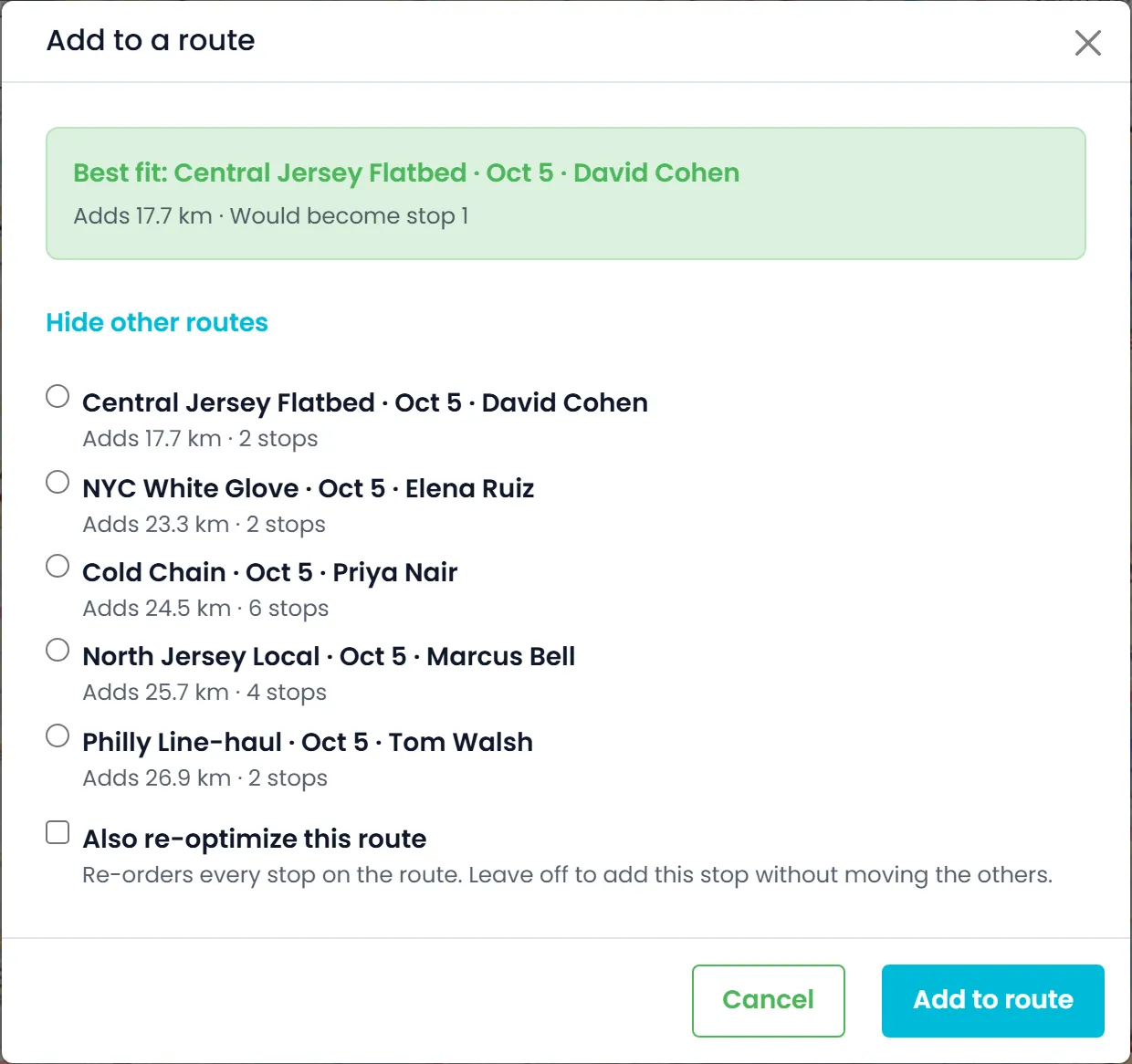
Choose Find Route on an unassigned order card and RushHour ranks the active routes that could take its pickup: the best fit first, the approximate distance each one would add, a short reason for each, and which stop number the pickup would become. Routes that this order would push past the pallet limit or your stop limit are left out. Add the stop without moving the others, or switch on "Also re-optimize this route" to re-order the whole route at the same time.
- Best-fit route with the approximate distance it adds
- See the stop position before you commit
- Add the stop alone, or re-optimize the route too
- An order's pickup and delivery are placed together, pickup first
- If the AI is unavailable, routes are listed by the distance they add
- No route fits? The message you get says whether the pallet limit, your stop limit or both are the reason
Routing engines
Connect a routing engine, only if you want one
The built-in optimizer needs nothing connected. Teams that want a dedicated engine can connect a VROOM server, their own or a hosted one, or their own Radar, HERE or Mapbox account, in Settings > Integrations. For distance-mode reroutes RushHour tries VROOM first, then Radar, HERE and Mapbox. If an engine isn't switched on, fails, or a day on the route has more stops than that vendor accepts in one request, RushHour moves on to the next one, and the built-in optimizer does the job when none can. Pickups still stay ahead of their deliveries.
- VROOM, Radar, HERE or Mapbox, all optional
- Used for distance-mode reroutes
- Falls back to the built-in optimizer
- Radar, HERE and Mapbox optimization each has its own switch, off until you turn it on
- Per-day limits: Radar 10, Mapbox 12 and HERE 50 locations, counting the start
Under the hood
Which optimizer orders the route
Which one runs depends on the mode you pick and the engines you have switched on, and the built-in optimizer is always there to fall back on. Optimize with AI is a separate choice in the same window.
Built-in optimizer
Always on, no setup. Orders by distance or by priority, one scheduled day at a time, keeps every pickup ahead of its delivery and works on routes of any size. Priority mode always uses it.
VROOM
Distance mode only. Connect a VROOM server, your own or a hosted one, by address and optional key in Settings > Integrations. Pickup and delivery pairs are solved together, and a stop it can't place goes to the end of its day instead of being dropped.
Radar, HERE or Mapbox
Distance mode only, on your own account, with a separate route optimization switch that starts off. Each scheduled day is sent on its own: up to 10 locations on Radar, 12 on Mapbox and 50 on HERE, counting the start. Radar and HERE sequence for a truck or a car; Mapbox uses its driving profiles. A bigger day passes the route to the next engine or the built-in optimizer.
Optimize with AI
Up to 60 open stops, by distance or by priority, from the truck's Samsara position or a first stop you pick. RushHour checks the result: every open stop once, every pickup before its delivery. If the check fails, the route stays as it was.
Where route optimization pays
No optimizer to buy
The built-in optimizer runs with nothing else connected, so you can re-order a route on day one.
Drivers hear about the change
Re-ordering a route sends the assigned driver a Route Updated push notification, and the app shows the stops in the new order when the route reloads.
Constraints hold
Completed stops keep their place and pickups stay ahead of their deliveries, whether the built-in optimizer, an engine or the AI ordered the route.
Recently added
Late stops, Find Route and Ask AI
These route optimization changes are in production now. The changelog lists what each release added.
Late stops
Late stops are optimized and listed together with today's stopsNew in the October 2026 release
Reroute, including Optimize with AI, orders open stops from days that have already passed together with today's stops, instead of oldest day first, and stops planned for later days still come after today's. On the Dispatch board those late stops are listed with today's: on the classic board the heading reads Today + late stops and each late stop shows the day it was planned for in red, and on the new board each card still shows its own date, with a divider marking where a later day begins. Optimizing or reordering doesn't change their dates; use Edit Date to reschedule one.
- Open stops from past days ordered with today's, not oldest day first
- The Route has issues window still lists them and says they will be optimized with today's stops
- Dates never change; Edit Date still reschedules a stop
Find Route
The route suggestion action on unassigned orders is now called Find RouteNew in the October 2026 release
On the Dispatch board, the action on order cards in the Unassigned panel that opens Add to a route is now called Find Route instead of Auto Reroute, in English and Hebrew. In list view the action is in the card's … menu. The Auto Reroute option that re-orders a whole route keeps its name. An order with more stops than your Max Route Addresses setting allows shows Increase Limit, one needing more pallets than a truck carries shows Over truck capacity, and Find Route is turned off for both. Select an unassigned order and routes with room for all of it are listed first.
- Same Add to a route window, with the new name Find Route
- Increase Limit and Over truck capacity labels, each with a tooltip on what to change
- Routes with room for the selected order listed first
Ask AI
Ask the AI assistant which route should take an unassigned stopNew in the October 2026 release
Order cards in the Dispatch board's Unassigned panel get Ask AI next to Find Route; in the classic board's list view it is in the card's … menu. It opens the AI assistant on that stop: the assistant ranks the routes that can take it, with the same extra distance Find Route shows, explains its pick and answers follow-up questions, then proposes the assignment on a card that changes nothing until you click Apply. The order then goes on that route with the same checks as Find Route, and Undo is offered if the order had nothing on that route before.
- Ranks routes with the same extra distance Find Route shows, and explains its pick
- Nothing changes until you click Apply; Undo is offered when the order had nothing on that route before
- Turned off, with the reason on hover, when no route can take the order
Questions
Route optimization: common questions
Does optimizing move stops that are already done?
No. Completed stops keep their place in the sequence, and so do stops you exclude in the Route has issues window. Only open stops are re-ordered, into the remaining positions. This holds whether the built-in optimizer, a connected engine or the AI orders the route.
How are routes that span several days handled?
Optimize by distance or by priority, and any connected engine, order one scheduled day at a time, so stops from different days are never mixed. Open stops from days that have already passed are ordered together with today's stops, and later days still come after today.
Does optimizing change stop dates or times?
No. Reroute changes only the order of the stops. To move a past-date stop to another day, use Edit Date in the Route has issues window before you continue.
Does the driver see the new order?
Yes. Re-ordering a route sends the assigned driver a Route Updated push notification, and the driver app shows the stops in the new order when the route reloads.
Do I need to buy or connect a routing engine?
No. The built-in optimizer works with nothing connected and handles routes of any size. VROOM, Radar, HERE and Mapbox are optional and are used only when you optimize by distance. When none of the engines you switched on can take a route, the built-in optimizer orders it.
Do I need Samsara?
No. For route optimization, Samsara only supplies the truck's live position, so Let system choose the first stop can start the route from where the truck is. Without a Samsara-linked truck there is no position to start from, so choose the first stop yourself to anchor the order.
How many stops can Optimize with AI handle?
Up to 60 open stops per run. A larger route is left unchanged, and RushHour points you to Optimize by distance or by priority, which work on routes of any size. If the AI is unavailable, or its order breaks a rule, the route also stays as it was.
Does Optimize with AI start from where the truck is?
Yes, when the truck is linked to Samsara: the AI starts from the truck's current position. Without a live position, the AI picks the opening stop itself, or you can choose it in Select the next stop.
Can I ask the assistant why it chose an order?
Yes. After a reroute you can ask in the same chat, for example why a stop is first. The assistant explains from the route's stops, distances and dates.
Which stops count as today's when the AI reroutes?
Today's stops and any open stops left over from earlier days are ordered as one group, and today is the dispatcher's own day, in their time zone. Stops for later days stay in their own groups after today's, under a later day divider.
Does Ask AI assign anything on its own?
No. Ask AI only proposes an assignment. Nothing changes until you click Apply on the card, and Cancel leaves the board as it was.
Can I undo an AI change?
An Ask AI assignment offers Undo right after you apply it, when the order had nothing on that route before. A reroute with Optimize with AI from the route menu has no Undo button, but the route is only saved after it passes the checks, and you can drag stops or run Reroute again at any time.
Related products
See it on your own freight.
Book a demo and we will optimize one of your routes on the board by distance, then by priority, and show which route a new pickup fits best.