
RushHour vs Onfleet
Freight TMS or courier software?
Onfleet is delivery management software for couriers and last-mile fleets: a driver app, route optimization, photo and signature proof, SMS tracking notifications, driver pay calculation and a Courier Suite add-on with client portals, rate tables and invoicing. RushHour is built for freight delivered to businesses: pallets and cartons on multi-stop routes, BOLs and labels, and invoicing and card payments on the same order.
The short answer
You move pallets, cartons or full loads to stores, offices and receiving docks, you need BOLs and pallet labels, you price from your own rate cards, and you want invoices, card payments, AR aging and QuickBooks Online on the same order, with your own drivers and outsource carriers on one dispatch board.
You run courier or last-mile deliveries to consumers, your recipients expect SMS updates and a live tracking page, you need an API and webhooks, you want driver pay calculated from pay rules, or you rely on barcode scanning, ID and age checks or auto-dispatch at high task volumes.
New in the October 2026 release
Added by the October 2026 platform release. The table above already includes it.
- Tracking links your customers open without logging in, with a map of the stops and, while the load is moving, the next stop's estimated arrival and, as you choose, the truck's approximate area or live position; send them by hand or automatically by email
- Emails to the customer when the driver arrives at or leaves a stop, with the details you pick, off until you switch them on; email only, no SMS
- A Payouts page to enter route pay for drivers and outsource carriers, record payments and settle a period in full or in part
- API tokens, so another system can use the RushHour API without signing in. Still no webhooks.
Where each one is stronger
They overlap on dispatch, route optimization, a driver app and proof of delivery. They differ on who the delivery is for and what happens after it.
- Invoicing, payments and AR aging come with every plan: charge a saved card through Cardknox, email a payment request for a stop, and send invoices and payments to QuickBooks Online. On Onfleet, client invoicing is part of the Courier Suite add-on and exports as CSV.
- Freight paperwork from the order: Bills of Lading, pallet labels with QR codes and dispatch sheets.
- Boxes and crates, bags, pallets and full loads as items on the order, plus container freight station (CFS) items on imported orders, not a single task per drop.
- Rate cards built for freight: pallet-by-mileage grids, zone-to-zone rates, and per-customer cards.
- Your own drivers and outsource carriers assigned from the same dispatch board, plus transfer stops that hand freight between drivers at a hub.
- Customer records with a Lead, Prospect and Customer pipeline, and a company inbox that keeps email with the customer and the order.
- SMS notifications (billed by usage) and a branded tracking page with the driver's location for recipients. RushHour has no SMS; customers follow their orders in the Customer Portal or from a tracking link without logging in, and arrival and departure updates go by email only.
- Driver pay calculation on every plan, with pay rules by task, distance and time. RushHour's Payouts page records what each route pays and settles a period, with the amounts you enter.
- API and webhook access on every plan, plus a Zapier integration. RushHour documents its REST API and has API tokens, but no webhooks.
- Live driver location for dispatchers and recipients. On RushHour's dispatch map, truck positions come only from Samsara, for companies that connect it; the driver app's location feeds stop ETAs, the driver's distance from a stop and, if you choose, the truck position on a customer tracking link, but it is not drawn on the dispatch map.
- Tools for high task volumes: auto-dispatch, advanced route optimization, barcode scanning and ID and age verification on the Scale plan.
- Orders flow in from Shopify, and from other apps through Zapier.
In RushHour
What RushHour's side looks like
RushHour's own screens behind the wins above. We never show Onfleet's product.
Freight paperwork
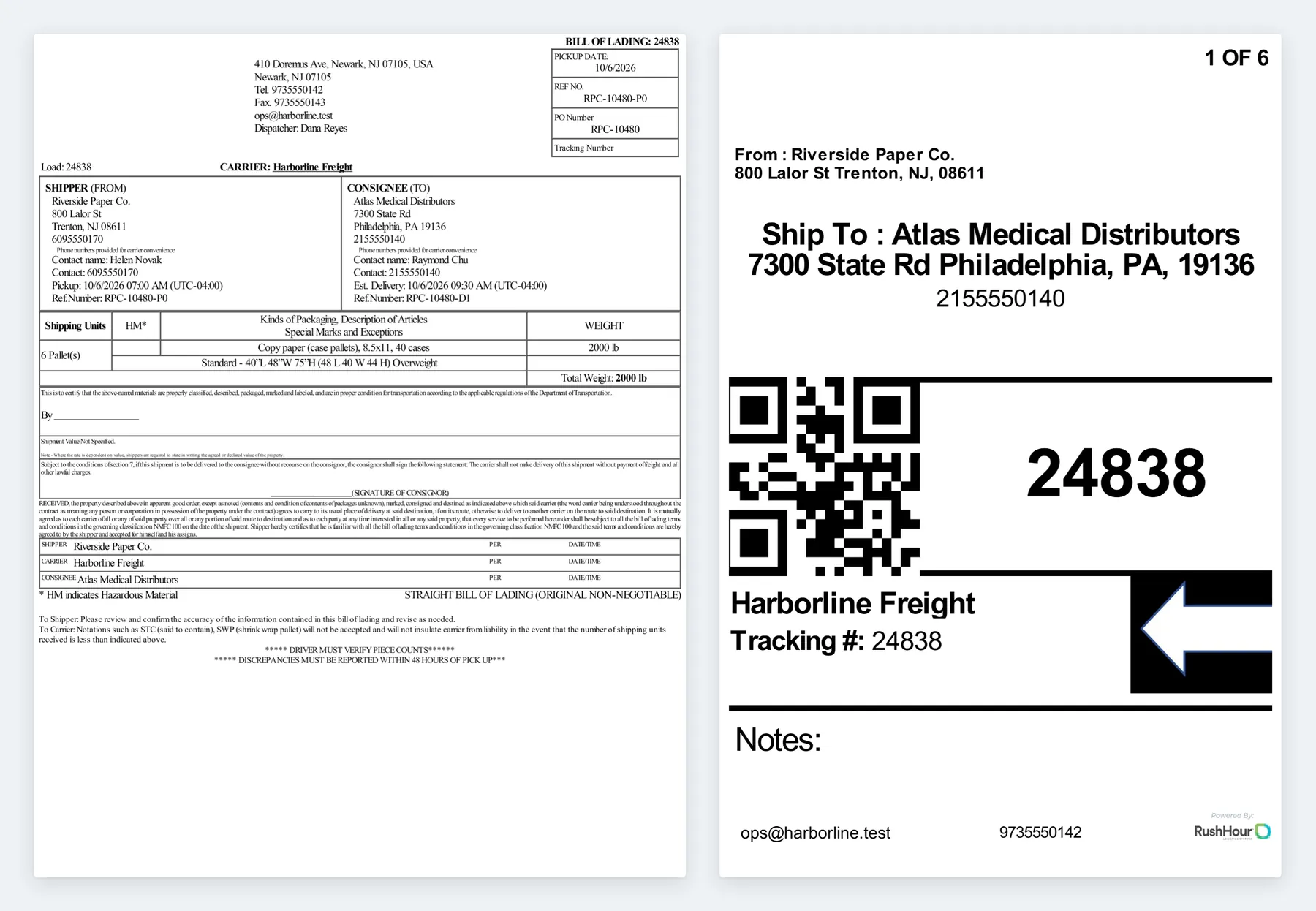
BOL and pallet labels from the order
The bill of lading and the labels come straight from the order's stops and items, so the paperwork matches what was booked.
- Straight bill of lading with shipper, consignee, contacts, pickup and estimated delivery times, shipping units, a hazardous-material (HM) column and total weight
- Labels numbered 1 of N, with From and Ship To, the delivery contact's phone and a QR code of the order number
- Download the BOL, the labels only, or the BOL and labels together
Freight on the order
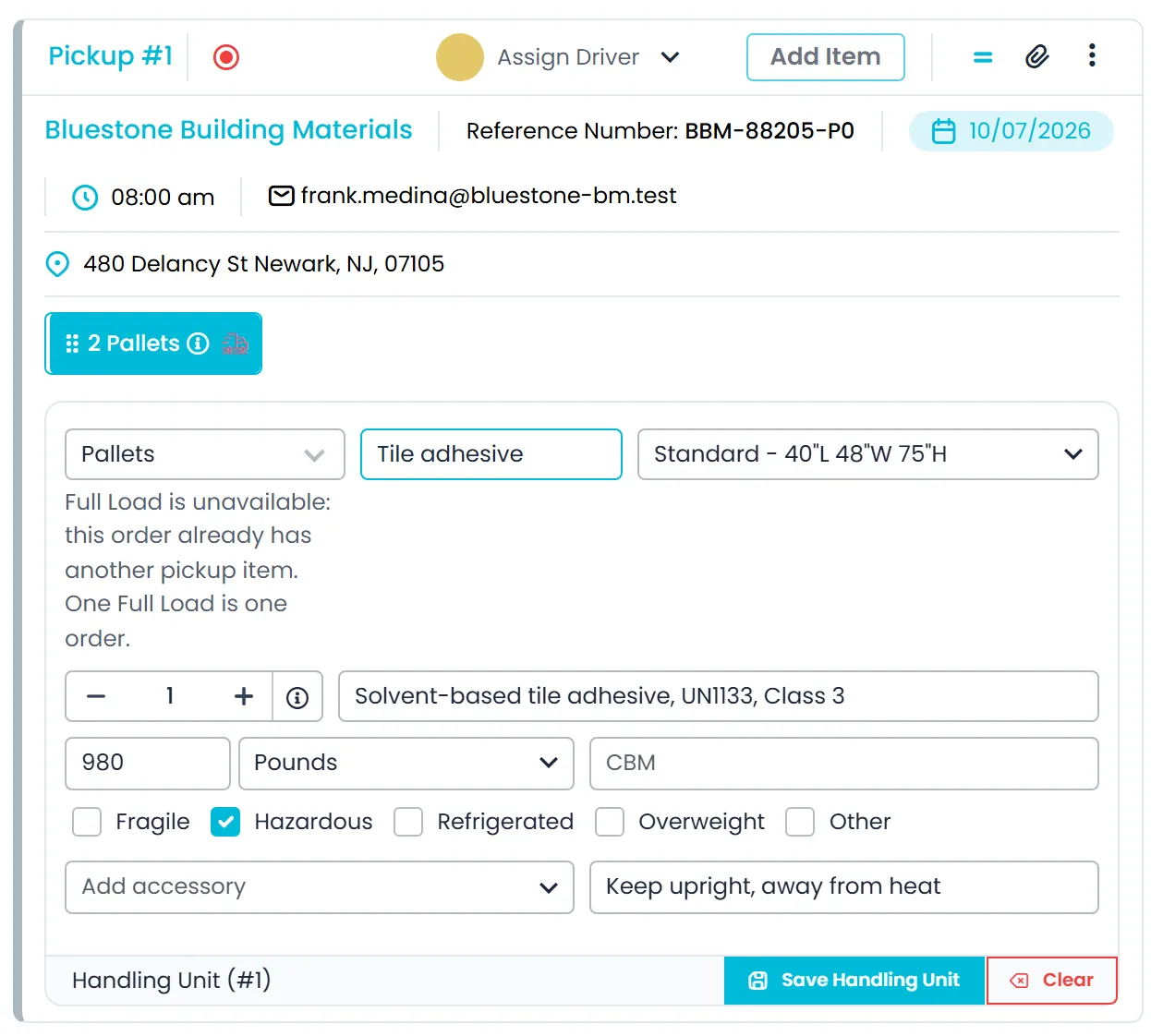
Items with sizes, weights and handling flags
Each pickup carries the freight it collects. The item type, size, weight and flags drive pricing, the paperwork and what the dispatch board shows.
- Item types: boxes and crates, bags, pallets, full load and other
- Standard, small and large pallet sizes, or length, width and height in inches or centimeters, with weight in pounds or kilograms
- Fragile, hazardous, refrigerated and overweight flags, which also show on unassigned stop cards on the dispatch board
Billing on the order
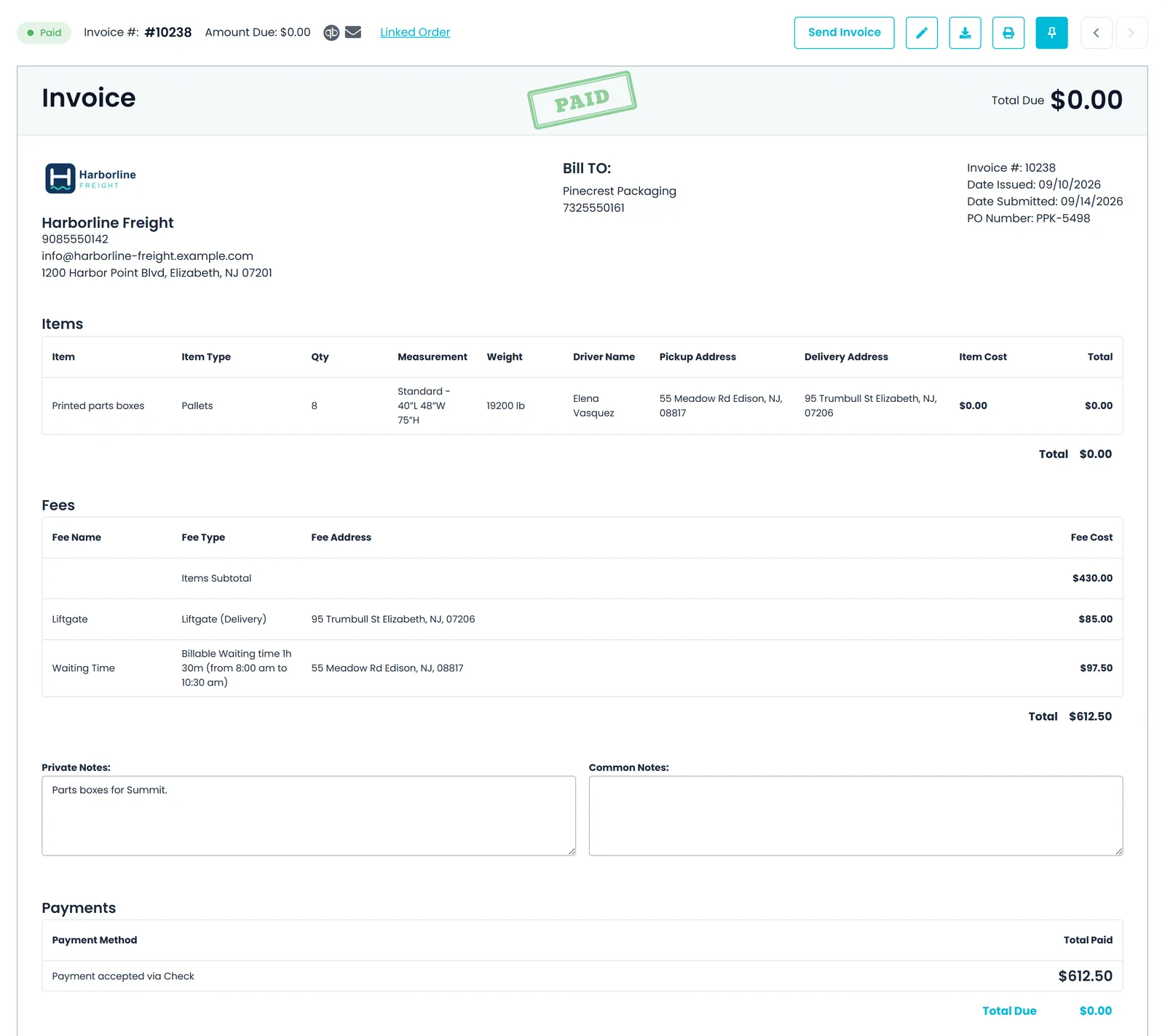
Invoice, payments and balance in one place
The invoice is built from the order with its items, accessorial fees and payments, on every RushHour plan.
- Item lines with type, quantity, size, weight, driver and the pickup and delivery addresses
- Fees such as liftgate and billable waiting time, each with the stop address it applies to
- Payments recorded against the invoice, with a Paid status once nothing is due
Recipient updates
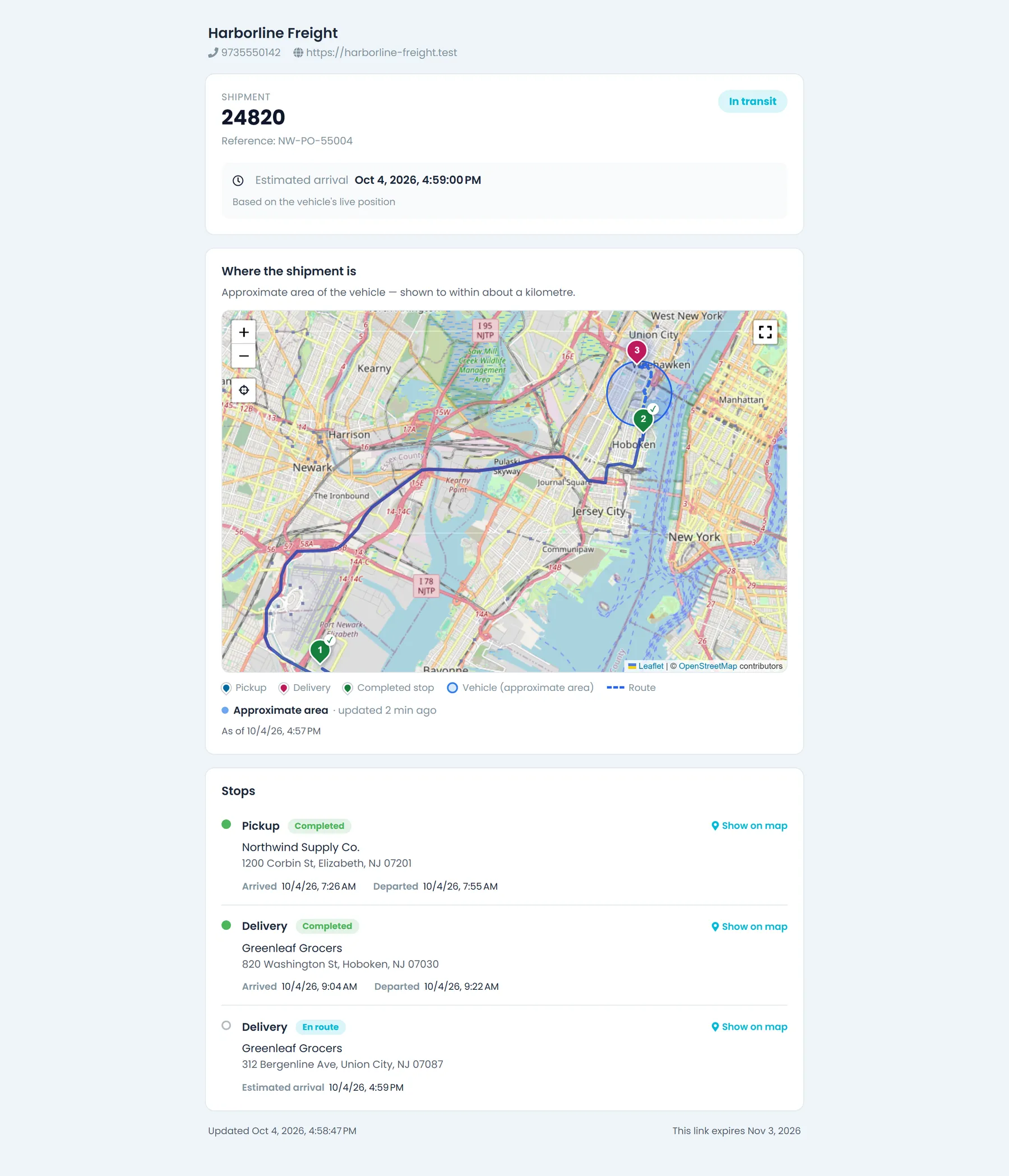
Tracking links your customers open without logging inNew in the October 2026 release
Turn on tracking links in Settings and share each order's link by hand or by automatic email. The page shows your company details and each stop's status on a map, adds the next stop's estimated arrival while the load is moving, and never shows prices.
- Truck position as an approximate area (the default), the last completed stop only, or the live position while the driver heads to this order's stops
- Links last from 1 to 365 days (30 by default) and can be revoked from the order's Tracking tab, which also counts opens
- Automatic arrival and departure emails with the details you pick, off until you switch them on
- Email only: RushHour does not send SMS
Row by row
RushHour marks reflect production today. Onfleet marks come from its pricing page and support center, linked below.
Swipe sideways to see every column.
| Capability | RushHour | Onfleet |
|---|---|---|
| Edit after dispatch | Built inChange stops, items and price on a dispatched order; the driver gets a push for stop changes | Limited, add-on or third-party integrationTasks editable until started; after that, address and phone are locked |
| Invoicing, payments and AR | Built inInvoices, payments and AR aging on every plan | Limited, add-on or third-party integrationClient invoicing in the Courier Suite add-on ($299/month); AR aging not found |
| QuickBooks | Limited, add-on or third-party integrationDirect connection to QuickBooks Online, one way; export file for QuickBooks Desktop | Limited, add-on or third-party integrationCourier Suite invoices export as CSV for upload to QuickBooks |
| Customer payments | Built inCards on your Cardknox account (saved cards, Customer Portal, invoice pay links without login); per-stop COD requests on your customer's own Cardknox account | Limited, add-on or third-party integrationBank payment links through the Aeropay integration |
| Driver pay calculation | Limited, add-on or third-party integrationPayouts page: route pay for drivers and outsource carriers, entered per route and settled in full or in part | Built inOn every plan, with payroll-provider integrations |
| Rate cards | Built inPallet grids, zone-to-zone rates, per-customer cards | Limited, add-on or third-party integrationRate tables by distance, weight or flat fee in the Courier Suite add-on |
| BOL, labels and freight paperwork | Built inBOL, pallet labels with QR code, dispatch sheet | Limited, add-on or third-party integrationOrder labels in the Courier Suite add-on; BOL not found |
| Proof of delivery | Built inSignature and photos from the driver app | Built inPhoto and signature on every plan |
| Customer portal | Built inShippers book orders, track, download documents and pay invoices | Limited, add-on or third-party integrationClient order entry and tracking portals in the Courier Suite add-on |
| Email inbox and customer pipeline | Built inCompany inbox with its own address; Lead, Prospect and Customer stages | Not available or not foundNot found |
| Route optimization | Built inRe-order a route's stops by distance or priority, on every plan | Built inBasic on Launch, advanced on Scale |
| Live location on the map | Limited, add-on or third-party integrationTruck pins for companies that connect Samsara; stop ETAs and customer tracking links also use the driver app's location | Built inDriver location for dispatchers and on the tracking page |
| SMS notifications and tracking links | Limited, add-on or third-party integrationNo SMS; tracking links without login, and arrival and departure emails | Built inStatus and ETA notifications with a branded tracking page |
| Public API and webhooks | Limited, add-on or third-party integrationDocumented REST API and API tokens; no webhooks | Built inOn every plan |
| Published starting price | From $299/month plus one-time onboarding | From $619/month (Launch); Courier Suite $299/month extra; SMS billed by usage |
What we checked on Onfleet's side
RushHour marks reflect production today. Competitor marks are based on the public pages below, checked September 2026; published prices were re-checked in October 2026. Products change, so check the vendor's current pages before you decide.
- Onfleet pricing page (plans and Courier Suite)
- Courier Suite page
- Driver pay and settlement page
- Support center: Edit a task
- Support center: Invoices (client view)
- Support center: Aeropay
- Support center: Notifications and tracking page
- Support center: Zapier integration
- Support center: Shopify workflow
Spotted something out of date? Email info@rushhourapp.com and we will check it and correct the page.
Onfleet or RushHour: common questions
Does RushHour send SMS to recipients?
No. RushHour does not send SMS. Your customers follow their orders by signing in to the Customer Portal, or from tracking links they open without logging in, sent by hand or automatically by email, and you can switch on emails when the driver arrives at or leaves a stop.
Can dispatchers see where drivers are?
Trucks linked to Samsara show on the dispatch map. For drivers who share location in the driver app, that location feeds each stop's estimated arrival and the driver's distance from a selected stop, but those drivers are not drawn on the map. Customer tracking links can also show the truck's approximate area or its live position on the way to the shipment, as you choose.
Can RushHour handle pallets and full truckloads?
Yes. Orders carry items such as boxes and crates, bags, pallets and full loads, with sizes, weights in pounds or kilograms, and handling flags such as fragile, hazardous and refrigerated. The BOL and labels print from the same items.
Is invoicing included?
Yes. Invoices, payments and AR aging are part of every RushHour plan, and invoices are built from the order. On Onfleet, client invoicing is part of the Courier Suite add-on, which its pricing page lists at $299 a month.
Does RushHour have an API and webhooks?
RushHour documents its REST API, the same one its portals and driver app use, and company admins create API tokens for connecting other systems. It does not send webhooks; integrations check for changes on a schedule.
Set up with you, not handed a login
Onboarding is a one-time fee on every plan. It covers importing your customers, rates and drivers, configuring your pricing and billing, and training your team, done with you rather than handed over as a manual.
Delivering freight to businesses? See it on your own orders
Bring a real multi-stop order to the demo. We will dispatch it, print the BOL and pallet labels, invoice it, charge the card and send it to QuickBooks Online.