
Who can see what.
And who did what.
Security here means three things: who in your company can see and change what in RushHour, a record of what they did, and how your records are kept apart from other companies on the platform. This page covers how each works today, and says plainly what is not built yet.
At a glance
What security & IT teams check
The short answers to a security questionnaire. Each one is covered in detail further down this page.
Company data separation
Business records are filtered to the company that owns them, in the data layer.
Customer Portal locked to one account
A customer's portal login can use only the features built for the portal, and reads only its own account's orders, invoices and records.
Custom roles
100+ named permissions, ticked per role, with users disabled in one step.
Sensitive details behind a permission
In driver lists and records, drivers' SSN, date of birth, license and home street address show only to roles you allow, and saved integration keys come back masked.
Hosted card fields
Card numbers go into Cardknox's fields; RushHour keeps the token and masked number.
Hosted in the US
The RushHour API, database and file storage run on AWS in the United States, and the Portal reaches the API over HTTPS.
Access, separation and audit
The controls behind your account
How access, sign-in, data separation, sensitive details, the audit trail and card payments work in RushHour today.
Access control
Custom roles, built from 100+ named permissions
Start from the built-in Admin, Dispatcher, Sales, Billing and Accounting roles, or create your own in Settings > Users, and tick exactly which permissions each role gets: more than 100, across 15 areas from orders, quotes and dispatch to accounting, documents and settings. A user can hold more than one role. When someone leaves, disable them. The user is checked again on every request, so their next one is refused even if they are still signed in, and resetting a user's password from the office signs them out of every session.
- 100+ named permissions, ticked per role
- A disabled user is refused on their next request
- An office password reset ends every session
- Up to 6 roles per user, and a user can do anything one of their roles allows
- Each role's permissions are set per company, so one role can allow different things in two of your companies
- 116 permissions: Settings 37, Orders 19, Dispatch 18, Accounting 9, Customers 7, Quotes 7, Documents 4, Drivers 3, Outsource 3, Customer Portal 2, Inbox 2, Issues 2, Compliance 1, Dashboard 1, Reports 1
- Menu entries for areas a user can't open are hidden, and the server refuses actions their roles don't allow
User management
Invite, disable and reset office users from one list
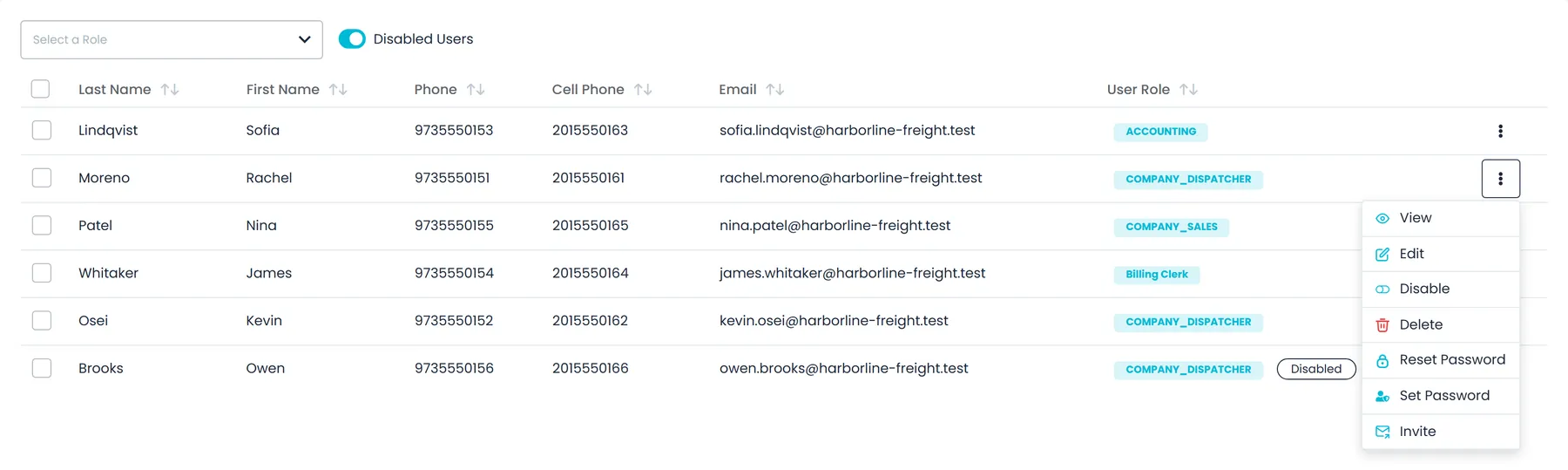
Settings > Users lists your office staff with their roles. Filter it by role, or turn on Disabled users to see who has been switched off. Adding a user emails the person an invitation, and they set their own password from the link. Invitation links expire after 14 days, and Invite sends a fresh one. From each user's menu, an admin can disable or enable them, delete them, email a password reset link, or set a new password directly, with an option to generate one. A disabled user keeps their account and history and can be enabled again.
- Invitation links expire after 14 days and can be sent again
- Disable instead of delete: access stops, the account and its history stay
- Reset Password emails a link; Set Password lets an admin type or generate one
- Either way, the user is signed out of any session already open
- Only company admins can delete users or reset and set other users' passwords
Sign-in and sessions
Strong passwords, and sessions that end when access changes
Office users sign in to the Company Portal with their email and password. Every password screen in the Portal, from setting up a new account to a reset, requires at least 8 characters with upper- and lowercase letters, a number and a special character (! @ # $ % ^ & or *). Users can tick Keep me signed in, and signing out in one browser tab signs out their other open tabs. Each request checks that the user is still enabled and that their password has not been changed or reset since they signed in. A forgotten password is reset from an emailed link; in the driver app, drivers use a one-time code instead.
- Portal passwords of 8+ characters with upper- and lowercase letters, a number and a special character
- Keep me signed in, and sign-out that reaches every open tab in the browser
- Sign-ins, sign-outs, password changes and resets, and sign-ins refused for a wrong password, with the reason, are recorded in Activity Logs
- Driver app password resets use a one-time code
Data separation and hosting
How company records are kept apart, and where they are hosted
Orders, customers, invoices and the other business records carry the company they belong to, and the data layer applies that filter to queries on them by default, instead of leaving each screen to hide other companies' rows. Customer Portal sign-ins are locked down by default: they can reach only the features built for the portal, and only their own account's records. Pricing benchmarks that draw on other carriers use lanes aggregated across at least five companies, never another company's own rates. The RushHour API, database and file storage run on AWS in the United States, and the Portal reaches the API over HTTPS.
- Company filter applied in the data layer
- Customer Portal logins blocked outside portal features by default
- Portal logins read only their own customer's records
- Benchmarks only from lanes shared by five or more companies
- API, database and file storage hosted on AWS in the US
Sensitive data
Driver ID details behind a permission, and saved keys masked
In driver lists and driver records, a driver's social security number, date of birth, license number, expiry and image, and home street address and ZIP code are filled in only for users whose role has the 'Drivers settings - view details' permission. For everyone else those fields come back empty, so dispatchers can still assign drivers without seeing their ID. Keys you save for integrations, such as the payment gateway, telematics, maps and routing services, come back masked when the settings are opened, and payment-gateway and telematics keys are stripped from the company data sent to browsers, the Customer Portal and driver phones. If someone changes a routing engine's server address without entering the key again, the saved key is cleared instead of being sent to the new address, and vendor keys carried in request addresses are kept out of server logs and error reports.
- In driver lists and records: SSN, date of birth, license and home street address only with 'Drivers settings - view details'
- Saved integration keys shown masked when the settings are opened
- A routing engine's key is cleared when its server address changes
- Vendor keys kept out of server logs and error reports
Audit trail
See what was done, by whom, and when
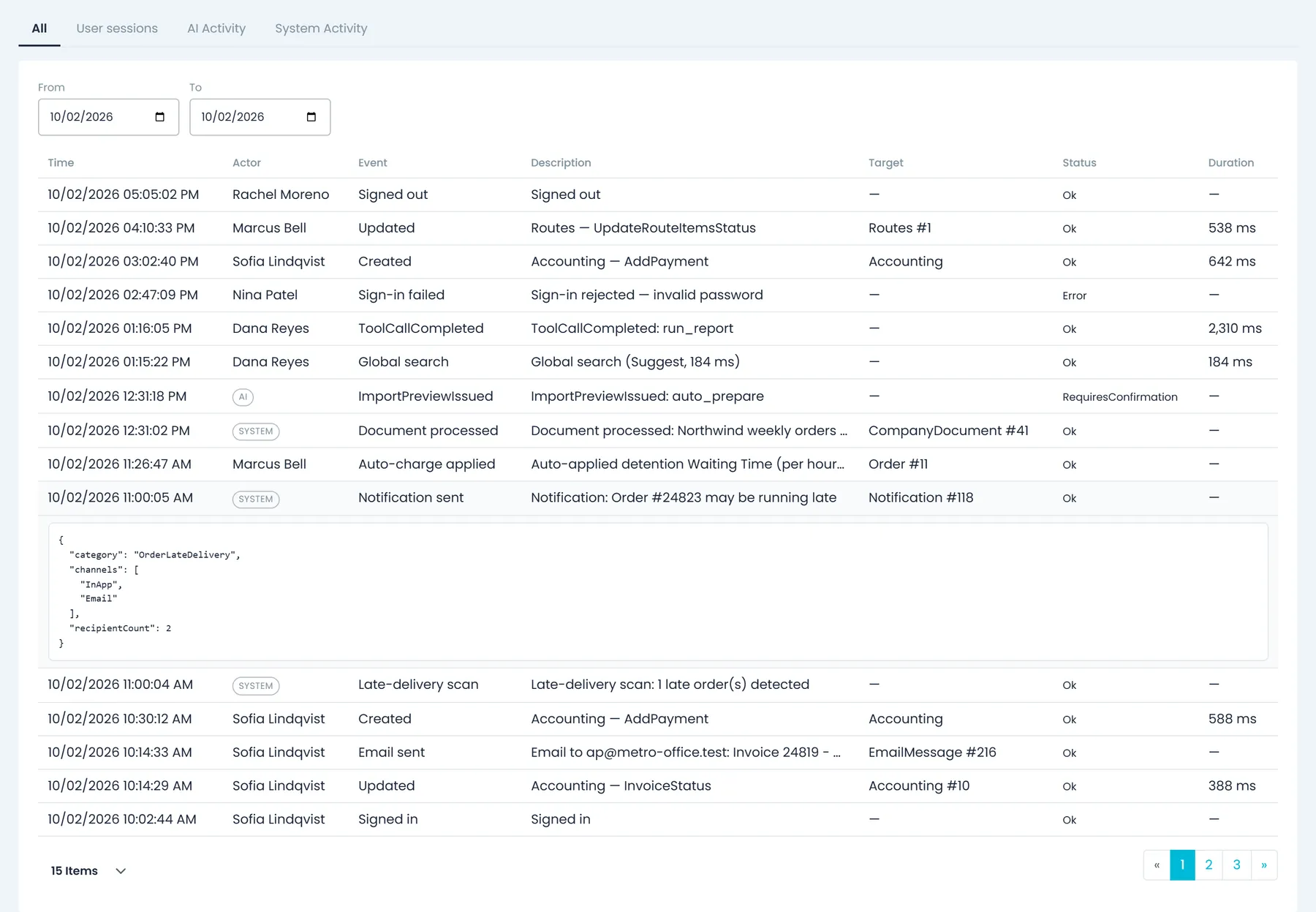
Settings > Activity Logs records the creates, edits and deletes signed-in users make in RushHour: who did it, which action, which record, when, and whether it went through. Events are kept for 365 days and can be filtered by date and searched. Separate tabs show sign-in sessions, kept for 180 days, and, for users with permission, what the AI assistant and background system jobs did. Orders and quotes go further, with an Audit log tab showing each changed field's old and new value.
- Creates, edits and deletes, kept for 365 days
- User sessions (kept 180 days), AI Activity and System Activity tabs
- Sign-ins, wrong-password attempts, password resets and forced logouts on the record
- System Activity shows automated work, such as emails sent or failed, documents processed and late-delivery scans
- 'Activity log - view own activity log' and 'Activity log - view all users' are separate permissions
- Field-by-field before and after on orders and quotes
Order history
Field-by-field history on every order and quote
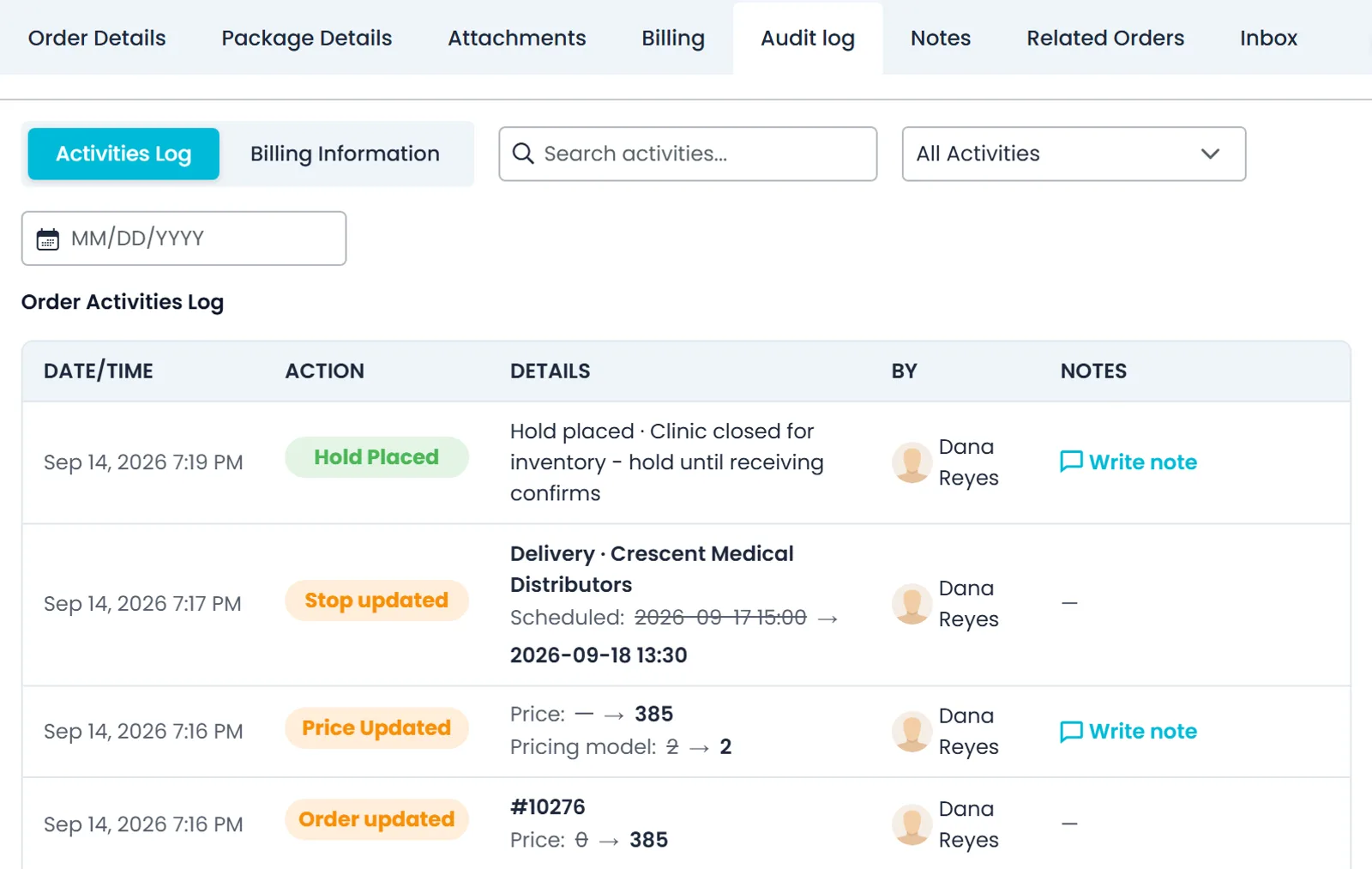
Open an order or quote and its Audit log tab lists each change with the date and time, the action, the old and new values, and who made it, whether a team member, a driver or a Customer Portal user. Updates RushHour makes on its own are listed too. Filter the list by type of activity, search it or pick a date, and add notes to activity entries such as a hold being placed. The tab is for your staff only: it carries prices and internal notes, so the Customer Portal cannot reach it.
- Old and new values for fields such as price, stop times and item quantities
- Covers changes by team members, drivers and Customer Portal users, and RushHour's own automatic updates
- Notes on activity entries, for staff only
- The tab is renamed Log Activity and also records BOL, label and invoice PDF downloads, who a BOL was emailed to, and Copy to Driver sendsNew in the October 2026 release
Card payments
Card numbers are typed into Cardknox's fields
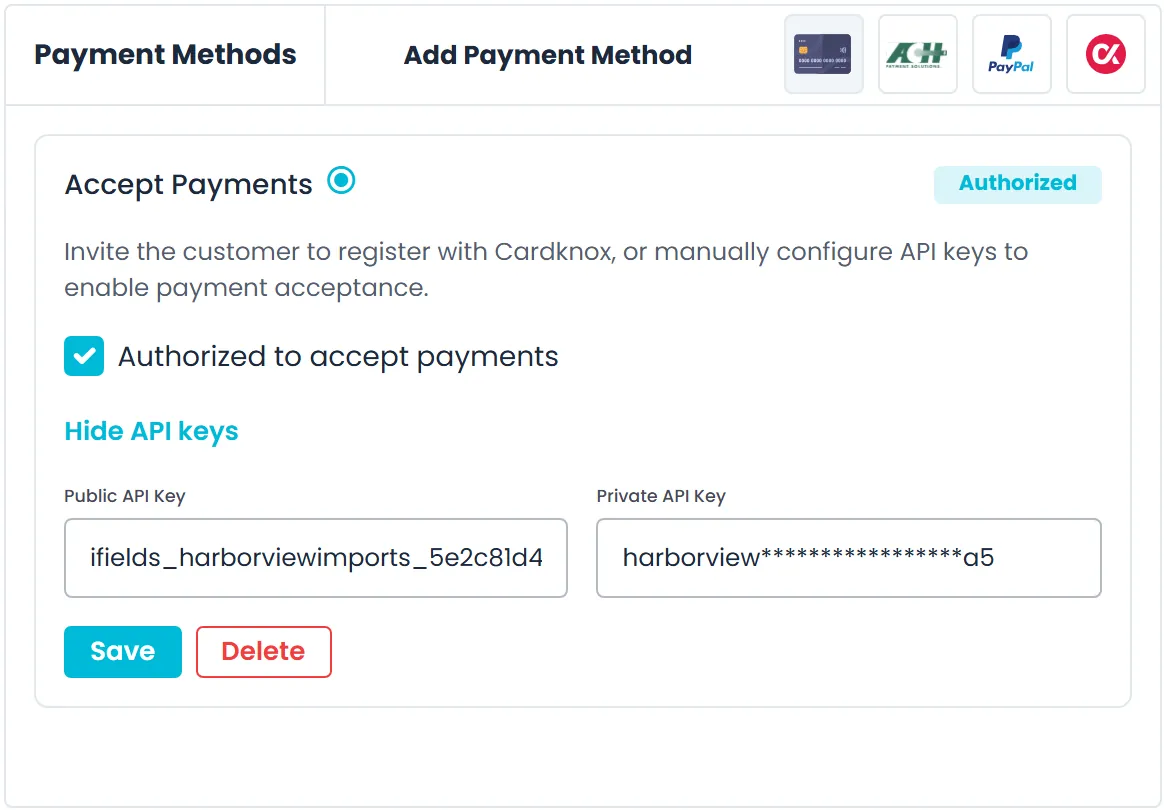
When your office takes a card payment in the Portal, or a customer pays from the emailed payment form, the card number is typed into hosted fields served by Cardknox, the payment gateway. RushHour receives a gateway token and the masked card number, which it uses to show and charge the card later.
- Cardknox hosted card fields in the Portal and the emailed payment form
- Customers saving a card in the Customer Portal type it into Cardknox fields too
- RushHour keeps the gateway token and the masked number
- Your private Cardknox key is shown masked in Settings and never sent in full to browsers or phones
- Customers pay an invoice by card from a secure payment link, without logging inNew in the October 2026 release
Straight answers
What we don't have yet
Security reviews go faster when the gaps are on the table. These are not built today.
Sign-in
In RushHour today
Not built yet
- No single sign-on or two-factor sign-inUsers sign in with an email and password. There is no SAML or OpenID Connect single sign-on and no second sign-in factor.
- No Google or Microsoft sign-inUsers can't sign in with a Google or Microsoft account.
Wrong passwords
In RushHour today
Not built yet
- No account lockoutAn account is not locked after repeated wrong passwords.
Sessions
In RushHour today
Not built yet
- No IP allowlist or idle timeoutSign-in is not limited to approved IP addresses, sessions don't end after a period of inactivity, and the password rules are the same for every company.
Audit trail
In RushHour today
Not built yet
- No audit-log exportThe activity log and order audit history are viewed and searched in the Portal. There is no export file or feed.
Certification
In RushHour today
Not built yet
- No SOC 2 or ISO 27001RushHour has not been audited against SOC 2 or ISO 27001. We can walk your team through the controls on this page instead.
FAQ
Questions IT and security reviewers ask
Where is RushHour hosted?
On Amazon Web Services in the United States. The application servers, the database and image storage run in US East (Ohio), and uploaded company documents are stored in US West (Oregon). The Customer Portal and this website are hosted on Vercel. Every RushHour app reaches the API over HTTPS, and the Sub-processors page lists each outside service and what it handles.
Does RushHour support single sign-on or two-factor authentication?
Not today. Office users sign in with an email and password, and the Company Portal requires at least 8 characters with upper- and lowercase letters, a number and a special character. There is no SAML or OpenID Connect single sign-on, no Google or Microsoft sign-in and no second sign-in factor. Sign-ins refused for a wrong password are recorded in Settings > Activity Logs with the reason.
How do we remove someone's access when they leave?
In Settings > Users, choose Disable from the person's menu. RushHour checks the user on every request, so their next request is refused even if they are still signed in. The account and its history stay, and it can be enabled again later. A company admin can also delete the user.
How long does a sign-in last?
With Keep me signed in ticked, a sign-in lasts up to 30 days. Signing out ends it in that browser, including the user's other open tabs, and it ends everywhere when an admin disables the user or resets or sets their password. There is no idle-session timeout today.
Who can see drivers' social security numbers and license details?
In the driver list and driver records, only users whose role has the 'Drivers settings - view details' permission see them. For everyone else, the SSN, date of birth, license number, expiry and image, and home street address and ZIP code come back empty, so dispatchers can still assign drivers without seeing those details.
Can one customer see another customer's data in the Customer Portal?
No. A Customer Portal login can use only the features built for the portal, and the orders, invoices, payments and other records it reads are limited to its own customer account. Staff-only screens, such as an order's audit log with its prices and internal notes, can't be reached from the portal.
Does RushHour store card numbers?
Card numbers are typed into hosted fields served by Cardknox, the payment gateway, in the Company Portal, the Customer Portal and the emailed payment form. RushHour keeps the gateway token and the masked card number, which it uses to show and charge the card later.
How long is activity kept, and can we export it?
Activity Logs events and the AI assistant's activity are kept for 365 days, and user sign-in sessions for 180 days. You can filter them by date and search them in the Portal, but there is no export file or feed today.
Is RushHour SOC 2 or ISO 27001 certified?
No. RushHour has not been audited against SOC 2 or ISO 27001. We can walk your team through the controls on this page, our Data Processing Agreement and our sub-processor list instead.
Related
Recently added
More control over who gets in
These access changes are in production now. The changelog lists what each release added.
Customer Portal access
Switch off a customer's portal access, and reset portal passwordsNew in the October 2026 release
Each customer shows its Customer Portal access status: Open with no portal login, Pending while invitations wait to be accepted, and Active once a login can sign in. Users with the Delete Customers permission can disable a customer from its profile, which locks out all of its portal logins until someone selects Enable. Company admins can also reset a portal user's password from the Customers list, a customer's page or the Customer Portal Access window: the user is signed out and emailed a link to set a new one.
- Open, Pending and Active portal status on every customer
- Disable locks out every portal login of that customer until Enable
- Admins reset a portal user's password and sign them out
Sign-in and permissions
No second sign-in after a temporary password, and new permissionsNew in the October 2026 release
When someone signs in with a temporary password and the Portal asks them to choose a new one, saving it now signs them in with the new password and takes them straight to the page they were opening. New permissions let admins open the new screens to other roles, among them View reports for the new Reports page, where the money reports also need invoice or expense access and the rest stay admin-only, and 'Compliance - view hours of service' for the new Hours of Service board.
- Saving a new password signs the user straight in
- View reports opens the new Reports page to other roles
- 'Compliance - view hours of service' opens the Hours of Service board
Recently added
Retention rules for your drivers' data
These controls are in production now. The changelog lists what each release added.
Driver data retention
Choose how long driver GPS history and personal details are keptNew in the October 2026 release
A Driver data retention section in Settings > Profile sets your company's own policy. A company that already used RushHour before this release keeps what RushHour did before: GPS history older than 90 days is deleted every night, and a driver deleted from the Portal has their name, contact details, ID number, date of birth, license and home address erased after a 30-day waiting period. A company that opens its account later starts with GPS history kept and drivers it deletes archived, so they can be restored. Either way you can switch deleting GPS history on or off and set the number of days, with the latest 30 days always kept, and switch erasing the drivers your staff delete on or off; switching it on applies only to drivers deleted after you do. When drivers delete their own account in the driver app, on Android or iPhone, those details are erased after the same waiting period by default. RushHour asks you to confirm before either deletion is switched on, and changing these settings needs the permissions to view and edit driver data.
- Companies already on RushHour keep 90-day GPS deletion and erasure of deleted drivers; new accounts start with both off
- Optional daily GPS cleanup that always keeps the latest 30 days
- Erasure after a waiting period, 30 days unless you set another
Also new
Connecting other systems to RushHour gets its own page.
Walk our security model with your IT team.
We'll go through roles and permissions, company data separation, the activity log, our DPA and sub-processor list, and the gaps listed above.