
Freight software built
inside a freight company.
RushHour is an operations platform for freight: orders, dispatch, drivers, documents and invoicing for trucking, forwarding and delivery operators, in one system.
Our story
RushHour was written inside a working freight company. The dispatchers, billers and owners who deal with the problem every day specified it, not analysts studying it from the outside.
Orders, dispatch, drivers, customers, documents and invoicing used to live in separate systems, and every handoff between them was manual. So we built one platform where the order carries all of it, from booking to the paid invoice.
That company is Shimon's Express, a New Jersey freight operator. It has run its pickups and deliveries, airport cargo runs and long-haul loads on RushHour since 2020. Its office works in the web platform and its drivers work from the driver app.
12 countries, 41 US states
Where stops on the platform have been so far, from local pickups and deliveries to airport cargo runs and long-haul loads, since the first orders in February 2020.
Direct support
Email support@rushhourapp.com and a person on the RushHour team replies.
Office, shipper and driver apps
The web platform, the customer portal and the driver app all work on the same order record.
Audit log
Field-level history on every order, plus an activity log of user, AI and system actions kept for 365 days.
See it in the product
The facts above, on screen
Several facts on this page come from screens you can open in a demo. Here are four of them and what each one shows.
Order audit log
What changed on an order, who changed it and when
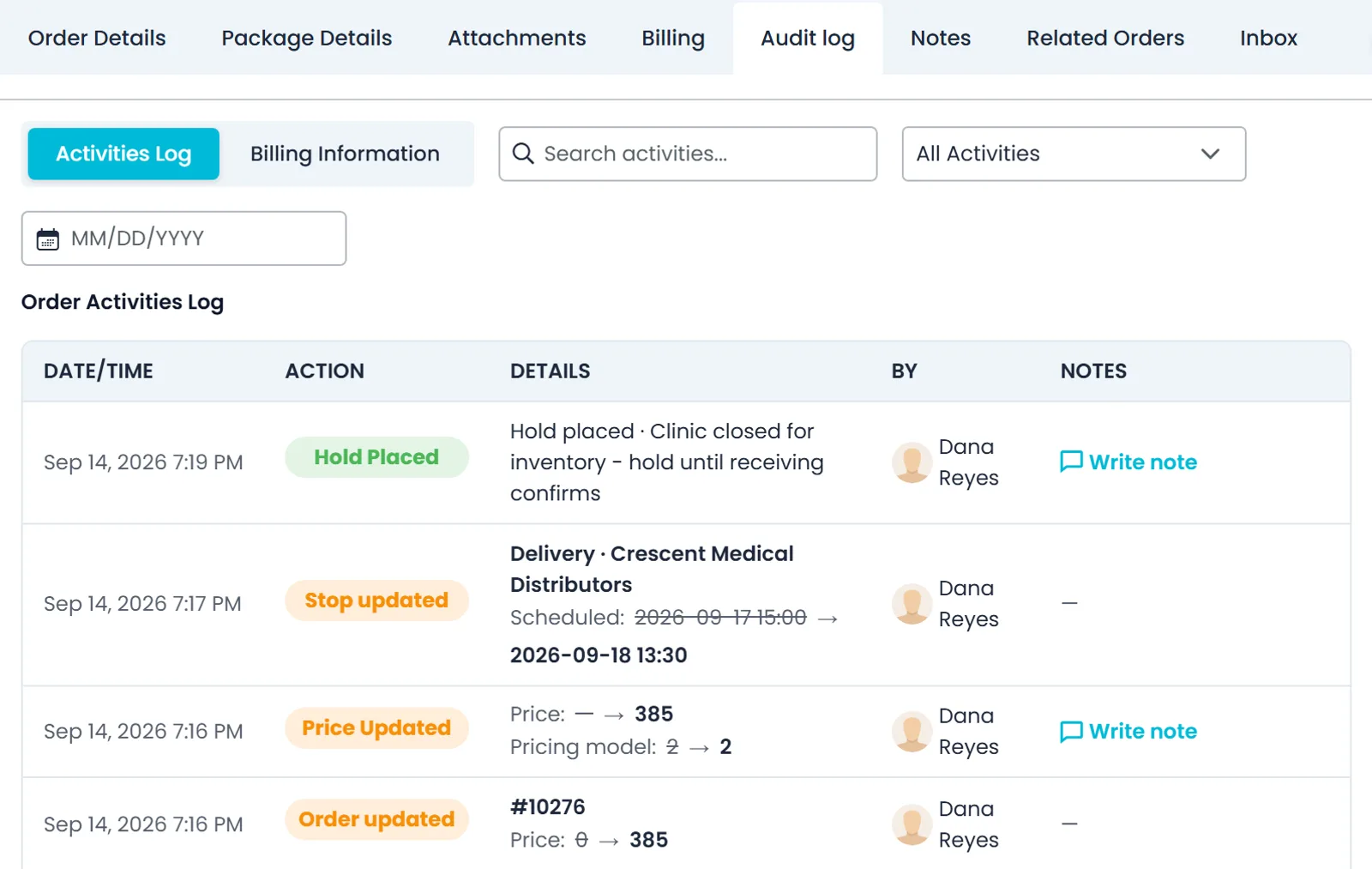
Open the Audit log tab on an order or a quote to see its changes as they happened: what changed, the old and new value, who made the change and when.
- Price, pricing model and stop schedule changes shown as the old value and the new one, and holds with their reason
- Search the log, filter it by activity type or pick a date
- Write a note on entries such as a hold or a price update to record why it happened
- Quotes have the same Audit log tab as orders
Activity Logs
People, the AI assistant and automated jobs in one activity log
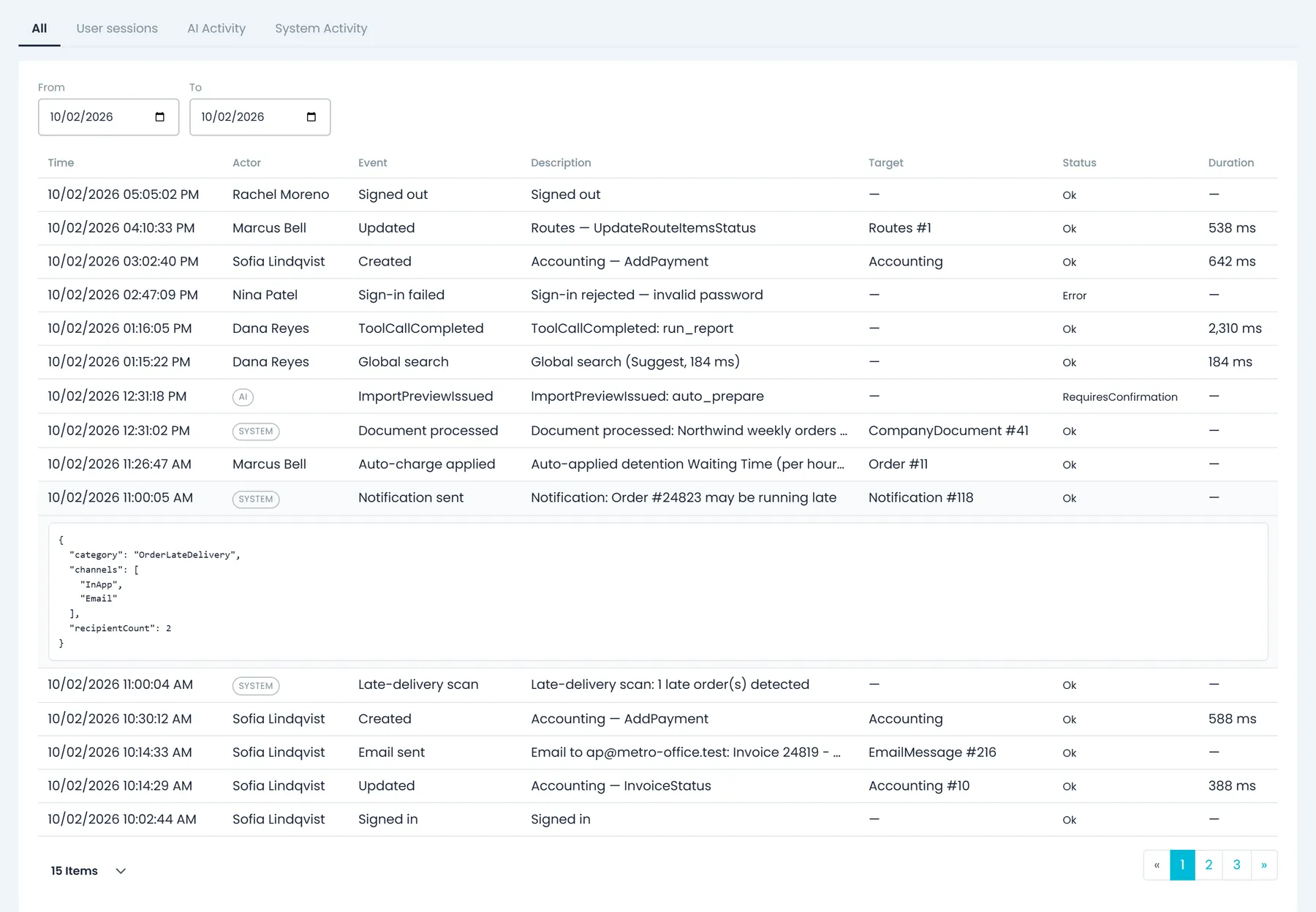
Settings > Activity Logs lists what users did, what the AI assistant did and what ran on its own, newest first, with the actor, event, target record and status of each entry.
- Tabs for All, User sessions, AI Activity and System Activity
- Sign-ins, failed sign-ins, password changes and resets, forced logouts, and the records people create, update or delete
- Automated jobs too: emails sent or failed, documents processed and late-delivery scans
- User sessions show when each person started and stopped, and their total time worked
- Filter by date range, search, and show 15, 20, 50 or 100 rows per page
- Seeing your own activity and seeing everyone's are separate permissions
Roles and permissions
Access built from 100+ named permissions
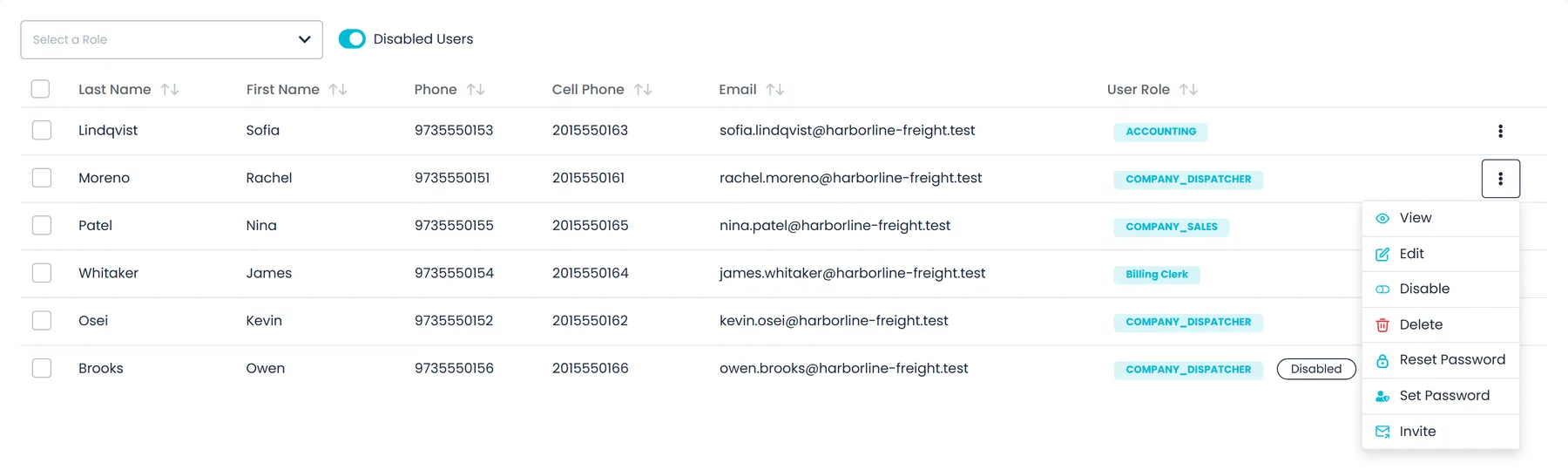
Each person gets one or more roles, and each role is a set of named permissions you tick under Settings > Users > Roles. Grants are set per company, so the same role can carry different permissions in each of your companies.
- Built-in roles for office staff: Admin, Dispatcher, Sales, Billing and Accounting
- Create your own roles with a name and description, then tick their permissions in a grid with Select all
- 100+ named permissions across 12 areas, from Dispatch, Orders and Quotes to Accounting, Documents and Settings
- A person can hold up to six roles at once
- Sidebar entries for areas a person has no permission to view are hidden
- 116 permissions across 15 areas, adding Compliance, Issues and ReportsNext release
Integrations
12 connectors, switched on per company
Settings > Integrations lists every connector in one place. Each one is switched on for your company, most of them with your own vendor account or keys.
- Card payments through Cardknox, with your own public and private keys
- Samsara vehicle tracking with your Samsara API token
- Telegram: sign in with a Telegram phone number and the code Telegram sends, then send route and stop details to drivers
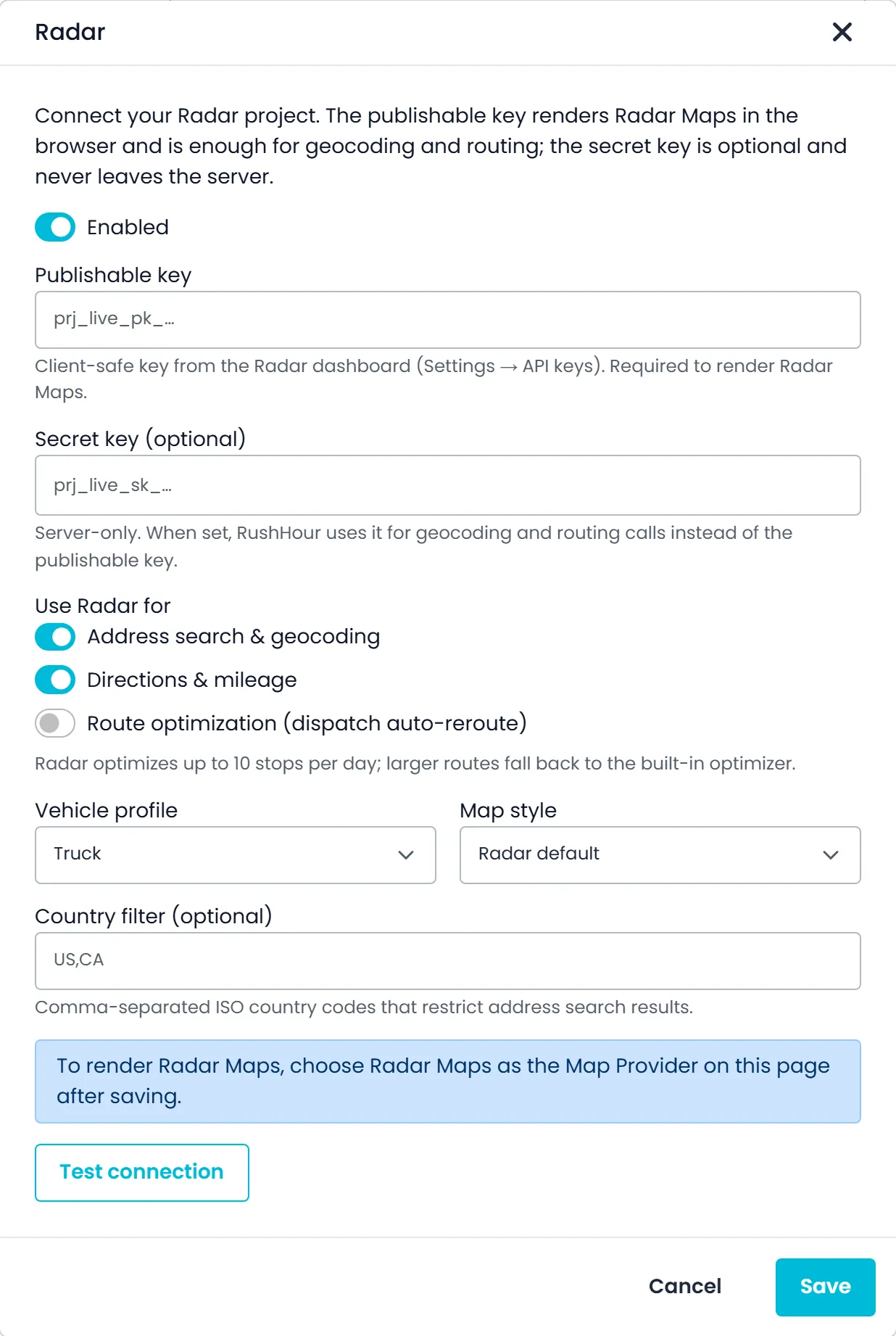
- Maps and routing: Google Maps, OpenStreetMap, Radar, HERE, Mapbox, Trimble Maps, Valhalla and VROOM
- The Radar, HERE, Mapbox, Trimble Maps, Valhalla and VROOM dialogs have a Test connection button that reports the result, or times out after about 20 seconds
- Separately, in Accounting: an export file for QuickBooks Desktop, with the details on the integrations page
- TollGuru toll costs with your own TollGuru account, and an Installed tab that lists only what your company has set upNext release
The problem we kept seeing
Most freight companies run dispatch in one system, customers in another, billing in a third and tracking somewhere else, with accounting at the bottom of the pile. The handoffs between them are manual, they take hours every day, and they break the moment something changes.
RushHour is the system those gaps used to live in. The order carries the dispatch, the driver's proof of delivery, the documents and the invoice, and dispatchers see stop status on the dispatch board as drivers work through their routes.
Measured on the RushHour platform
in freight orders run through the platform
invoiced through the platform
orders and quotes entered since 2020
connectors in Settings > Integrations, from QuickBooks Online and Cardknox to Samsara and map providers
Production database figures, September 2026, rounded down. See all integrations
Timeline
From one freight company's office to three apps
Dated milestones, from the first order to the release in final testing now.
February 2020
First orders on RushHour
The first orders run through the platform. Shimon's Express, where RushHour was built, has run on it since 2020, and the order and load figures on this page are counted from here.
August 2026
Customer Portal in production
Carriers' customers get their own login at customer.rushhourapp.com to place orders and send them for approval, follow each shipment on a map with its event timeline, and open their invoices and paperwork, in English or Hebrew.
September 2026
Rebuilt driver app 2.0 on Google Play
A new design and a step-by-step flow at every pickup and delivery that follows each company's Driver App settings, plus rebuilt vehicle inspections and group chats with other drivers.
September 2026
Platform release 0.3.194
Companies can connect their own HERE, Mapbox or Radar account for maps, address search and routing, or a Trimble Maps account for address search and truck routing, and dispatchers can add driver instructions to individual stops and open a History tab on each driver.
September 2026
Public changelog
Releases of the platform, the Customer Portal and the driver app are listed with their dates and changes, in English and Hebrew, with the incoming release first.
September 29, 2026
Driver app 2.x on the App Store
iPhone drivers move from version 1.1.4 to the rebuilt app with version 2.0.12, so Android and iPhone now run the same 2.x app.
In final testing
Proof of Delivery PDFs, tracking links, invoice payment links and driver settlementsNext release
Proof of Delivery PDFs, tracking links your customers can open without logging in, card payment links for invoices, built-in reports and a Payouts page for settling driver and carrier pay are finished and waiting for the next production release.
How we ship
Staging first, then production, in the open
New work reaches your account in numbered releases. You can see it coming before it arrives, and pages on this site mark anything that is not in production yet.
What the badges on this site mean
- No badge: in production today.
- Next releaseFinished and in final testing. It ships with the next production release.
- Coming soonPlanned, and not built yet.
- 1
Finished and checked on staging
New work goes to a staging environment first, where it is finished and checked before it reaches production.
- 2
Marked Next release on this site
While it waits for the next production release, pages here mark it with the Next release badge, and the changelog lists it as the incoming release.
- 3
Released and logged
When a release reaches production, the changelog lists it with its date and what changed for dispatchers, billing teams, drivers and your customers, in English and Hebrew. Security fixes are never announced before they are in production.
- 4
Driver app, store by store
Driver app releases show which version Google Play and the App Store offer, so you know what your drivers can install.
What we hear from business owners
These were the daily frustrations before RushHour. Here is what we did about each one.
Data scattered everywhere
Orders, customers, documents and invoices live in one system, and each document stays on the order it belongs to.
See Documents & PaperworkToo many subscriptions
Dispatch, the driver app, the customer portal and invoicing come in one subscription instead of a stack of separate tools.
See pricingInvoice chaos
Every invoice is linked to its order and can be found by customer, invoice number or order number.
See Billing & InvoicingWhat we believe
How we build RushHour, and where you can see it in the product.
Built for the people on the board
Every decision starts with what helps the people dispatching, driving and billing.
It has to work on the worst day
Software earns its place on the busiest day of the week, not the quietest.
Access that fits the role
Custom roles built from 100+ named permissions, so each person sees what their job needs.
Growth needs clean books
Invoices built from orders, payments recorded against them, and QuickBooks Online export when you use it.
Paperwork you can find
BOLs, labels, dispatch sheets and attachments stay on the order they belong to.
We say what is not built yet
Anything on this site that is not live yet carries a badge: Next release when it is finished and ships with the next production release, and Coming soon when it is still planned. Plan prices and onboarding fees are published on the pricing page.
Questions about RushHour
Is RushHour used by a working freight company?
Yes. RushHour was built inside Shimon's Express, a New Jersey freight operator that has run its pickups and deliveries, airport cargo runs and long-haul loads on it since 2020. Across the whole platform, more than 32,000 loads and over $17M in freight orders have run through it, measured on the production database in September 2026.
How can I tell whether a feature on this site is live?
Anything without a badge is in production today. Next release means the feature is finished and in final testing, and ships with the next production release. Coming soon means it is planned and not built yet. The changelog at rushhourapp.com/changelog lists the incoming release and past production releases with their dates.
Which phones does the driver app run on?
Android phones through Google Play and iPhones through the App Store. Both run the same 2.x app, which reached iPhones on September 29, 2026. The app's screens are in English, and the changelog shows which version each store offers.
Can I control what each person in the office can see and do?
Yes. Start from the built-in Admin, Dispatcher, Sales, Billing and Accounting roles or create your own, and tick which of the 100+ named permissions each role gets. A person can hold up to six roles, grants are set per company, and sidebar entries for areas a person cannot view are hidden. The next release adds permissions for Compliance, Issues and Reports.
Does RushHour work in Hebrew?
Yes. The Company Portal and the Customer Portal work in English and Hebrew, with right-to-left screens in Hebrew. The driver app's screens are in English.
How do I reach the RushHour team?
Email support@rushhourapp.com and a person on the RushHour team replies. To see RushHour on your own lanes, book a demo from the contact page.
Where to look next
Want to talk about what your operation looks like?
Tell us how you run today. We'll tell you honestly whether RushHour is the right fit.