
RushHour vs Bringg
Carrier operations and billing, or delivery orchestration?
Bringg is a delivery orchestration platform for enterprise retailers and 3PLs, coordinating owned fleets and a network of outside carriers with consumer notifications and a developer API. RushHour is for carriers and freight operators who dispatch their own drivers and outsource carriers, and bill and collect from the same orders.
The short answer
You are a carrier or freight operator running your own drivers and outsource carriers, and you want orders with pallets and full loads, prices from your own rate cards, BOLs, invoicing, card payments and QuickBooks Online in one system.
You are a large retailer, brand or 3PL orchestrating consumer deliveries across your own fleet and many third-party carriers, with SMS and email notifications, carrier selection by cost and a developer API at the center.
New in the October 2026 release
Added by the October 2026 platform release. The table above already includes it.
- Tracking links customers open without logging in, an automatic email with the link, and emails when the driver arrives at or leaves a stop; email only, no SMS
- A Payouts page in Accounting to settle driver and outsource-carrier pay per route, in full or in part, with a statement for each settlement
- Invoice pay links, so a customer pays the balance by card on a secure page without logging in (needs a connected Cardknox account)
- API tokens, so another system can use the RushHour API without signing in. Still no webhooks.
Where each one is stronger
Both dispatch drivers, edit routes after dispatch and capture proof of delivery. The difference is who is doing the delivering and who sends the bill.
- Freight orders with boxes and crates, pallets and full loads, priced from your own pallet grids, zone-to-zone rates and per-customer rate cards.
- Invoices, payments and AR aging live with the order, and invoices and payments are sent to QuickBooks Online.
- Charge a customer's saved card through your Cardknox account, let customers pay invoices in the Customer Portal, or email a per-stop COD payment request that is paid into the billing customer's own Cardknox account.
- Your own drivers and the outsource carriers you work with, assigned from the same dispatch board.
- Bills of Lading, pallet labels with QR codes and dispatch sheets generated from the order.
- A Lead, Prospect and Customer pipeline and a company inbox that keeps inbound and outbound email with the customer and the order.
- A delivery network of 250+ third-party, crowdsourced and autonomous carrier options across 70+ countries, reached through one integration. RushHour has no carrier network.
- SMS and email notifications for consumers, with a link to a delivery tracking page. RushHour has no SMS; customers track orders in the Customer Portal or from a tracking link, and arrival and departure updates go by email only.
- A developer API and webhooks for connecting order and carrier systems. RushHour documents its REST API and has API tokens, but no webhooks.
- Carrier cost rate cards that pick the cheapest carrier per order and compare carrier invoices with the estimate.
- Configurable driver flows at handoff: signature, photo, barcode scan, and a web page action for card payment.
- Built for enterprise retail volumes, including big and bulky, white-glove and grocery deliveries with scheduled, same-day and express windows.
In RushHour
What RushHour's side looks like
RushHour's own screens behind the wins above. We never show Bringg's product.
Customer pricing
Price each order from your own rate cards
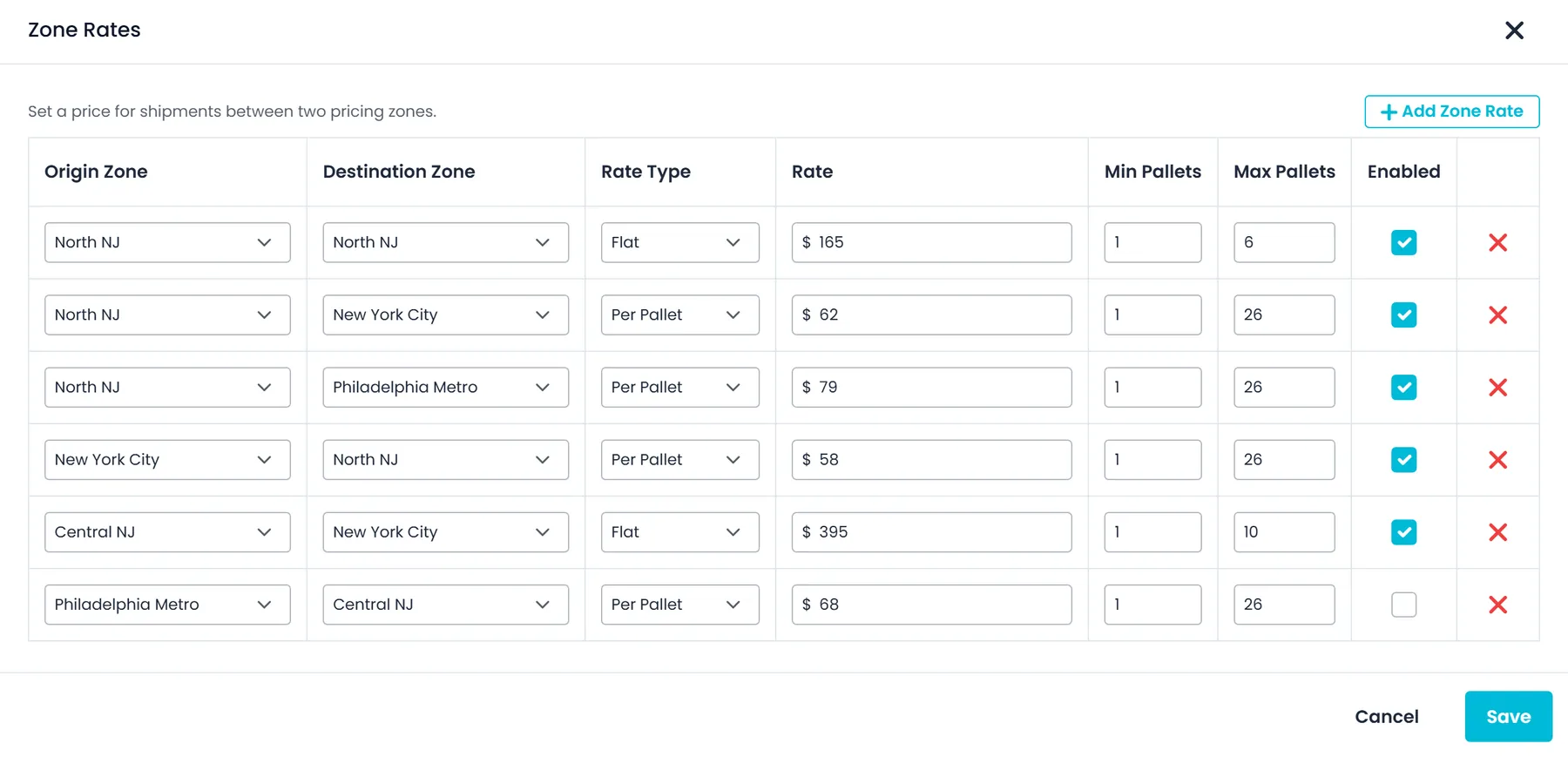
Zone-to-zone rates sit next to pallet-by-mileage grids and per-customer cards, so each order is priced from what you charge your customer.
- A price between two pricing zones, flat or per pallet
- Minimum and maximum pallets per rate, and an Enabled switch to pause a rate without deleting it
- Pallet-by-mileage grids and per-customer cards for everything else
Customer payments
Shippers pay their invoices in the Customer Portal
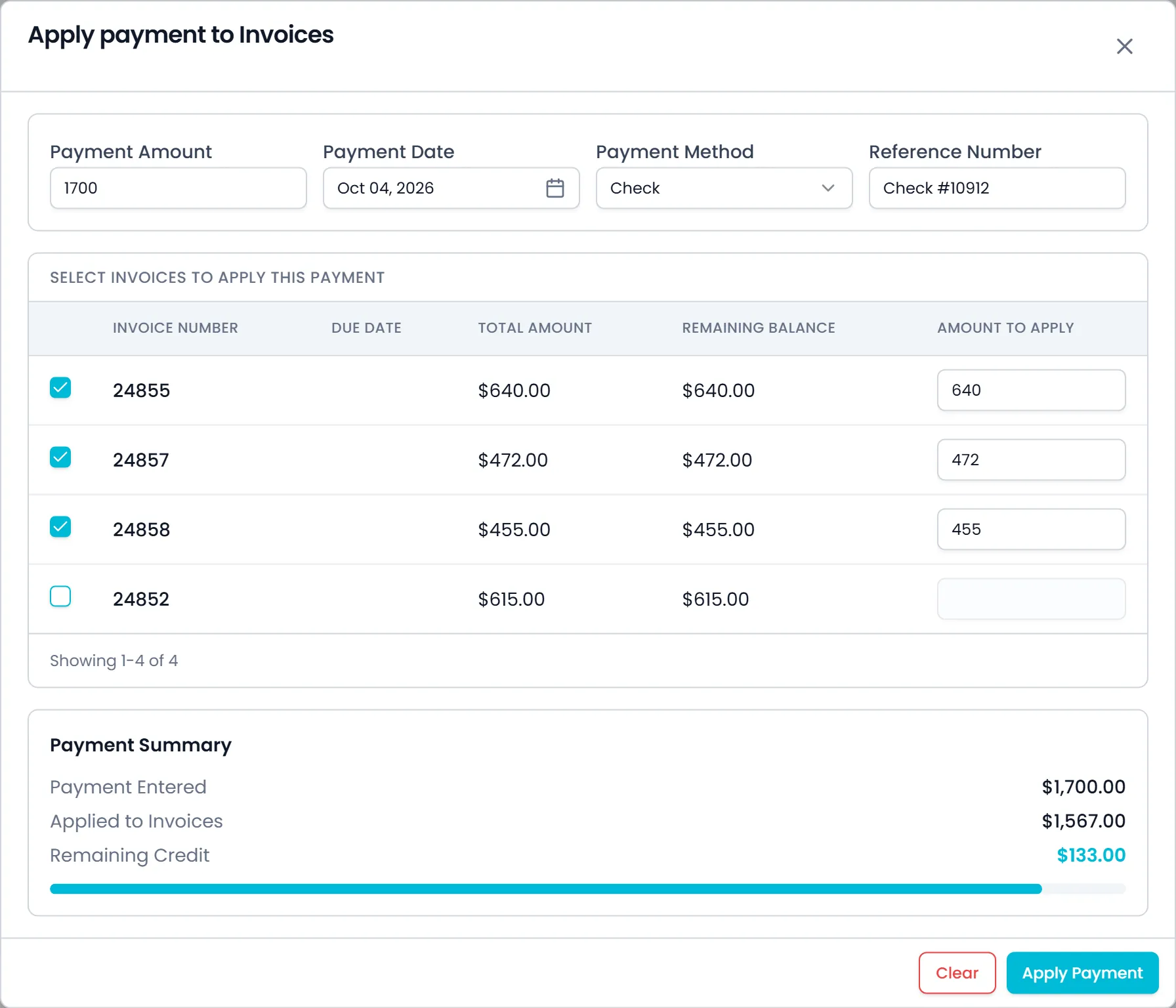
Your customers sign in, see their invoices and balances, and, once you connect Cardknox, pay with a saved card that runs through your Cardknox merchant account.
- Invoice statuses such as paid, unpaid, overdue and partly paid, with the balance on each
- One payment spread over several open invoices: tick an invoice to apply its full balance, then change any amount
- Any amount left over is recorded as customer credit
- Cards are saved through Cardknox's hosted card fields
Freight paperwork
A BOL viewer with print, email and download
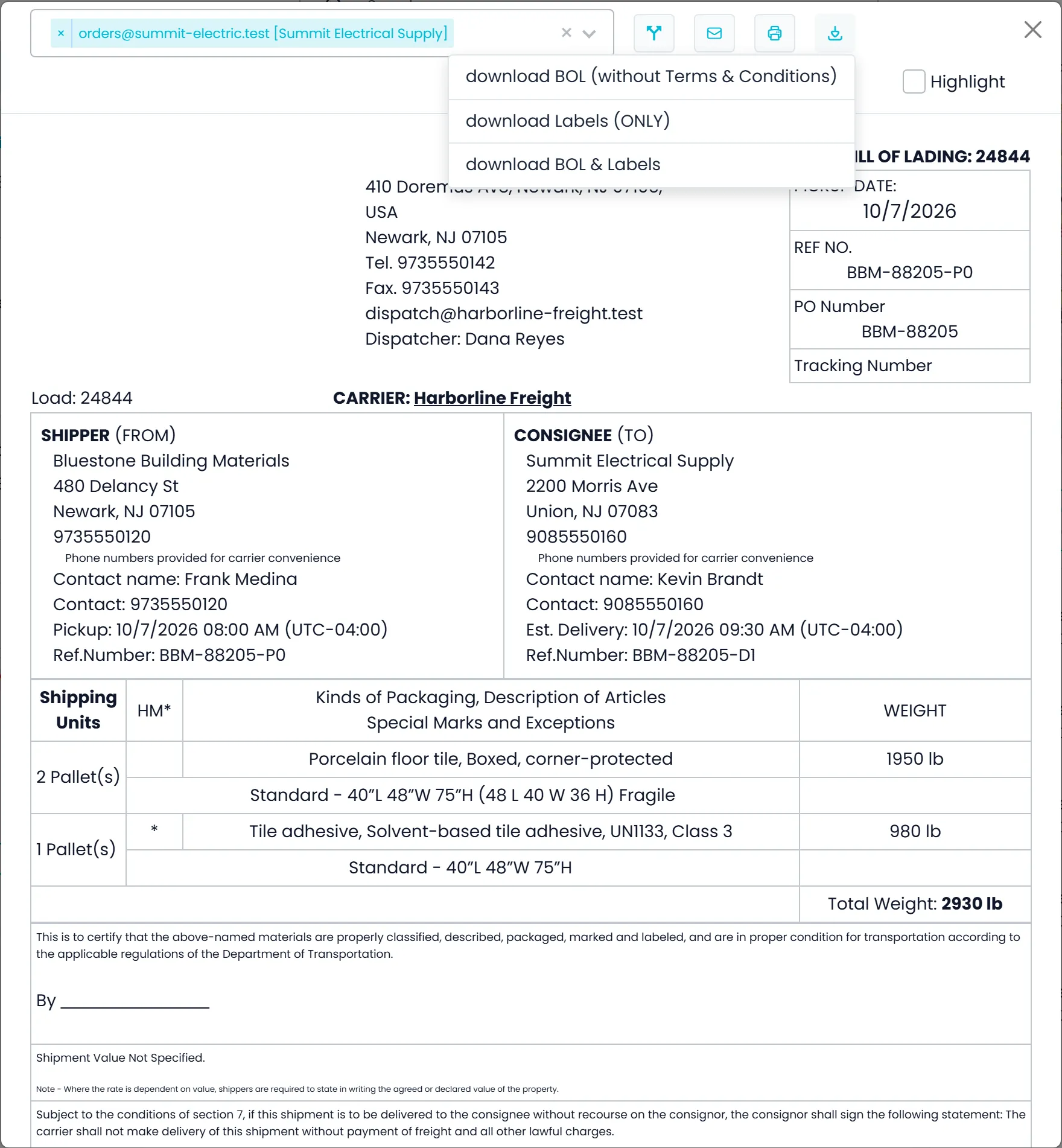
Open the BOL from the order, email it to a contact, print it, or download the BOL, the labels only, or both.
- Shipper and consignee with contacts, pickup and estimated delivery times and reference numbers
- Each shipping unit with its packaging, size, flags such as Fragile, a hazardous-material (HM) mark and weight
- Download the BOL without terms and conditions, the labels only, or the BOL and labels together
Your drivers and carriers
Your own drivers and outsource carriers on one dispatch board
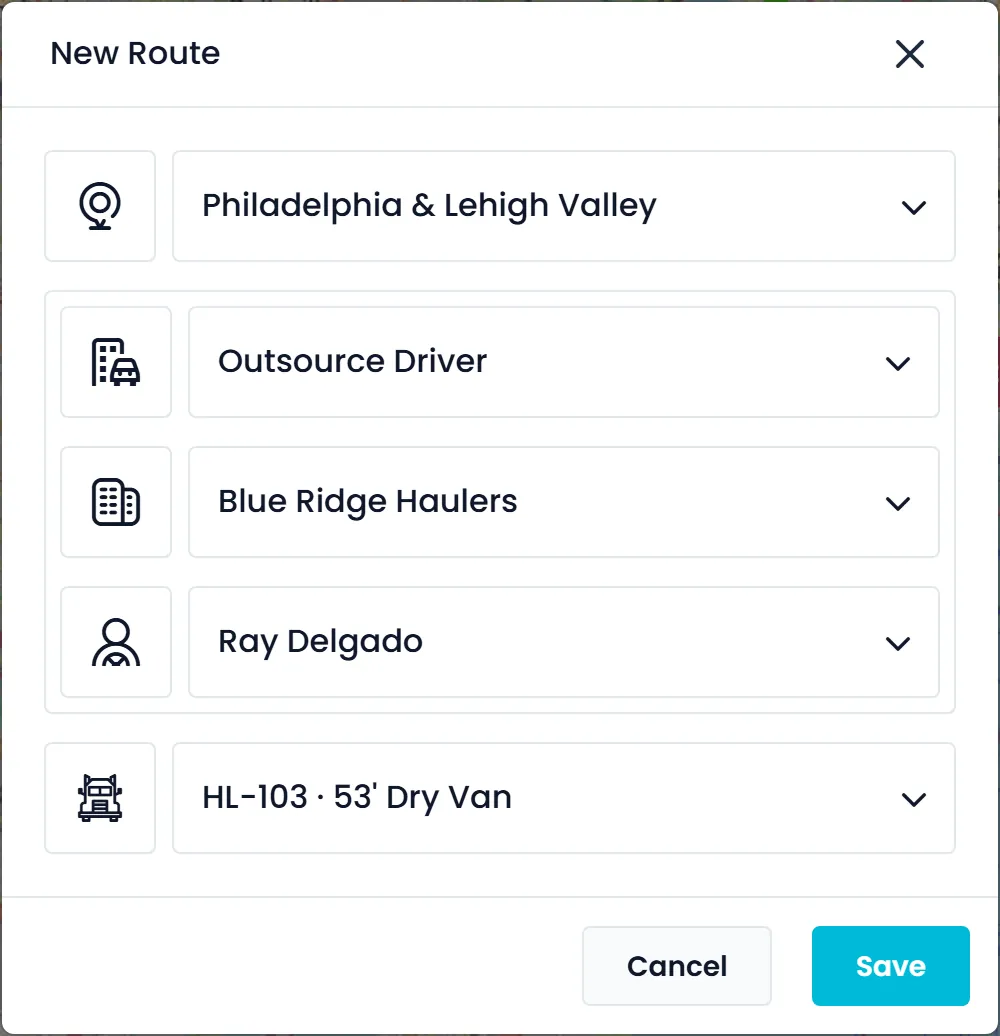
Give a route to an outsource carrier's driver the same way as to your own, and hand freight between two routes at a hub with a transfer stop.
- New Route: switch from Company Driver to Outsource Driver, then pick the carrier, its driver and a truck
- Carrier drivers can be invited to the RushHour driver app and complete stops there
- Assign Transfer adds a drop-off to one route and a collection to the other for the same freight, with both times set up front
Row by row
RushHour marks reflect production today. Bringg marks come from its website, help center and developer docs, linked below.
Swipe sideways to see every column.
| Capability | RushHour | Bringg |
|---|---|---|
| Edit after dispatch | Built inAdd, remove or re-order stops; the driver gets a push notification | Built inAdjust the uncompleted part of a dispatched route; reassign orders within a team |
| Customer invoicing, payments and AR | Built inInvoices, payments and AR aging | Not available or not foundCustomer invoicing and AR not found; carrier invoices are compared in its billing portal |
| QuickBooks | Limited, add-on or third-party integrationOne way to QuickBooks Online; export file for QuickBooks Desktop | Not available or not foundNo QuickBooks connection found |
| Card payments from customers | Built inSaved cards, Customer Portal and invoice pay links without login on your Cardknox account; per-stop COD requests on your customer's own Cardknox account | Limited, add-on or third-party integrationDriver flow can open a card-payment web page; cash on manual orders |
| Driver and carrier pay | Limited, add-on or third-party integrationPayouts page: route pay for drivers and outsource carriers, entered per route and settled in full or in part | Limited, add-on or third-party integrationCarrier cost rate cards and carrier invoice comparison; driver settlement not found |
| Rate cards | Built inCustomer pricing: pallet grids, zone-to-zone rates, per-customer cards | Limited, add-on or third-party integrationCarrier cost rate cards: what you pay each carrier |
| BOL, labels and freight paperwork | Built inBOL, pallet labels with QR code, dispatch sheet | Limited, add-on or third-party integrationShipping labels, packing slips and commercial invoices; BOL not found |
| Proof of delivery | Built inSignature and photos from the driver app | Built inSignature, photo or barcode scan at handoff |
| Email inbox and customer pipeline | Built inCompany inbox with its own address; Lead, Prospect and Customer stages | Not available or not foundNot found |
| Third-party carrier network | Not available or not foundNo network; you add the outsource carriers you already use | Built in250+ carrier options in 70+ countries |
| Consumer notifications and tracking links | Limited, add-on or third-party integrationNo SMS; tracking links without login, and arrival and departure emails | Built inSMS and email notifications with a tracking page link |
| Public API and webhooks | Limited, add-on or third-party integrationDocumented REST API and API tokens; no webhooks | Built inDeveloper API and webhooks |
| Published starting price | From $299/month plus one-time onboarding | No public price list found; ask their sales team |
What we checked on Bringg's side
RushHour marks reflect production today. Competitor marks are based on the public pages below, checked September 2026; published prices were re-checked in October 2026. Products change, so check the vendor's current pages before you decide.
- bringg.com: platform and delivery network
- Help center: Carrier costs with rate cards
- Help center: Driver actions in order flows
- Help center: Add orders manually
- Help center: Plan and dispatch routes
- Help center: Delivery notifications
- Help center: Documents and printing
- Developer docs: Webhooks
Spotted something out of date? Email info@rushhourapp.com and we will check it and correct the page.
Bringg or RushHour: common questions
Does RushHour have a carrier network?
No. RushHour does not offer a network of third-party carriers. You add the outsource carriers you already work with, give their drivers routes from the same dispatch board as your own drivers, and they can complete stops in the RushHour driver app.
Does RushHour notify recipients by SMS?
No. RushHour does not send SMS. Your customers follow their orders by signing in to the Customer Portal, or from tracking links they open without logging in, sent by hand or automatically by email, and you can switch on emails when the driver arrives at or leaves a stop.
How do customers pay their invoices?
Shippers sign in to the Customer Portal, see their invoices and, once you connect Cardknox, pay with a saved card. One payment can be spread over several open invoices, with the amount on each one adjustable. Saved-card payments run through your Cardknox merchant account. They can also pay a single approved invoice by card from a secure link, without logging in.
Does RushHour have an API and webhooks?
RushHour documents its REST API, the same one its portals and driver app use, and company admins create API tokens for connecting other systems. It does not send webhooks; integrations check for changes on a schedule.
Set up with you, not handed a login
Onboarding is a one-time fee on every plan. It covers importing your customers, rates and drivers, configuring your pricing and billing, and training your team, done with you rather than handed over as a manual.
Running your own freight operation? See it on your orders
Bring a real order to the demo. We will price it from your rate card, dispatch it, print the BOL, invoice it, charge the card and send it to QuickBooks Online.