
RushHour next to the platforms
freight teams also shortlist
A side-by-side with Rose Rocket, Onfleet and Bringg, checked against each vendor's own public pages in September 2026, with published prices re-checked in October 2026. Where another platform is the better fit, we say so.
The summary table
Thirteen capabilities side by side. Open a comparison for the notes and sources behind each mark; where a comparison does not cover a row, the table says Not compared.
Swipe sideways to see every column.
| Capability | RushHour | Rose Rocket | Onfleet | Bringg |
|---|---|---|---|---|
| Edit orders and routes after dispatch | Built in | Built in | Limited, add-on or third-party integration | Built in |
| Invoicing, payments and AR in the same system | Built in | Built in | Limited, add-on or third-party integration | Not available or not found |
| QuickBooks connection | Limited, add-on or third-party integration | Built in | Limited, add-on or third-party integration | Not available or not found |
| Collect payments from customers | Built inSaved cards, Customer Portal payments and invoice pay links through Cardknox | Built in | Limited, add-on or third-party integration | Limited, add-on or third-party integration |
| Driver or carrier pay calculation | Limited, add-on or third-party integrationPayouts page for drivers and outsource carriers; you enter the pay per route | Built in | Built in | Limited, add-on or third-party integration |
| Rate cards | Built in | Built in | Limited, add-on or third-party integration | Limited, add-on or third-party integration |
| International rate cards (Ocean, Air, Ground) | Built inOcean, Air and Ground legs in one price | Not available or not found | Not compared | Not compared |
| BOLs, labels and freight paperwork | Built in | Built in | Limited, add-on or third-party integration | Limited, add-on or third-party integration |
| Signature and photo proof of delivery | Built in | Built in | Built in | Built in |
| Email inbox linked to customers and orders | Built in | Built in | Not available or not found | Not available or not found |
| Public API and webhooks | Limited, add-on or third-party integrationDocumented REST API and API tokens; no webhooks | Built in | Built in | Built in |
| Hebrew interface (right to left) | Built inCompany Portal and Customer Portal | Not available or not found | Not compared | Not compared |
| Published starting price | From $299/month plus one-time onboarding | From $2,080/month; Enterprise priced on request | From $619/month (Launch); Courier Suite $299/month extra; SMS billed by usage | No public price list found; ask their sales team |
RushHour marks reflect what is live in production today. Competitor marks reflect their public pages as of September 2026, with published prices re-checked in October 2026; an X means we could not find it there, not that it can never be done. Not compared means that comparison page does not cover the row.
New in the October 2026 release
Added by the October 2026 platform release. The table above already includes it.
- A Payouts page in Accounting to settle driver and outsource-carrier pay per route, in full or in part, with a statement for each settlement
- Invoice pay links, so a customer pays the balance by card on a secure page without logging in (needs a connected Cardknox account)
- Tracking links customers open without logging in, with your company details and each stop on a map, the next stop's estimated arrival while the load is moving, and never prices
- Automatic emails to the customer when the driver arrives at or leaves a stop, off until you switch them on; email only, no SMS
- API tokens, so another system can use the RushHour API without signing in, limited to the roles you pick and revocable at any time
Pick a comparison
Each page lists where RushHour is the better fit, where the other platform is, a row-by-row table and the pages we checked.
Both are full TMS platforms with dispatch, invoicing and payments. Rose Rocket goes further on EDI, API, settlement and accounting sync; RushHour is lower in price, bilingual and strong on pallet and international pricing.
Where RushHour fits better
- Lower published entry price: Starter is $299 a month for up to 3 office users and 5 drivers, plus one-time onboarding. Rose Rocket's pricing page starts its Full Service Platform at $2,080 a month with unlimited users.
- Company Portal in Hebrew (right to left) as well as English, including date pickers and most error messages, plus a Hebrew and English Customer Portal for your shippers; the driver app is in English only.
Where Rose Rocket fits better
- EDI with trading partners: load tenders and 214 status updates. RushHour has no EDI.
- A documented API, plus webhooks for order status changes. RushHour documents its REST API and has API tokens, but no webhooks.
Onfleet is built for courier and last-mile tasks with SMS tracking and an open API. RushHour is built for pallets and cartons delivered to businesses, with freight paperwork and billing on the order.
Where RushHour fits better
- Invoicing, payments and AR aging come with every plan: charge a saved card through Cardknox, email a payment request for a stop, and send invoices and payments to QuickBooks Online. On Onfleet, client invoicing is part of the Courier Suite add-on and exports as CSV.
- Freight paperwork from the order: Bills of Lading, pallet labels with QR codes and dispatch sheets.
Where Onfleet fits better
- SMS notifications (billed by usage) and a branded tracking page with the driver's location for recipients. RushHour has no SMS; customers follow their orders in the Customer Portal or from a tracking link without logging in, and arrival and departure updates go by email only.
- Driver pay calculation on every plan, with pay rules by task, distance and time. RushHour's Payouts page records what each route pays and settles a period, with the amounts you enter.
Bringg orchestrates many carriers for large retailers and 3PLs. RushHour runs a freight operator's own dispatch, paperwork and billing.
Where RushHour fits better
- Freight orders with boxes and crates, pallets and full loads, priced from your own pallet grids, zone-to-zone rates and per-customer rate cards.
- Invoices, payments and AR aging live with the order, and invoices and payments are sent to QuickBooks Online.
Where Bringg fits better
- A delivery network of 250+ third-party, crowdsourced and autonomous carrier options across 70+ countries, reached through one integration. RushHour has no carrier network.
- SMS and email notifications for consumers, with a link to a delivery tracking page. RushHour has no SMS; customers track orders in the Customer Portal or from a tracking link, and arrival and departure updates go by email only.
On screen
Where RushHour differs, in its own screens
Real RushHour screens behind the rows where it stands apart. We never show another vendor's product.
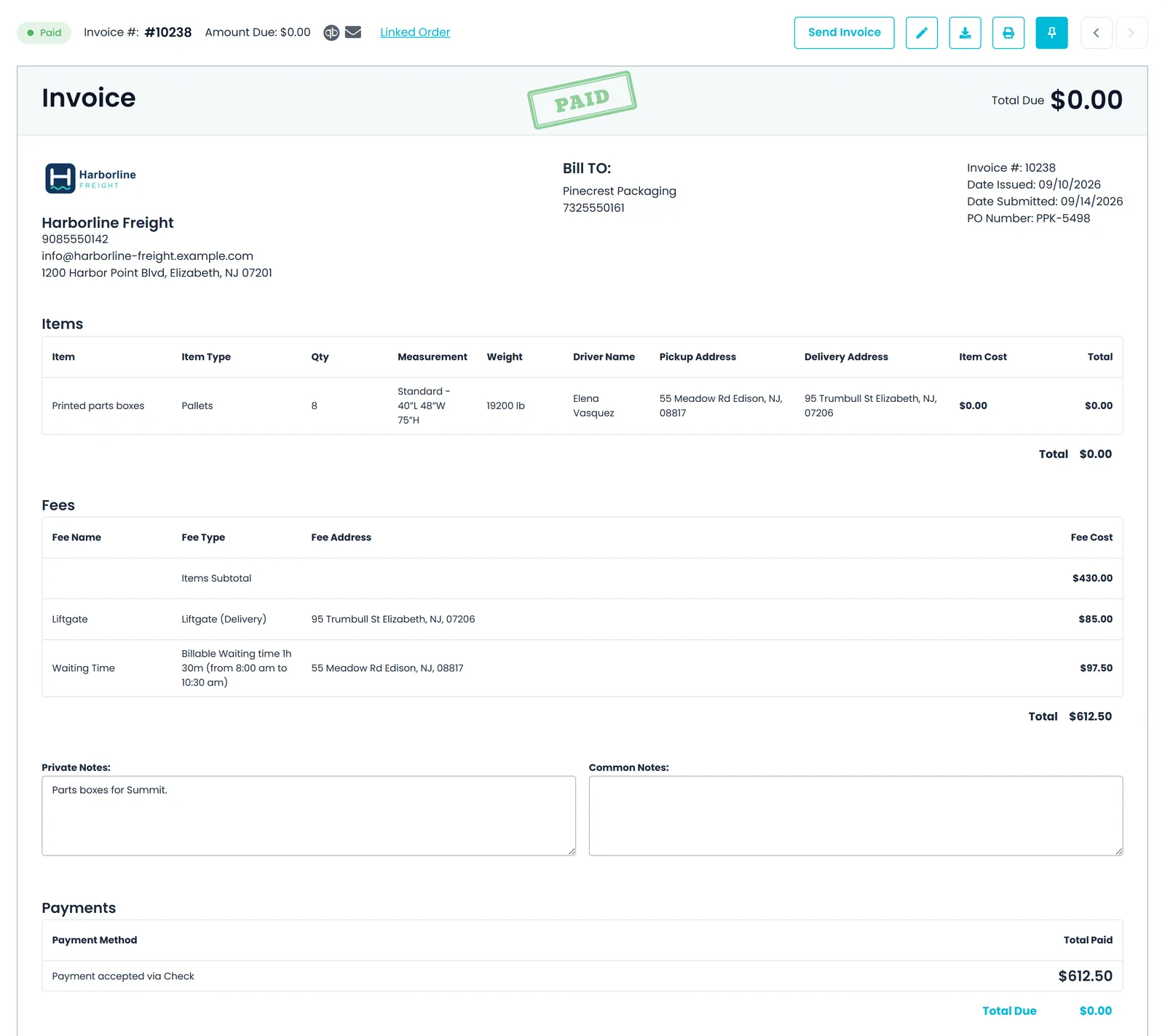
Billing on the order
The invoice is built from the order you dispatched
Item lines, accessorial fees such as liftgate and waiting time, payments and the balance due sit on one invoice built from the order, so nothing is retyped between dispatch and billing.
- Item lines with type, quantity, size, weight, driver and the pickup and delivery addresses
- Fees such as liftgate and billable waiting time, each with the stop address it applies to
- Payments recorded against the invoice, with a Paid status once nothing is due
- Send the invoice by email or print it from the same screen
Freight paperwork
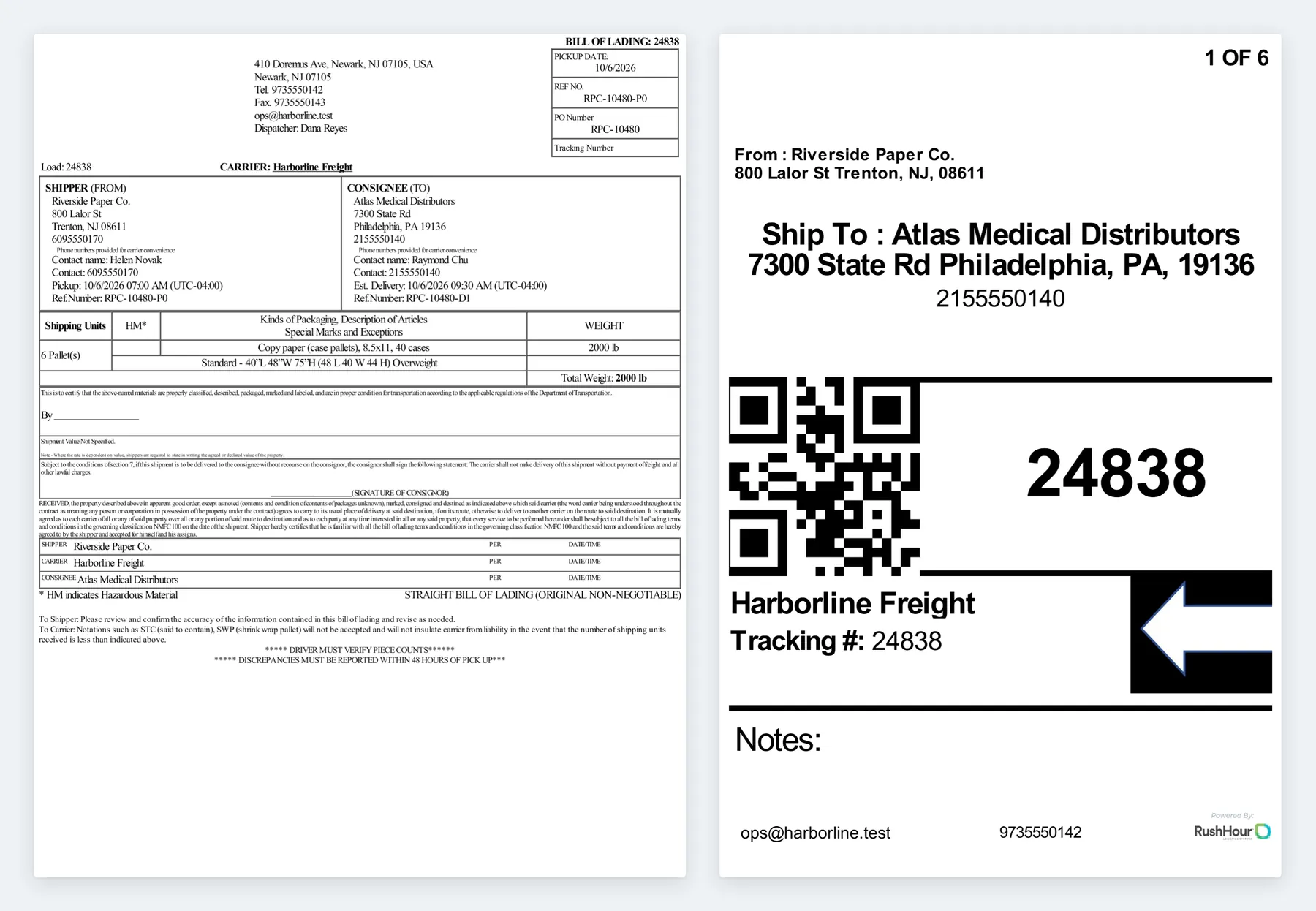
BOL and pallet labels printed from the order
The bill of lading and the labels come straight from the order's stops and items, so the paperwork matches what was booked.
- Straight bill of lading with shipper, consignee, contacts, pickup and estimated delivery times, shipping units, a hazardous-material (HM) column and total weight
- Labels numbered 1 of N, with From and Ship To, the delivery contact's phone and a QR code of the order number
- Download the BOL, the labels only, or the BOL and labels together
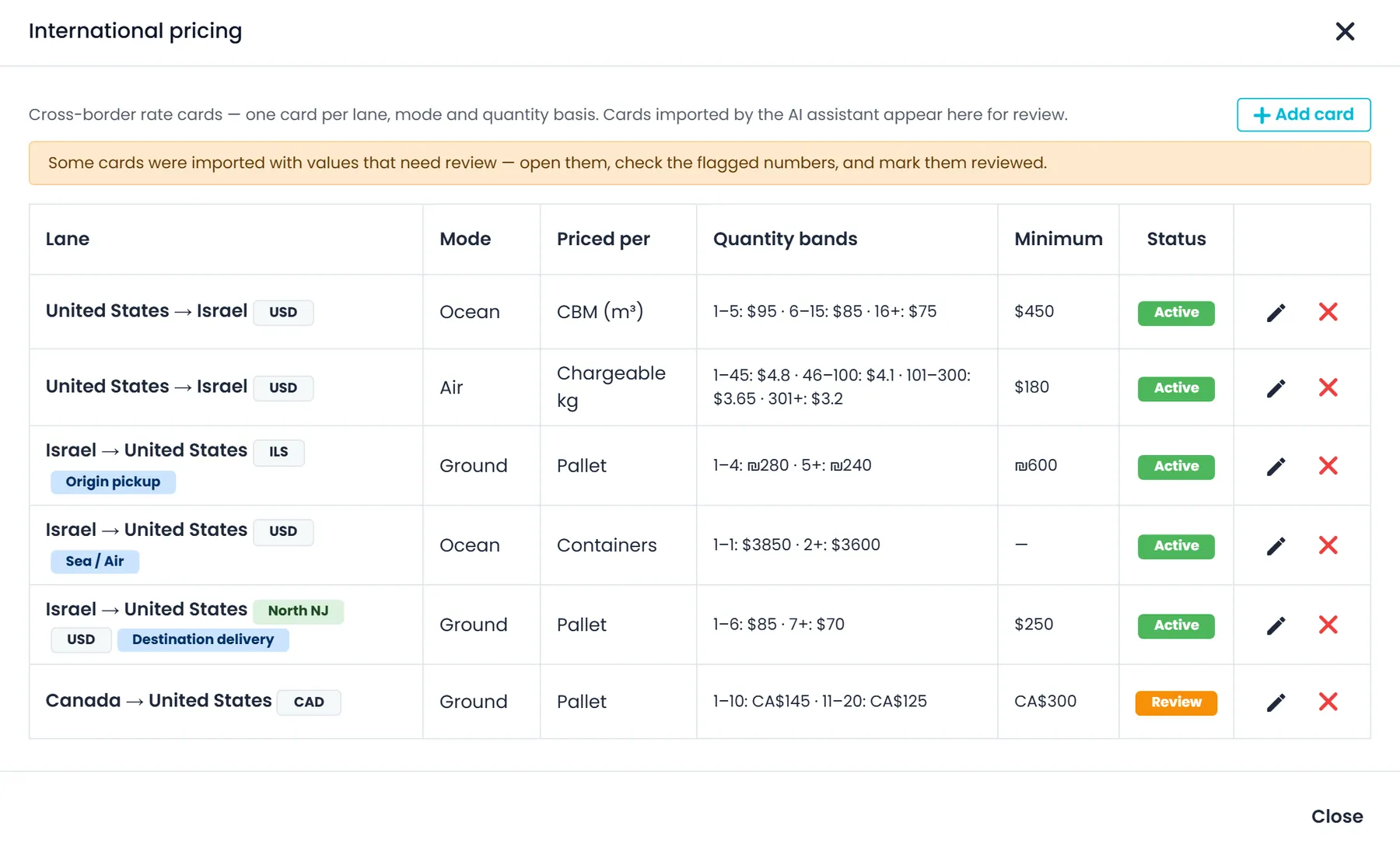
International pricing
Cross-border rate cards for Ocean, Air and Ground
Each card covers one country lane, mode and quantity basis. Split a lane into origin pickup, the sea or air leg and destination delivery, and RushHour adds the legs into one order price.
- Priced per pallet, chargeable kg, piece, CBM or container, with quantity bands and a minimum charge
- Each card sets its own currency and can carry a fuel percentage and valid-from and valid-to dates
- Company-wide cards and customer-specific cards, each with an Enabled switch
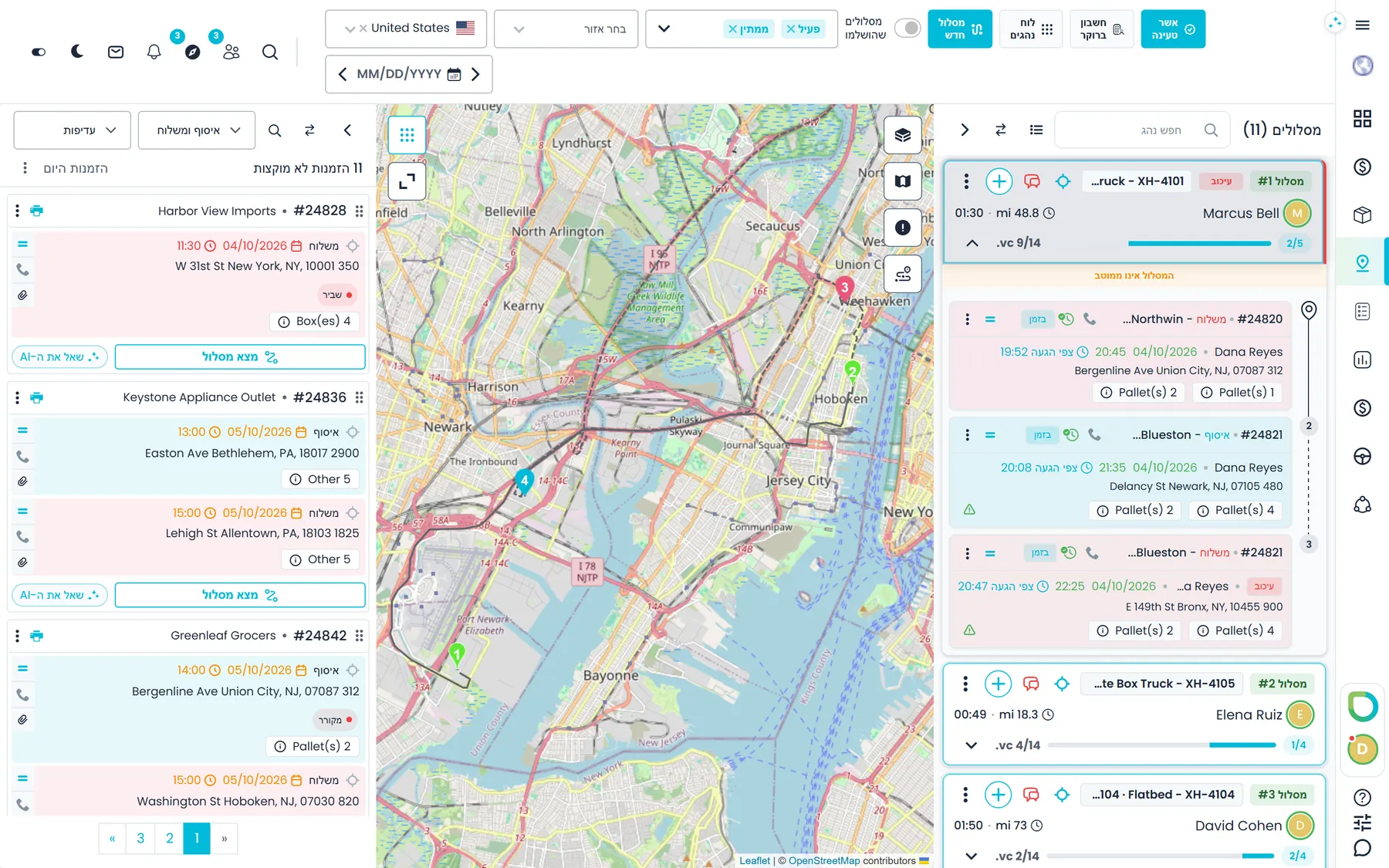
Hebrew and English
The office portal in Hebrew, right to left
Office teams work in Hebrew or English. The layout, date pickers and validation messages follow the language, and most error messages from the server are translated too.
- Switch language on the sign-in page, in Settings > Systems or in the setup wizard
- The Customer Portal your shippers use also works in Hebrew and English
- The driver app and the documentation site are in English only
How we score
- RushHour columns show only what is live in production. Features we have built but not yet released carry a Next release badge.
- Competitor columns are based on each vendor's own website, pricing page and help center as of September 2026, and published prices were re-checked in October 2026. Each comparison page links the exact pages we used.
- A green check means built in. Amber means limited, sold as an add-on, or done through a third-party integration. An X means not available, or for a competitor, not found in its public documentation.
- RushHour card payments need a Cardknox merchant account. Saved-card and Customer Portal payments go through your own Cardknox merchant account; per-stop COD payment requests are paid into your billing customer's own Cardknox account once that customer is authorized. We mark card payments built in because these screens are part of RushHour itself, but each processing account is a separate agreement with Cardknox. The QuickBooks Online connection is marked amber because it sends invoices and payments one way only.
Spotted something out of date? Email info@rushhourapp.com and we will check it and correct the page.
Questions about these comparisons
What does RushHour get a check mark for?
Only what is live in production today. Work that is finished but not yet in production is marked Next release and never gets a check mark.
How current are the competitor marks?
They come from each vendor's own website, pricing page, help center and developer docs as checked in September 2026, and published prices were re-checked in October 2026. Each comparison page links the exact pages we used. Products change, so check the vendor's current pages before you decide, and email info@rushhourapp.com if something here is out of date.
Which platform fits which kind of operation?
Onfleet is built for courier and last-mile deliveries to consumers, with SMS updates, auto-dispatch and barcode and ID checks. Bringg is built for large retailers and 3PLs coordinating their own fleet and many outside carriers. Rose Rocket is a full TMS for carriers and brokers, with EDI, an API and webhooks. RushHour is built for carriers that move pallets, cartons and full loads to businesses and want dispatch, BOLs, rate cards and invoicing on the same order, at a published price.
Does RushHour send SMS to customers?
No. RushHour sends customer notifications by email only. You can also send tracking links that customers open without logging in, by hand or automatically, and switch on emails when the driver arrives at or leaves a stop.
Does RushHour have an API and webhooks?
RushHour has a documented REST API, the same one its own portals and driver app use, and each request runs with the roles and permissions of the user or API token that makes it. Company admins create API tokens in Settings > API Tokens, so another system can connect without a person signing in. It does not send webhooks, so integrations check for changes on a schedule.
Is RushHour available in Hebrew?
Yes. The Company Portal and the Customer Portal work in Hebrew and English, with a right-to-left layout in Hebrew. The driver app is in English only.
Product pages
Read more about where RushHour differs
The product pages behind the rows above, with screens and the limits of each feature.
Compare on a real order, not a brochure
In a demo we create an order, change it after dispatch, invoice it, charge the card and send the invoice to QuickBooks Online.