
Dispatch, Deliver,
and Get Paid
RushHour runs freight from order to paid invoice: quotes and orders, a dispatch board, a driver app with proof of delivery, a customer portal, and invoicing with card payments and QuickBooks Online export.
Drivers use the RushHour Drivers app on iPhone and Android


The Company Portal and the Customer Portal work in English and Hebrew.
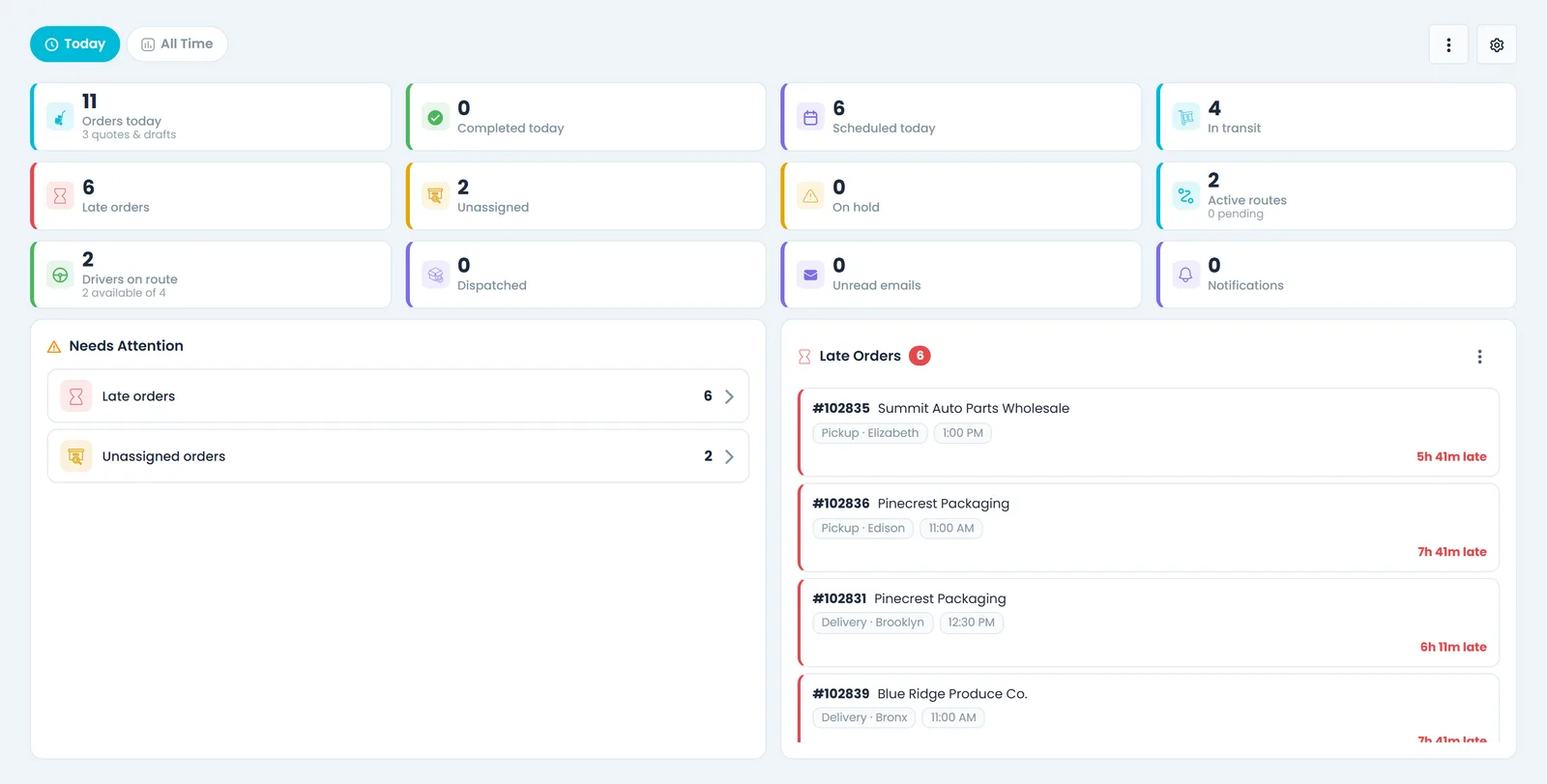

Built inside a working freight company
The numbers behind it
RushHour was built inside Shimon's Express, a New Jersey freight, forwarding and warehousing company, which still runs its operation on it. Nearly all of the volume below is theirs.
- orders and quotes entered
- 32,000+
- loads delivered
- 27,000+
- in freight orders
- $17M+
- miles on routed orders
- 3.3M+
- documents stored on orders
- 100,000+
- countries with stops, and 41 US states
- 12
Totals since 2020, measured on the RushHour production database in September 2026 and rounded down.
From order to paid invoice
One order record, from the first quote to the last payment
The office, the driver and the customer all work on the same order, so nobody types the same load twice.
1. Take the order
Quotes and orders
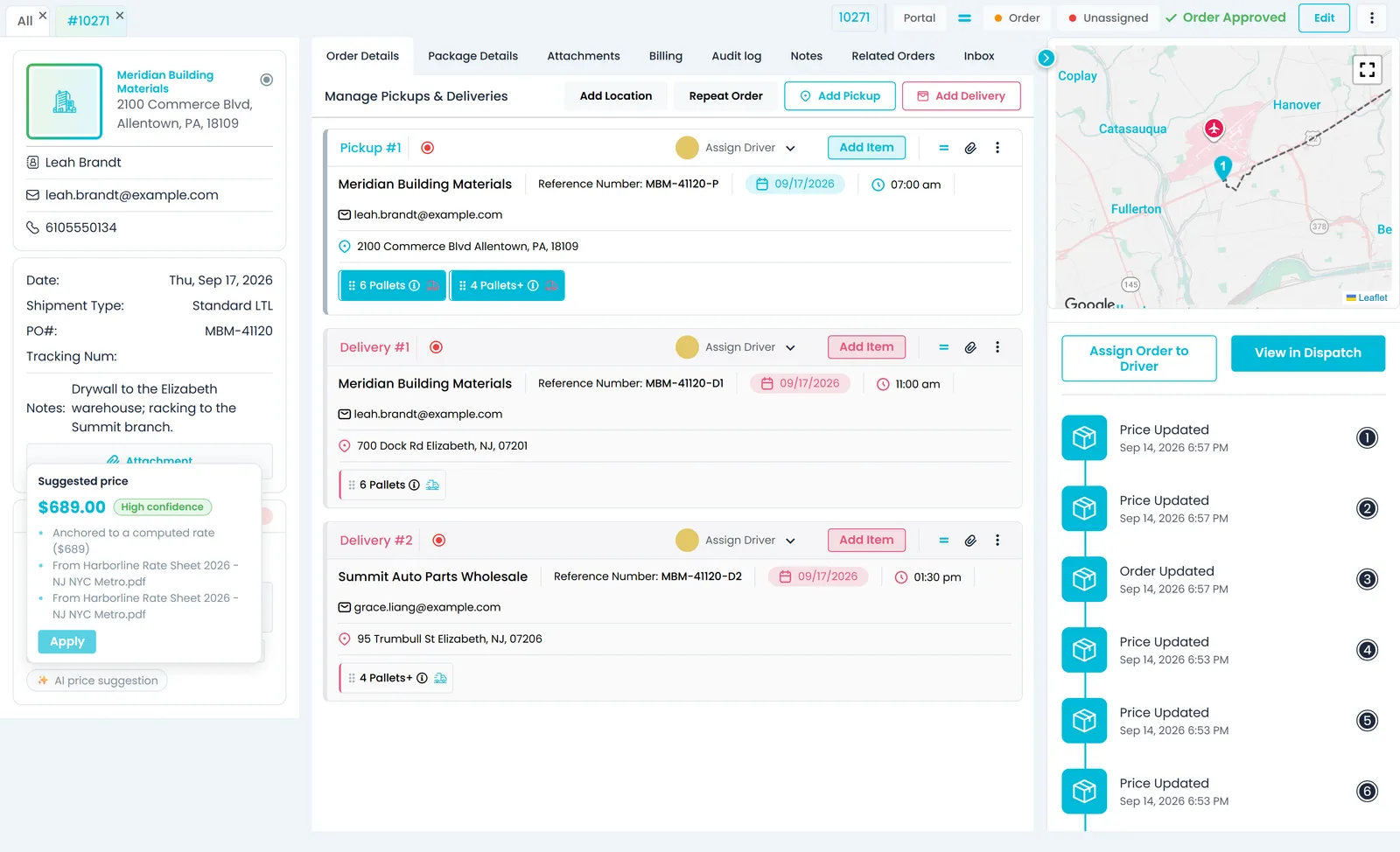
Build a quote or an order with its pickups, deliveries and freight, price it, and approve the quote into an order when the customer says yes.
- Pickups and deliveries with pallets, boxes or full loads
- Approve a quote and it becomes an order
- Price from your own pricing model, with an AI price suggestion that shows what it is based on: your rates, past orders on the lane and your rate sheets
- Import orders from spreadsheets or PDFs with AI, and review every row before anything is saved
- Customers can also place orders themselves in the customer portal
- Company admins can record an order's buying price and see its marginNew in the October 2026 release
2. Dispatch it
Dispatch board
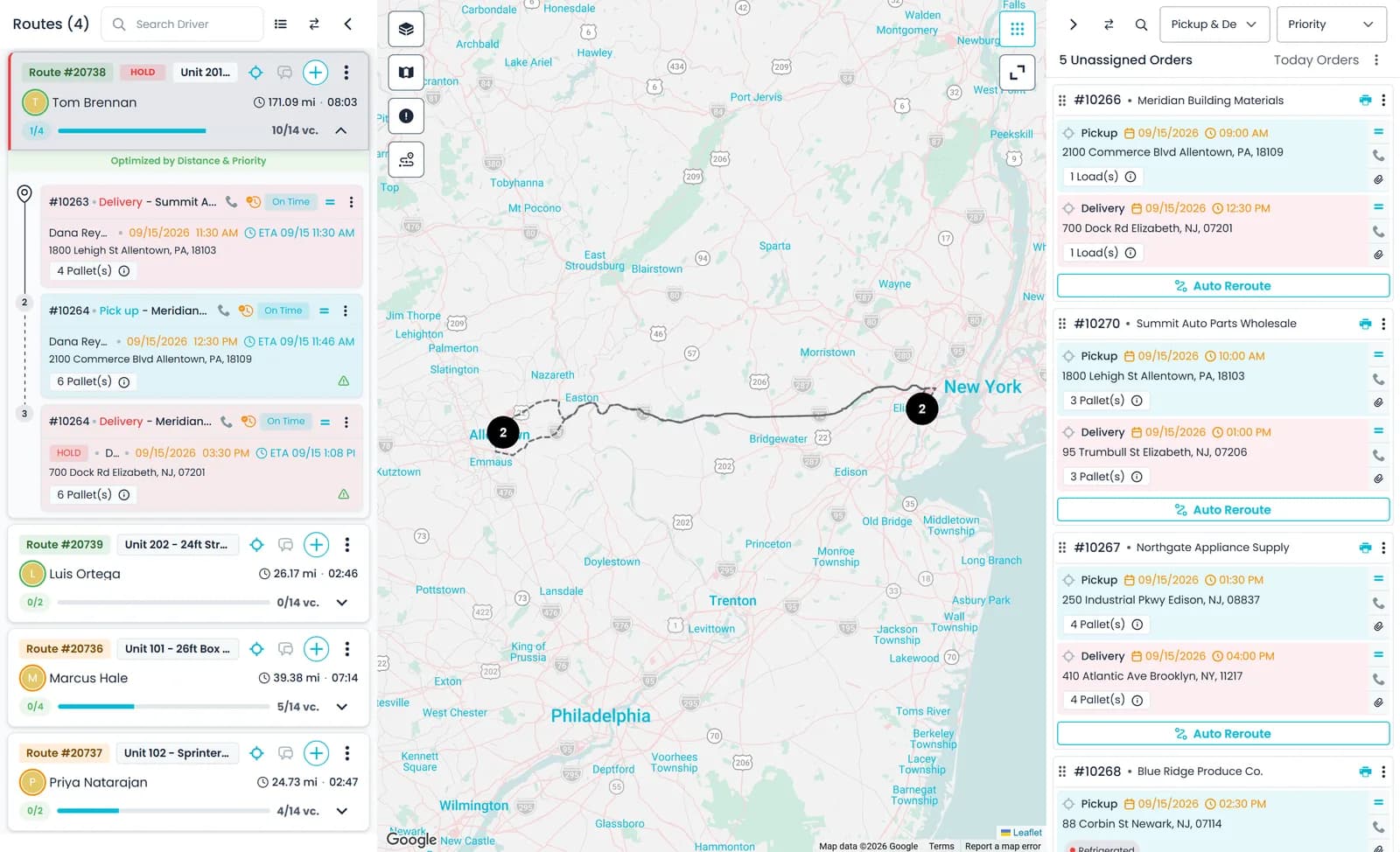
See every route and every unassigned stop on one board with a map. Drag stops onto routes and the driver gets the change in the app.
- Drag unassigned stops onto a route, reorder them, or move them to another route
- Give each route a driver, a truck and a zone
- Routes for your own drivers or for an outsource carrier's drivers
- Re-order a route's stops by distance or priority, or let AI choose the order
- Per-stop ETAs from Samsara truck positions or the driver app's location, updated as stops are completed
- Route changes are sent to the driver app
3. Deliver it
Driver app and proof of delivery
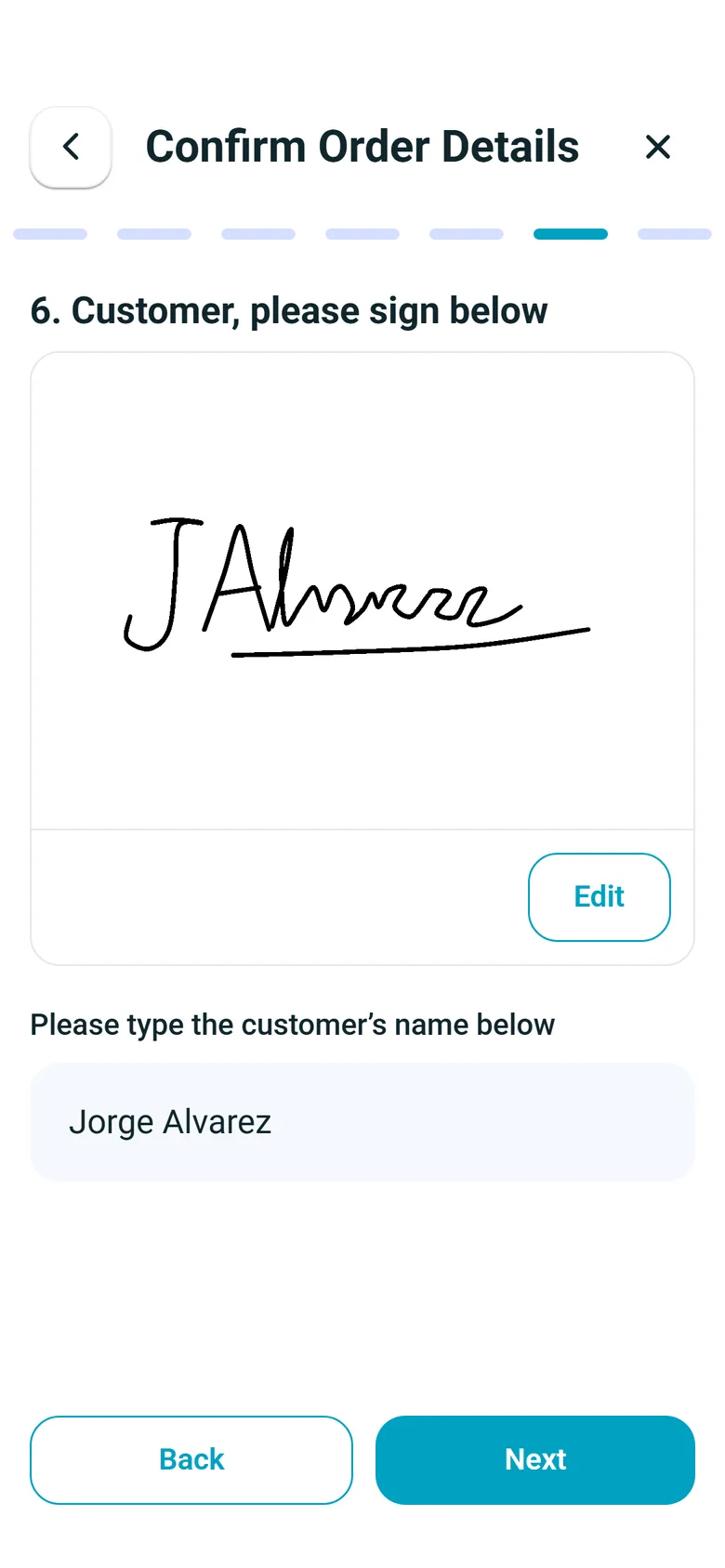
Drivers work stop by stop in the RushHour Drivers app from the App Store or Google Play. The signatures and photos they capture are saved to the order for the office to see.
- The day's route and its stops, in order
- Stop steps you set in the Company Portal, with a delivery photo and a signature required by default
- Consignee signatures at the stop
- Photos of the goods, and signed paperwork scanned into one PDF
- Barcode scans of pallets and items
- Route chat with the office
- Once the driver allows location access, the phone's location is shared while a route has stops left, for the office's ETAs
- Vehicle inspection before the shift
4. Get paid
Invoicing, payments and QuickBooks
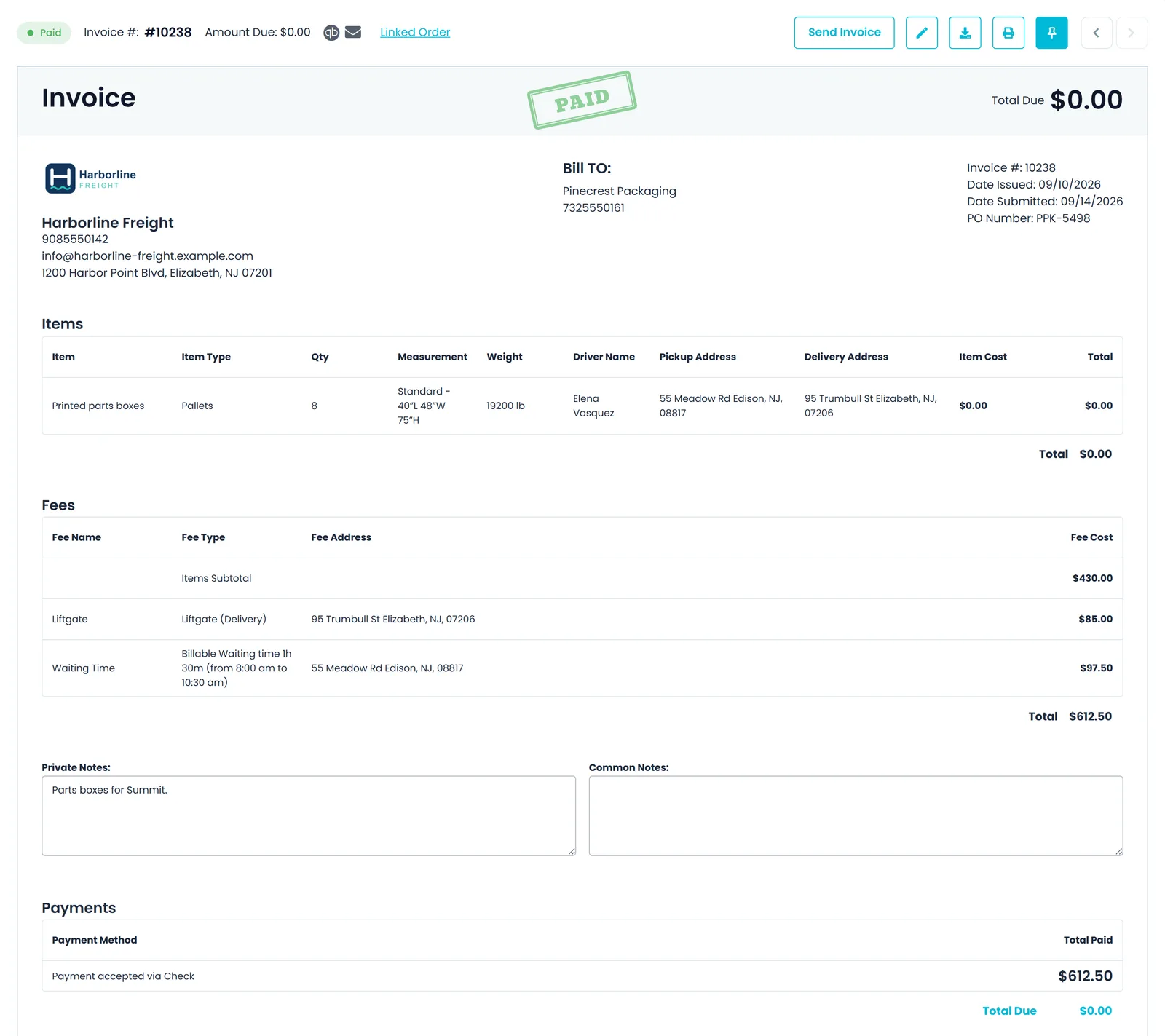
Invoices are created from your orders with their charges already on them. Record the payment, apply it to open invoices and send both to QuickBooks Online.
- Invoices created from the order, not retyped
- Record cash, check or card payments, with cards charged through your own Cardknox account
- Apply one payment across several open invoices
- Email invoices to customers from RushHour
- Send invoices and payments to QuickBooks Online
- A card payment link on approved invoices with a balance due, which customers pay without logging in (needs Cardknox)New in the October 2026 release
Alongside every step
Your shipper's view: the Customer Portal
Customers you invite sign in to their own portal. They book orders for you to approve, follow each order, open its paperwork and pay their invoices, without calling your office.
- Multi-stop orders with their freight details, sent to you as a quote to approve
- Each order's status and planned stop times, and the route and driver it is assigned to
- The BOL and order sheet to print, plus the photos and paperwork scans from the stops
- Invoices to check and pay, by card when you take cards through Cardknox
- In English or Hebrew, with a light or dark theme
Three apps and an API
One system for the office, the driver and the shipper
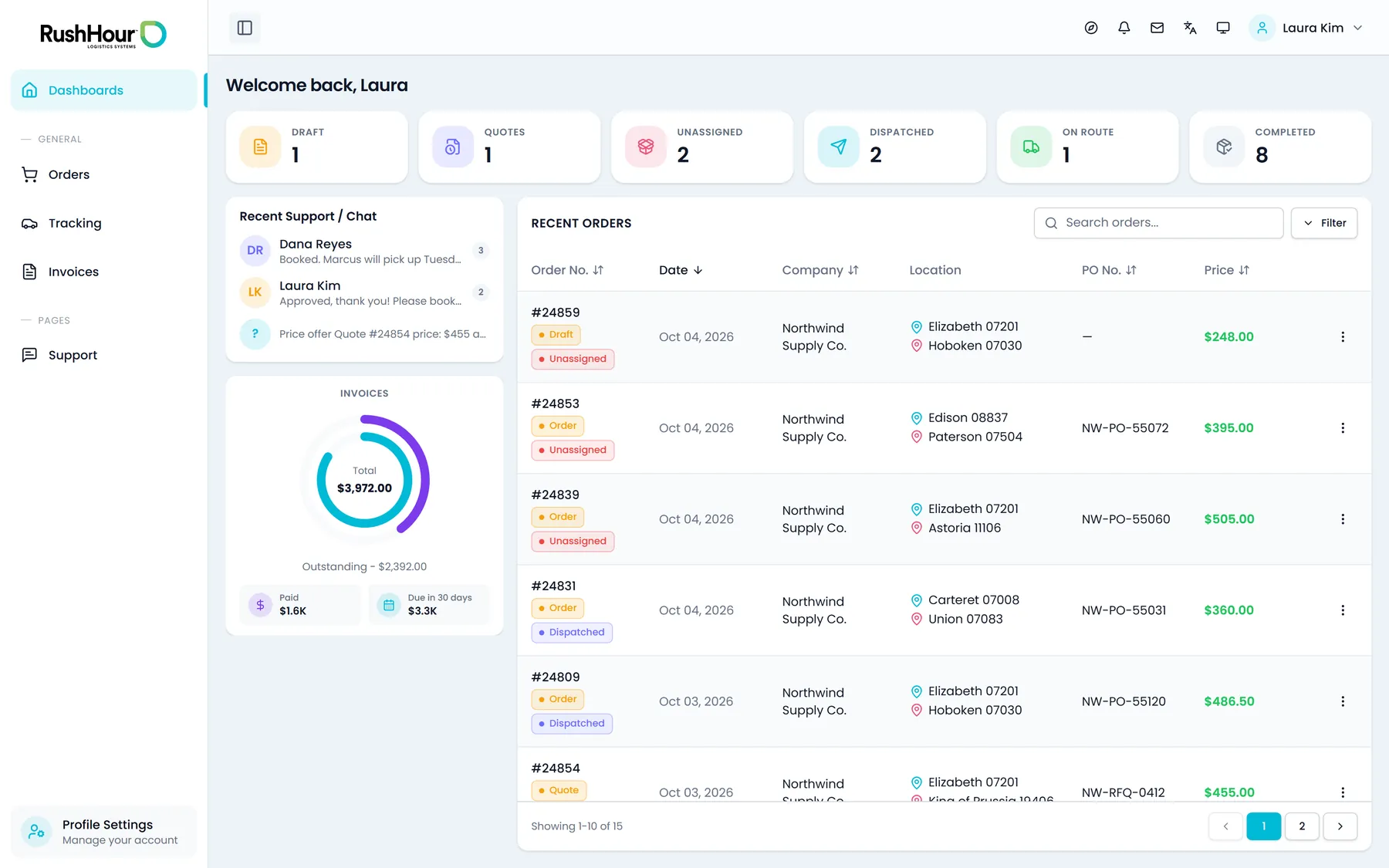
Your team works in the Company Portal, drivers in the RushHour Drivers app and your customers in their own portal. All three run on the same orders, through the same API your developers can use.
In the same system
Everything around the load
Each of these works on the same orders, customers, drivers and invoices.
Order Import
Turn spreadsheets, PDFs and CSV stop lists into orders. AI reads the file and you confirm the rows before they are saved.
Learn moreRate Cards & Quoting
Pallet-by-mile grids, zone-to-zone rates, charge types and fuel surcharge, plus ocean, air and ground rate cards for international lanes.
Learn moreRoute Optimization
Re-order a route's open stops by distance, by priority or with AI. RushHour checks the AI's order before it is saved, and keeps each pickup ahead of its delivery.
Learn moreProof of Delivery
Signatures, goods photos and paperwork from the driver app, kept on the order they belong to.
Learn moreCustomer Portal
Your customers sign in to place orders, follow their status, open their documents and pay invoices, by card when you take cards through Cardknox.
Learn moreAI Assistant
Ask about orders, routes and invoices in plain English. When it is about to change something, it asks you to confirm first.
Learn moreDocuments & Paperwork
Upload BOLs, invoices, price sheets and scans. AI reads them into searchable text, classifies them and adds a short summary.
Learn moreIntegrations
QuickBooks Online, Cardknox card payments, Samsara truck positions, and map and routing providers.
Learn moreMessaging
Chat with drivers one-to-one or per route from Inbox → Chat or a route card, while drivers reply from the Message tab of the driver app.
Learn moreMaps & Live ETAs
Samsara-linked trucks on the dispatch map, per-stop ETAs from truck GPS or the driver app's location, and your choice of map provider.
Learn moreBOLs, Labels & Load Scans
Bills of lading and 4 x 6 labels generated from the order, a route's BOLs printed together from its route card, and packing-list units drivers scan at pickup.
Learn moreOutsource Carriers
Keep each outside carrier with its contacts, trucks and agreed rates, and give its drivers routes on your board and in the driver app.
Learn moreRecently added
New in RushHour
These are in production now. Some you switch on in Settings. The changelog lists every change, release by release.
What it replaces
Fewer tools to keep in sync
Most freight offices run several of these side by side. RushHour does the same jobs across the office Portal, the driver app and the customer portal.
Instead of
A whiteboard or a separate dispatch tool
With RushHour
A dispatch board built from the same orders you invoice
Instead of
Paper BOLs and signed PODs in a folder
With RushHour
BOLs and labels printed from the order, signatures and photos from the driver app
Instead of
Customers calling and emailing for status
With RushHour
A customer portal where they follow their orders and open their documents
Instead of
Retyping loads into an invoicing tool
With RushHour
Invoices created from the order
Instead of
Re-keying invoices and payments into QuickBooks
With RushHour
Invoices and payments sent to QuickBooks Online
Instead of
A card terminal and separate payment links
With RushHour
Cards charged through your own Cardknox account, and invoices customers pay in their portal
Questions
Common questions about RushHour
What is RushHour?
RushHour is a transportation management system (TMS) for trucking and logistics companies. It covers quotes and orders, pricing, the dispatch board, the RushHour Drivers app with proof of delivery, a Customer Portal for your shippers, and invoicing and payments. It was built inside Shimon's Express, a New Jersey freight company that still runs its operation on it.
Which phones does the driver app run on?
Drivers install RushHour Drivers from Google Play on Android or from the App Store on iPhone, and it also runs on iPad. Your office invites each driver to your company. The app's screens are in English, in a light or dark appearance.
Can my customers book and follow their own shipments?
Yes. Customers you invite sign in to the Customer Portal to build multi-stop orders and send them to you for approval, follow each order's status, open the BOL, the order sheet and the files your office attaches to the order, and see and pay their invoices. Card payments go through your own Cardknox account. You can also send tracking links that open without a login.
Does it work if we also use outside carriers?
Yes. Keep each outsource carrier as a record with its contacts, trucks and agreed rates. Create routes for its drivers from the same New Route window you use for your own drivers, and invite those drivers to the RushHour Drivers app.
Does RushHour work in Hebrew?
Yes. The Company Portal and the Customer Portal both work in English or Hebrew, with a right-to-left layout in Hebrew. The RushHour Drivers app is in English.
Can RushHour connect to our other systems?
Yes. The REST API that the portals and the driver app use is documented at docs.rushhourapp.com/developers, and each request runs with the permissions of the RushHour user or API token it is made for; company admins create API tokens in Settings > API Tokens. Built-in connections include Cardknox card payments, Samsara truck positions, and map and routing providers; the Integrations page lists them all.
Comparing TMS options?
See how RushHour lines up
Side-by-side pages for Rose Rocket, Onfleet and Bringg, based on what each vendor publishes, including where they are the better fit.
See RushHour on your own freight
Book a demo and we will walk your loads through orders, dispatch, the driver app and invoicing.