
Not a chatbot bolted on.
An operator inside the app.
Ask in plain English or Hebrew, and the assistant opens the record, filters the list, runs the report or drafts the order. It works on your data with your permissions, and anything that updates, deletes, bills or emails waits for your confirmation.
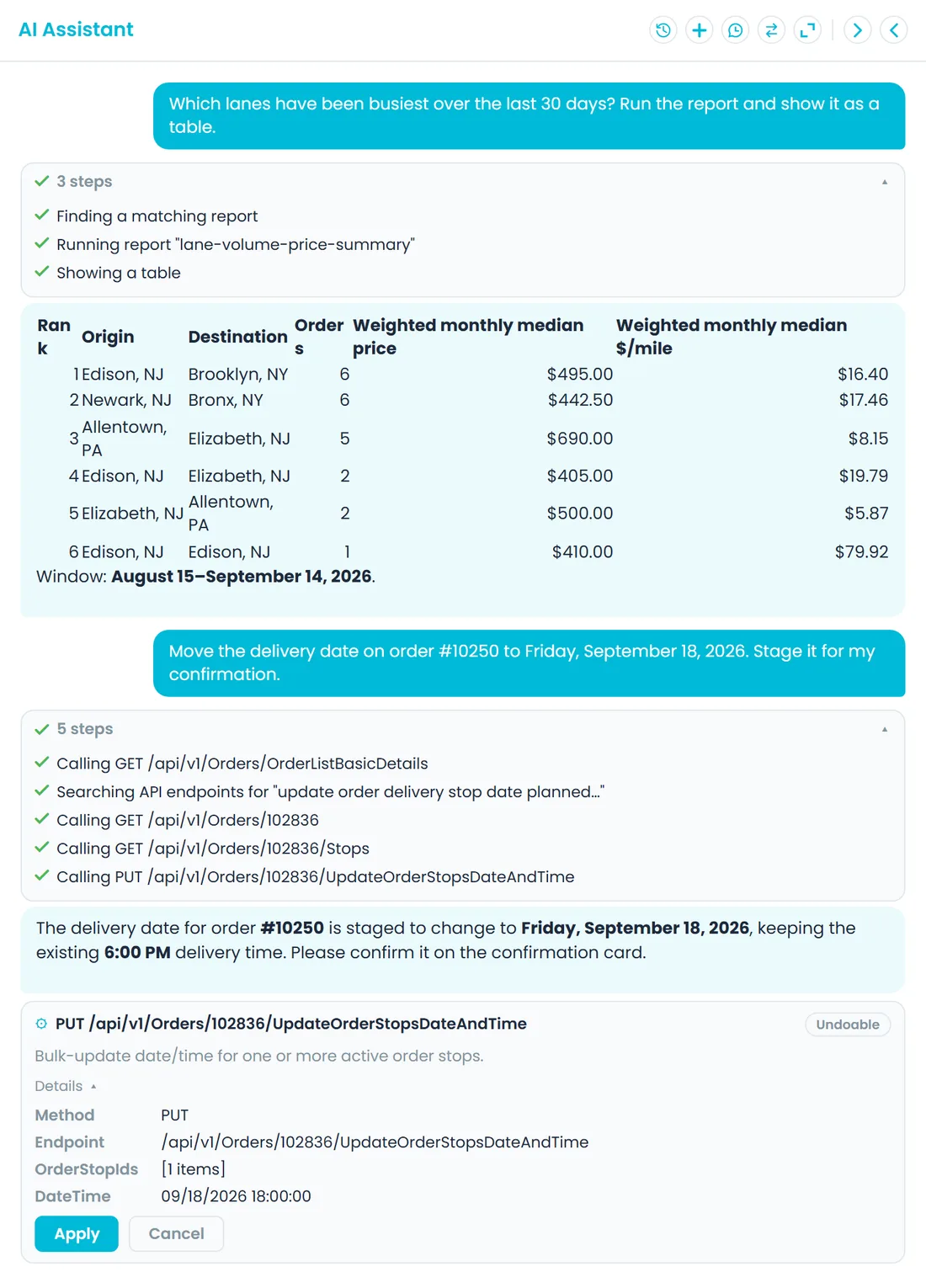
Ask, review, confirm
It does the clicking, and asks before it edits, deletes, bills or sends
Lookups and reports run straight away, and so can a simple new record such as a customer. Changes to existing records, deletions, billing, payments and emails wait on a card until you click Apply, and imports and order drafts open for review first.
Does the work
Tools pointed at your own orders, routes and customers
Open a customer, filter today's late orders, check dispatch status or run one of 44 built-in reports, such as AR aging, revenue by month or lane volume and price. The assistant calls the same API your dispatchers use, signed in as you, so your role decides what it can see and change.
- Opens pages and records, and filters the orders, quotes, dispatch, customer, driver, carrier and accounting lists
- Finds late orders and pulls up an order's full context
- Runs 44 read-only reports on request, on every plan
- The 44 reports cover receivables, revenue, lanes and prices, quotes, drivers, expenses, driver pay, vehicle inspections and warehouse inventory
- Runs as you, so your permissions and company data limits apply
- Switches the Orders page between table, map and kanban views, changes the theme or language, and reopens the setup guide when you ask
Late and at-risk work
Ask what's late, what's at risk and which routes are behind
Answers come from your schedule and your drivers' check-ins. A stop counts as late once its window has passed with no arrival confirmed by the driver, with 30 minutes' grace on exact times. At-risk stops are the ones whose window closes in the next few hours while they are still unassigned or on a route that hasn't started. Ask about one order and the assistant pulls its whole picture into a single answer.
- Looks 4 hours ahead for at-risk stops by default, and up to 24 hours
- Groups late stops by city, state, ZIP code, pricing zone or dispatch zone, for one day or a range of up to 31 days, across all customers or for one
- Flags accepted appointments that were missed, and stops on hold pause the lateness clock
- Per route: stops done and remaining, late stops, minutes behind plan, the next stop and the driver's last activity, plus a summary for the day
- One order by order, quote or PO number: scheduled and actual times stop by stop, route and driver, hold status, linked invoices and quotes, and what needs attention
- Minutes behind plan is an estimate from the schedule, not a live GPS arrival time
You stay in control
Updates, invoices and emails wait for your click
Changes to existing records, deletions, invoicing, payments and email sends are staged, not fired off. A card shows exactly what would change, and nothing runs until you apply it. Some areas are closed to the assistant altogether: the sign-in endpoints, the platform's user and tenant administration, AI provider keys and its own audit trail.
- Apply or cancel each staged action
- Cards carry an Undoable, Safe to re-run or Irreversible label, with the details of the change one click away
- A card you ignore expires after 15 minutes instead of running
- Apply runs with the permissions of the person who clicks it, and each card can be applied only once
- An AI reroute can be undone after you apply it
Orders and routes
Describe an order or a route, then check it before it saves
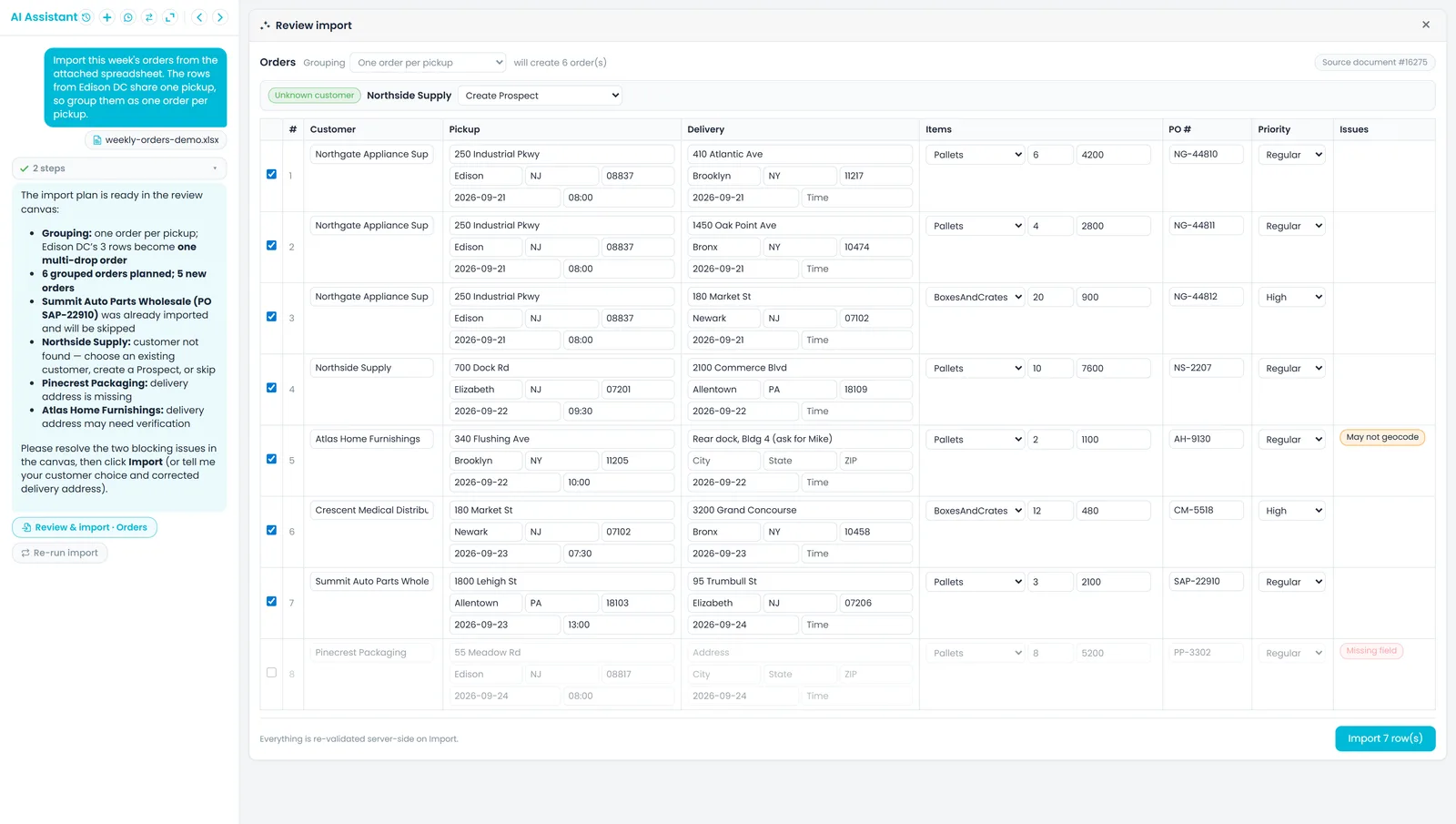
Tell the assistant about a load and it drafts the order on an editable review canvas, the same kind of preview a spreadsheet import opens. Ask it to build a route from open stops, or to re-order an existing route, and the plan comes back as a card you apply. On the dispatch board, Optimize with AI re-sequences a route and marks it Optimized by AI.
- Drafted orders open as an editable preview
- “Create an order for Acme, pick up tomorrow 9 am at 1 Warehouse Way, deliver to 5 Main St, 3 pallets” becomes an order or quote draft, with one pickup and one or more deliveries
- Ask it to fill in a new customer, driver, carrier, invoice or route form and the real form opens pre-filled from your message; nothing saves until you click Save
- New routes and reroutes are staged for you to apply
- A new route's card previews the driver, truck, zone and orders before anything is created
- Optimize with AI on the dispatch board
Quoting
Ask what to quote and see what the number is based on
Ask for a price on a lane and the answer comes with its basis: the grid price from that customer's pricing model, comparable recent orders in the same currency, and any pricing rules learned from rate sheets or agreements you uploaded. It stays a recommendation. You set the price, or tell the assistant to use it on a drafted order. The full picture of lane history and learned rules is on the Pricing Intelligence page.
- Grid price, past orders and learned rules in one answer
- A Why this price card shows what the price is anchored on, a High, Medium or Low confidence, the details it used and up to five source documents
- Comparisons in the same currency only
- Cross-border lanes are priced from your international rate cards
- Advisory, never applied without you
Your systems and files
Samsara, maps, QuickBooks and your documents in the same chat
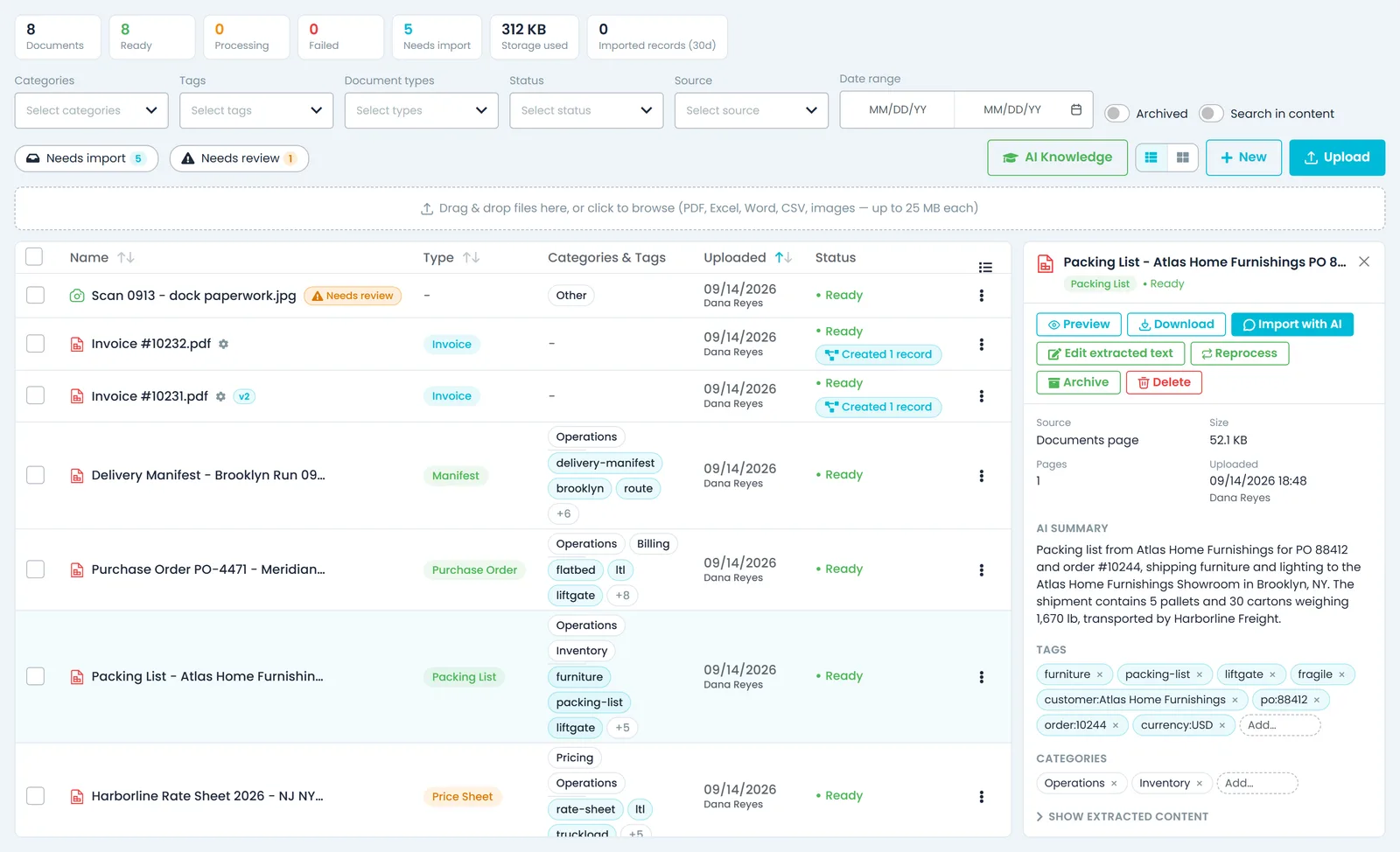
When Samsara is connected, ask where a truck is or how many driving hours a driver has left. Your map provider answers address lookups, drive-time estimates and nearby places. With QuickBooks Online connected, look up customers and invoices there. Attach a PDF or spreadsheet, or pick one from your Documents library, and ask the assistant to find, search or summarise it.
- Integration tools appear only once that integration is connected
- With Samsara connected, propose a new name, notes or plate for a vehicle and apply it from a before-and-after card
- QuickBooks exports from chat are staged and stay off until an admin allows them
- Attach a file by picker, drag and drop or paste
- Up to 10 files of 25 MB each per message, saved to your Documents library
- Search inside documents and get a summary
- Answers from your documents list up to five sources, with the page number where the file has pages; click one to open the file at that point
The parts your admin asks about
Every action on the record
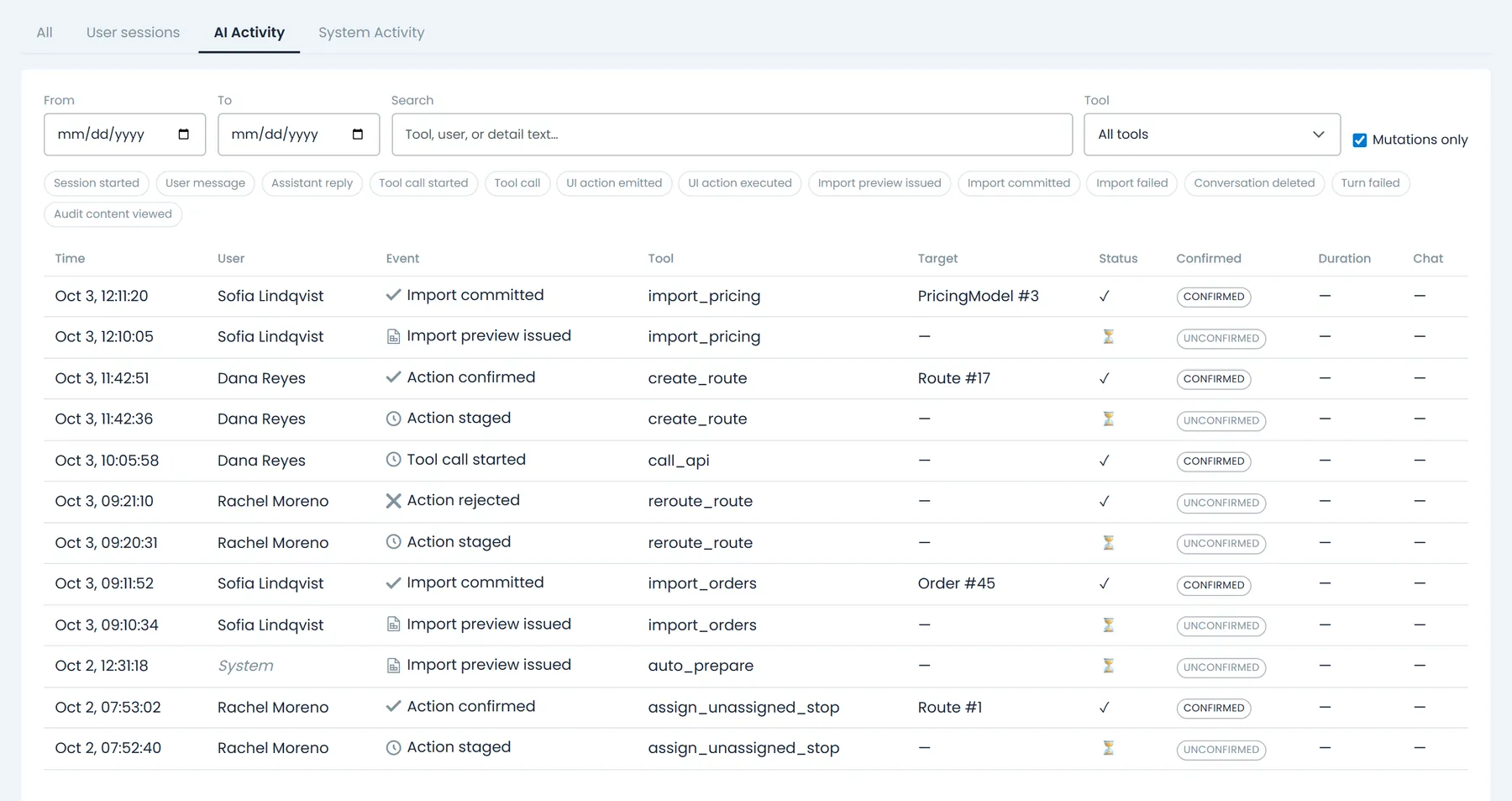
Each conversation turn, tool call, import and staged action is logged with credentials masked. Settings > Activity Logs > AI Activity shows your own activity, or everyone's if you hold that permission.
Usage you can account for
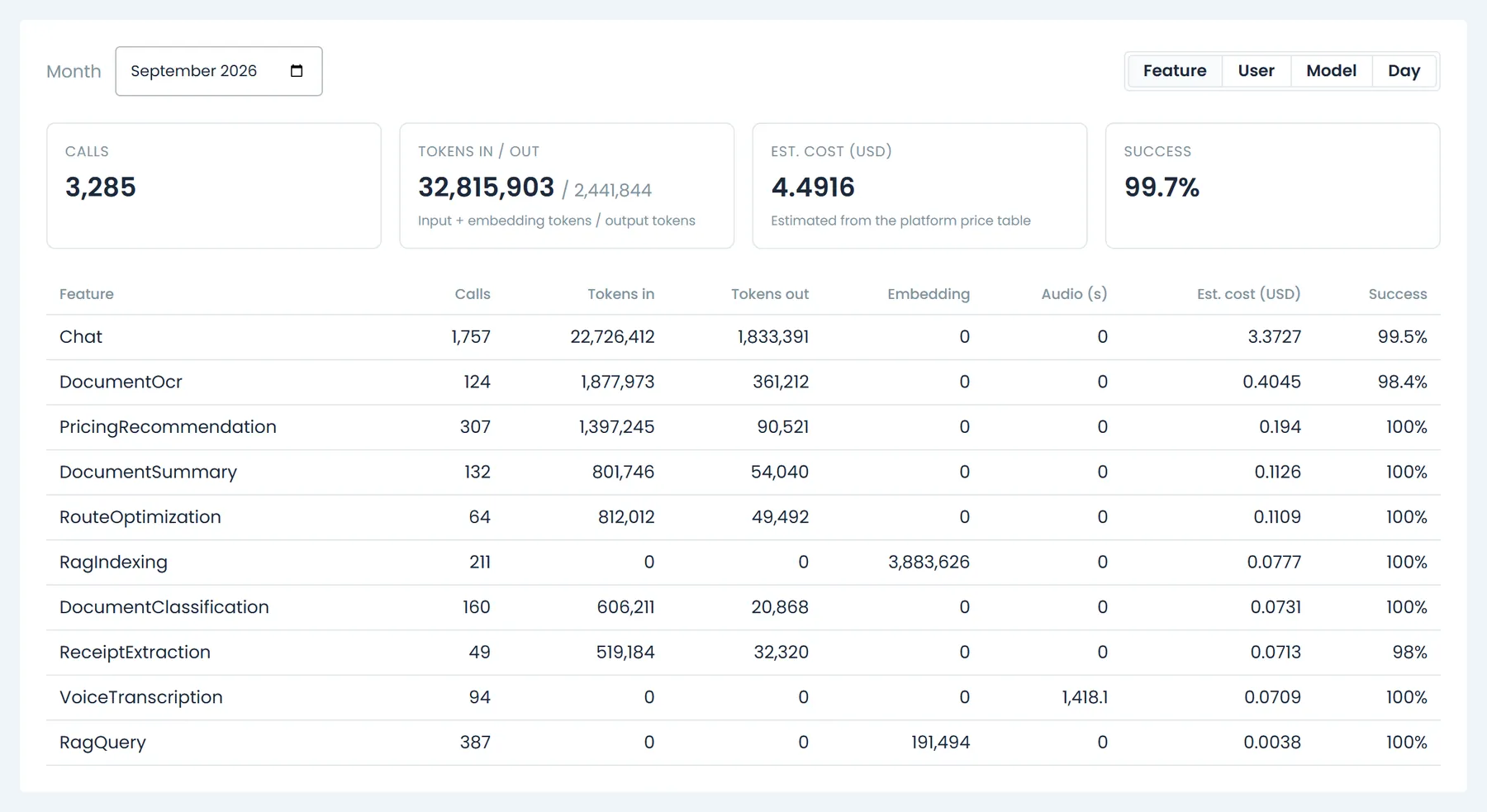
AI calls, tokens and estimated cost, grouped by feature, user, model or day, for the admins you give the AI usage permission.
Answers as tables and charts
Report results and lookups can appear beside the chat as a table, list, chart or stat tiles, or as a real app view such as an order's stops.
Read-only help for shippers
Switch it on for your company and Customer Portal users can ask about their own orders, order status, quotes and invoices. It cannot change anything, and a daily message limit applies.
Your own AI key, on request
Run the assistant's chat on your own OpenAI, Anthropic, xAI or Google key, stored encrypted and enabled for your account by RushHour. Document search and voice stay on RushHour's AI.
Replies in your language
Set the Portal to Hebrew and the assistant answers in Hebrew. Set it to English and it answers in English.
Example questions
What your team can ask it
Each question uses a tool the assistant already has. Answers come back in the chat, and the changes in these examples wait for you to confirm them.
Where you use it
On every office screen, and in front of your shippers
Your team gets the assistant on every page of the Company Portal. Your customers can get a read-only version in the Customer Portal once you turn it on.
Company Portal
A side panel on every page that knows what you have open
Open the assistant from the sparkle icon on any page of the Company Portal. It knows which page you are on, so 'summarize this order' works while the order is on screen, and it lists the steps it is taking while it works. Dock it on the left or right, drag its edge to resize it, or widen it to full width.
- Pop the chat out into a floating window that stays on top, in browsers that support it, such as Chrome and Edge
- Chat history keeps your earlier conversations to reopen, rename or delete
- With AI Activity access, open a conversation's audit trail straight from chat history
- Answers can open beside the chat as a table, chart or KPI tiles, or as a real app view such as a driver and vehicle map or an order's stops
Customer Portal
A read-only assistant for your shippers
Tick Enable the AI assistant in the Customer Portal under Settings > Profile, and your Customer Portal users get an assistant button in the corner of the screen. They can ask where an order is, which quotes are waiting for approval or which invoices are still open, and get an answer without calling your office. It sees only that customer's own data and can't change anything.
- Off until a company admin turns it on
- Answers about the customer's order list, one order's stops with scheduled and actual times and holds, quotes, and open, paid, partly paid or overdue invoices
- Saved conversations: start a new chat, or reopen or delete an earlier one
- Up to 100 messages per user a day, and a standing reminder in the chat to check important details
- Customer users need the Use AI assistant permission, which their role has by default and you can remove in Roles
For owners and IT
Controls for owners and IT
The assistant works inside the same roles, logs and settings as the rest of RushHour. This is what an admin can check and decide.
Permissions
It works as the person asking, inside their own company
Every lookup and change runs with the signed-in user's role and company, so the assistant can't see or change anything that person couldn't. Changes through the API are proposed one record at a time, multi-row imports open in a review screen first, and some areas are closed to it entirely.
- Blocked from sign-in, the platform's user and tenant administration, its own AI provider keys, its own audit trail and the activity log
- Chatting needs no extra permission; attaching files needs Upload documents, and imports and order drafts need Import with AI
- Each import preview can be committed once and expires after 30 minutes
AI Activity
A record of what the assistant read, proposed and changed
Settings > Activity Logs > AI Activity lists each chat turn: the user's message, the assistant's reply, every tool call and the record it targeted, imports, and each staged change with whether it was confirmed, cancelled, expired or failed. Click a chat number to reopen that conversation.
- Filter by dates, tool and event type, search the details, or tick Mutations only to see changes alone
- Passwords, tokens, API keys and other credentials are masked in the log
- Seeing your own AI activity and seeing everyone's are separate permissions
AI Usage
How much AI your company uses, and its estimated cost
Settings > AI Usage shows one month at a time: calls, tokens in and out, an estimated cost in US dollars and the success rate. Group the month by feature, user, model or day to see where usage comes from, from assistant chats and price recommendations to document reading, route optimization and the Customer Portal assistant.
- Calls paid for with your own AI provider key are marked own key
- Open to people with the AI usage permission, admins by default
- Usage records keep counts and cost, not the text of questions or answers
Bring your own key
Run RushHour AI on your own provider account, on request
On request, RushHour turns on the AI Provider (Bring Your Own Key) card in Settings > Integrations for your company. Your admin adds an OpenAI, Anthropic, xAI (Grok) or Google (Gemini) key, tests it, and picks which connection powers RushHour AI, or None to stay on RushHour's AI.
- Keys are stored encrypted and never shown again, only their last 4 characters
- Optional fallback to RushHour's AI when your provider fails, off by default and announced in the chat
- Document-search embeddings always run on RushHour's AI
Recently added
Ask AI from the Dispatch board
These assistant features are in production now. The changelog lists what each release added.
Unassigned orders
Ask AI which route should take an unassigned orderNew in the October 2026 release
Order cards in the Dispatch board's Unassigned panel get Ask AI next to Find Route; in the Old UI list view it is in the card's … menu. It opens the assistant on that stop: the assistant ranks the routes that can take it, with the same extra distance Find Route shows, explains its pick and answers follow-up questions, then proposes the assignment on a card that changes nothing until you click Apply.
- The order goes on that route with the same checks as Find Route
- Undo is offered if the order had nothing on that route before
- Ask AI is greyed out, with the reason on hover, when no route can take the order
- Follow-ups such as 'put it on Carlos's route instead' work in the same chat
Also new
Late stops in Optimize with AI, and a straight answer on tollsNew in the October 2026 release
When you use Reroute, including Optimize with AI, open stops left over from earlier days are sequenced together with today's stops instead of oldest day first, and stops planned for later days still come after today's. For companies connected to Trimble Maps, when no toll provider is connected the assistant says toll costs can't be calculated and that an administrator can connect one under Settings > Integrations, instead of reporting $0 in tolls.
- Optimizing doesn't change a late stop's date; use Edit Date to reschedule it
- A TollGuru account can be connected under Settings > Integrations
FAQ
Questions about the AI assistant
Can the assistant change data without asking?
Lookups and reports run straight away, and so can a simple new record such as a customer. Changes to existing records, deletions, invoicing, payments and emails are staged on a card that shows what would change, and nothing happens until you click Apply. Imports and order drafts open in a review screen first, and a card left unapplied expires after 15 minutes.
What can it see?
Only what the person asking can see. It works with that user's role and company, proposes API changes one record at a time, and is blocked from sign-in, the platform's user and tenant administration, AI provider keys and its own audit trail.
Can we check what it did?
Yes. Settings > Activity Logs > AI Activity records each message, tool call, import and staged change, with credentials masked. Seeing your own AI activity and seeing everyone's are separate permissions.
Does it work in Hebrew?
Yes. Set the Company Portal to Hebrew and the assistant answers in Hebrew; set it to English and it answers in English. You can also ask it to switch the Portal's language.
Can our customers use it?
Yes, once you turn it on. A company admin ticks Enable the AI assistant in the Customer Portal under Settings > Profile, and Customer Portal users can ask a read-only assistant about their own orders, quotes and invoices. It can't change anything or see other customers' data.
Can we use our own AI provider?
On request, RushHour can turn on bring-your-own-key for your company. Your admin adds an OpenAI, Anthropic, xAI or Google key under Settings > Integrations, and AI Usage marks the calls that key paid for. Document-search embeddings stay on RushHour's AI.
How do we see what AI usage costs?
Settings > AI Usage shows calls, tokens and an estimated cost in US dollars for each month, grouped by feature, user, model or day, for people with the AI usage permission. There is no per-company spending limit to configure.
Where the assistant shows up next
What would you ask it first?
Bring the question to the demo. We'll run it live and show you what it stages before it acts.