
Settle driver and carrier pay route by route,
with a statement they can check.
Payouts in Accounting lists your own drivers' and outsource carriers' routes with each route's payout amount, what has been paid on it and what is still due. Add a driver's or carrier's routes for a period, enter the payout amount for each route, then group the unpaid ones into a numbered settlement, record a full or partial payment and send them a PDF statement. At year end, export what you paid each of them to CSV.
From route to statement
Know what you owe, then settle it
Open Payouts from the button in the Accounting page header, in the classic or the new layout. RushHour keeps the record of what you owe and what you paid, while the money itself goes out the way you already pay people.
What you owe
Each route's payout, with paid and due side by side
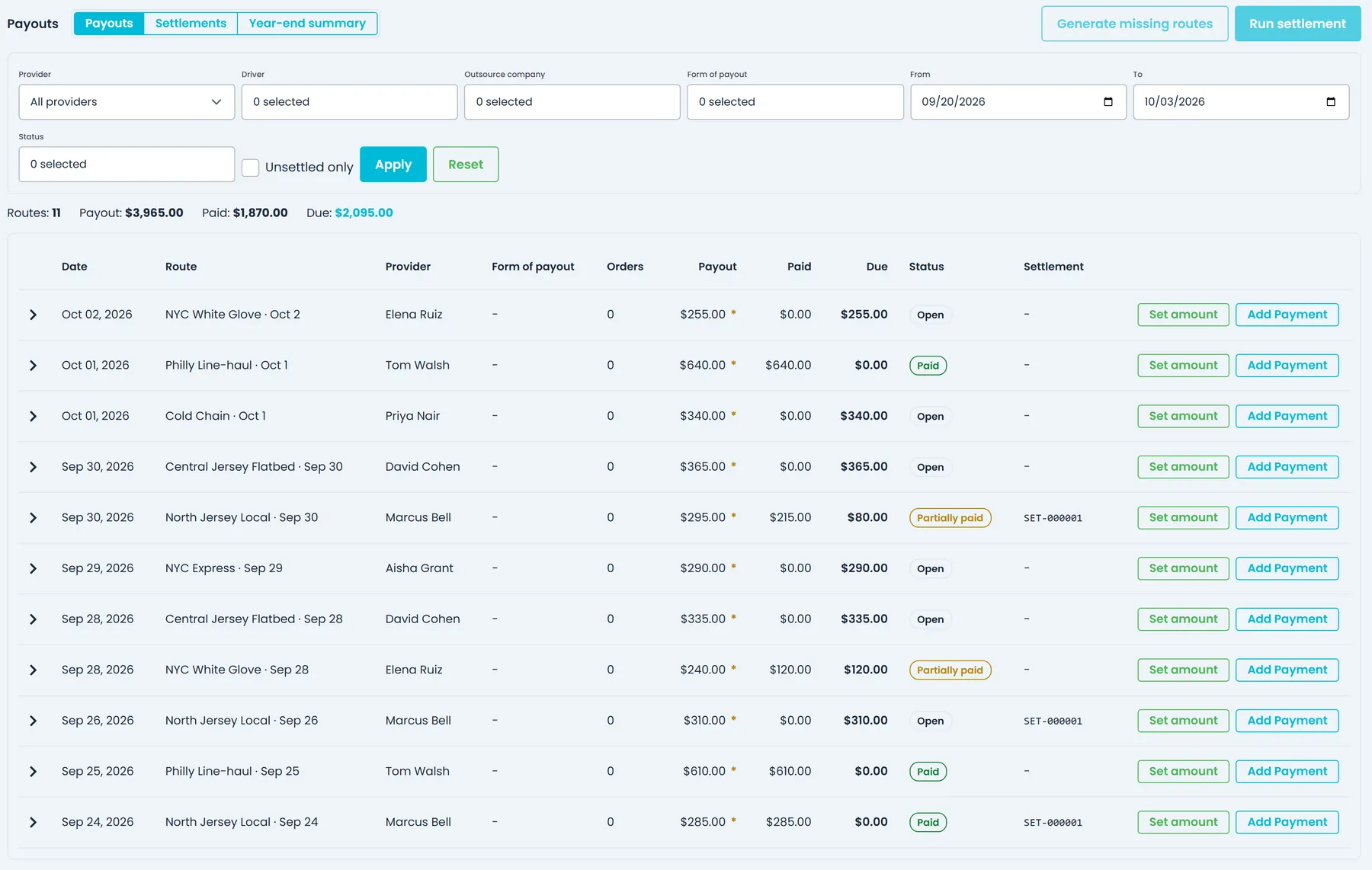
Accounting → Payouts lists the routes of your own drivers and outsource carriers with each one's payout, paid, due and status, and totals everything your filters match. Filter by provider, driver or carrier, form of payout, status and dates, or use Unsettled only to hide routes already in a settlement. Pick one driver or carrier to see their total owed, paid year to date and open routes.
- Your own drivers and outsource carriers on one page
- Filters for provider, form of payout, status, dates and Unsettled only
- Total owed, paid year to date and open routes per driver or carrier
- A totals bar for routes, payout, paid and due across the filtered list
Route amounts
Set what each route pays, and see what's been paid on it
Use Set amount to enter what each route pays, and every amount entered by hand is flagged. For one driver or carrier and a period, Generate missing routes adds a payout line for each of their routes created in that period that doesn't have one yet. Expand a route to see the payments applied to it, or use Add Payment to record a payment against that route alone.
- Amounts entered by hand are flagged on the route
- Missing payout lines generated for a chosen period
- Routes with nothing owed stay Draft and can't be settled
- New payout lines start without an amount until you set one
Settlement runs
Group a period's routes into one settlement and record what you paid
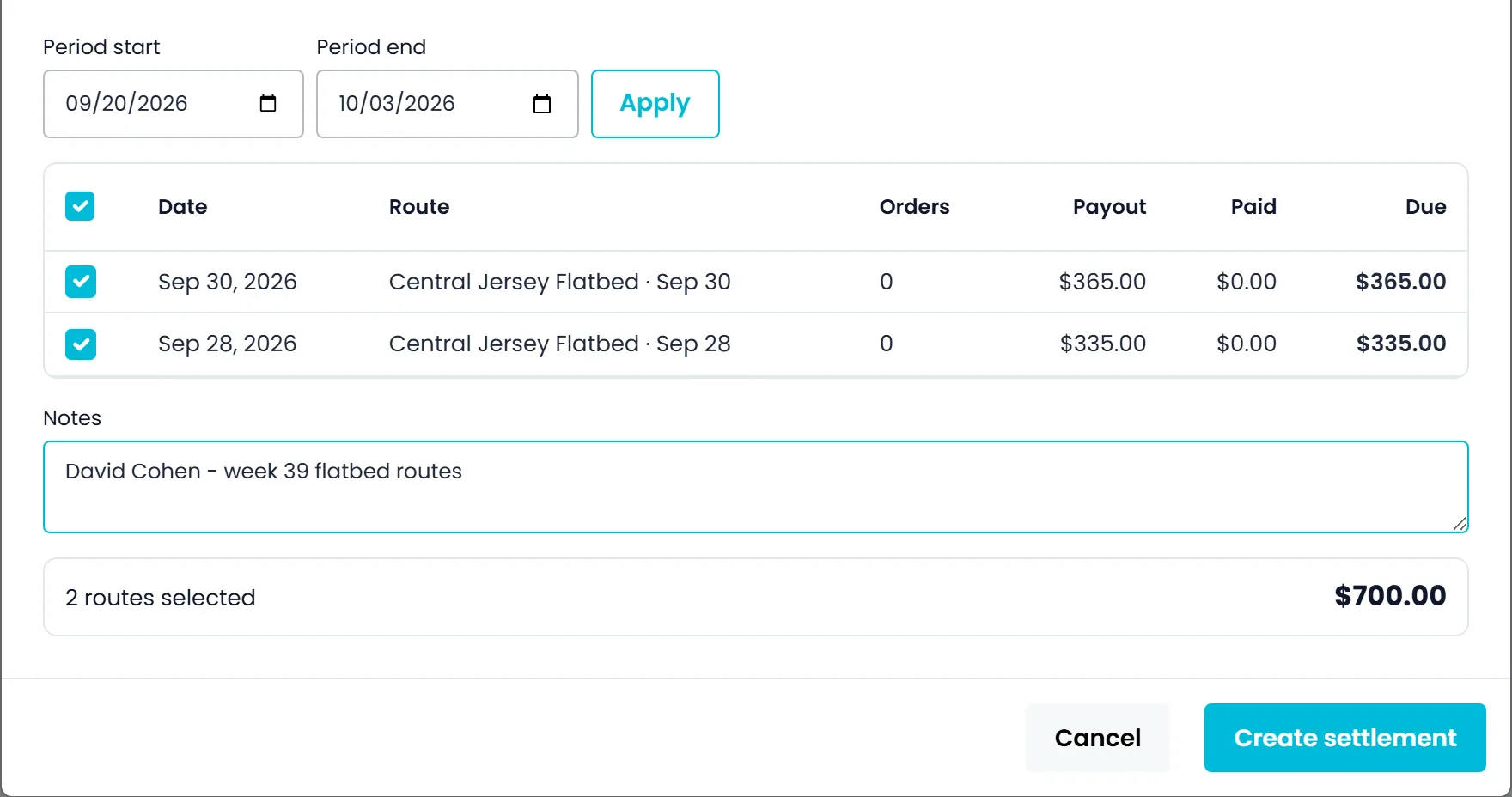
For one driver or carrier, Run settlement lists the payout lines added in the period you pick that still have a balance and aren't in a settlement yet. Every route starts ticked, so you only untick the ones to leave out, add a note if you want one, and the settlement gets its own number, such as SET-000001. Pay fills in the whole balance, or enter less to record a partial payment, which is applied to the settlement's routes in order.
- Draft, Partially paid and Paid status on each settlement
- Cash, ACH / bank transfer, credit card or PayPal payments
- A route can't be in two settlements at once
- Cancel a settlement that has no payments, and its routes can be settled again
Settlement statements
A statement the driver or carrier can check
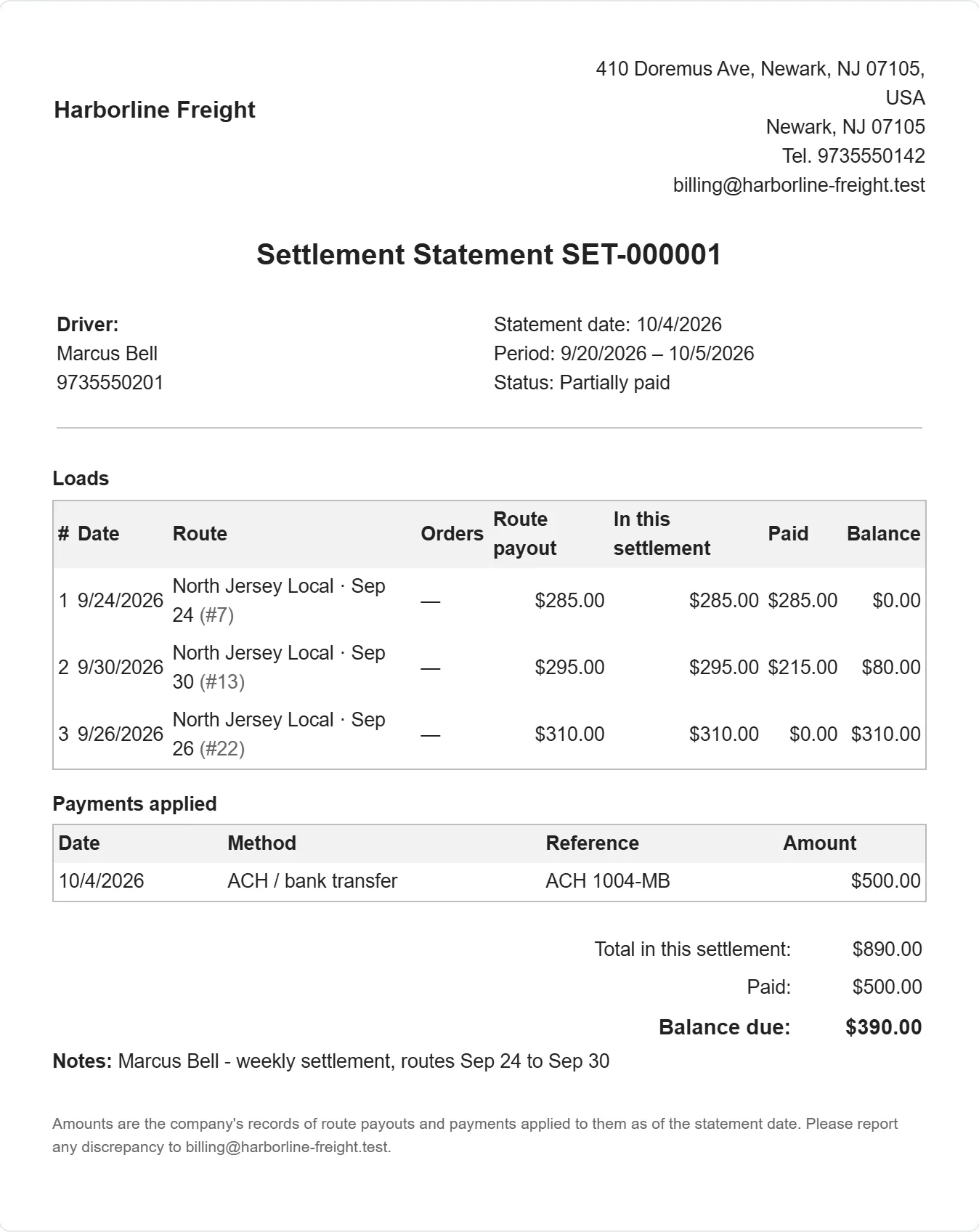
Each settlement has a statement with your logo and company details, the period, every route with its amount, what was paid, the balance due, and each payment with its method and reference. Print it, download it as a PDF, or email the PDF to one or more addresses, and the settlement keeps when it was last sent and to whom. The statement also asks the recipient to report any discrepancy to your company email.
- Print, download or email the PDF
- Routes, payments and balance due on one statement
- Last sent date and recipients kept on the settlement
- Add your own message to the email, with the PDF attached
Year-end summary
A year of driver and carrier payments in one CSV
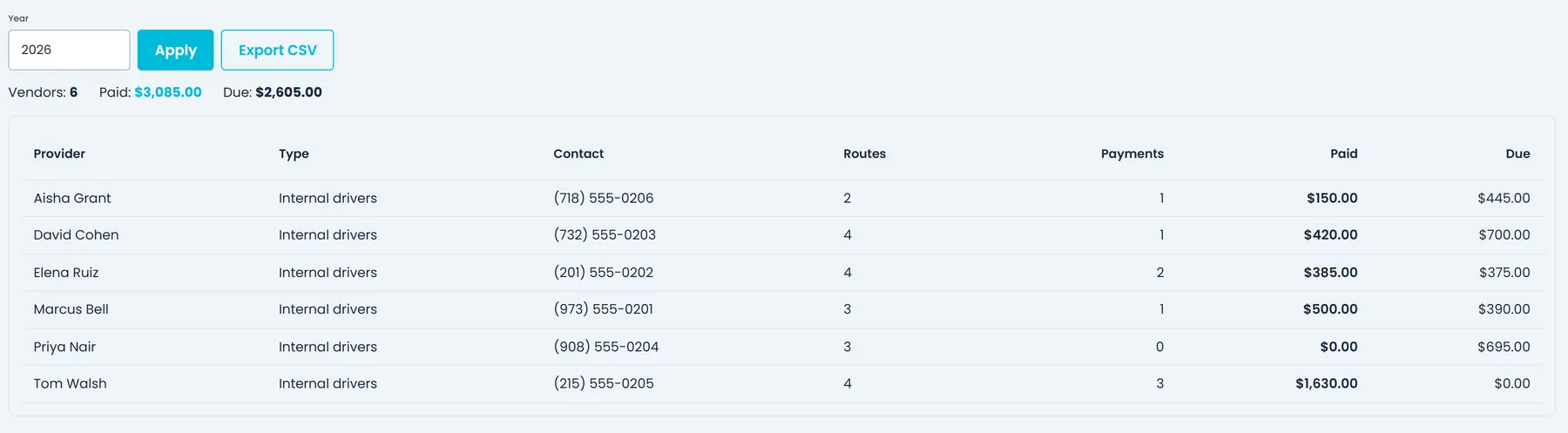
For any calendar year, the Year-end summary lists each driver and carrier with payments or payout routes that year, with their email or phone, number of routes and payments, total paid and anything still due. Export it to CSV, with first and last payment dates, to hand to your accountant.
- Drivers and carriers together, for any calendar year
- Routes, payments, total paid and still due for each
- CSV export with first and last payment dates
- Number of drivers and carriers, total paid and total still due for the year, at the top
Worked example
One driver's week, from routes to statement
Three routes, one settlement and a partial payment, done at the end of the week. The steps are the same for an outsource carrier.
1. Add the week's routes
On Friday, pick the driver and this week's dates, Monday to Sunday, then Generate missing routes. A payout line appears for each of their routes created that week that doesn't have one yet.
2. Set what each route pays
Enter $285, $295 and $310 with Set amount. Each route turns from Draft to Open, with a mark that the amount was entered by hand.
3. Run the settlement
Run settlement opens with the same dates and lists the three routes, all ticked, for a total of $890. Create it and it gets its own number, such as SET-000001.
4. Pay part, send the statement
Record $500 by ACH with your reference. It covers the first route and $215 of the second, the settlement shows Partially paid with $390 due, and you email the PDF statement.
Where clear settlements pay off
No route settled twice
A route can't sit in two settlements at once, a payment can't be more than the route or settlement still owes, and a payment recorded on a single route counts toward the settlement that route is in.
A record both sides can read
Each settlement keeps its routes, payments and statement, and a settlement with payments on it can't be cancelled.
Pay stays with the right people
Opening Payouts needs the View Settlements permission, and making changes needs Manage Settlements. Company admins have both and decide which other roles get them.
Your own drivers and your carriers
For an outsource carrier, Generate missing routes covers the routes of every driver linked to that carrier, and the settlement and its statement are made out to the carrier company.
FAQ
Questions about driver settlements
Does RushHour send the money to my drivers and carriers?
No. RushHour keeps the record of what each route pays, what you paid and what is still due. You pay the way you do today, then record the payment in Payouts with its date, method (cash, ACH / bank transfer, credit card or PayPal), reference and notes.
Are route payout amounts calculated for me?
No. On the Payouts page you enter each route's amount with Set amount, and the route shows that it was entered by hand. Generate missing routes adds the payout lines for a driver or carrier and a period, without amounts. The rates you agreed with each outsource carrier are kept on that carrier's Finance tab, so you can work from them.
Does it work for owner-operators and outside carriers?
Yes. Payouts shows your own drivers and the outsource carriers you hire on one page. An owner-operator can be set up as one of your drivers or as an outsource carrier with its own driver, and settled either way. A carrier's settlement and statement are made out to the carrier company.
Can a route be paid twice?
No. A route can be in only one settlement at a time, a payment can't be more than the route or settlement still owes, and a route with no amount stays Draft and can't be paid or settled. A payment recorded on a single route also counts toward the settlement that route is in.
Which routes go into a settlement?
The payout lines in the period you pick that still have a balance and aren't already in a settlement. The period goes by the Date each line shows on the Payouts page, which is the day the line was added to Payouts, not the date of the route, so if you add last week's routes today, pick a period that ends after today. Every line starts ticked, and you can untick any route before you create the settlement.
Can I cancel a settlement?
Yes, as long as no payment has been recorded on it. Its routes are then free to go into a new settlement. A settlement with payments on it can't be cancelled, so the record keeps explaining the money that went out.
Who can see what drivers and carriers are paid?
Opening Payouts needs the View Settlements permission. Setting amounts, recording payments, running and paying settlements and emailing statements need Manage Settlements. Company admins have both by default and decide which other roles get them.
Does RushHour prepare tax forms for drivers and carriers?
No. For a calendar year, the Year-end summary lists each driver and carrier with their contact, routes, number of payments, total paid and anything still due. Its CSV export also has first and last payment dates and the total route payout, ready for your accountant.
When can I use driver settlements?
Driver settlements are finished and in final testing, and ship in the next release. The changelog lists everything in that release.
Related
Bring last month's driver pay sheet.
In the demo we set route amounts for a sample driver, run a settlement for the month, record a partial payment and open the PDF statement.