
Paperwork you can search.
Not a folder full of PDFs.
Upload a BOL, an invoice, a price sheet or a photo of a paper form, and RushHour reads it into text, classifies it and adds a short summary and tags. The invoices, BOLs and quotes you send from RushHour are filed in the same library, with a note of what they were generated from and who they went to.
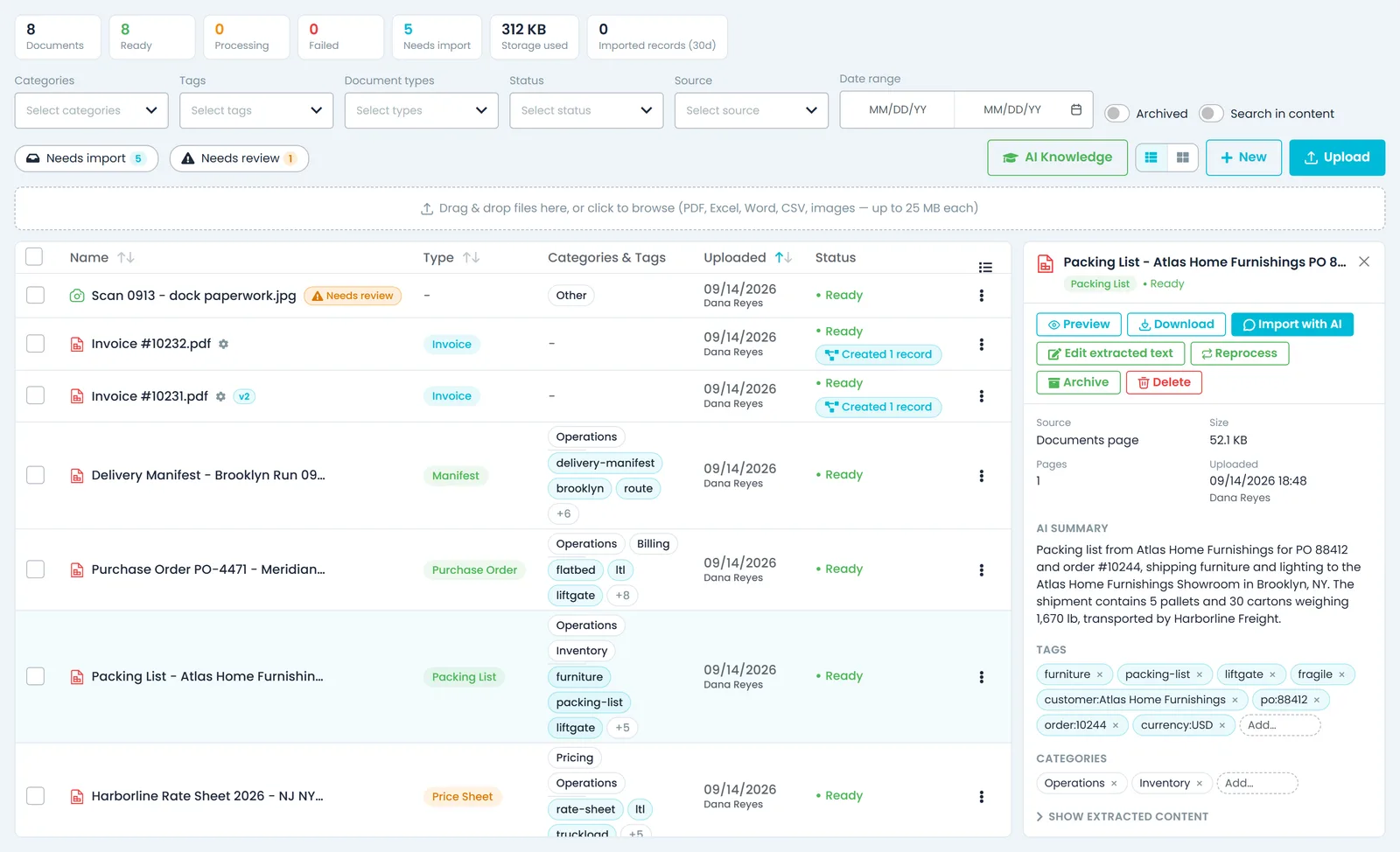
From intake to answer
Read, filed and findable without anyone typing it in
Extraction & classification
Files you upload land as text you can search
Drop in up to 10 files at a time, up to 25 MB each. PDFs, Word files, Excel and CSV sheets and photographed paperwork are read into text, with OCR for photos and scans. Each file is then classified, for example as an invoice, packing list, purchase order, price sheet, manifest, shipping document or receipt, and gets a one- or two-sentence summary plus automatic categories and tags.
- PDF, Word, Excel, CSV and photos of paper forms
- Classified, summarized and tagged on the way in
- Detected types include order sheet, manifest, packing list, purchase order, price sheet, shipping document, invoice, customer document and receipt
- Failed, unrecognised or low-confidence reads are flagged Needs review
- Correct the extracted text yourself, or reprocess the file
Intake queue
See what is waiting, not just what was uploaded
Counters at the top of the Documents page show how many documents you have, how many are Ready, Processing or Failed, how many need import, the storage used and how many AI imports were confirmed in the last 30 days. Needs import lists the order sheets, manifests, packing lists, purchase orders, price sheets and customer documents that are read but not imported yet. Import with AI opens the assistant with a request written for that type of document.
- Needs import: ready documents of those types with no records linked to them yet
- Needs review: shaky reads to check before anyone relies on them
- For a manifest, the request asks how to group the deliveries: one order per delivery, one multi-drop order, or orders grouped by customer
- Linked records list what an import created or updated from the file, such as orders, customers, pricing and load units, and open the order, customer or pricing page
The library
One library, not five shared drives
Filter by category, tag, document type, status, source or upload date, and switch between a table and category folders. Save the filter combinations you reuse as named views in your browser. Select up to 200 documents to tag, categorize, archive or delete them in one action.
- Saved views with category, tag and type filters
- Bulk tag, categorize, archive and delete, up to 200 at once
- A regenerated invoice or BOL updates its entry and shows a version pill instead of adding a copy
- Compare two documents side by side, and open any document's activity history
- Compare reads up to 2,000 lines of each document, puts the older one on the left, and counts the lines added and removed
- Each document's menu: preview, download, print, send by email, rename, tag, categorize, archive, reprocess or delete
Search & ask
Search what is inside the document
Turn on Search in content and the library matches the extracted text inside each document, not just names, tags, categories and summaries, so a lane, a rate or a reference number finds the paperwork that mentions it. Or ask the AI assistant: its answer lists the sources it used, and a source chip opens the PDF at the cited page or highlights the passage in the extracted text.
- Search in content across extracted text
- Assistant answers link back to the source page or passage
- Up to five source chips per answer, each with the document name and, where known, the section, sheet or page
- Ask the assistant to summarise a whole document
AI Knowledge
See what the AI learned from your paperwork, and switch it off
When a document classified as a price sheet or a customer document is processed, RushHour reads out the pricing rules in it: lane rates, accessorial rates, discounts, minimum charges and custom rules. The AI Knowledge window on the Documents page lists each rule with its amount, confidence, source document and, where stated, effective date, filtered by kind, customer or document, and the assistant uses the active rules as evidence when it recommends a price. A second tab lists the file layouts it remembers from imports you confirmed.
- Suppress a rule to keep it for reference while the AI stops using it, reactivate it later, or delete it for good
- A suppressed rule stays suppressed when the document is processed again
- A document that taught rules shows how many, and a click opens them
- Learned layouts show the source file and how often each was used, with an on/off switch and an option to forget it
- The window loads faster with hundreds of learned rules or layouts, and lane rate, accessorial rate and custom rule entries are labeled by name on each rule and in the filter list, in English and HebrewNew in the October 2026 release
Generated paperwork
What you send is filed, and customers serve themselves
Invoices, BOLs and quotes you send from RushHour are filed in the library on their own, and the Customer Portal lets shippers pull their own BOLs and order sheets.
Automatic capture
The paperwork you send files itself
Invoice and BOL PDFs are filed when you download or email them. Quote PDFs are filed when emailed, pallet labels when sent with the BOL, and the library also keeps order paperwork attached to invoice emails, attachments on emails you send customers, and the QuickBooks export files you run. Each one shows what it was generated from, who it was last sent to, and its send history.
- Invoice and BOL PDFs, on download or email
- Emailed quotes, labels and customer email attachments
- QuickBooks export files
- Re-sending an unchanged file adds to its send history instead of filing a copy
- Proof-of-delivery PDFs you email, or download for a whole order, are filed against the orderNew in the October 2026 release
- Forward paperwork to your company's own email addressComing soon
Customer Portal
Your customers pull their own paperwork
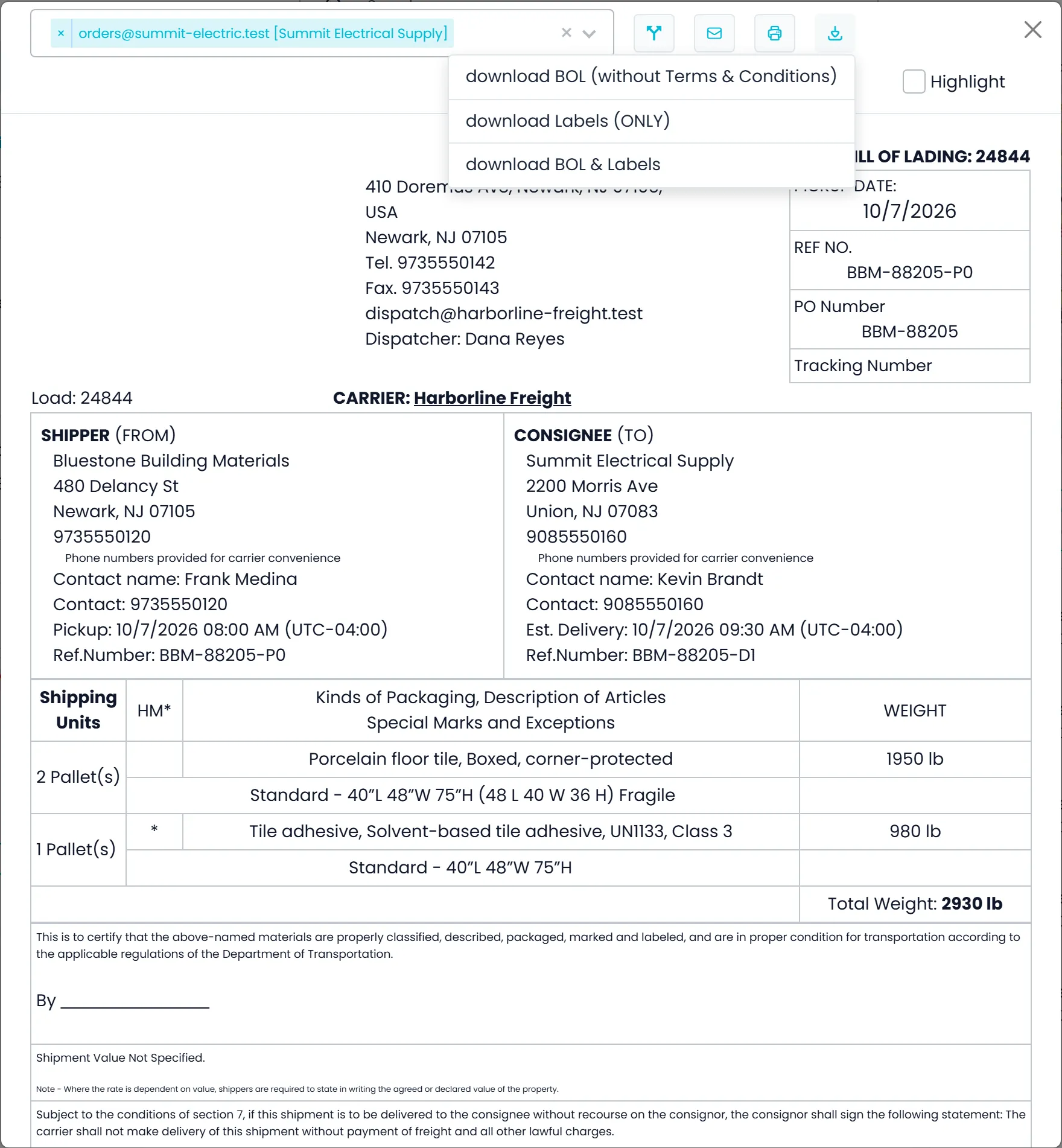
Shippers who sign in to your Customer Portal open the BOL and the order sheet for their own orders from the orders list once an order is scheduled. Both are built from the same templates your office uses, and they can print them or download the PDF. Invoices open in a preview they can print, and the files attached to an order can be previewed and downloaded.
- Order Sheet and BOL in the orders list menu, once an order is scheduled
- BOL options: split the items per stop, or highlight items
- Invoices: preview and print, from the same invoice document your office sends
- Order attachments: preview and download, and customers can attach their own paperwork until the order is approved
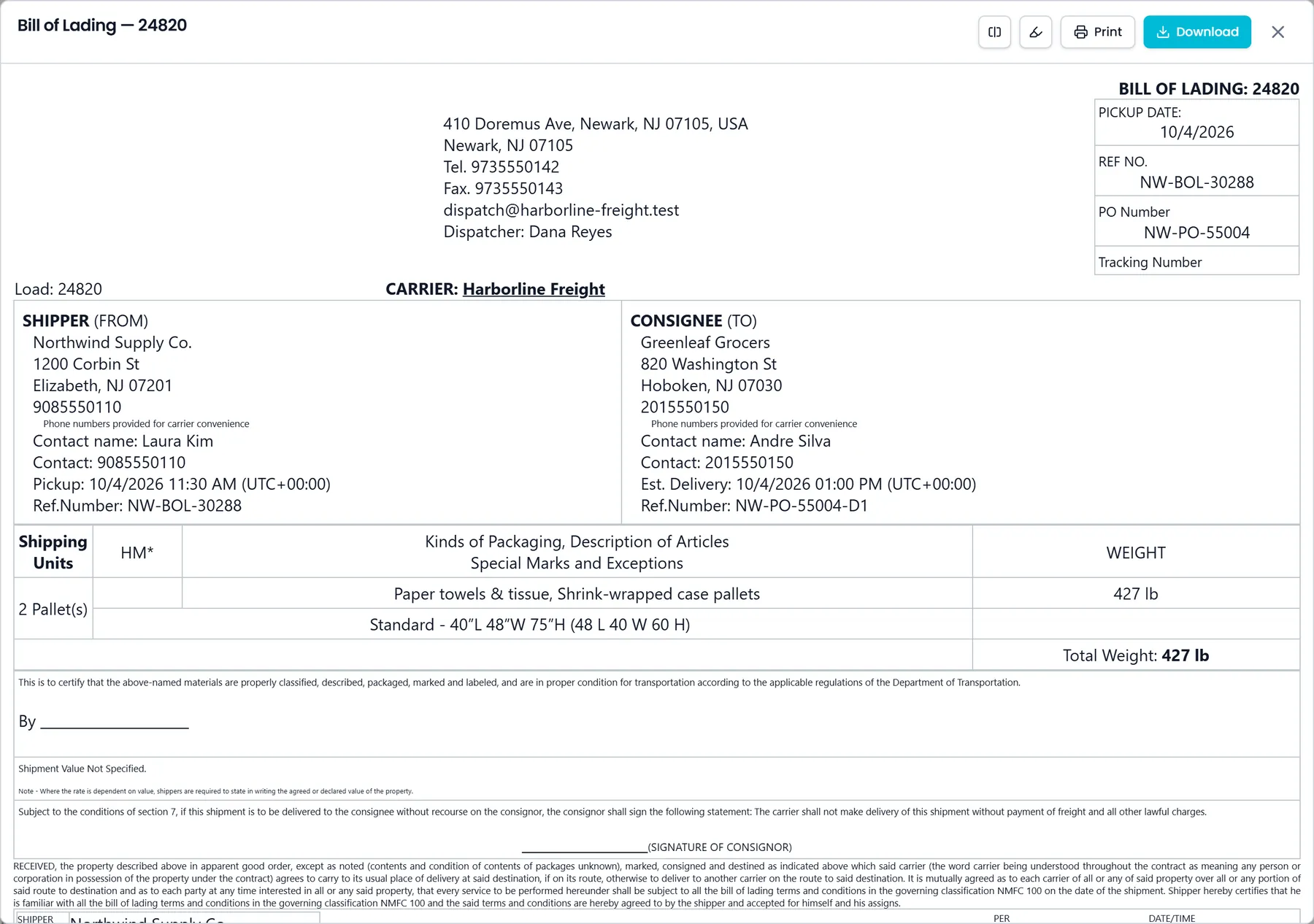
Filed automatically
Which generated documents land in the library
Each one is linked to the record it came from. Emailed files also show who they were last sent to, with their send history.
Invoice PDFs
Filed when you download or email an invoice, and linked to the invoice.
Bill of lading PDFs
Filed when you email a BOL or download the standard BOL for an order, and linked to the order.
Quote PDFs
Filed when you email a quote, and linked to the quote.
Pallet labels
Filed when you email them together with the BOL, and linked to the order.
Order paperwork
The order's attachments, merged into one PDF and sent with an invoice email. Linked to the invoice.
Customer email attachments
Files you attach to an email you send a customer from RushHour. Linked to the customer and read and classified like an upload.
QuickBooks Desktop export
Each file you export for QuickBooks Desktop, with links to the invoices in it (up to 100 per file).
Proof of delivery PDFsNew in the October 2026 release
Filed when you email a POD, or download one for the whole order, and linked to the order.
What that changes day to day
Write documents in-app
Draft in the built-in editor, save as Markdown, PDF or Word, reopen it to edit later, and email any library document as an attachment.
You can see where a file came from
Generated documents record the order or invoice they were made from, who they were last sent to and their send history, up to the last 50 sends, so you can see whether and to whom a document went out without searching anyone's mailbox.
Retention you preview first
Set a retention window and see which documents fall outside it, how much space that is, and which are held back and why. Nothing is deleted automatically.
Permissions by role
Viewing, uploading and managing documents (edit, archive, delete) are separate role permissions, and Import with AI is a fourth, so a teammate can read and upload paperwork without creating records from it.
A history on every file
Each document shows who uploaded it and when, and its Activity lists when it was emailed from the library, captured, reprocessed or changed in a bulk action, and which records an AI import created from it.
Limits you can plan around
Up to 10 files per upload and 25 MB per file, OCR on the first 20 pages of a scanned PDF, bulk actions on up to 200 documents, and comparisons of up to 2,000 lines per document.
Questions
Documents: common questions
Which files can we upload, and how large can they be?
PDF, Word (.doc and .docx), Excel (.xls and .xlsx), CSV, plain text and images (PNG, JPG, WEBP, GIF and TIFF). You can upload up to 10 files at a time, by button or drag and drop, each up to 25 MB. Photos and scanned pages are read with OCR, up to the first 20 pages of a scanned PDF.
Will RushHour create orders from a document on its own?
No. A new document is read, classified and filed. Order sheets, manifests, packing lists, purchase orders, price sheets and customer documents then wait under Needs import. Import with AI opens an editable preview in the AI assistant, and nothing is saved until you confirm it. Creating records from a file also needs the Import with AI permission, which is separate from viewing and uploading documents.
What if the AI misreads a scan?
Reads that look shaky are flagged Needs review: the type was not recognized, extraction failed, no text was found or confidence is low. Open Edit extracted text to correct it, and search and imports use your correction. You can also reprocess the file.
What happens when we regenerate an invoice or a BOL?
The library keeps one entry per generated document. When a changed version is filed again, that entry is updated and shows its version, such as v2, instead of a second copy. Sending an unchanged file again adds to its send history.
Can our customers get their own BOL?
Yes. In the Customer Portal, once an order is scheduled, they open its BOL and order sheet from the orders list to preview, print or download them, and they can preview and print their invoices. They can also open the files attached to their orders, and attach their own until an order is approved.
Can we stop the AI from using a rate it learned from a document?
Yes. In Documents, open AI Knowledge and suppress the rule. It stays on the list for reference, the AI stops using it, and it stays suppressed if the document is processed again. You can reactivate it or delete it for good, and learned import layouts can be switched off or forgotten the same way.
Put your documents to work
Where does your paperwork pile up?
Bring a BOL, an invoice and a price sheet to the demo. We will run them through and show you what comes back.