
Know what every truck
actually costs.
Drivers log fuel and repair costs from the driver app on Android or iPhone with a photo of the receipt, even with no signal. Receipts uploaded in the office are read by AI and checked by a person before anything is booked. Driver submissions wait for approval, and every cost is filed against the truck, driver or order it belongs to, so you see spend and cost per mile for each truck.
From receipt to cost per mile
Every truck cost in one ledger
It all lives under Settings → Expenses in the Company Portal, in ten tabs from Trucks to Setup, plus an Expenses screen in the driver app.
Driver expense capture
Catch every truck cost before the receipt goes missing
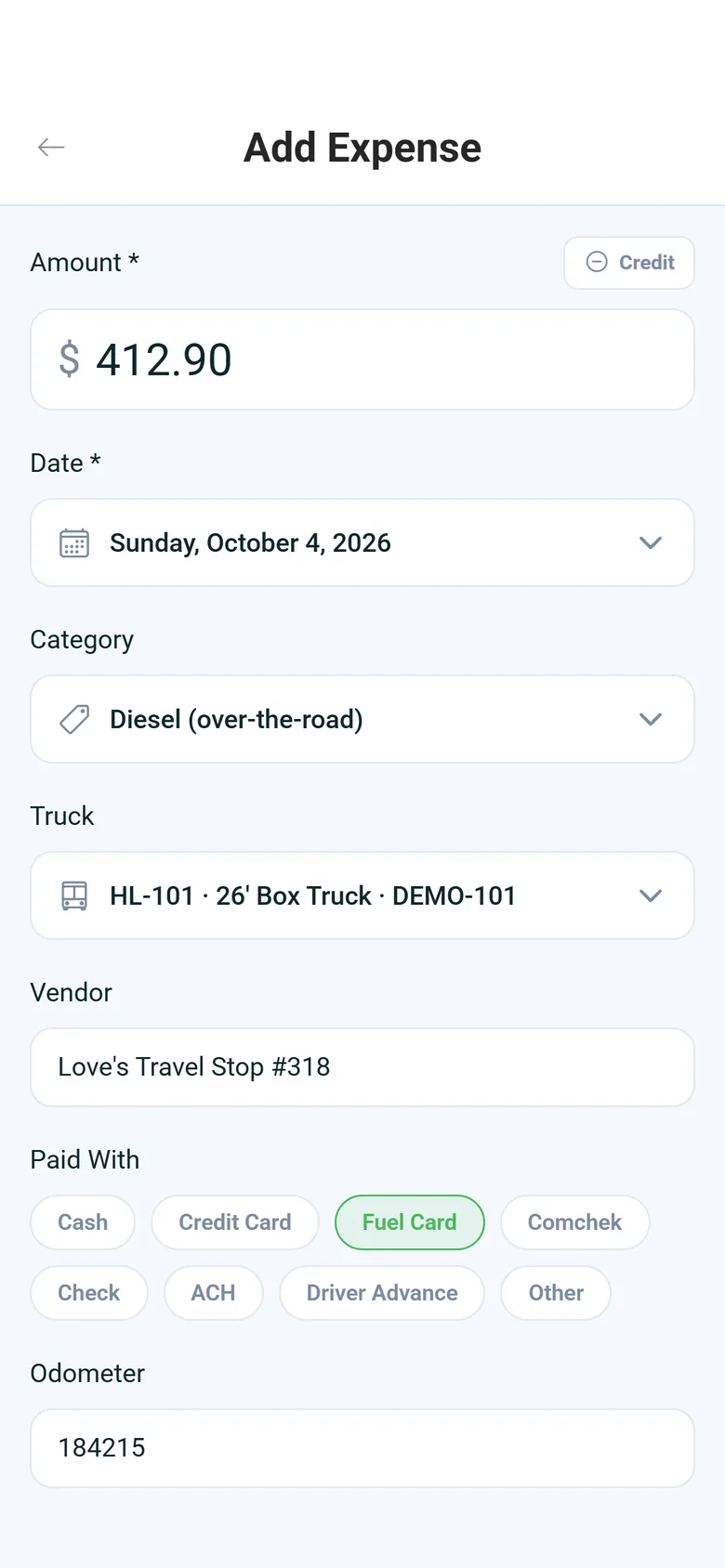
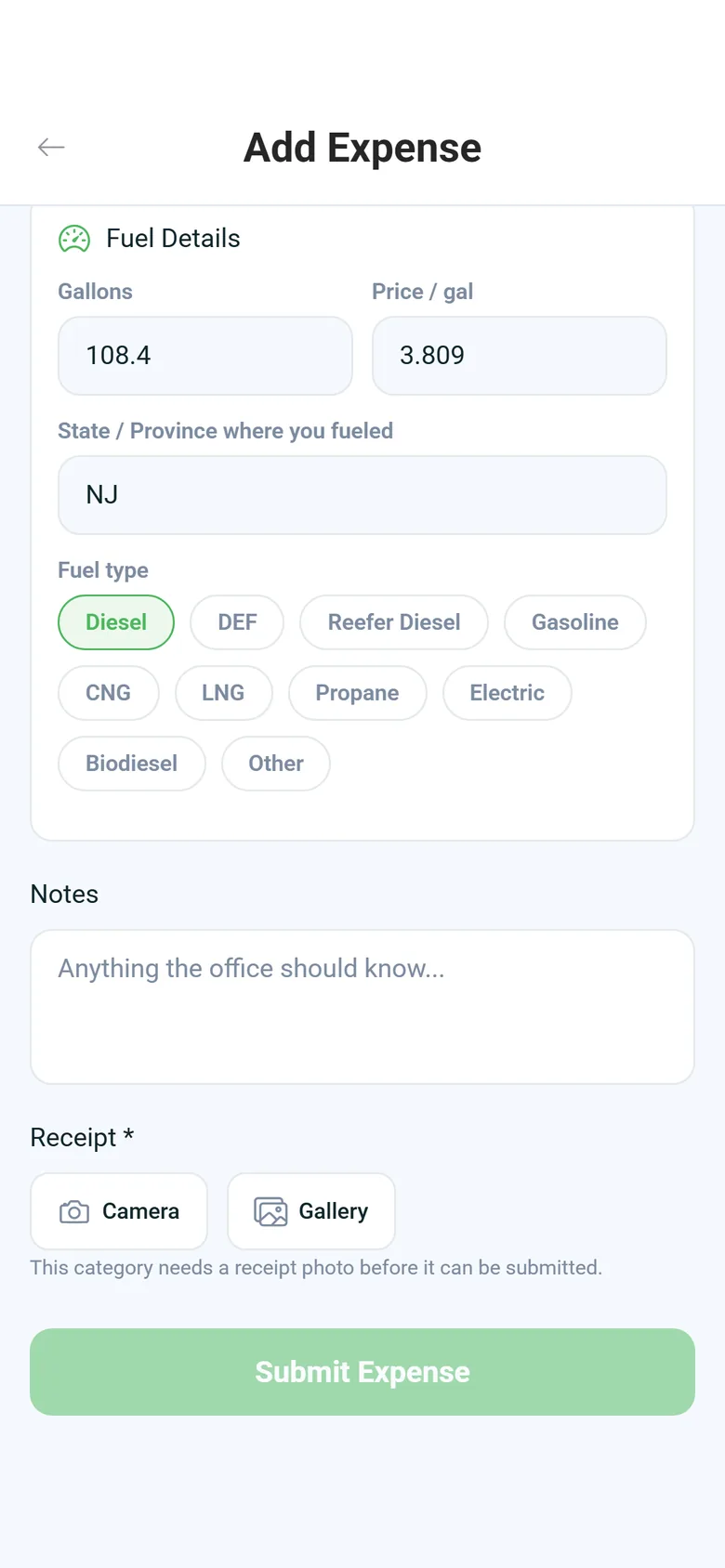
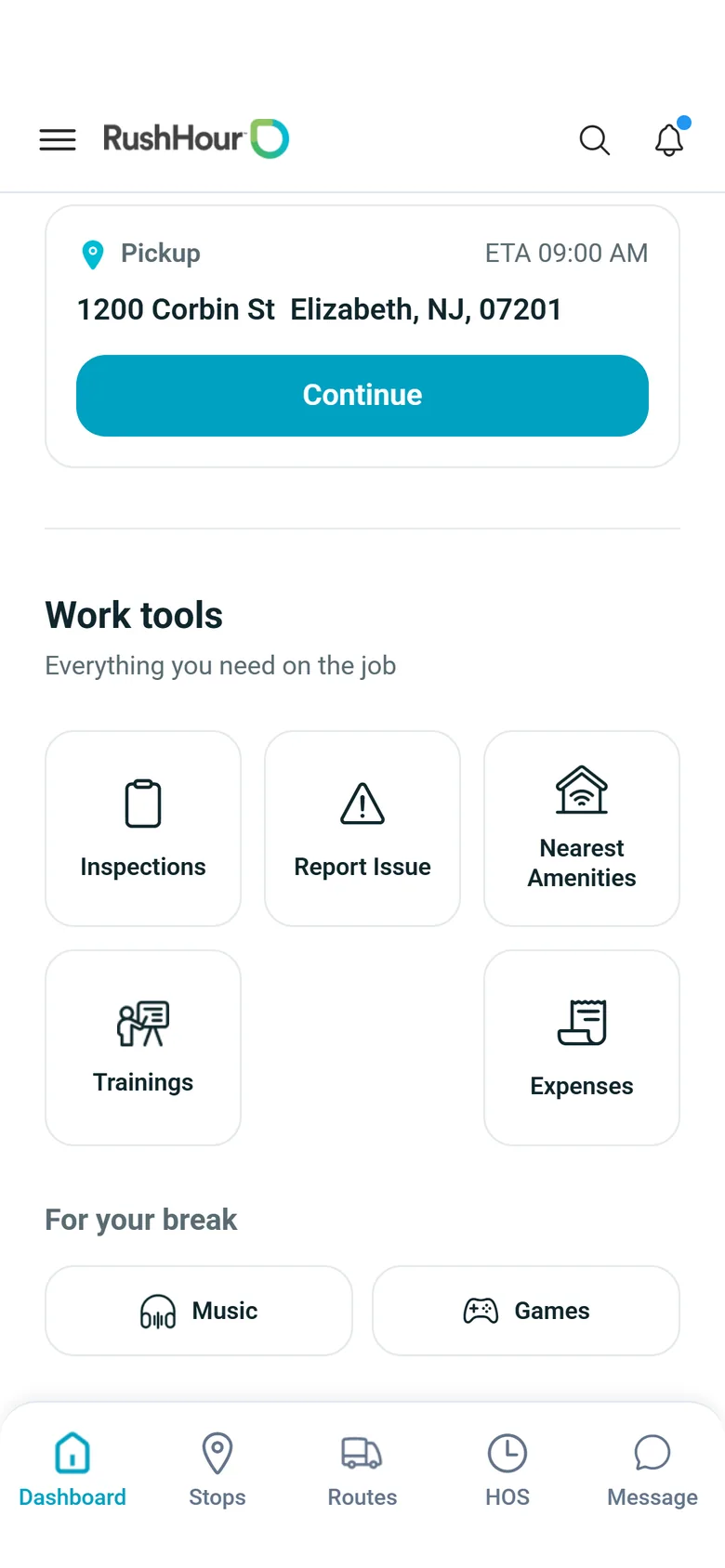
Drivers open Expenses from the Work tools on the driver app's dashboard and add the cost: amount, date, category, truck, vendor, how it was paid and the odometer, plus a photo of the receipt from the camera or the gallery. At the pump they also enter gallons, price per gallon, fuel type and state, and the app works out the total. A Credit switch records refunds and credits, such as a fuel-card credit. With no signal, the expense and its photo wait on the phone and upload when coverage returns, without creating duplicates. Expense capture is in version 2.x of the driver app, on both Android and iPhone. The office can also enter costs or upload receipts for any driver.
- Receipt photo, amount and truck from the phone
- Gallons, price per gallon, fuel type and state at the pump
- Queues offline and uploads when signal returns
- Paid with cash, credit card, fuel card, check, ACH, Comchek or a driver advance
- Categories that need a receipt cannot be submitted without the photo
- Edit or delete until the office reviews it, and see the reason if it is rejected
Approvals
Driver expenses wait for a yes
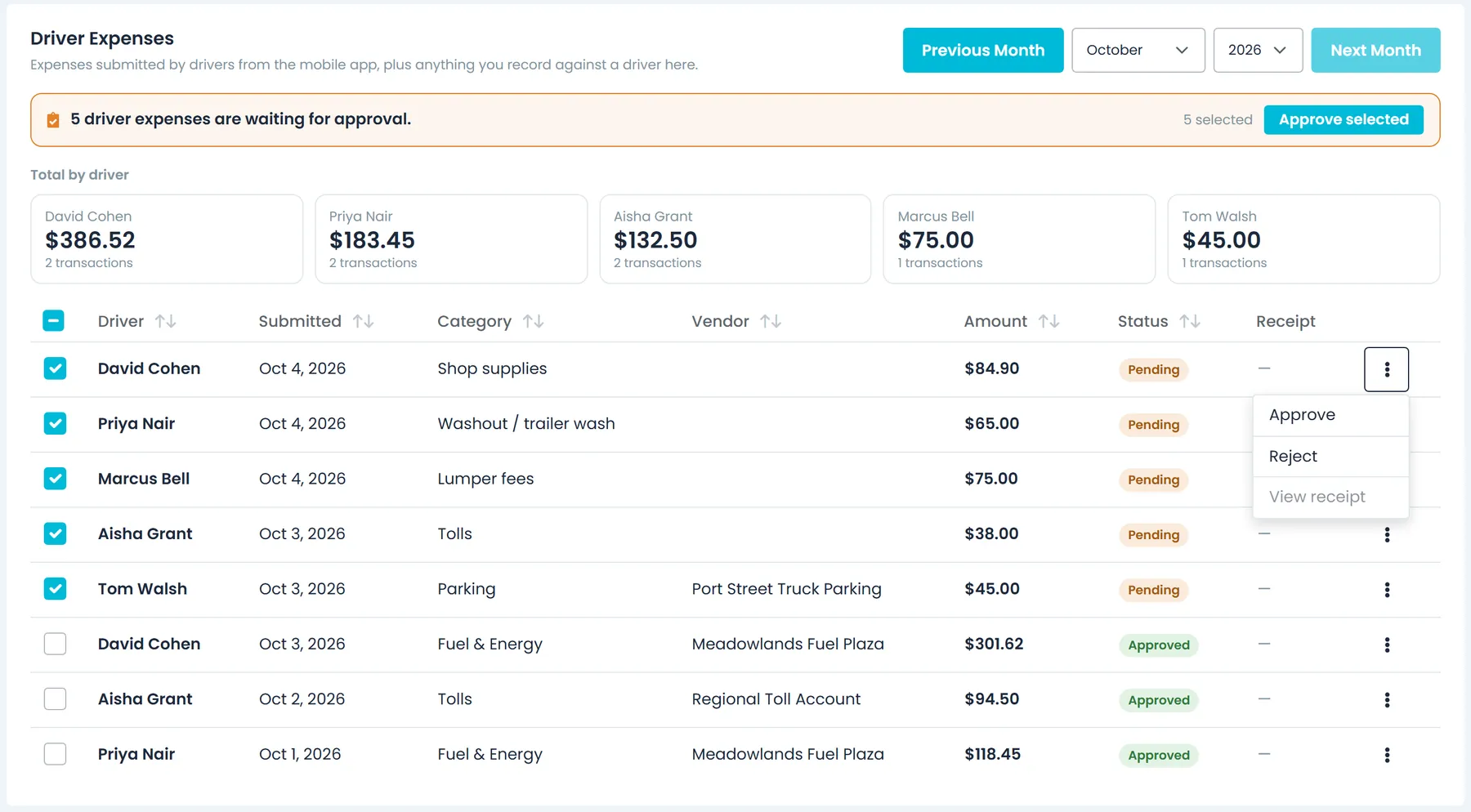
Expenses a driver submits from the app arrive on the Drivers tab as Pending, with any receipt photo the driver took, and a banner says how many are waiting. Approve them, or reject them with a reason the driver sees in the app, one at a time or in bulk. Costs the office types in are booked straight away unless their category has an approval threshold and the amount reaches it, and receipts confirmed from the AI reader also wait for approval. The Drivers tab shows driver expenses for the month with a total for each driver.
- Approve or reject with a reason, in bulk
- Approval thresholds per category
- Monthly total for each driver
- Nobody can approve an expense they submitted themselves
- A category that needs a receipt cannot be approved without one
AI receipt reading
Drop in a stack of receipts, check the numbers, book them
In the office, drag in receipt photos or PDF invoices, up to 10 files at a time and 25 MB each. AI proposes the vendor, date, total, currency, tax, payment method and a category, and for fuel the gallons, price per gallon, fuel type and state. Each reading shows its confidence so shaky ones stand out, and nothing becomes a cost until a person reviews and confirms it. A confirmed receipt lands in the ledger as Pending with the receipt attached, ready for approval. If a receipt cannot be read, you can still enter it by hand. This runs on receipts uploaded in the Portal, not on photos drivers attach in the app.
- Images and PDFs, several at once
- Confidence shown on every reading
- Nothing booked until someone confirms
- Up to 10 files per upload, 25 MB each
- Fuel purchases detected, with gallons, fuel type and state
The ledger
Every cost filed against its truck, driver or order
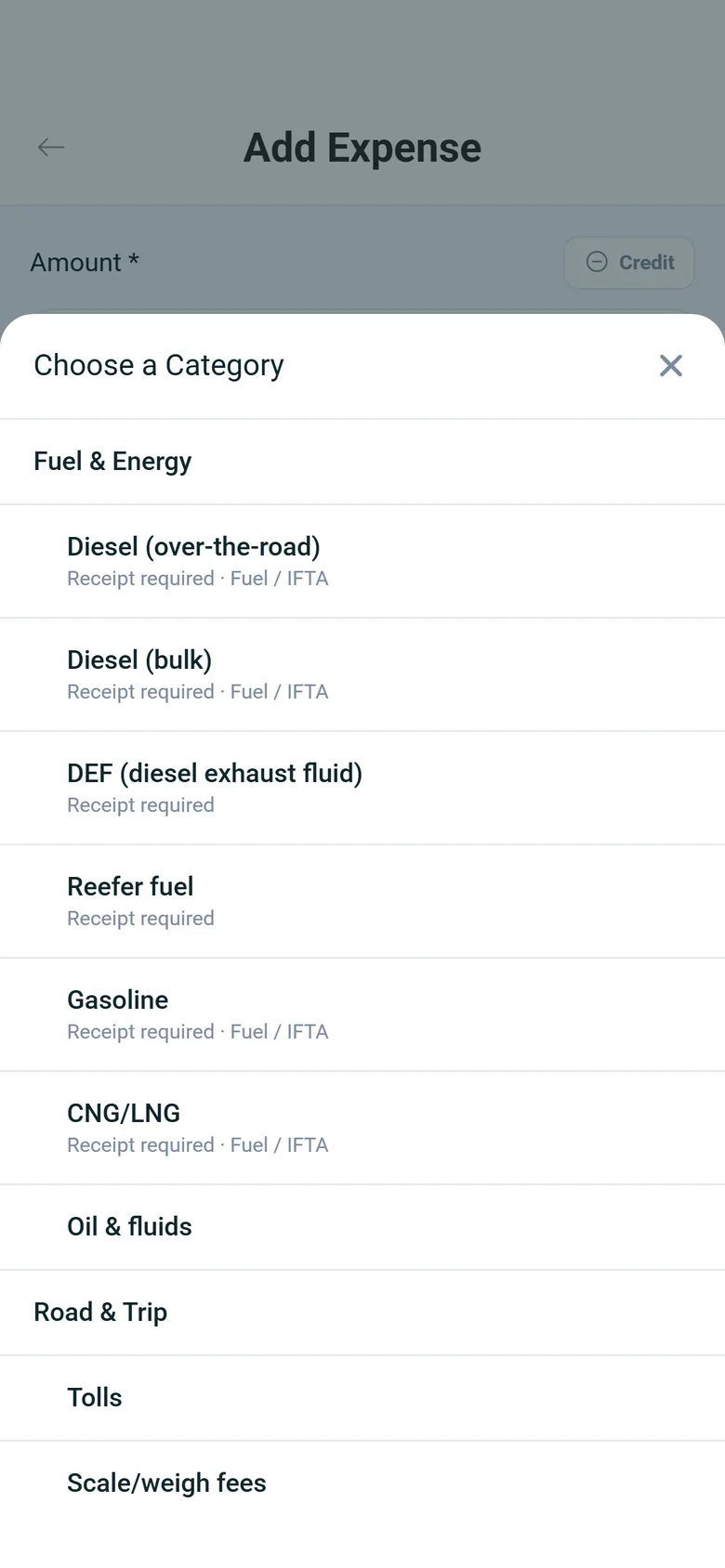
All expenses land in one Transactions list you can filter by date, category, vendor, truck, driver, approval status, source, amount, receipt and billable, with totals for the whole filtered set. Each cost can carry the truck, driver and order it belongs to, along with its currency, payment method, reference number, quantity and unit price. Categories start from a ready-made trucking chart of accounts: 64 categories in 8 groups covering fuel and energy, road and trip costs, equipment, maintenance, insurance, licensing and taxes, driver costs and overhead, each marked as fixed, variable or semi-variable, with a vendor list alongside.
- Filters with totals for the whole filtered set
- Truck, driver and order on every cost
- A ready-made trucking chart of accounts: 64 categories in 8 groups, each fixed, variable or semi-variable
- Approve, reject or set the category on many rows at once
- Each row shows its source: monthly grid, manual entry, driver app, receipt or recurring schedule
- Flag costs to bill back to the order, such as lumper fees, and filter for them
- An expense totals report by type and subtype on the new Reports page, with CSV exportNext release
Categories & vendors
Your chart of accounts and the people you pay
One click loads the standard trucking catalogue, and you can rename, extend or switch off any line. Each category sets its cost behavior, what it usually applies to (overhead, a truck, a driver or an order), a GL account code, whether it counts as IFTA fuel, whether it needs a receipt, an approval threshold and whether it is billed back by default. The vendor list keeps truck stops, insurers, shops and landlords with contact details, tax ID, a 1099 flag, payment terms and a default category, and ranks your top vendors by spend for the month.
- The standard trucking catalogue in one click, then rename, extend or switch off lines
- Receipt-required, IFTA fuel and bill-back flags per category
- An approval threshold per category
- Vendors with tax ID, 1099 flag and payment terms
- Top vendors by spend this month
Monthly views
Each truck's month, the office and the one-offs
The New Trucks tab shows one month at a time: for each truck, the truck payment, trailer payment, maintenance, insurance, license, tolls, fuel and other costs, with the fleet total and the average per truck. Its Odometer view takes the month's miles, or odometer start and end readings that work out the miles. Where a month has no entry yet, the grid shows the last amount entered for costs such as truck payments and insurance, as a starting point you can change or clear, and an Exclude Expenses window leaves a truck's costs out of the monthly grid and its totals for a date range. The Office tab holds the month's office costs with the total and the average per active truck, and Misc holds one-off costs that are not tied to a truck, a driver or an order.
- Per-truck month grid: truck and trailer payments, maintenance, insurance, license, tolls, fuel and other
- Miles, or odometer start and end readings, per truck per month
- Exclude Expenses windows that leave a truck's costs out for a date range
- Office costs with the average per active truck
- Misc tab for one-off costs not tied to a truck, driver or order
- On the Trucks tab, a typical truck's monthly costs and miles give a fixed cost per mile, which Classic quotes add as a truck line when Use New Pricing is on in Settings → Billing
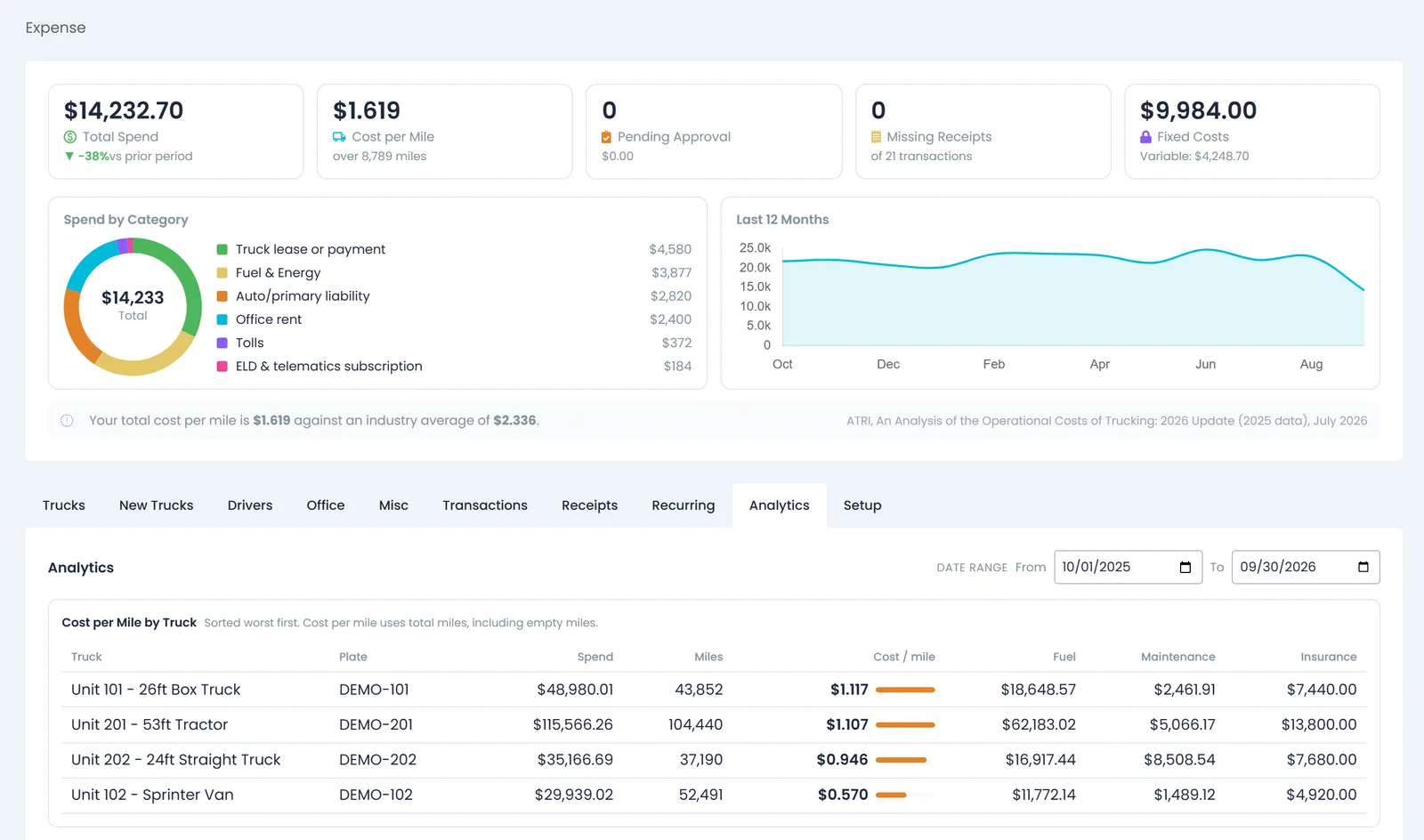
Cost per mile
Every rate shown with the miles behind it
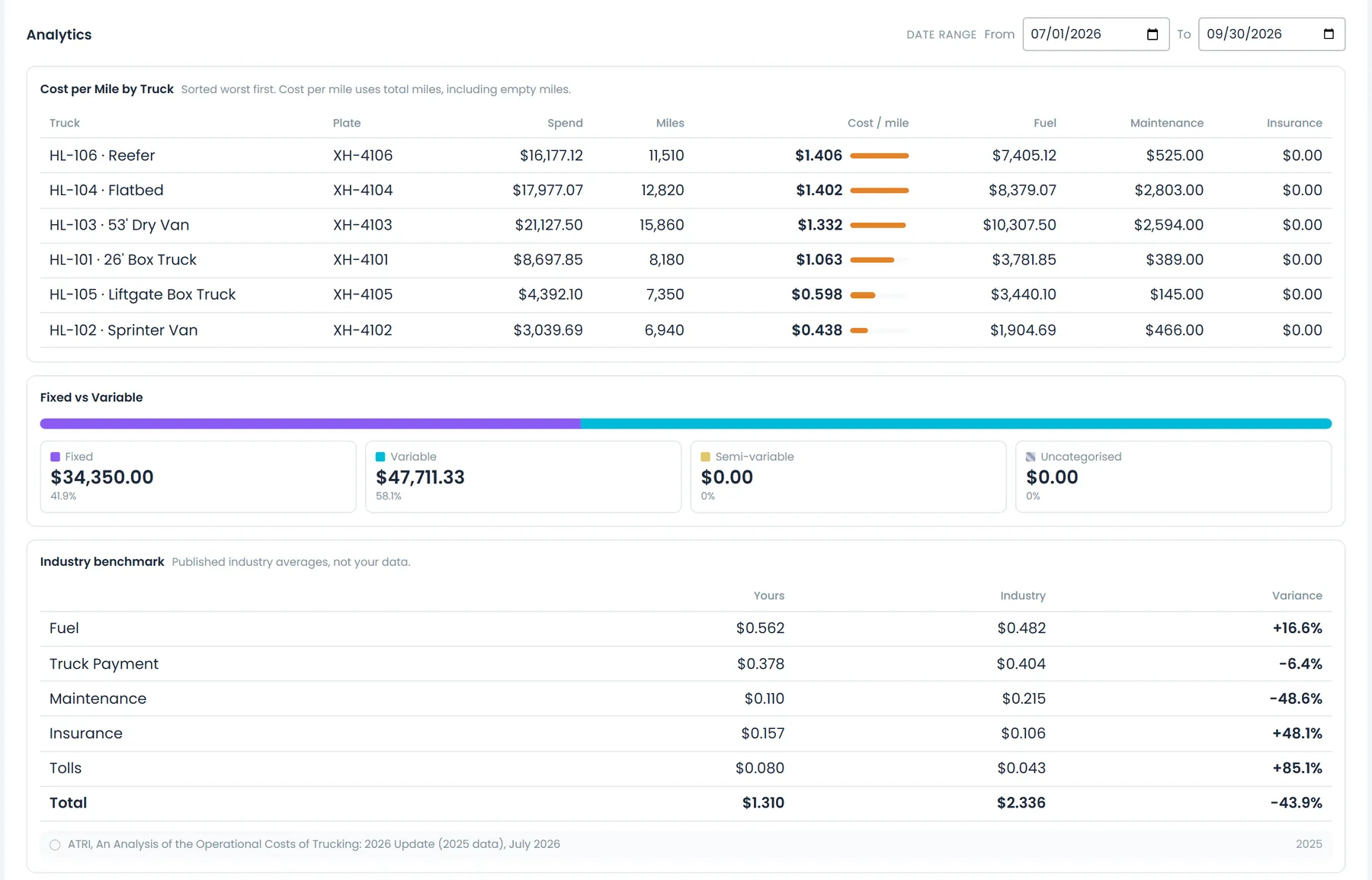
A summary above every Expenses tab covers the current month: total spend against the prior period, cost per mile with the miles it was divided by, expenses pending approval, missing receipts, fixed against variable spend, spend by category, a 12-month trend and your cost per mile next to the industry average. On the Analytics tab, pick any date range: trucks are ranked by cost per mile, worst first, with spend, miles, fuel, maintenance and insurance, alongside the fixed and variable split and a line-by-line industry comparison. Open a truck for its spend by type, a 12-month trend and its cost per mile next to the fleet's. Miles come from the mileage and odometer entries your team records, not from telematics, so cost per mile needs those entries.
- Cost per mile shown with the miles it was divided by
- Cost per mile by truck, worst first
- Compared with ATRI's published US trucking costs
- Fuel, truck payments, maintenance, insurance and tolls per mile against the industry figures
- This month's pending approvals and missing receipts at a glance
Recurring costs
Insurance and truck payments that post themselves
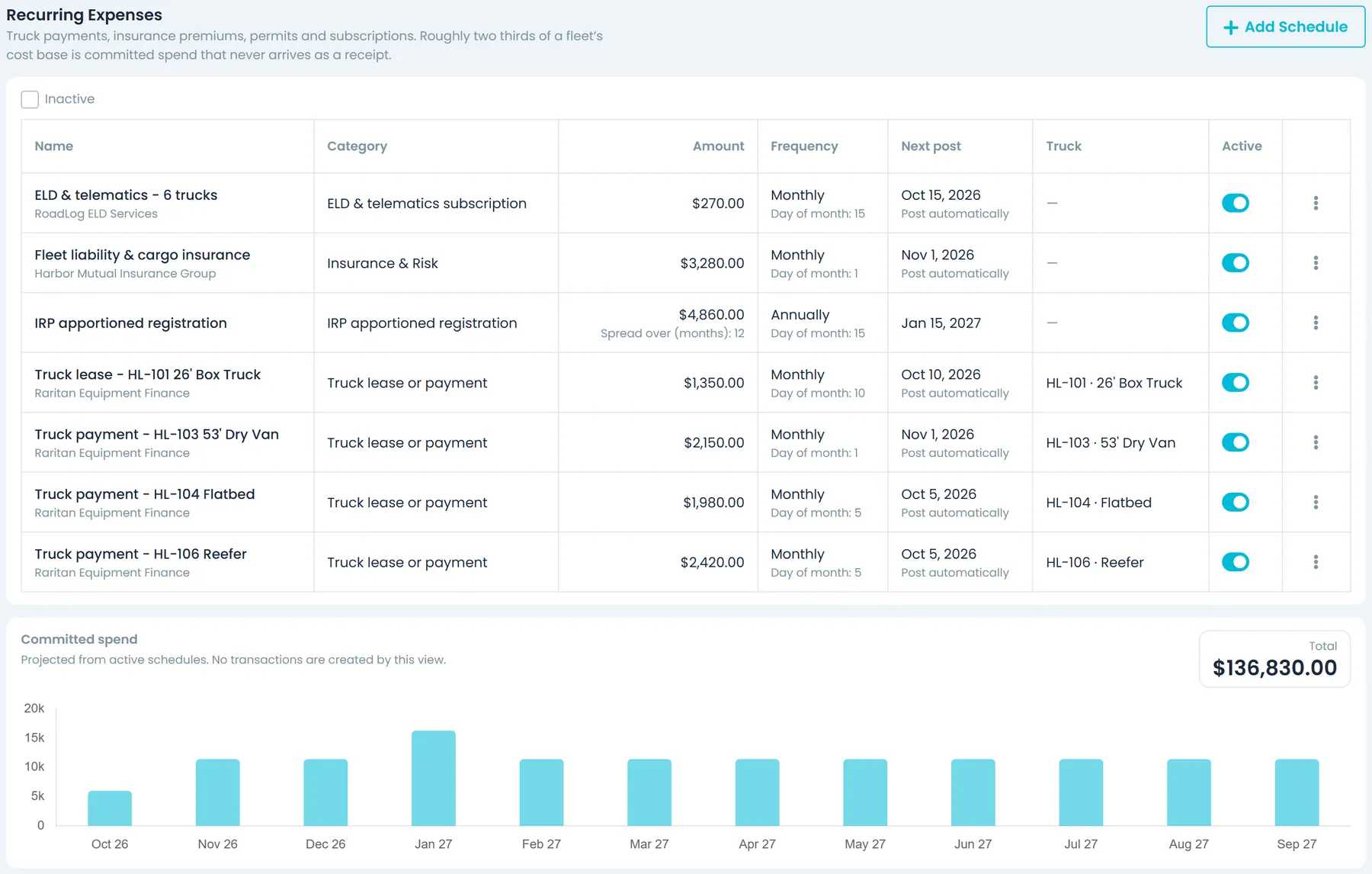
Set up recurring schedules for insurance premiums, truck and trailer payments, permits and subscriptions: weekly, every 2 weeks, monthly, quarterly, twice a year or annually, from a start date to an optional end date. They post on schedule without anyone typing them in, and Post now books any occurrence that is due on the spot, never the same one twice. A prepaid premium can be spread over several months instead of landing in a single month, and the schedules add up to a 12-month forecast of the spend you have already committed to. Turn off automatic posting to keep a schedule in the forecast only.
- Weekly to annual schedules that post automatically
- Prepaid premiums spread across months
- Committed-spend forecast
- Post now, or keep a schedule as a forecast only
- Link a schedule to its truck, driver and vendor
IFTA fuel data
Fuel records ready for the fuel-tax work
Fuel expenses store the fuel type, gallons and the state or province where the fuel was bought, and categories marked as IFTA fuel flag those rows as IFTA-eligible. Drivers enter these details at the pump in the driver app, and the AI receipt reader picks them off receipts uploaded in the office. RushHour does not yet track miles by jurisdiction or produce the quarterly IFTA return.
- Fuel type, gallons and purchase state on each fuel row
- Diesel, gasoline and CNG/LNG count as IFTA fuel by default; DEF and reefer fuel do not
- Miles by jurisdictionComing soon
- Quarterly IFTA returnComing soon
In the driver app
Expenses from the cab
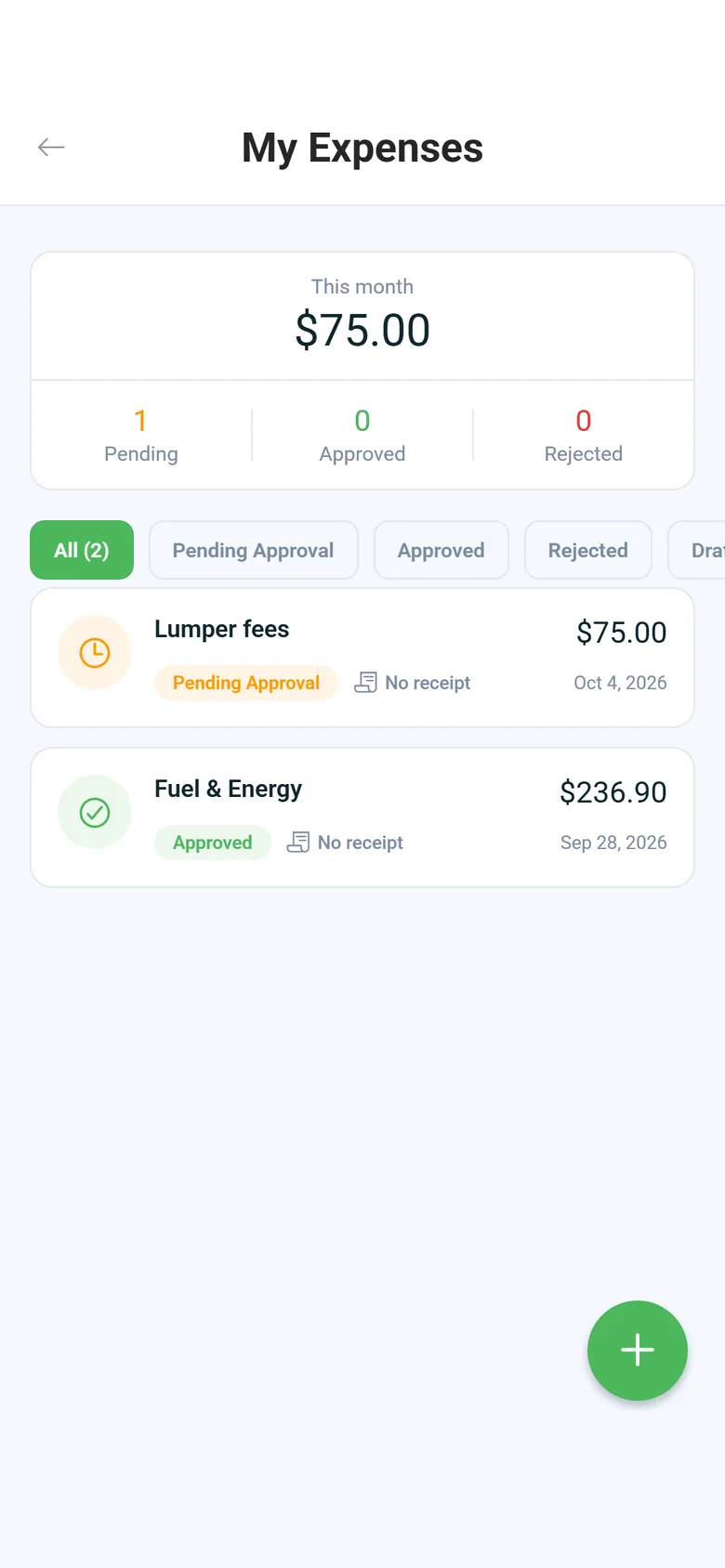
Expenses in version 2.x of the RushHour driver app on Android and iPhone: one tap from the dashboard, your company's own categories, and the status of every expense.
Good to know before you start
What the numbers depend on, so they mean what you think they mean.
Cost per mile uses recorded miles
Miles come from the mileage and odometer entries your team records for each truck. A truck with no miles recorded shows spend but no cost per mile.
Driver capture on Android and iPhone
Expense capture is in the driver app on Android and iPhone, in version 2.x. The office can still enter costs or upload receipts for any driver.
Trucks come from Samsara
Per-truck costs need trucks in RushHour, and adding a truck in the Portal means picking a vehicle from your connected Samsara account.
A US benchmark, in dollars
The industry comparison uses ATRI's published US operating costs in US dollars, without currency conversion.
FAQ
Questions carriers ask about expenses
Do I need telematics or an ELD to get cost per mile?
No. Cost per mile divides your spend by the miles your team records for each truck: the month's miles, or odometer start and end readings, on the New Trucks tab. A truck with no miles recorded still shows its spend, just without a cost per mile.
Can I make bigger expenses wait for approval?
Yes. Driver expenses always wait for approval. For costs the office enters, give a category an approval threshold: any charge or credit at or above it waits for a second person, because nobody can approve an expense they submitted themselves. A category can also require a receipt before anything in it is approved.
Does RushHour file my IFTA return?
No. Fuel rows keep the gallons, fuel type and the state or province where the fuel was bought, and IFTA fuel categories mark them as IFTA-eligible, so the purchase records are ready for whoever prepares your return. Miles by jurisdiction and the quarterly return are planned but not built yet.
Can the office record expenses for a driver?
Yes. In Settings → Expenses, add an expense against any driver and truck, or upload the receipt on the Receipts tab, confirm what was read, then set the driver and truck on the transaction. Anything recorded against a driver shows on the Drivers tab with that driver's monthly total.
What happens to a receipt photo taken without signal?
The expense and its photo are saved on the phone and upload by themselves when signal returns, and My Expenses shows how many are waiting. If an upload keeps failing, the photo stays on the phone until the driver taps Retry. On a shared phone or tablet, each driver's waiting expenses stay with that driver and upload when they sign in again.
Who can see and approve expenses?
Two role permissions control it: one to view expense data and one to create, edit and delete it. Approving and rejecting needs the second. Drivers only ever see their own expenses in the app.
Do my truck costs feed into pricing?
Yes. On the Trucks tab you set what a typical truck costs each month and how many miles it drives, which gives a fixed cost per mile. With Use New Pricing turned on in Settings → Billing (it is off by default), Classic quotes are priced from your shipment types and add that cost per mile as a truck line. The AI assistant's price checks also compare a lane price with a cost floor that includes truck cost per mile from your expenses, for roles that can see invoices and payments.
Go further
Related pages
Bring a few of last month's fuel receipts to the demo.
We'll upload them, show you what RushHour reads off each one, and where they land in your expense ledger.