
Know what each load costs you,
next to what it sells for.
Build a Classic price from your own cost per mile, driver wage and diesel price. Then switch on the cost ledger, record what you actually pay carriers and vendors on each order, and RushHour shows the profit with a label that says whether the costs behind it are estimates or confirmed. Recording a cost never changes a price or an invoice.
From quote to margin
Cost, price and margin on the same order
Classic pricing, the cost floor and expense analytics are in the Company Portal today. The per-order cost breakdown is an option a company admin turns on in Settings → Billing.
Classic cost-plus pricing
A price built up from what the load costs you
Choose Classic in an order's price box and RushHour prices the load from your own operating costs: route miles times your cost per mile, drive time plus an hour for every stop at your default driver wage, and fuel at 15 miles per gallon times the diesel price on file for your company's state. Additional charges are added as cost lines too, and your Default Markup % goes on top. See Details opens Price Details, where you can switch a cost line off, change the markup, or add a discount with a reason, as an amount or a percentage.
- Cost per mile and Default Markup % under Settings → Billing → Invoice Presets, the hourly driver wage under Settings → Drivers Settings, and the State for Gas Cost under Settings → Profile
- Each cost line with its quantity, price per unit and total, then cost, markup, subtotal, discount and grand total
- If your role can see expense data, ask the AI assistant for the price vs cost report to see your order prices against their cost-line totals, month by month
- Used while Use New Pricing in Settings → Billing is off, which is the default; with it on, Classic prices from your shipment types instead
Cost breakdown per order
Every cost on the load, beside what you charged
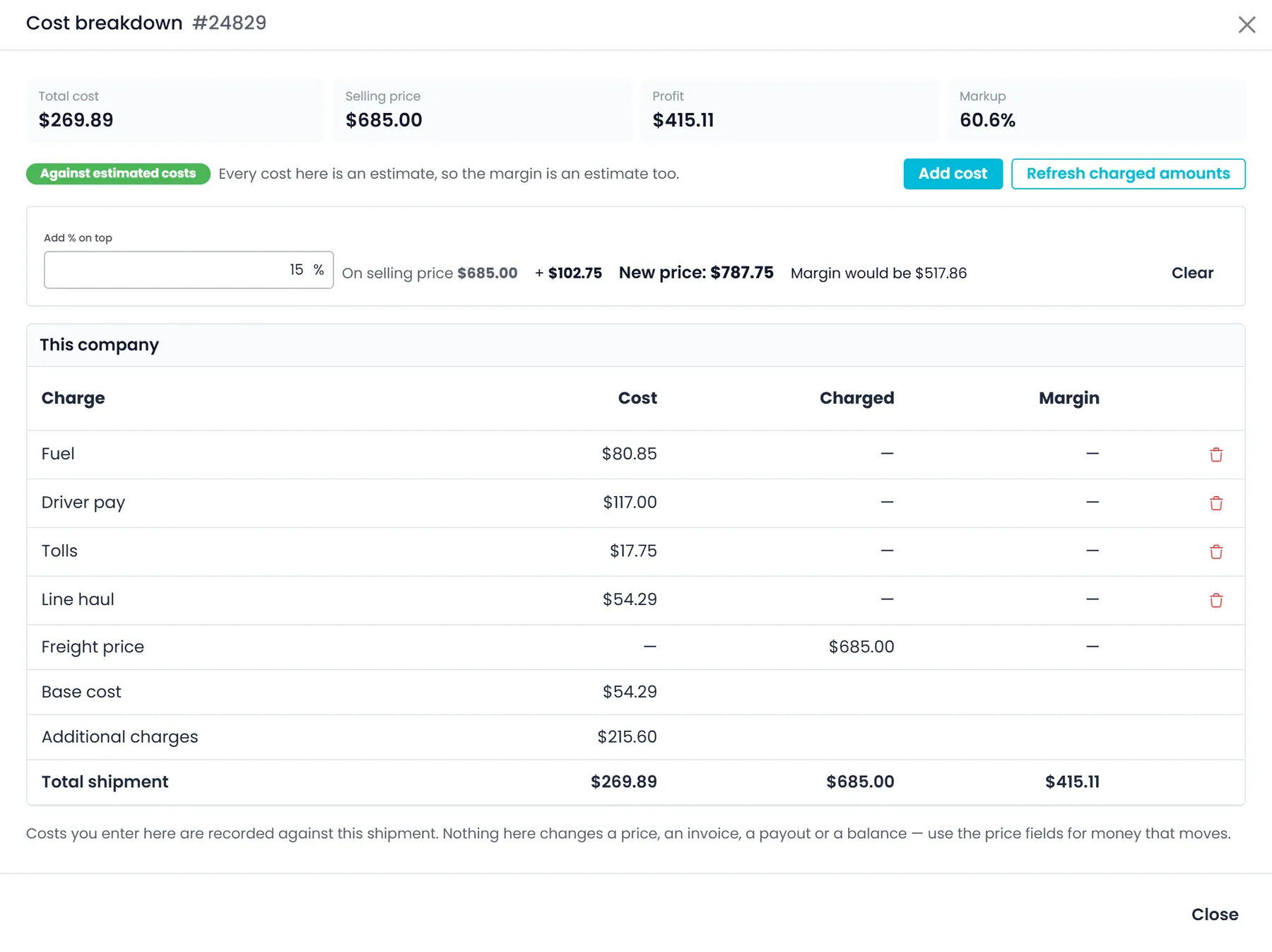
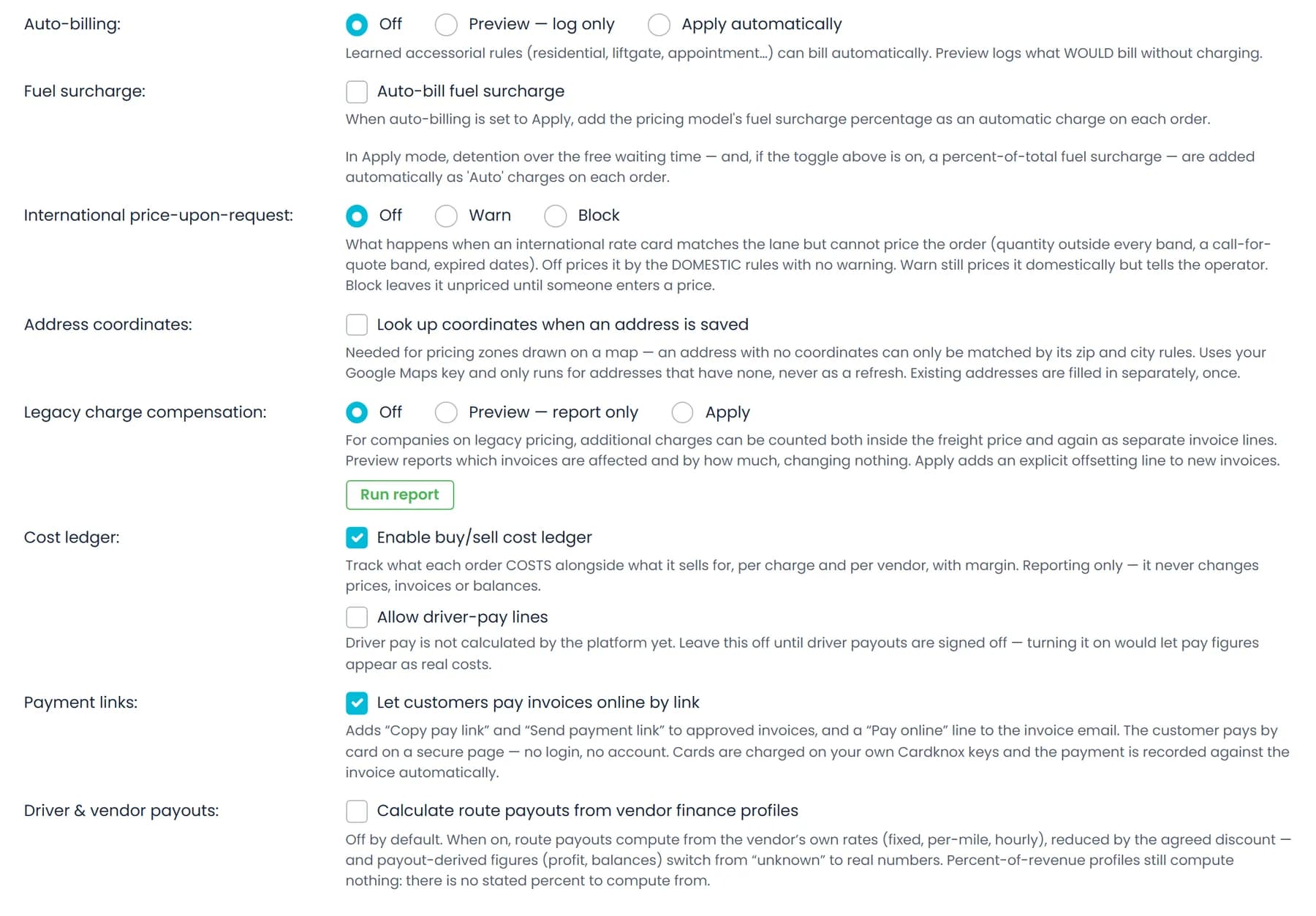
Turn on Enable buy/sell cost ledger in Settings → Billing (it is off by default), and a Cost breakdown button appears in the price box of every saved order and quote in the New UI. Record each cost with its charge, quantity times rate or a plain amount, and notes. Refresh charged amounts brings in what the order is billing, its freight price and additional charges, and the dialog shows total cost, selling price, profit and markup.
- Your costs listed charge by charge, with base cost, additional charges and total shipment
- Quick-add buttons for Fuel, Line haul, Driver pay, Tolls, Lumper and Detention
- Costs you type in count as estimates, and the margin label says so: Against estimated costs
- Add % on top: type a percentage to see the new price and the margin it would leave, without changing anything
- Open to users whose role can see invoices and payments
Before you quote
Hold a price up against your cost floor
Ask the AI assistant for a price on a lane and, if your role can see invoices and payments, the assistant also works from a cost floor for that lane: drive time estimated at 45 mph plus an hour at pickup and an hour at delivery at your default driver wage, fuel at 15 miles per gallon and your state's diesel price, and a truck operating cost per mile from the monthly truck expenses and monthly truck miles you enter in Settings → Expenses. It can set that floor against the price it calculated for the lane and give the margin, with the basis of each number and what was left out.
- Monthly expenses typed as gas, or named as driver pay or tolls, stay out of the per-mile rate, so nothing is counted twice
- Truck costs and mileage entries recorded over the last six months give a measured cost per mile alongside
- Tolls are not included
Cost per mile
Your real cost per mile, truck by truck
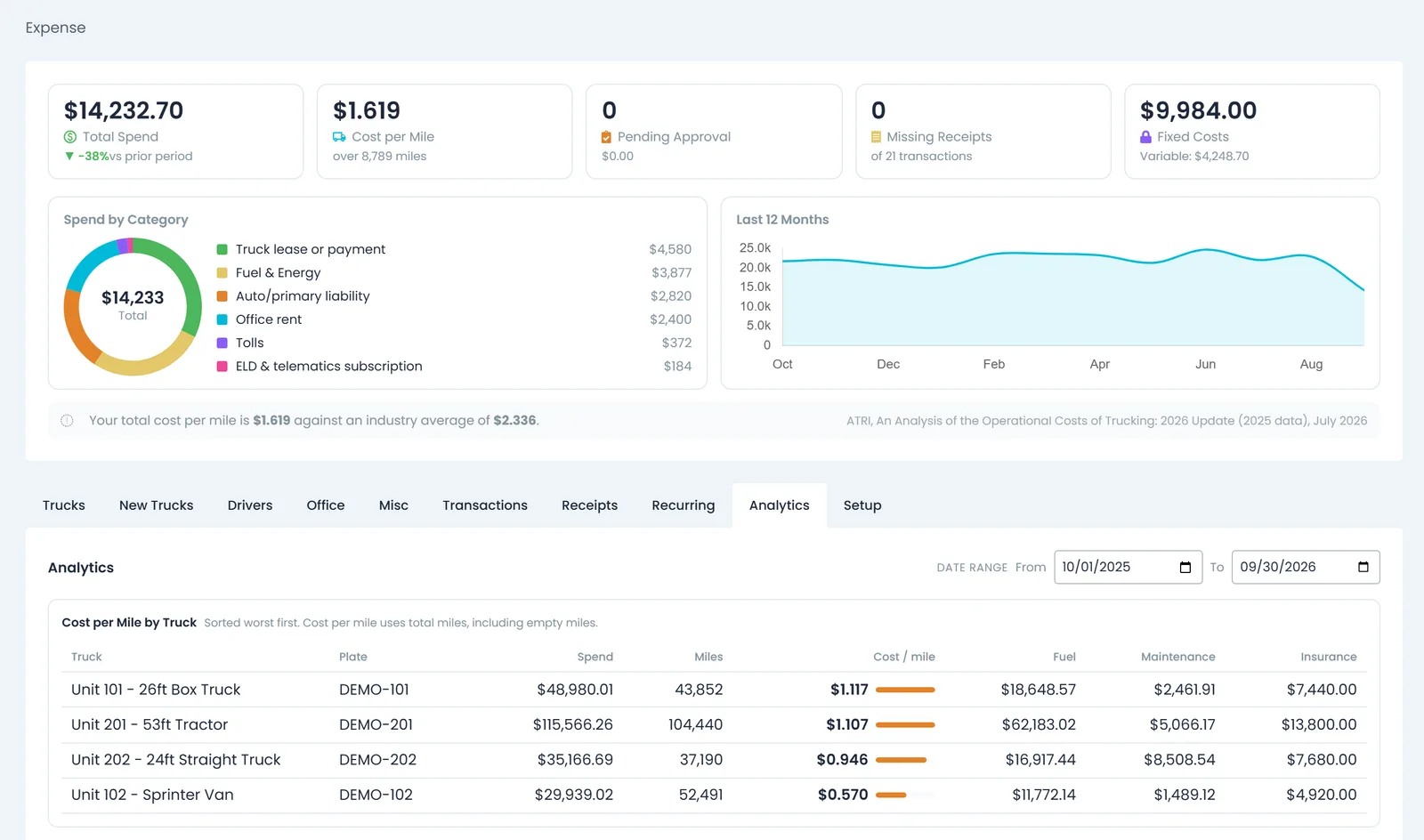
Settings → Expenses turns the truck costs your drivers and office record into total spend, cost per mile with the miles it was divided by, and fixed against variable costs, and sets your overall cost per mile beside ATRI's published average for US trucking. Its Analytics tab ranks trucks by cost per mile, worst first, with fuel, maintenance and insurance split out.
- Spend by category and a 12-month trend
- Cost per mile by truck, worst first, counting empty miles too
- Miles come from the mileage and odometer entries your team records
Outsource carriers
What you agreed to pay each carrier
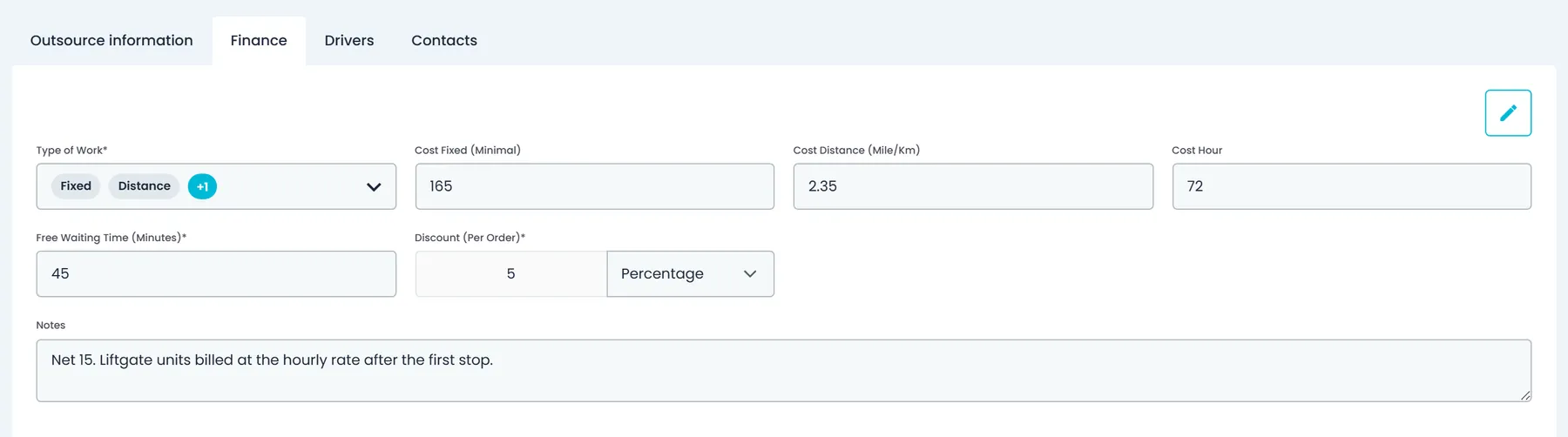
Each outsource company's Finance tab keeps the rates you agreed with that carrier: the type of work (fixed, distance or hourly, alone or combined), a fixed minimum, a cost per mile or kilometer, a cost per hour, free waiting time in minutes, and a per-order discount as a fixed amount or a percentage. When the carrier's invoice for a load arrives and the cost ledger is on, add what you paid as a cost line, such as Line haul, in that order's Cost breakdown, and the dialog shows the profit left on the load.
- Agreed rates kept on the carrier's own Finance tab
- What you paid the carrier recorded as a cost line in each order's Cost breakdown
- A Payouts page in Accounting lists each driver's and carrier's routes with the payout, what has been paid and what is still dueNext release
Margins you can trust
Reporting only, never rewrites a price
Costs you record sit beside the order. They never change its price, an invoice, a payout or a customer balance, so you can try a number without risk.
Margin labels say how solid they are
Every margin carries its basis: against estimated costs, costs partly confirmed, or against confirmed costs. With no costs recorded it reads No margin available, never a confident zero.
Kept per currency
Costs you add are recorded in the order's currency. When a vendor's lines are in more than one currency, RushHour leaves that vendor's total blank instead of adding them up, and when costs and charges are in different currencies the margin reads No margin available instead of a made-up number.
Costs stay with the right people
The Cost breakdown and the cost floor need permission to see invoices and payments. In the next release, the order buying price goes only to company admins.
Next release
Buying price, toll costs and margin reports
These are finished and in final testing. They become available with the next production release, and details can still change before then.
Buying price
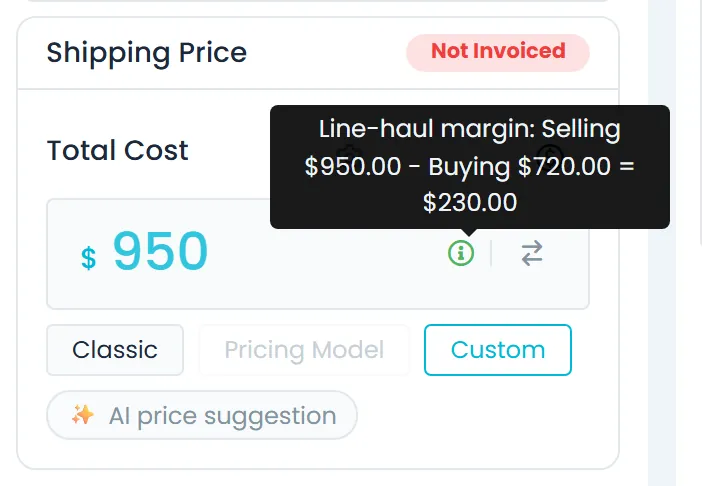
The buying price and line-haul margin on the orderNext release
In the price box of a saved quote or of an order that isn't closed, in both the Old UI and the New UI, company admins can switch between the selling price and the buying price (what you pay whoever hauls the load), enter the buying price with the edit icon and save it straight away. An info icon beside the price shows the line-haul margin: the selling price minus the buying price.
- Only company admins see the buying price; other roles never receive it
- Saved on its own, without saving the whole order
- The tooltip shows the whole sum, so you can check it
TollGuru toll costs
Toll costs from your own TollGuru accountNext release
Add your TollGuru API key under Settings → Integrations, and the tolls on a route are added as a Tolls line when an order is priced. Test connection checks the key without saving it, and the TollGuru card shows whether orders are currently priced with toll costs. You need your own TollGuru account.
- A Tolls line beside mileage, driver time and fuel
- Test connection before you save the key
- The saved key is masked and never shown in full in the browser
Reports and payouts
Margin reports and carrier pay on their own pagesNext release
A new Reports page in the sidebar runs 18 built-in reports with CSV export, including order prices against their cost-line totals by month and the route payouts recorded for drivers and outsource carriers, grouped by payment status. A new Payouts page in Accounting lists each driver's and carrier's routes with the payout amount you enter, what has been paid and what is still due, and groups unpaid routes into settlements.
- The price vs cost report says whether the cost lines are real costs or rate-card prices
- Export any report's rows to CSV
- Payouts opens to company admins by default
Questions about load costs and margin
Does recording a cost change the order price or the invoice?
No. The Cost breakdown is reporting only: costs you record there never change a price, an invoice, a payout or a customer balance. To change what you charge, use the order's price fields.
How does RushHour calculate a Classic price?
While Use New Pricing in Settings → Billing is off, which is the default, a Classic price adds up route miles times your cost per mile, drive time plus an hour for each stop at your default driver wage, fuel at 15 miles per gallon times the diesel price on file for the state in your company profile, and any additional charges. Your Default Markup % goes on top and a discount, if you add one, comes off. Price Details shows every line and lets you change the markup and discount on that order.
What do the margin labels mean?
Against estimated costs means every cost on the order is an estimate. Costs partly confirmed means some costs come from a vendor invoice and some are still estimates. Against confirmed costs means every cost comes from a vendor invoice or a driver payout. No margin available means no costs are recorded yet, or the costs and charges are in different currencies.
Who can see costs and margins?
The Cost breakdown and the cost floor in the AI assistant's price recommendations need permission to see invoices and payments, and the price vs cost report needs access to expense data. In the next release, the order buying price is shown only to company admins, and other roles never receive it from the API.
Can I record what I pay the hauler on a brokered load?
Yes. With the cost ledger on, add what you pay the hauler as a cost line, for example Line haul, in the order's Cost breakdown, and the dialog shows the profit and markup left on the load. In the next release, company admins can also enter a buying price in the order's price box and see the line-haul margin, the selling price minus the buying price.
Are tolls included in the cost?
Not today: the Classic cost lines and the cost floor leave tolls out. In the next release, you can connect your own TollGuru account under Settings → Integrations, and the tolls on a route are added as a Tolls line when an order is priced.
What happens with costs in different currencies?
Costs you add are recorded in the order's currency. If a vendor's lines are in more than one currency, that vendor's total is left blank rather than added up, and if costs and charges are in different currencies, the margin reads No margin available.
Related
Which of your loads actually make money?
Book a demo with a recent load in mind, and we will walk through its cost, its price and the margin between them in RushHour.