
Every integration, listed.
No marketplace filler.
QuickBooks Online for the books, Cardknox for card payments, Samsara for truck positions, Telegram for messaging drivers, and your choice of map and routing provider. Each one is switched on per company in Settings, most of them with your own vendor account or keys. If we don't connect to something you run, we'll say so.
Connectors
What RushHour connects to today
Everything below is set up in Settings > Integrations, except the QuickBooks Desktop export, which runs from Accounting. All of it is in production apart from the badged email item. Features RushHour does on its own, like PDFs, dashboards or imports, are not counted here.
Accounting
Send invoices and payments to QuickBooks, or hand your accountant a Desktop import file.
- QuickBooks Online: add your Intuit app keys, then sign in to QuickBooks
- Invoices and payments export automatically or when you choose
- The customer is created in QuickBooks on its first export, and failed exports are retried
- QuickBooks Desktop: export selected invoices to an import file
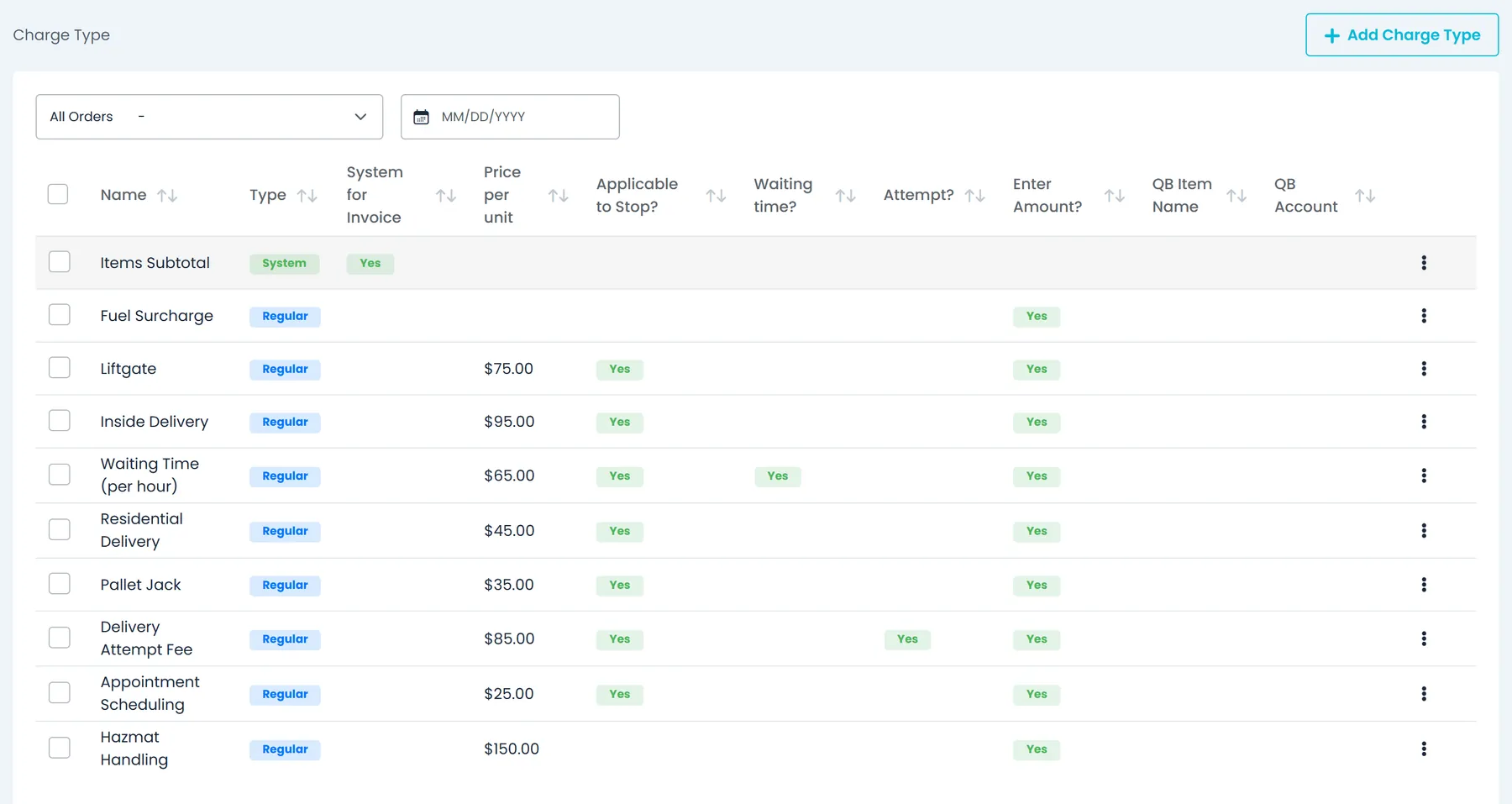
- In that file, charge lines use the QuickBooks item and account set on each charge type, and each invoice posts to Accounts Receivable
Card payments
Charge cards through your own Cardknox merchant account.
- Cardknox: enter your public and private keys in Settings
- Charge a saved card and apply the payment to the invoice
- Customers add a card in the Customer Portal through Cardknox's hosted card fields
Vehicle location
Already running Samsara? RushHour reads your vehicles and their positions from it, on every plan.
- Samsara: paste one API token
- Link Samsara vehicles to your trucks
- Truck positions from Samsara on the dispatch board, and GPS-based stop ETAs
- Ask the AI assistant for a vehicle's location or a driver's Samsara HOS clock
Maps & address lookup
Choose the map and geocoding provider for your company.
- Google Maps by default, with the option to use your own key
- OpenStreetMap maps, or your own tile server
- Trimble Maps with your own key, for address lookup and truck routing
- Radar, HERE or Mapbox on your own account: map, address lookup, directions and stop sequencing, each switched on separately
Routing engines
Connect an open-source routing engine by its server address.
- Valhalla for truck-aware road routing
- VROOM for stop sequencing and route optimization
- Enter the server address and an optional key, then check it with Test connection
Messaging
Send route and stop details to drivers on Telegram.
- Telegram: sign in with your phone number and the code Telegram sends
- Copy a route or a stop for the driver, and send the details to them on Telegram
- Your company's own address for forwarding paperwork by emailComing soon
TollGuru toll costs, described below, are the newest of these connectors, after Radar, HERE and Mapbox.
Maps and routing
Which provider does what
The map your team sees and the service that finds addresses, plans directions and orders stops are separate choices, so you can mix them: Google maps with Valhalla directions and VROOM for stop order, for example.
| Provider | Draws the map | Address search | Directions and mileage | Stop order in Reroute | What you need |
|---|---|---|---|---|---|
| Google Maps | Yes, by default | Yes, by default | Yes, by default | — | Nothing. Optionally your own Google key for address lookups |
| OpenStreetMap | Yes | — | — | — | Nothing. Optionally your own XYZ tile server, such as MapTiler or Stadia |
| Radar | Yes | Yes | Yes, truck or car | Yes, up to 10 locations per route day | Your Radar publishable key; a secret key is optional |
| HERE | Yes, with a second browser key | Yes | Yes, truck or car | Yes, up to 50 locations per route day | Your HERE server key; a second browser key only if HERE draws your map |
| Mapbox | Yes | Yes | Yes, car only | Yes, up to 12 locations per route day | Your Mapbox public token; a secret token is optional |
| Trimble Maps | No | Yes | Yes | — | Your Trimble Maps (PC*MILER) key |
| Valhalla | No | — | Yes, truck or car | — | The address of a Valhalla server you run or subscribe to; a key is optional |
| VROOM | No | — | — | Yes | The address of a VROOM server you run or subscribe to; a key is optional |
- Stop-order limits count locations per route day, including the starting point. If any day on the route is over a vendor's limit, the whole route goes to the next connected optimizer, then to RushHour's built-in method. Optimizers are used when you Reroute with Optimize by distance.
- When several services are on, RushHour asks them in a fixed order: Valhalla, Radar, HERE, then Mapbox for directions, and VROOM, Radar, HERE, then Mapbox for stop order. If one fails, it moves on to the next. After them, directions come from Trimble Maps when it is on, otherwise from Google Maps.
- The map provider you pick also draws the tracking map in your Customer Portal.
Connector by connector
What each connection does once it's on
What you enter, what changes in RushHour, and the limits worth knowing before you connect.
Map provider
Pick the map your team and your customers see
The Map Provider row in Settings > Integrations sets the map for the whole company: the dispatch board, the Orders map and the tracking map in your Customer Portal. Maps switch to the new provider after the page is reloaded.
- Google Maps is the default and needs no setup. Add your own Google key from the row's menu and RushHour uses it for your company's Google address lookups.
- OpenStreetMap works without a key. For everyday team use, enter your own XYZ tile server URL, such as MapTiler or Stadia.
- Radar, HERE and Mapbox maps use your own keys. If a key is missing, RushHour shows OpenStreetMap instead of a blank map.
- Trimble Maps is listed but can't draw the map. Use it for address search and directions.
Radar, HERE, Mapbox and Trimble Maps
Address search and directions on the vendor account you already pay for
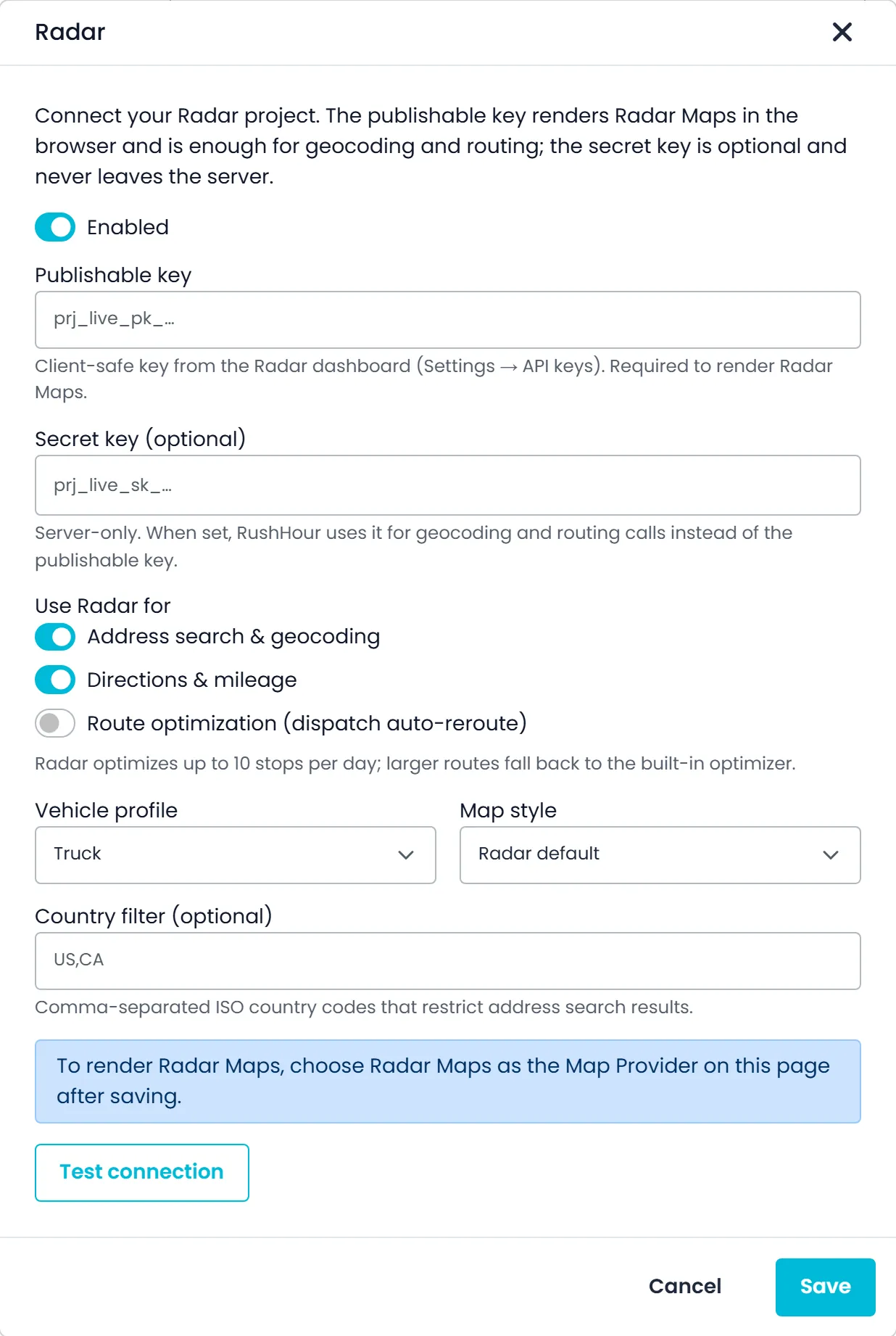
Connect the vendor with your own keys and switch on each job separately: address search and geocoding, directions and mileage, and, on Radar, HERE and Mapbox, route optimization. Each card has an Enabled switch, so you can turn a vendor off without losing its settings.
- Truck or car profile on Radar and HERE. Mapbox offers Driving and Driving (live traffic), with no truck profile.
- Map styles per vendor, such as Radar Light and Dark, HERE Explore, Lite and Logistics, or Mapbox Streets and Satellite streets
- On Radar, HERE and Mapbox, an optional country filter, such as US,CA, keeps address search results in the countries you serve
- With address search on, the vendor also turns coordinates into addresses, finds nearby places such as fuel stops, and answers the AI assistant's address and place lookups
- Trimble Maps (PC*MILER) adds a region setting, North America by default, for where it searches
- Secret keys stay on RushHour's servers and are shown masked, and RushHour refuses a secret key pasted into a browser-key field
Valhalla and VROOM
Open-source routing on a server you choose
Valhalla calculates road-following directions and mileage for routes and orders, with a Truck or Auto (car) costing model. VROOM sets the stop order when you Reroute with Optimize by distance, one day at a time, keeping an order's pickup ahead of its delivery and never dropping a stop.
- Enter the server's public web address, and an API key if the server needs one
- Use a server you run or a hosted VROOM service, with the SaaS (/solve) or root endpoint style and an optional routing profile
- Test connection checks the settings without saving them, and reports a timeout after 20 seconds
- If an engine fails, RushHour moves on to the next provider or its built-in method, so directions and Reroute keep working
- Directions set the miles used for pricing, so a new provider or profile can change the miles, and the price, on new quotes
Samsara
Your Samsara trucks on the dispatch board
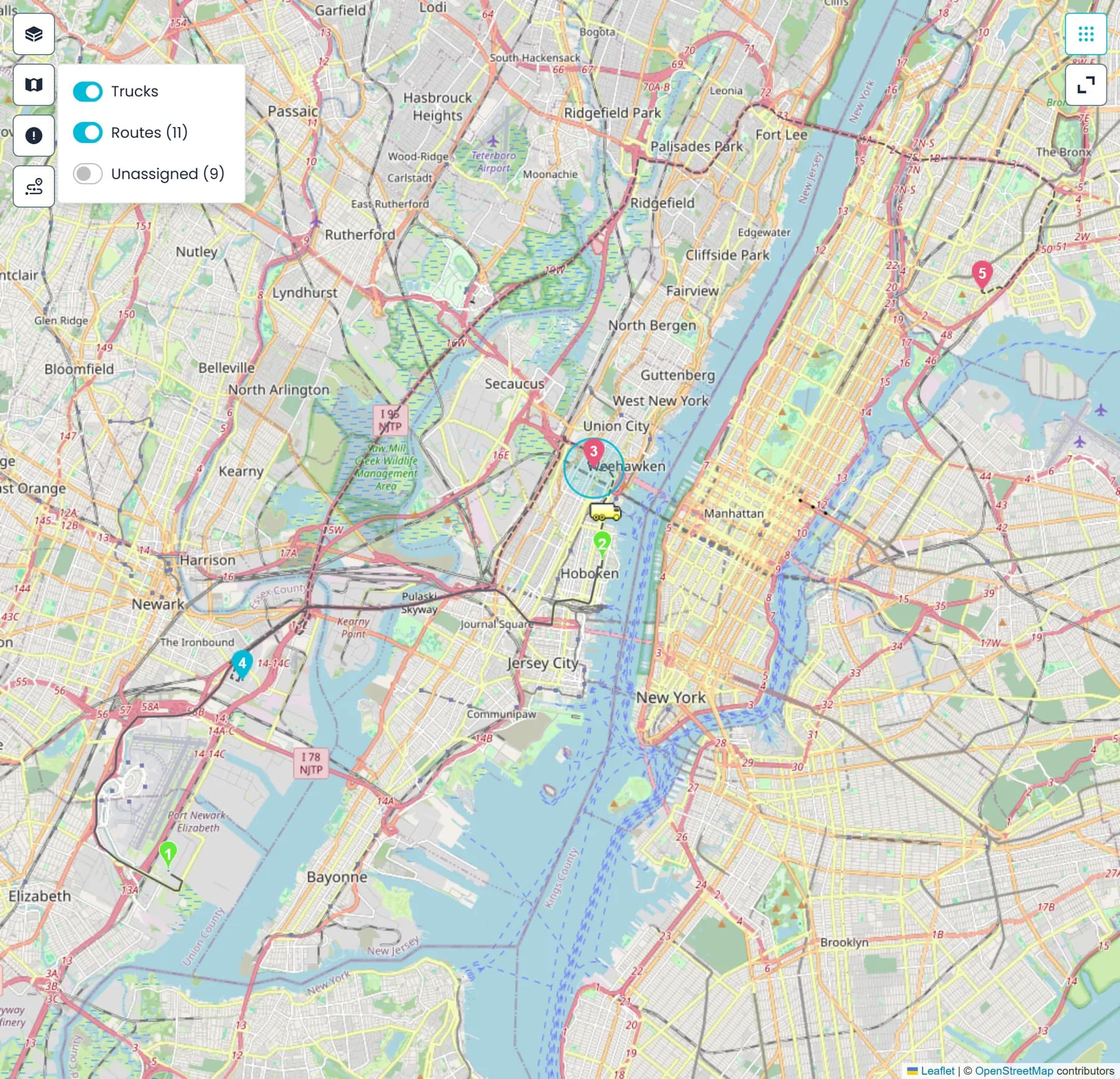
Paste one Samsara API token in Settings > Integrations. For every truck linked to a Samsara vehicle, RushHour shows where it is while you dispatch and uses that position for stop ETAs.
- Truck positions on the dispatch board map, the Orders map and the Assign Driver distance badges
- Stop ETAs use the Samsara position first, then the driver app's location if it is no more than 20 minutes old
- Reroute can start from where the truck is now
- The AI assistant can list your Samsara vehicles, say where one is, and read a driver's Samsara hours-of-service clocks
- Positions are read from Samsara as you work, cached for about two minutes, and not saved as a location history in RushHour
Cardknox
Card payments through your own merchant account
Connect your Cardknox merchant account with its public and private keys. Cards are then saved and charged through Cardknox, and the money goes to your account.
- Save a customer's card on the customer's Payments tab, and mark one card as the default
- Charge a saved card when you record a payment, and apply it to the invoice
- Customers save cards and pay invoices by card in the Customer Portal. The card option appears only once Cardknox is connected.
- Card numbers are typed into fields served by Cardknox, so they never reach RushHour
Telegram
Send stop details to a driver's Telegram
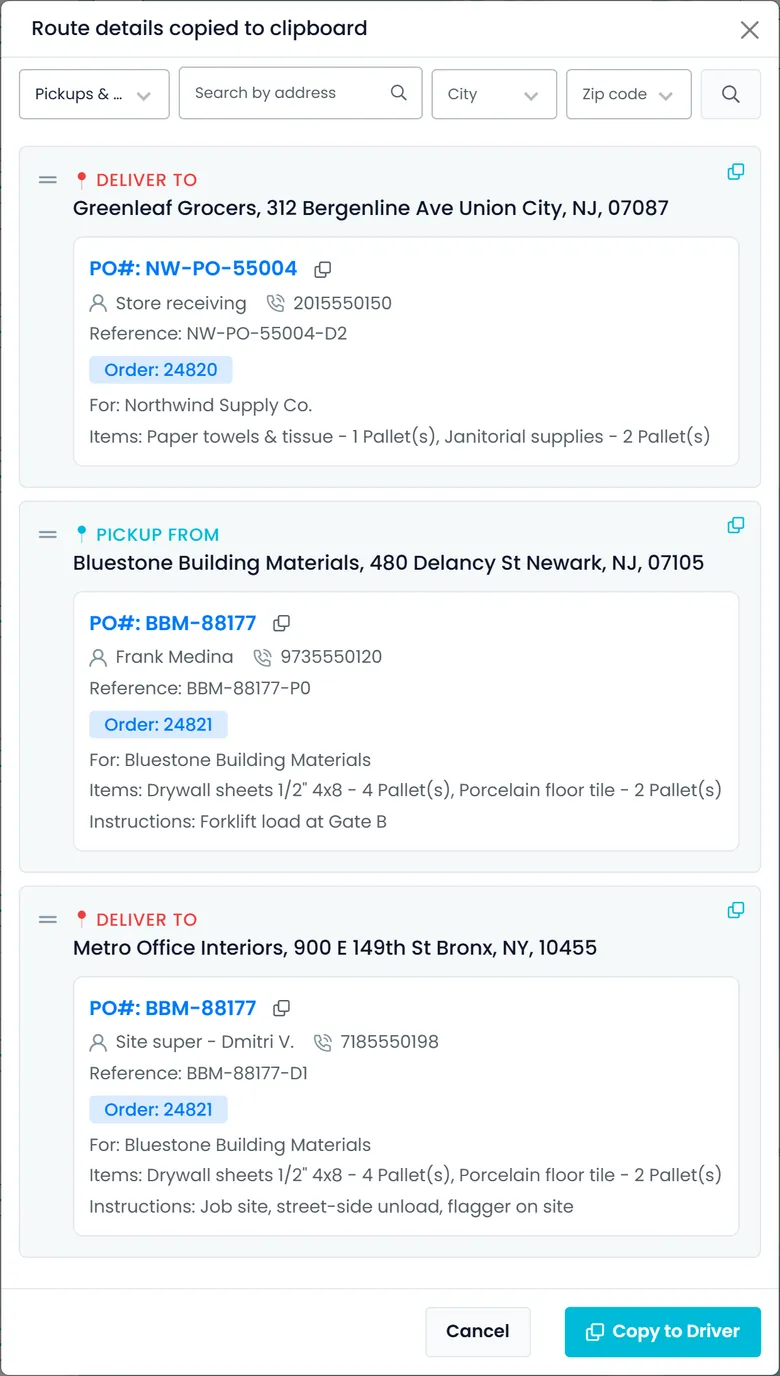
Sign RushHour in to your company's Telegram account once, with the phone number and the code Telegram sends. After that, Copy to Driver also sends the stop details to the driver as Telegram messages.
- Add each driver's Telegram user ID on the driver's settings
- Messages carry the stop type and address, contact and phone, order and PO numbers, reference, items and driver instructions
- If a driver has no Telegram user ID yet, RushHour tells you instead of sending
QuickBooks Desktop export
An export file for QuickBooks Desktop
In Accounting, tick the invoices and use the QuickBooks export. RushHour downloads a file that posts each invoice to Accounts Receivable under the customer's name, ready to import into QuickBooks Desktop.
- Charge lines, including the items subtotal, use the QuickBooks item and account set on their charge type, and each item is listed with its pickup and delivery address
- The invoice number carries over as the QuickBooks document number
- The export is recorded on each invoice, and a copy of the file is kept in your Documents library
How connecting works
Your accounts, switched on per company
Connect it in Settings
Google Maps and OpenStreetMap work without a key. The other connectors need your own account, key or server address, and many have a Test connection button. For QuickBooks Online, we walk you through the Intuit app keys during onboarding.
Bring your own AI key
Run the AI assistant's chat on your own OpenAI, Anthropic, xAI or Google key, enabled for your account by RushHour on request. Document search and voice stay on RushHour's AI.
Imports and exports
Where there is no connector, data moves as files: spreadsheet and document import into orders and rate cards, export files for QuickBooks Desktop, and invoice, quote and BOL PDFs.
Step by step
Connecting takes three steps
The same flow for every card in Settings > Integrations. The Integrations step of the Setup guide opens the same dialogs.
Open Settings > Integrations
A company admin opens the Integrations page in the Company Portal. Cards you have already set up show View instead of Install.
Add your account
Paste the vendor's key or token, sign in to Telegram with a code, or enter a server address for Valhalla and VROOM. Saved secrets are shown masked.
Test, then switch it on
Valhalla, VROOM, Radar, HERE, Mapbox and Trimble Maps have Test connection, which checks the settings without saving them. Then turn on the jobs you want the vendor to do.
Measured on the platform
What isn't built
Straight answer: there are no webhooks, no SDK, no sandbox and no EDI. The RushHour API is documented for developers at docs.rushhourapp.com, and an integration connects with an API token that a company admin creates in Settings > API Tokens. There is no partner marketplace, and no ELD or telematics connector other than Samsara. If you need data in or out of RushHour, talk to our team and we'll tell you what is possible and what it would take.
FAQ
Questions about integrations
Do we need our own accounts and keys?
Not for maps: Google Maps works out of the box on RushHour's account, and OpenStreetMap needs no key. Cardknox, Samsara, Radar, HERE, Mapbox and Trimble Maps use your company's own account and keys. Telegram signs in with your company's Telegram phone number, and Valhalla and VROOM need the address of a server you run or subscribe to.
Who can connect or change an integration?
Company admins. Saving, changing or removing the Samsara, Cardknox, Radar, HERE, Mapbox, Trimble Maps, Valhalla and VROOM connections needs the Company Admin role, and the Telegram sign-in needs the Integrations settings permission.
Do you connect to ELD or telematics systems other than Samsara?
No. Samsara is the only telematics system RushHour reads from today. Without it, drivers can share their location from the RushHour driver app (on Android from version 2.0.8 and on iPhone from version 2.0.12), and the dispatch board uses that location for stop ETAs and driver distances.
Does RushHour send webhooks?
No. To keep another system up to date, have it check the RushHour REST API on a schedule; the developer docs at docs.rushhourapp.com explain how. An integration connects with an API token that a company admin creates in Settings > API Tokens, or signs in as a dedicated Company Portal user.
What happens if a connected map or routing service is down?
Dispatch keeps working. If Valhalla, VROOM, Radar, HERE or Mapbox fails, RushHour moves on to the next connected service and then to its default: Google Maps for address search and directions, and its built-in method for Reroute. Trimble Maps is the exception: when it handles address search or directions, Google Maps doesn't take over that job if Trimble Maps fails.
Do our customers see the map provider we choose?
Yes. The tracking map in your Customer Portal uses the same map provider as your Company Portal. If a Radar, HERE or Mapbox browser key is missing, it shows OpenStreetMap instead.
Recently added
Tolls in your order prices, plus two Settings upgrades
These are in production now. The changelog lists what each release added.
TollGuru toll costs
Toll costs on priced orders, from your own TollGuru accountNew in the October 2026 release
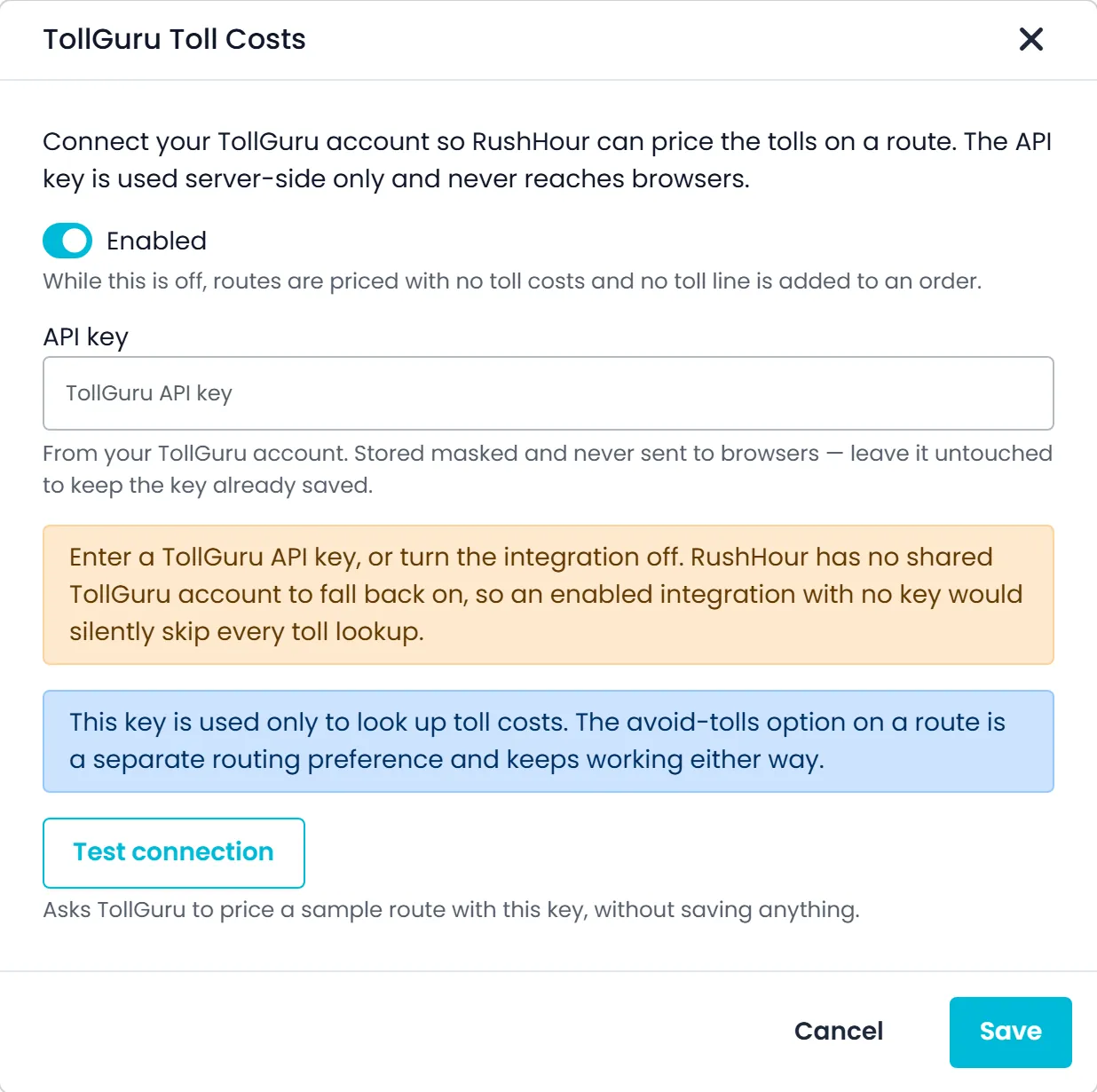
Add your TollGuru API key in Settings > Integrations. When an order is priced with the Classic price type, RushHour looks up the tolls on its route and adds them to the order's costs as a Tolls line, so the price includes them. You need your own TollGuru account.
- Test connection checks a key without saving it
- The saved key is masked and never shown in full in the browser
- Tolls are looked up for the truck axle count set in Settings > Profile
- The TollGuru card says whether orders are currently priced with toll costs
- Also offered in the Integrations step of the Setup guide
Settings > Integrations
An Installed tab that lists what you've set upNew in the October 2026 release
Settings > Integrations opens on the Installed tab, which lists the integrations your company has set up, while the All tab shows everything available. The Map Provider and Telegram rows appear on both tabs.
- Installed is the tab you land on
- All lists every connector you can add
- With nothing set up yet, Installed points you to the All tab
Samsara in Settings > Fleet
Samsara location, vehicle name and VIN in the Fleet listNew in the October 2026 release
With your Samsara account connected under Settings > Integrations, each truck linked to a Samsara vehicle shows that vehicle's current location, name and VIN in the Settings > Fleet list.
- Current Location, Vehicle Name and VIN columns, filled from Samsara
- Needs your own Samsara account, connected under Settings > Integrations
Also new
Company admins create API tokens in Settings > API Tokens, so another system can use the RushHour API without signing in.
See these connectors at work
The product pages where each connection shows up day to day.
Bring your stack to the demo.
Tell us what you run today and we'll be straight about what connects now, what we'd export to instead, and what isn't built.