
The operations platform
for freight carriers.
Orders, dispatch, drivers, paperwork, invoicing and payments in one system, for LTL and full-load carriers, freight forwarders and regional fleets. Take the order once and it becomes the route, the BOL, the proof of delivery and the invoice, without re-typing it anywhere.
The freight workflow, end to end
From the order to the paid invoice
Every step works from the same order, so dispatch, the driver and billing never disagree about what was booked.
Orders and dispatch
Change the route after it has been dispatched
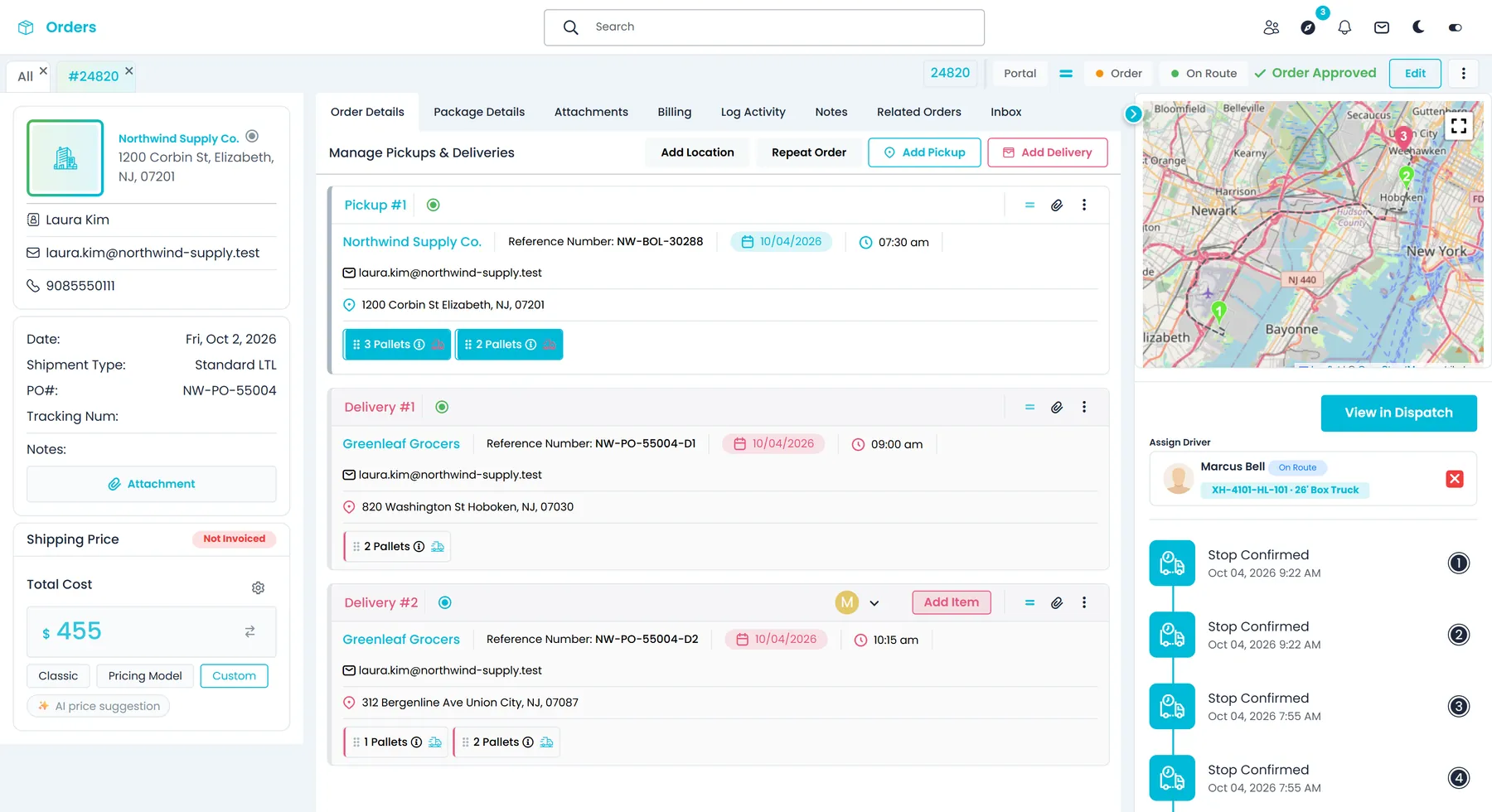
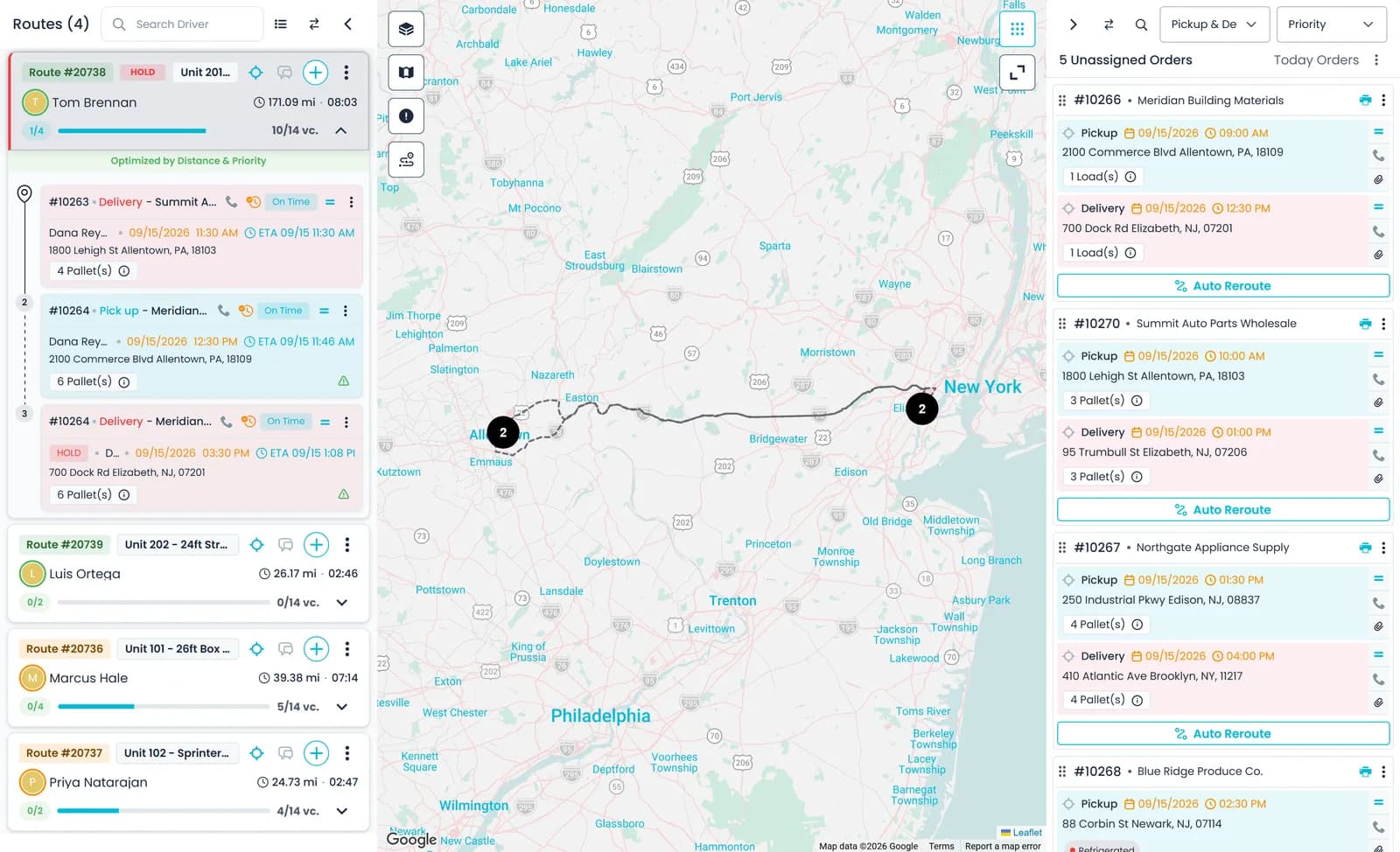
One order can carry several pickups and deliveries. After dispatch you can still add or remove a stop, re-order the route, or drag a stop or a whole order onto another truck or back to the unassigned list, without rebuilding the order. When stops are added, removed, re-ordered or moved, the driver gets a push notification.
- Several pickups and deliveries on one order
- Drag a stop or a whole order to another route
- Push notification to the driver when their stops change
Drivers and carriers
Your own drivers and outside carriers on the same board
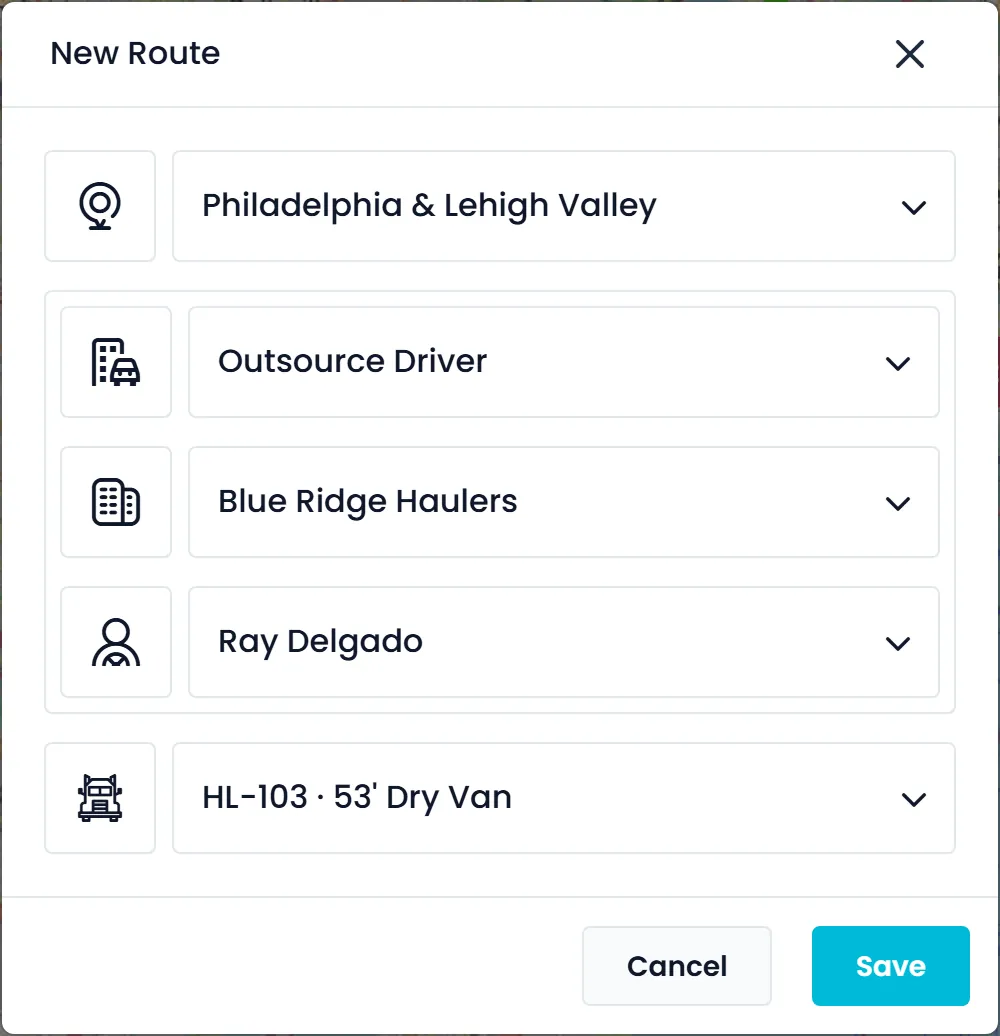
When you build a route, choose a company driver, or choose an outsource driver, then the carrier company and one of its drivers. Each carrier record keeps its terms: the type of work, a fixed, per-distance or hourly cost, free waiting time and an agreed discount. Outsourced legs sit on the dispatch board next to your own trucks, and carrier drivers can be invited to the RushHour driver app to complete their stops with the same steps as your own drivers.
- Company drivers and outsource drivers in one route dialog
- Carrier records with their cost terms and free waiting time
- Carrier drivers invited to the RushHour driver app, like your own
- Driver and carrier settlements per routeNew in the October 2026 release
Rate cards
Price the load from your own rate cards
Give each customer its own pricing model: a grid of mileage bands by pallet count, zone-to-zone rates, and international rate cards for air, ocean and ground lanes. Customers without their own model are priced from your company default. The price is calculated in the order editor as you build the order, and an approved quote becomes the order at the price you quoted.
- Mileage-band by pallet-count grids per customer
- Zone-to-zone rates, flat or per pallet
- Customers without their own model use your company default
- Approve a quote and it becomes the order
Freight forwarding
Blind BOLs, cross-border lanes and six currencies
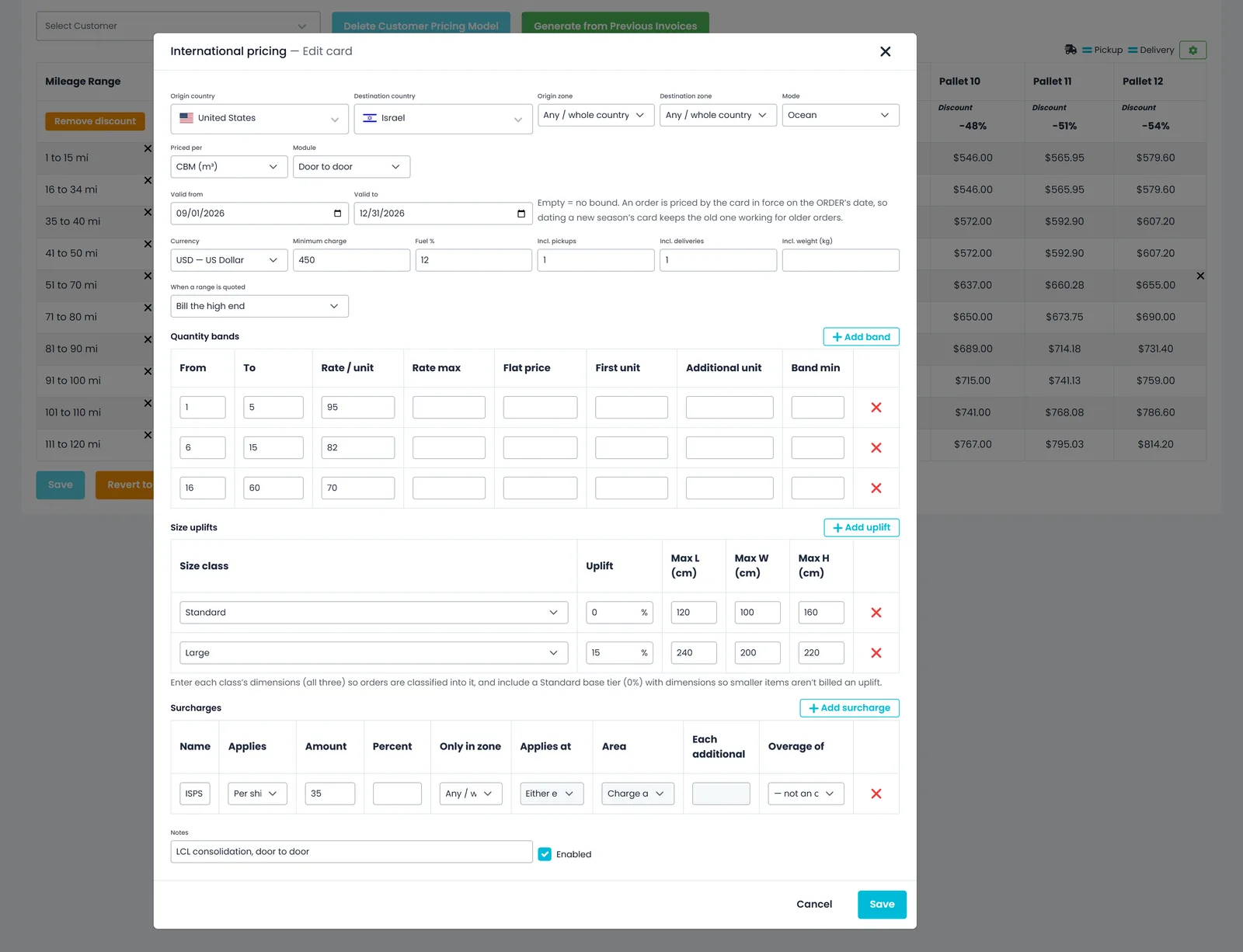
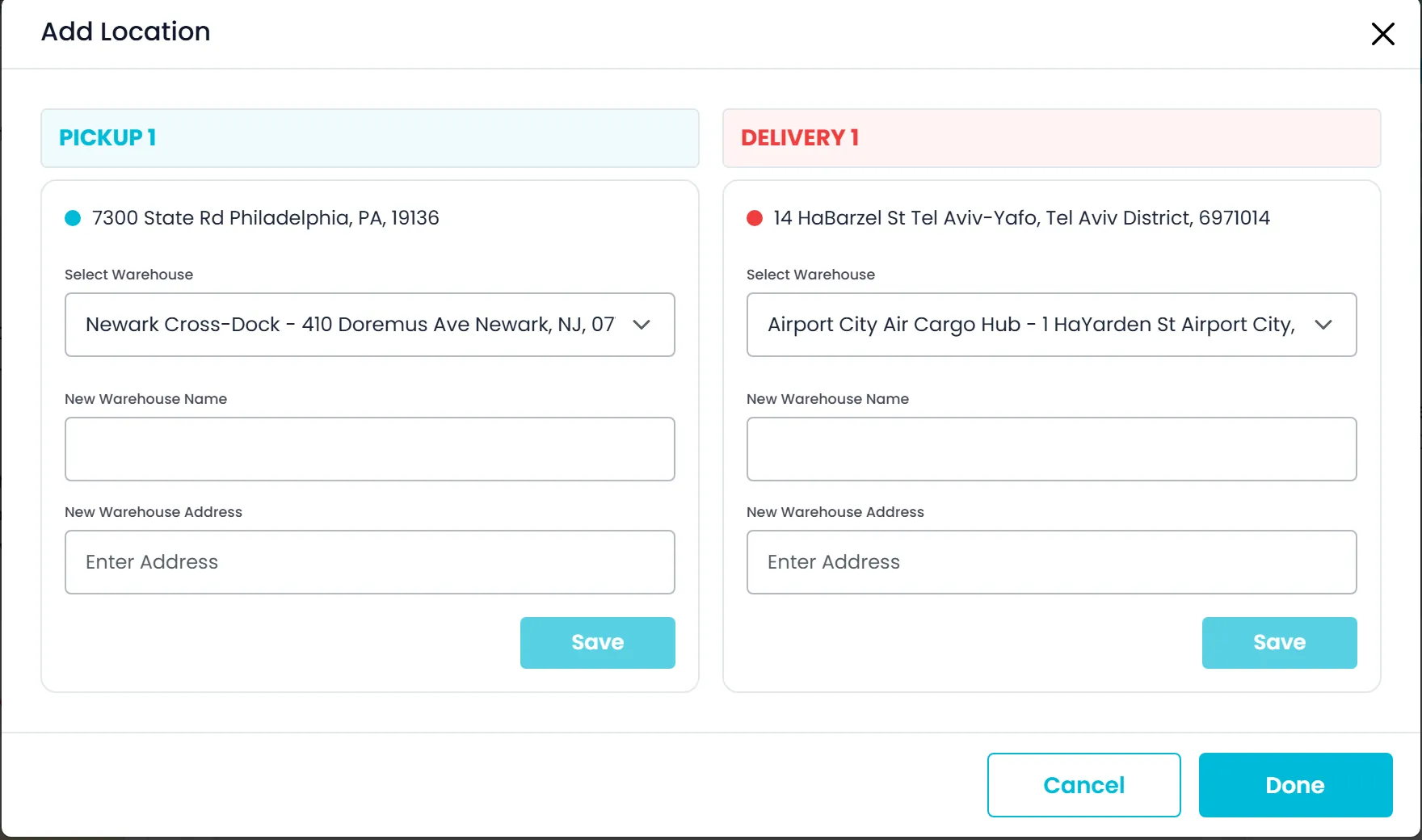
Tick Blind Shipping on a pickup or delivery and enter the name and address to show instead of the real ones: the BOL prints them for everyone except the billing customer and that stop's own customer. International rate cards price ocean, air and cross-border ground lanes door to door, or split into origin pickup, the sea or air leg and destination delivery when each part comes from a different vendor. Every leg is its own card, and RushHour adds legs in the same currency into one price. Quote and invoice in USD, CAD, MXN, EUR, GBP or ILS, one currency per order, and keep your own exchange rates rather than a live feed. When there is no drivable route between pickup and delivery, choose a hub warehouse near each end and each half runs as its own leg.
- Blind Shipping on a pickup or delivery, with a blind name and address on the BOL
- Door to door, or Origin pickup, Sea / Air and Destination delivery cards, added into one price when they share a currency
- One currency per quote, order and invoice, from USD, CAD, MXN, EUR, GBP and ILS
- Your own exchange rates in Settings → FX rates, not a live feed
- Container number on Full Load items
- Filter the Orders and Quotes lists to regular or Air/Port ordersNew in the October 2026 release
Paperwork
BOLs, labels and dispatch sheets from the order
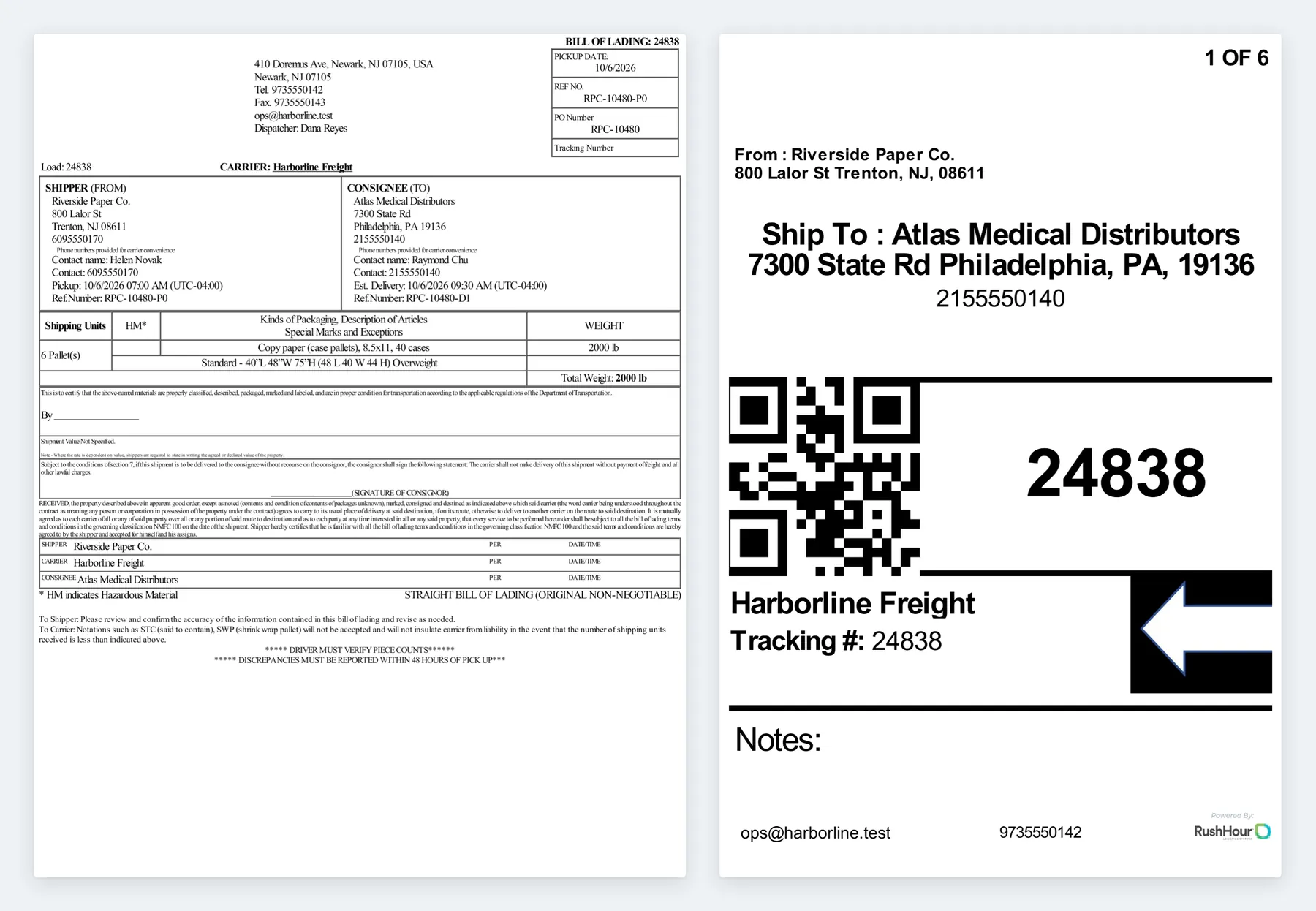
The Bill of Lading, pallet labels and the dispatch sheet are generated from the order, so the paperwork matches what was booked. Labels carry a QR code of the order number and the delivery contact's phone. Print them or email them from the order, and on the dispatch board pick the stops on a route and print their BOLs in one go.
- BOL generated from the order's stops and items
- Pallet labels with a QR code of the order number
- Dispatch sheet for the driver
- Print the BOLs for a route's stops together from the dispatch board
- Print BOLs and labels for up to 50 orders at once from the Orders listNew in the October 2026 release
Driver app
Each stop closed with proof from the driver's phone
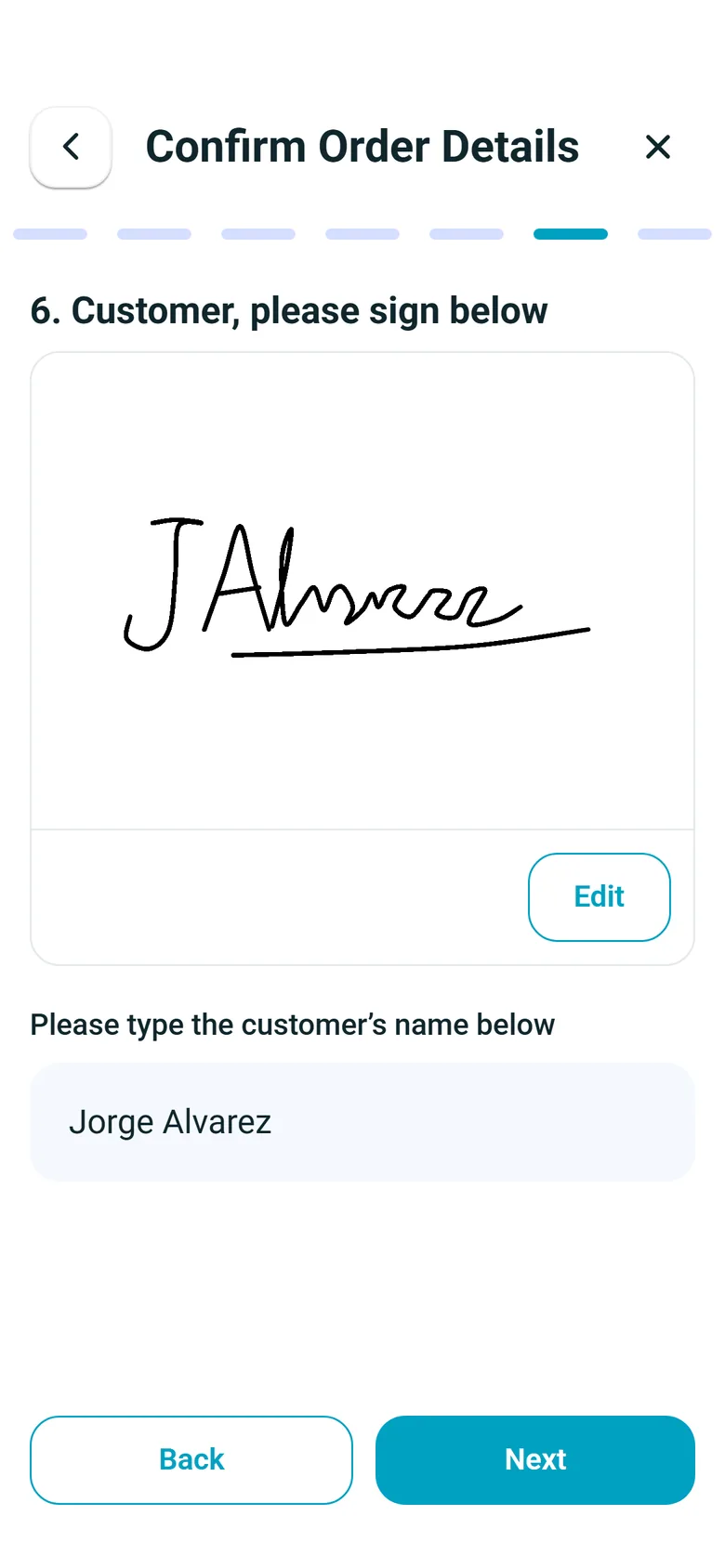
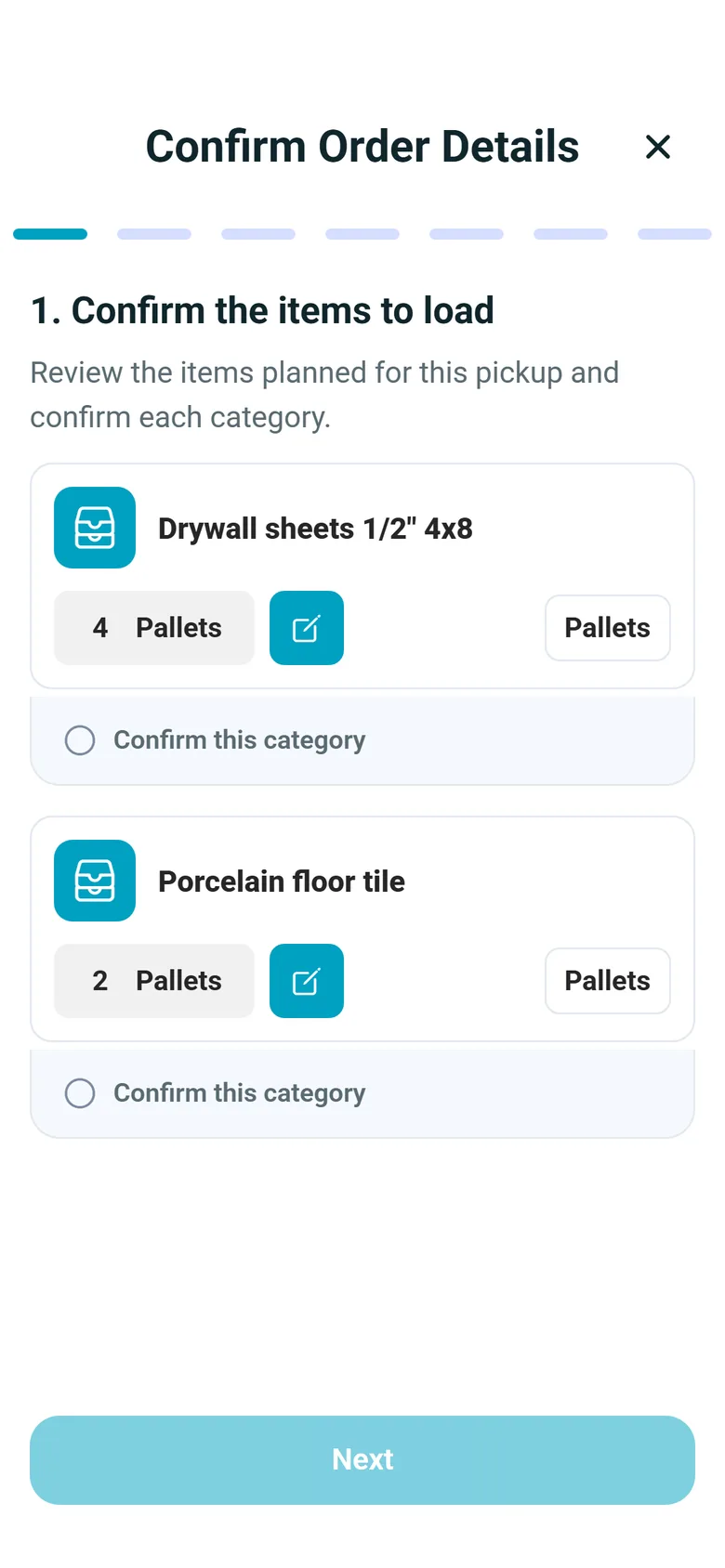
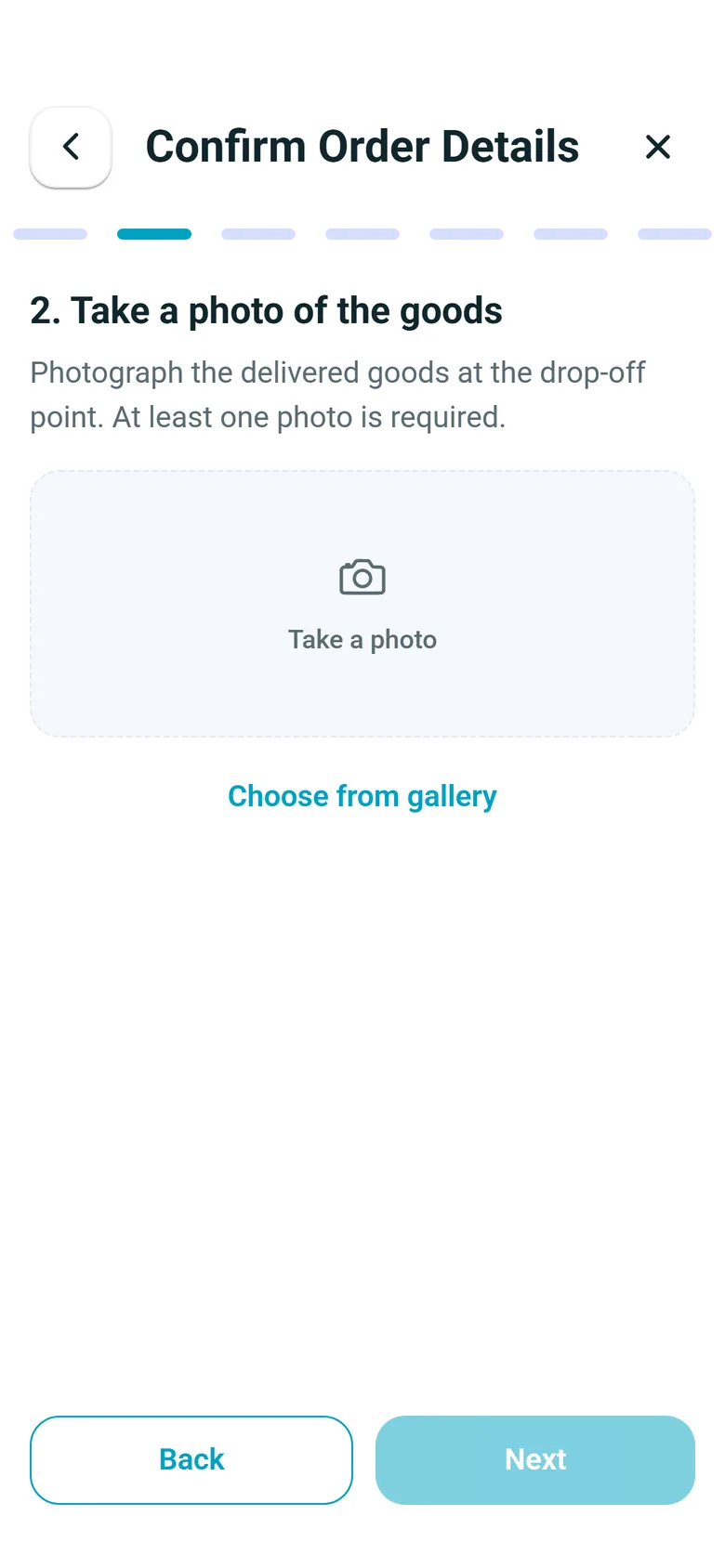
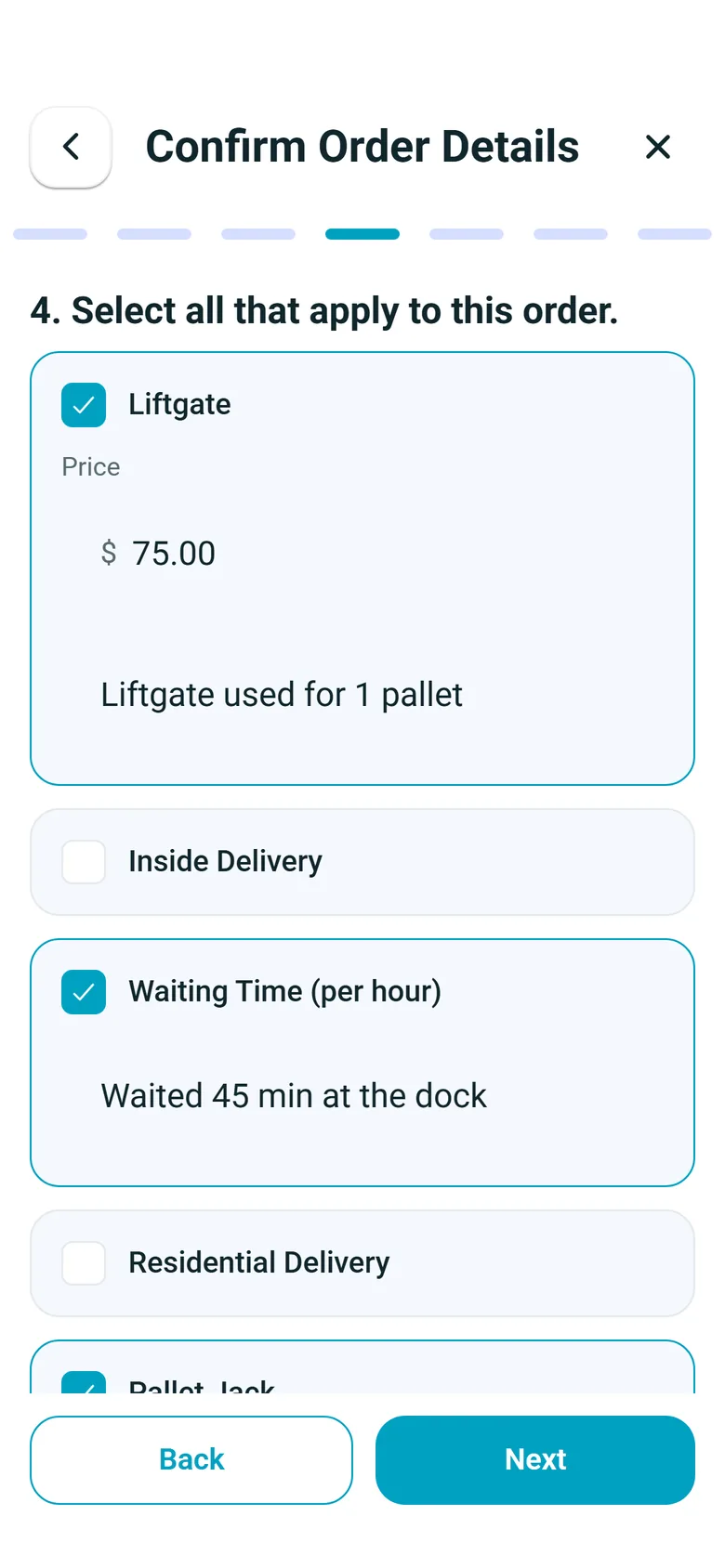
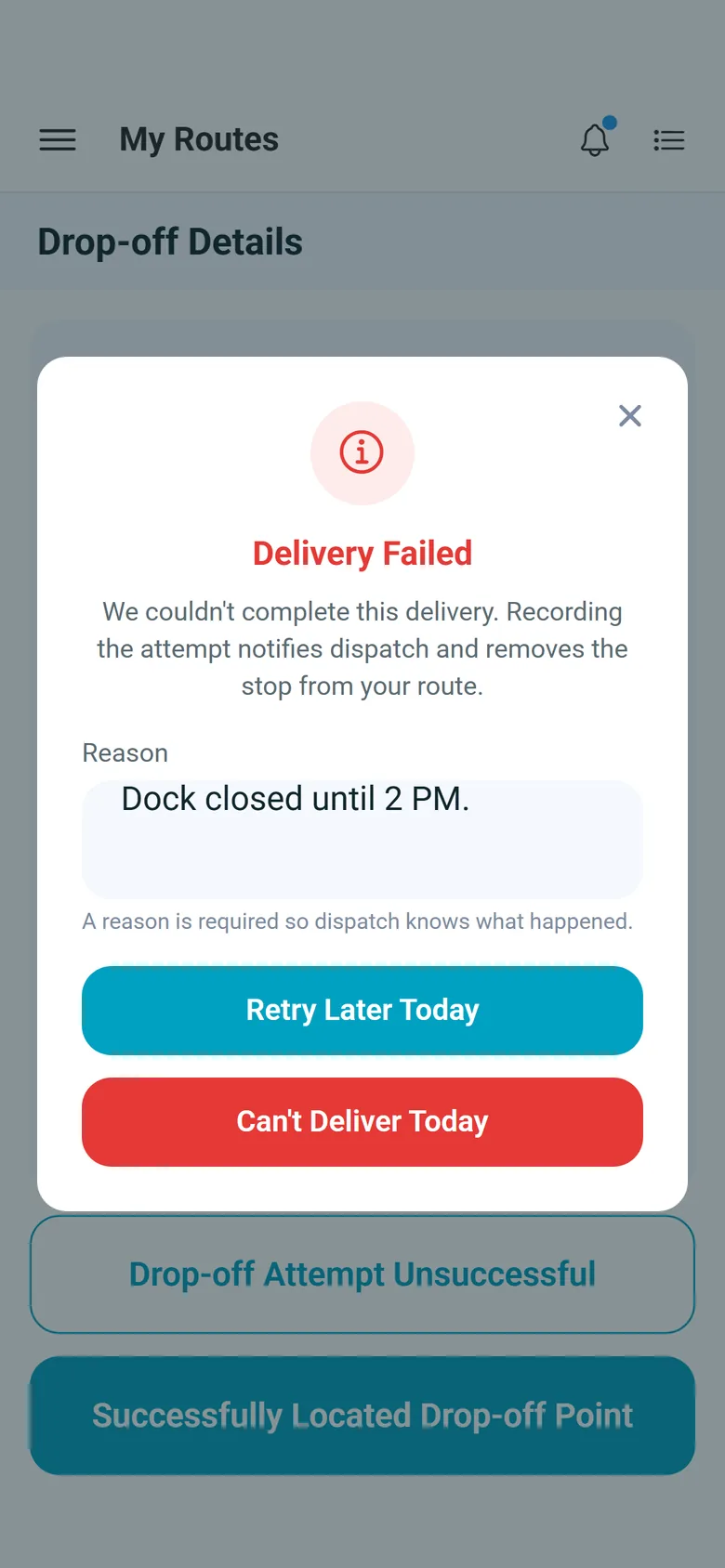
Drivers work the route in the RushHour Drivers app. At the stop they take goods photos, capture the consignee's signature, photograph a check when freight is collected at the stop (and record cash collected at a pickup), or log a failed attempt with a reason. Each stop runs as a step-by-step wizard with the steps your company requires, barcode scans at pickup and multi-page paperwork scans.
- Goods photos and signature saved to the order
- Freight collected at the stop (check photos, cash at pickup) and failed attempts recorded with a reason
- Pickup barcode scans and paperwork scans in the app
- Your company picks the steps, and whether a missing photo or signature warns the driver or blocks the stop
Billing
Invoice from the order, get paid, send it to QuickBooks
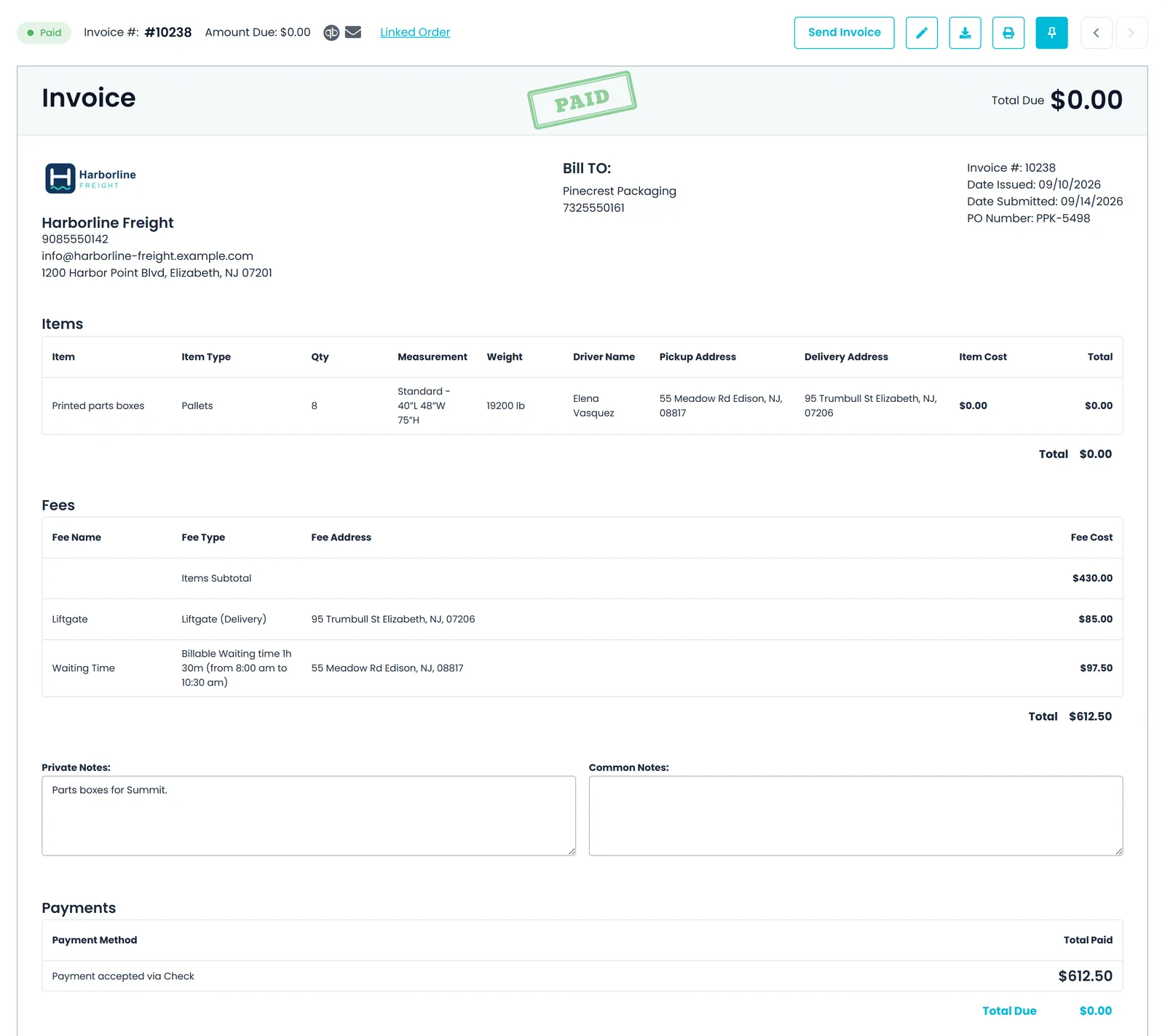
Invoices are created automatically from the order, either when it is entered or when it is completed (your choice in Settings → Billing, where Manual is also an option), and updated with waiting time and stop charges at close. Charge the customer's saved card through Cardknox, or let the customer pay the invoice in the Customer Portal. Invoices go to QuickBooks Online automatically or when you choose, and payments recorded in the office export there too.
- Invoice created from the order, not re-typed
- Close & Create Invoice in one step from the Orders list
- Saved card charged through Cardknox, or paid by card in the portal
- QuickBooks Online export, automatic or manual
Visibility
Customers follow their own loads
Your customers sign in to the Customer Portal to follow their orders stop by stop and open the delivery documents, instead of calling your office. Track Live shows a package's route on a map beside its shipment timeline and whether a driver is assigned; it does not show the truck's live position. On your dispatch board, stop ETAs start from the truck's Samsara position, or from the driver's phone when the driver app is sharing location, and Samsara-linked trucks appear on the dispatch map.
- Order tracking in the Customer Portal
- BOL and order sheet PDFs to view, print or download, and invoices to view and print, in the portal
- Report an Issue sends a note about the shipment into the support conversation with your team
- Truck positions on the dispatch map for Samsara-linked trucks
- Stop ETAs on the dispatch board from Samsara or the driver app's location
In the driver app
What your driver does at each stop
Real screens from the RushHour driver app on Android and iPhone. The app runs in English.
For the freight you actually move
Built for pallets, lanes and hand-offs
Cross-dock transfers
Hand freight from one route to another through your warehouse or any address. RushHour creates the matching drop-off and pick-up stops and allocates the item quantities to each leg.
Air, ocean and ground lanes
International rate cards price origin pickup, main transport and destination delivery, with chargeable weight or CBM, minimums, surcharges and validity dates.
Hands-on onboarding
We set the account up with you: customers and rate cards imported, drivers and trucks entered, and the driver app steps chosen before your first load.
Recently added
New for logistics companies
These features are in production now. The changelog lists every change.
Freight already run through RushHour
Platform-wide figures from the RushHour production database, September 2026, rounded down. Almost all of this volume is Shimon's Express.
Questions from carriers and forwarders
Can our own drivers and outside carriers share one dispatch board?
Yes. When you create a route, choose Company Driver for your own fleet, or Outsource Driver and then the carrier and one of its drivers. Carrier routes sit on the same board as yours, and carrier drivers can be invited to the RushHour driver app to complete their stops with the same steps as your own drivers. Each carrier record keeps the terms you agreed: a fixed, per-distance or hourly cost, free waiting time and a discount.
Does RushHour support EDI or load tendering?
No. RushHour has no EDI with trading partners, does not send load tenders to carriers and is not a load board. Your team enters orders in the Company Portal, your customers can book them in the Customer Portal for you to approve, order sheets and other files can be imported with the AI assistant, and your other systems can use the RushHour REST API with API tokens that company admins create.
Can we export invoices to QuickBooks as a file?
Yes. In Accounting, select the invoices and use the QuickBooks export to download a file that you import into QuickBooks Desktop. The Integrations page has more on how RushHour works with QuickBooks.
Can we price ocean, air and cross-border freight?
Yes. International rate cards price a lane by origin and destination country, with either end optionally narrowed to one of your pricing zones, for Ocean, Air or Ground, per pallet, chargeable kg, piece, CBM or container. Price a lane door to door, or split it into origin pickup, sea or air, and destination delivery cards that RushHour adds into one price when they share a currency. The cards price orders that use the Pricing Model price type, which the order editor offers for pallet orders, and each quote, order and invoice keeps one currency: USD, CAD, MXN, EUR, GBP or ILS.
Can our customers see where their freight is?
Customers with Customer Portal access follow each order stop by stop. Track Live shows a package's route on a map beside its shipment timeline and whether a driver is assigned, but not the truck's live position. You can also send tracking links that open a map without logging in, with the next stop's estimated arrival and, as you choose, the truck's approximate area, its live position on the way to the shipment, or only the last completed stop.
What happens when a driver can't complete a pickup or delivery?
The driver taps Pickup Attempt Unsuccessful or Drop-off Attempt Unsuccessful, types the reason, and chooses Retry Later Today or Can't Pickup Today / Can't Deliver Today. Arrival and departure times are recorded with the attempt, and the stop leaves the driver's route and returns to your unassigned list to dispatch again. A setting in Settings → Driver App decides what happens to transfer stops that depend on it.
Products for carriers and forwarders
See your own load run through RushHour.
Bring one real order. We will take it through dispatch, proof of delivery and the invoice with you.