
Plans & Pricing
Starter, Growth and Pro start with a 30-day free trial. Nothing is charged until the trial ends, and you can cancel any time before then.
or $2,699 / year, about 3 months free
+ $299 one-time onboarding, paid after the 30-day free trial
Sized for
Every feature, on every plan, including:
- 15,000 AI credits included every month
- Driver app (Android and iOS) and customer portal
- Route optimization by distance, priority or AI
- Invoicing, card payments and QuickBooks Online export
- 30 days free, then $299 / month
- Card required but not charged during the trial; cancel any time before it ends
- $299 one-time onboarding, paid after the 30-day free trial (invoiced separately)
- Plus sales tax or VAT where it applies, calculated at checkout
or $4,499 / year, about 3 months free
+ $499 one-time onboarding, paid after the 30-day free trial
Sized for
Every feature, on every plan, including:
- 30,000 AI credits included every month
- Driver app (Android and iOS) and customer portal
- Route optimization by distance, priority or AI
- Invoicing, card payments and QuickBooks Online export
- 30 days free, then $499 / month
- Card required but not charged during the trial; cancel any time before it ends
- $499 one-time onboarding, paid after the 30-day free trial (invoiced separately)
- Plus sales tax or VAT where it applies, calculated at checkout
or $8,999 / year, about 3 months free
+ $999 one-time onboarding, paid after the 30-day free trial
Sized for
Every feature, on every plan, including:
- 50,000 AI credits included every month
- Driver app (Android and iOS) and customer portal
- Route optimization by distance, priority or AI
- Invoicing, card payments and QuickBooks Online export
- 30 days free, then $999 / month
- Card required but not charged during the trial; cancel any time before it ends
- $999 one-time onboarding, paid after the 30-day free trial (invoiced separately)
- Plus sales tax or VAT where it applies, calculated at checkout
Free plan
For an owner-operator or a one-truck business: run your whole operation on RushHour, free, with no time limit.
$0 on monthly and yearly billing · no onboarding fee
Sized for
What you get
- Every feature: dispatch, driver app, customer portal, invoicing and accounting
- No onboarding fee and no time limit
- 500 AI credits every month; buy more any time
- Upgrade any time: Starter, Growth and Pro start with a 30-day free trial
Good to know
- Hard limits: 1 office user, 1 driver and 100 orders a month. To add more, upgrade to a paid plan.
- A card is required to confirm your business. It is never charged for the Free plan, only for AI credits you buy or a paid plan you upgrade to.
- For new accounts only: a company on a paid plan cannot switch to Free.
Enterprise
From $1,999 / month. Every feature, as on every plan, with the sizing, contract, configuration and custom development scoped with you. For high-volume freight operations.
One-time onboarding is required and non-negotiable. Starter $299 · Growth $499 · Pro $999. It covers importing your customers, rates and drivers, configuring your pricing and billing, and training your team, done with you rather than handed over as a manual. With a free trial it is not charged to your card: we invoice it separately after the 30-day trial ends. Cancel during the trial and you pay nothing.
Add-on
Managed operations staff
RushHour's own operations staff, working inside your account as part of your team. They are not only dispatchers: they answer emails, WhatsApp messages and phone calls, create and update orders, and do any other work in the platform for you. They are already trained on RushHour and know it well, so there is nothing to teach them about the platform. Available on every plan, for as many people as you need.
- Answer your emails, WhatsApp messages and phone calls
- Create orders and keep them up to date
- Dispatch: assign drivers, plan routes and keep the day on track
- Do any other day-to-day work in the platform for you
- Already trained on RushHour, ready from day one
- They work in your Company Portal with the role you ask for, alongside your own team
- Hourly for peaks and cover, or a dedicated person on a monthly rate
- Request, follow and end the service from Settings → RushHour Staff in the Company PortalNew in the November 2026 release
Rates per staff member
The rate depends on where your staff member is based. Available on every plan, including Free. Billed monthly by invoice, separately from your subscription.
Talk to us about staffingCompare plans
Every plan, side by side
Prices, sizing, AI credits and additional-usage rates. Every plan includes every feature; the full list is below the table.
| Plan details | Free | Starter | Growth | Pro |
|---|---|---|---|---|
| Price | ||||
| Monthly | $0 | $299 | $499 | $999 |
| Yearly, 3 months free | $0 | $2,699 | $4,499 | $8,999 |
| One-time onboarding (required) | None | $299 | $499 | $999 |
| Sized for | ||||
| Office users | 1 | 3 | 5 | 10 |
| Drivers | 1 | 5 | 15 | 50 |
| Orders / month | 100 | 500 | 2,000 | 7,000 |
| AI credits / month | 500 | 15,000 | 30,000 | 50,000 |
| If you outgrow it | ||||
| Each additional office user | Upgrade to a paid plan | $49 / month | $39 / month | $29 / month |
| Each additional driver | Upgrade to a paid plan | $49 / month | $35 / month | $19 / month |
| Each additional order | Upgrade to a paid plan | $0.49 / order | $0.25 / order | $0.12 / order |
| Additional AI credits | $10 / 1,000 credits | $10 / 1,000 credits | $9 / 1,000 credits | $8 / 1,000 credits |
| Add-ons | ||||
| Managed operations staff (RushHour's own staff working for you) | From $10 / hour or $1,760 / month per staff member, depending on where they are based | From $10 / hour or $1,760 / month per staff member, depending on where they are based | From $10 / hour or $1,760 / month per staff member, depending on where they are based | From $10 / hour or $1,760 / month per staff member, depending on where they are based |
| Features | ||||
| Everything included on every plan | Included | Included | Included | Included |
Every plan
Included on every plan
Every plan includes every feature: dispatch, CRM, billing, accounting and everything below. Plans differ only in the drivers, orders, office users and AI credits they include, and in price.
- Edit orders and routes, even after dispatch
- Driver app for Android and iOS, and a customer portal for your shippers
- BOL, pallet label, quote and invoice PDFs
- Invoicing, payments and AR aging
- Card payments through Cardknox
- QuickBooks Online export of invoices and payments
- CRM with customer message threads and a company inbox
- English and Hebrew in the Company Portal and the Customer Portal, with a right-to-left layout in Hebrew
- Route optimization by distance, priority or AI
- Samsara integration: truck positions on the dispatch board
- 44 ready-made reports through the AI assistant
- Configurable stop steps in the driver app
- Warehouses, hubs and zones for multi-site work
- 100+ granular permissions and an activity log
- Custom dashboards from the widget catalogue
- The AI assistant, with AI credits included every month
- Owner-operator and carrier payouts per route
- Per-stop ETAs on the dispatch board, using the driver app's location when it is less than 20 minutes old
- Live driver locations on the dispatch map from the driver appComing soon
Run your entire operation
in one platform.
Dispatch, drivers, customers, billing and payments in one subscription instead of a stack of separate tools, with onboarding we run with you rather than a manual.
On every plan
Three apps, one subscription
Your office, your drivers and your shippers each get their own app, and all three work from the same orders. This is what each of them sees.
For the office
The Company Portal
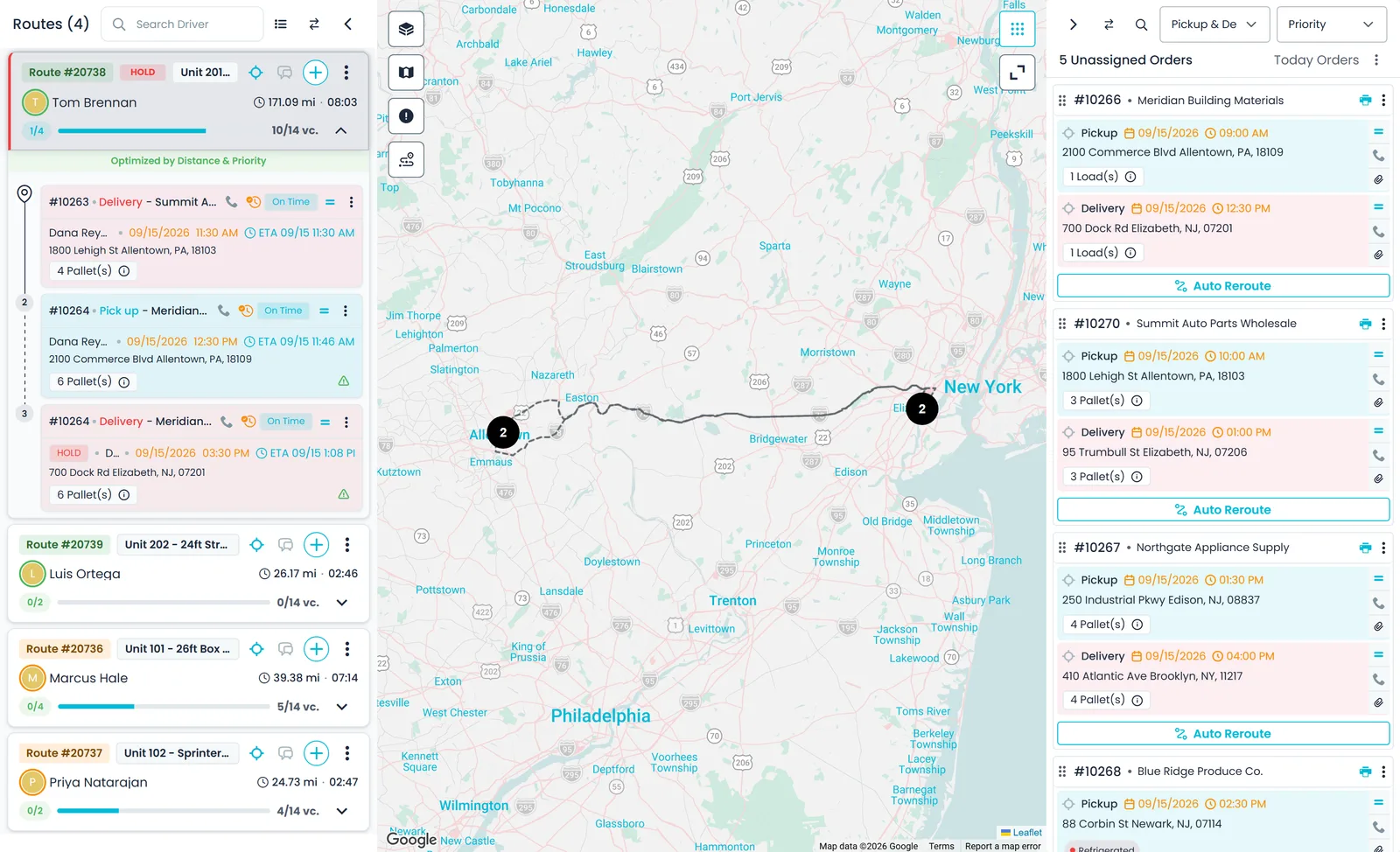
Dispatchers, sales and billing staff work in one web app. The dispatch board shows your routes with each route's driver and truck, the map, and the orders still waiting for a route, and the same app holds your orders and quotes, customers, invoices and payments.
- A card for each route with its driver, its truck and how far along the route is
- ETAs on open stops, starting from the driver app's location when it is less than 20 minutes old, otherwise from the last completed stop or the schedule
- Orders, quotes, customers, invoices and payments in the same app, with one search across them
- In English or Hebrew, with a light or dark theme
For drivers
The RushHour driver app
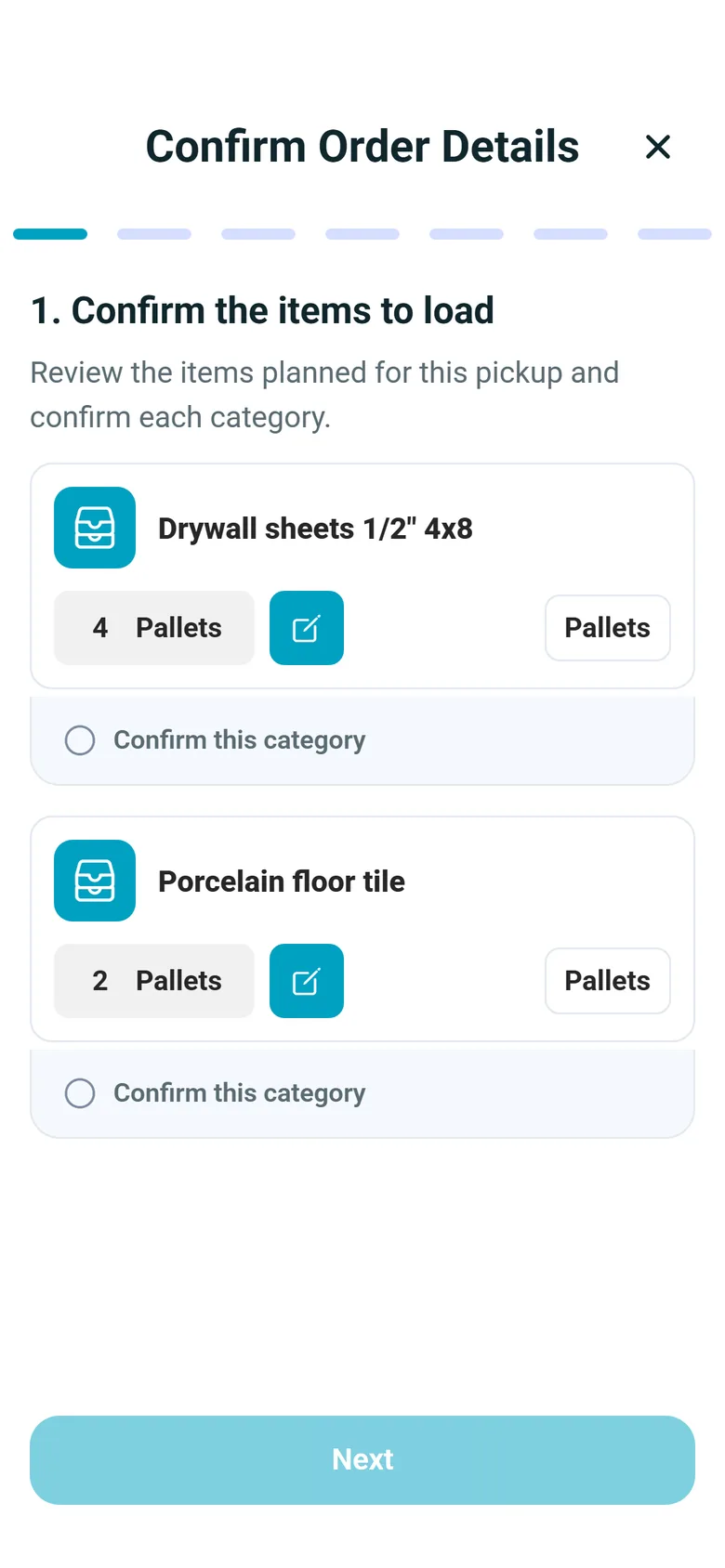
Drivers sign in on Android or iPhone and get their route. At each stop the app asks one question per screen, such as confirming the items, photographing the goods, adding charges, scanning the paperwork and collecting the signature.
- Each stop shows the order number, date, customer, address and status; on stops still to do, Navigate shows the route on the app's map with the distance to the stop
- Photos, paperwork scans and signatures are saved on the order stop, where your office sees them
- Once the driver allows location access, the app shares their location while stops remain on their route, and that location feeds the ETAs on your dispatch board
For your shippers
The Customer Portal
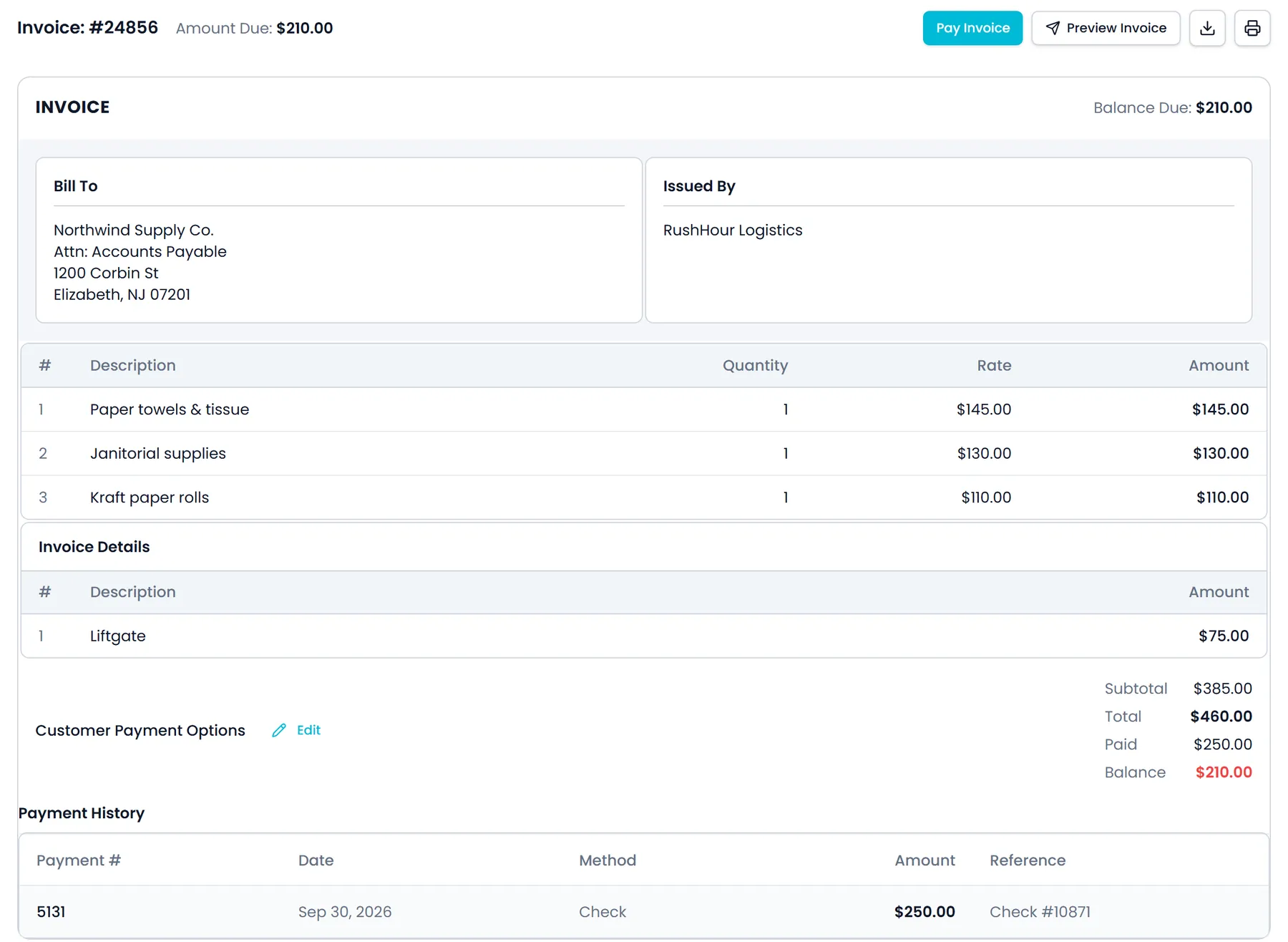
Your customers' staff get their own login. They book orders and see an estimated price, follow each order and open its BOL, and see their invoices with the amount due, the invoice lines, totals and payment history.
- Orders a shipper submits reach your team as quotes to approve
- Shippers preview and print the same invoice document your office prints
- They can record a check or cash payment, or pay by card once you connect Cardknox
- In English or Hebrew, with no charge for the shippers you invite
Straight answer
What the price covers
The subscription replaces several tools, and the onboarding fee pays for setting RushHour up on your own freight.
One system, not five
Dispatch, CRM, billing, the driver app and accounting in one system, all working from the same orders.
Edit orders and routes live
Change a stop after dispatch without re-creating the order.
The right access for everyone
Office users work under custom roles, drivers use the driver app and shippers get their own portal login, so each sees only what their role allows.
Onboarding done with you
We import your customers, rates and drivers, configure pricing and billing, and train your team. The one-time fee is listed on every plan above.
Need a custom setup?
Bigger fleet, more hubs, or freight that doesn't fit a standard tier? Talk to us and we'll scope it with you.
Email us
[email protected]- Importing your customers, rates and drivers
- Configuring your pricing and billing
- Training your team
Frequently asked questions
Is there a free trial?
Yes. Starter, Growth and Pro start with a 30-day free trial. You enter a card at checkout, but nothing is charged until the trial ends, and if you cancel before then you pay nothing. When the trial ends, that card is charged for your plan, monthly or yearly as you chose. The one-time onboarding fee is not charged to the card: RushHour invoices it separately after the trial. If a payment fails, Stripe retries it and RushHour keeps working in the meantime. When a cancelled subscription ends, or if a payment still can't be collected, your office staff can no longer create new quotes and orders until billing is sorted out. Everything else keeps working, including dispatch and your existing quotes and orders, and your drivers and customers are never blocked. A company admin fixes it under Settings > Subscription: pay the open invoice in Manage billing, or turn a cancelled subscription back on with Restart subscription (charged straight away, with no new trial).
Is there a free plan?
Yes. The Free plan costs $0 a month, with no onboarding fee and no time limit. It includes every feature, for 1 office user, 1 driver and up to 100 orders a month. Those are hard limits: to add a second office user or driver, or to go past 100 orders in a month, upgrade to a paid plan.
Why does the Free plan need a card?
The card confirms you are a real business, and it is what you pay with if you buy AI credits or upgrade later. The Free plan itself is never charged.
Can I move from a paid plan to the Free plan?
No. The Free plan is for new accounts only. Paid plans can switch between Starter, Growth and Pro. From the Free plan you can upgrade any time under Settings > Subscription, and your first paid plan starts with a 30-day free trial.
Can I switch plans later?
Yes. A company admin can switch to another plan, or between monthly and yearly billing, under Settings > Subscription in the Company Portal. During the trial a switch costs nothing; after it, the difference is prorated, and a move to yearly billing is charged straight away. The same page lets you update your card, see your invoices and cancel.
Why is onboarding required?
Because setup decides whether the software works for you. We import your customers, rates and drivers, configure your pricing and billing, and train your team, hands-on, once, at the start.
What if I outgrow the user, driver or order sizing?
Nothing gets cut off: RushHour does not block users, drivers or orders past your plan's sizing. The plan comparison on this page lists each plan's rates for additional office users, drivers and orders, and if you grow past your tier we'll talk with you about those rates or a move to the tier that fits.
Do you charge extra for the driver app or customer portal?
There is no separate charge for either. Both are included on every plan; drivers beyond your plan's sizing count like any other driver, and there is no charge for the shippers you invite to the portal.
What payment methods do you accept?
The plans on this page are paid by card through Stripe, monthly or yearly. Stripe sells them as the merchant of record through its Link service, so your receipts come from Link and your card statement shows LINK.COM*. The one-time onboarding fee is invoiced separately by RushHour. Enterprise contracts can also be invoiced on agreed terms.
Do I need my own Cardknox merchant account for card payments?
Yes. Card payments in RushHour go through your own Cardknox merchant account, which an admin connects with its public and private keys under Settings > Integrations. Saving a customer's card, charging it from the office and card payments in the Customer Portal all go through that account, and the card processing agreement is between you and Cardknox.
Is Samsara a separate subscription?
Yes. Samsara is a subscription you hold with Samsara. RushHour connects to your Samsara account with its API token, which an admin pastes under Settings > Integrations. Link each truck to its Samsara vehicle, and trucks on active routes then appear on the dispatch map, refreshed about every two minutes, with their positions feeding the stop ETAs. Without Samsara, the ETAs on the board can use the driver app's location instead.
Which languages does RushHour support?
The Company Portal and the Customer Portal are both available in English and Hebrew, with a right-to-left layout in Hebrew. In the Company Portal you switch the language on the sign-in page or in Settings. The driver app is in English.
Can I export my data?
Yes. You can export your customers to a CSV file with the fields you choose, download invoice, quote and BOL PDFs, export selected invoices to a QuickBooks Desktop file, and work with your data through RushHour's REST API, which is documented at docs.rushhourapp.com/developers, with API tokens for connecting other systems without a user's password.
Do the plans have different features?
No. Starter, Growth and Pro include every feature. They differ only in how many drivers, orders, office users and AI credits are included each month, and in price. Enterprise is for larger operations, with sizing and terms set with you.
What are AI credits?
Each plan includes AI credits every month for RushHour's AI features, such as the AI assistant: 15,000 on Starter, 30,000 on Growth and 50,000 on Pro. Additional AI credits cost $10 per 1,000 on Starter, $9 per 1,000 on Growth and $8 per 1,000 on Pro.
What is the managed operations staff add-on?
RushHour's own operations staff work for your company inside your account, as part of your team. They are not only dispatchers: they answer emails, WhatsApp messages and phone calls, create and update orders, dispatch drivers and do any other work in the platform. They are already trained on RushHour, so they need no time to learn it. The add-on is available on every plan, and the price depends on where the staff member is based: $10 per hour or $1,760 per month for staff in the Philippines, and $45 per hour or $7,920 per month for staff in Israel, per staff member. You can have more than one. To start, talk to us: the RushHour team assigns people, and the service is invoiced monthly, separately from your subscription.
Explore the platform
See what each part does
The product pages show the screens, options and limits in detail.
See your pricing and lanes in a demo
We'll walk your orders, rates and invoicing through RushHour and recommend the plan that fits your volume.