
From the yard to the job site,
proved and invoiced.
Getting materials to a job site is freight with a harder address. RushHour marks the stop as a temporary job site, carries the site contact and instructions, dispatches the multi-stop run, holds a drop until the site or the account is ready, brings back photo and signature proof from the drop, and bills the waiting time on the invoice.
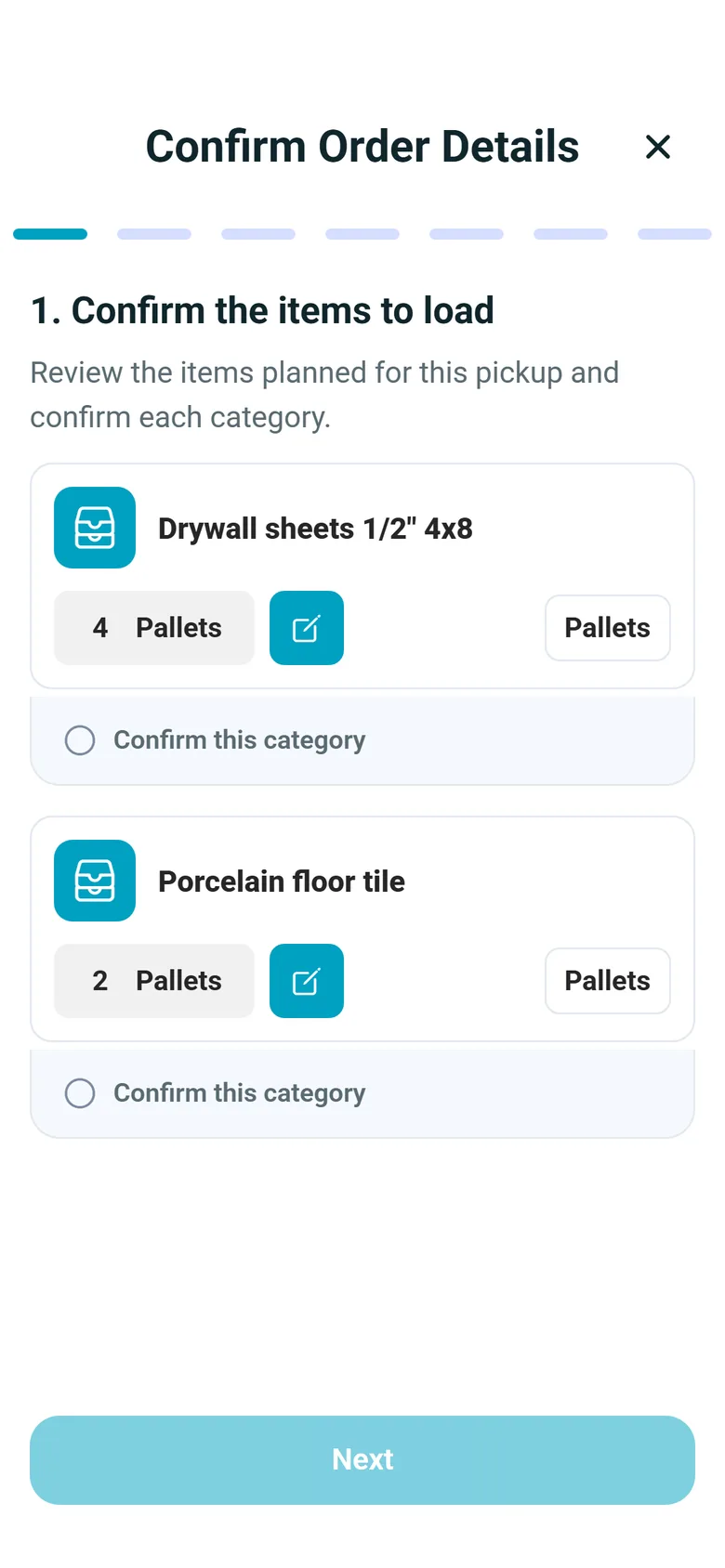
The job-site delivery workflow
Every load to the site, proved and billed
Screens and steps from the Company Portal and version 2.x of the driver app on Android and iPhone.
Job-site stops
A job site is not another saved address
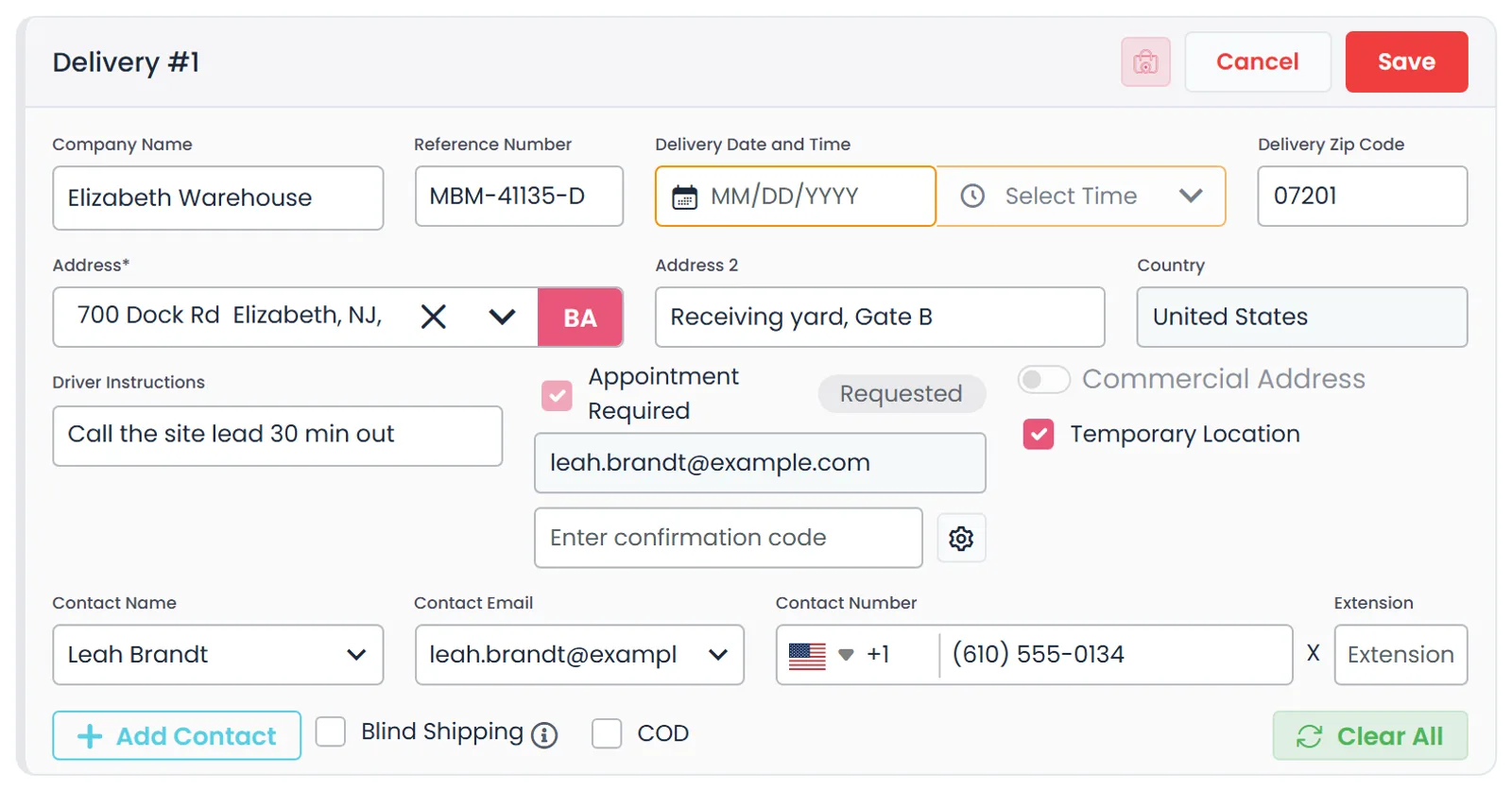
Tick Temporary Location on the stop and the one-off site address stays out of your customer's saved locations. Add the site contact's name, phone and email, a time window or an appointment, and driver instructions, which are included when you copy the route details for the driver. The delivery contact's name and number print on the BOL, and when you email the BOL from the order, the site contact's email is offered as a recipient.
- Temporary Location flag for one-off job sites
- Site contact name and number printed on the BOL
- Site contact's email offered when sending the BOL
- Appointment Required: email a request, and the date and time picked in the reply land on the stop for you to approve
- One-off sites and their contacts are not added to your customer records
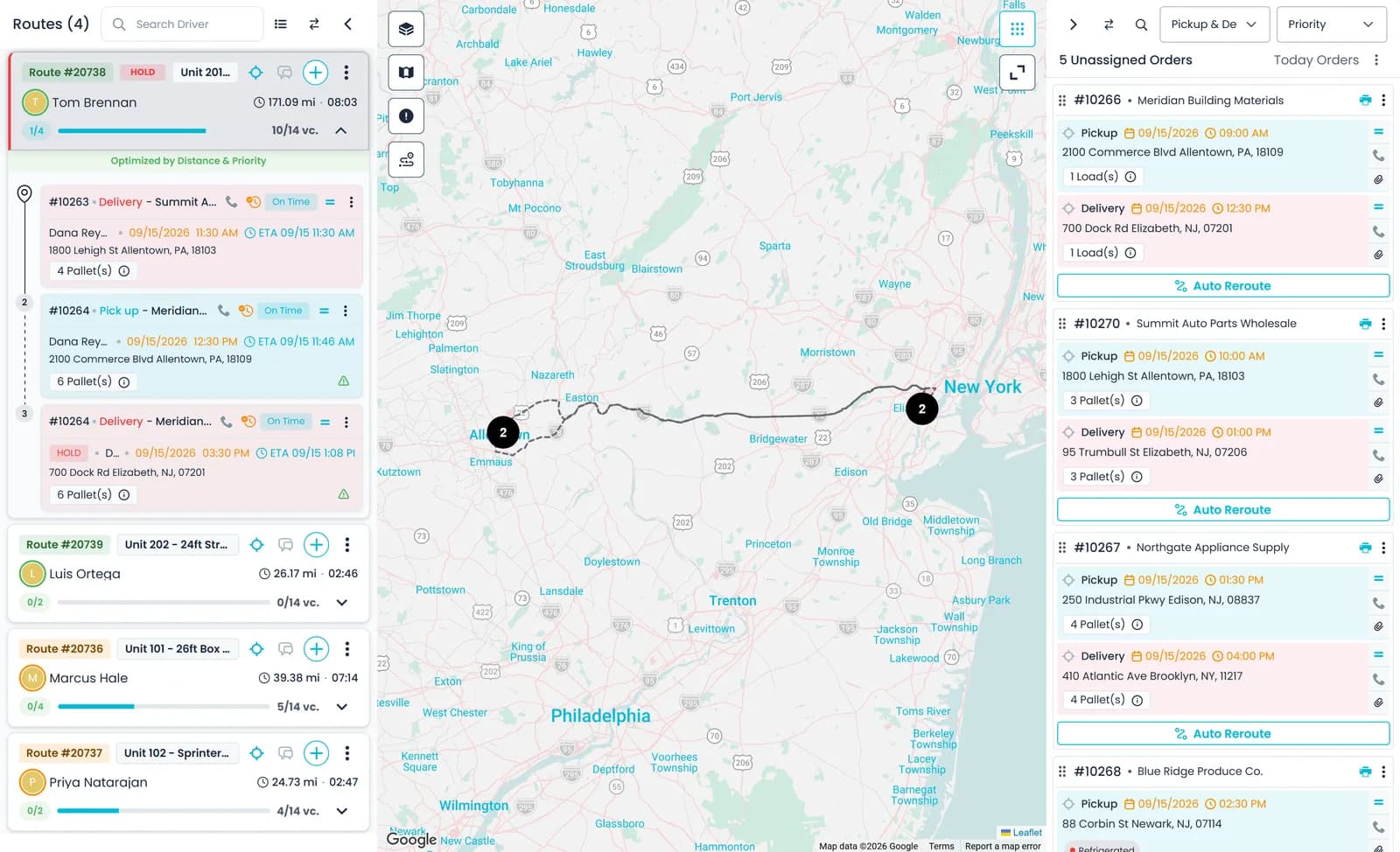
Dispatch board
One board for every drop heading to a site
Drag job-site orders onto routes, each with its driver and truck, and get a warning when the pallets on a route go over the pallet limit, a single limit that applies to every truck. Re-order the route's stops by distance or priority, and the driver gets a push notification when stops are added, removed, re-ordered or moved.
- Drag-and-drop assignment to a driver and truck
- Pallet-limit warnings (one limit for every truck)
- Stop order optimized by distance or priority
- Copy Route for Driver: site contacts, references, items and instructions in one message for any messaging app, also sent over Telegram when Telegram is connected and the driver's Telegram ID is on file
Site not ready
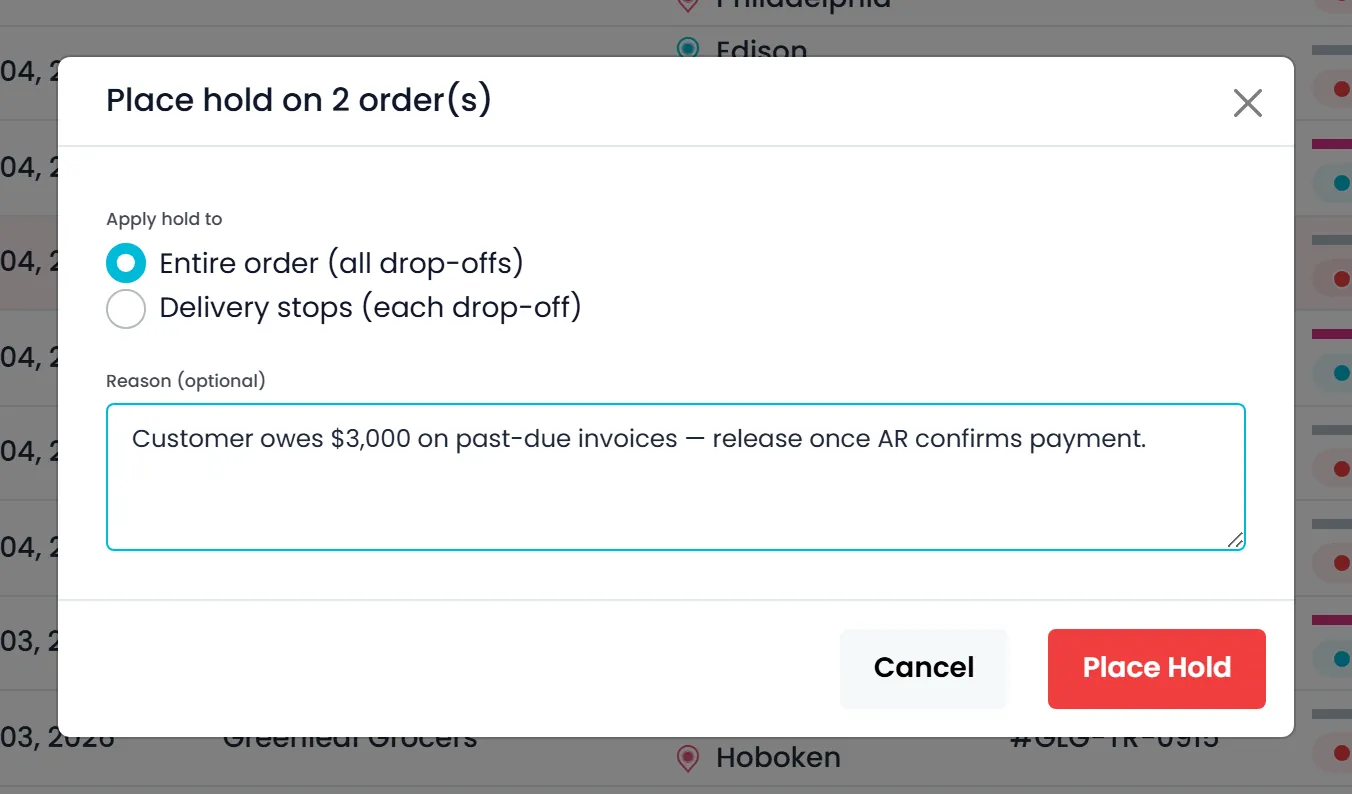
Hold the drop until the site, or the account, is ready
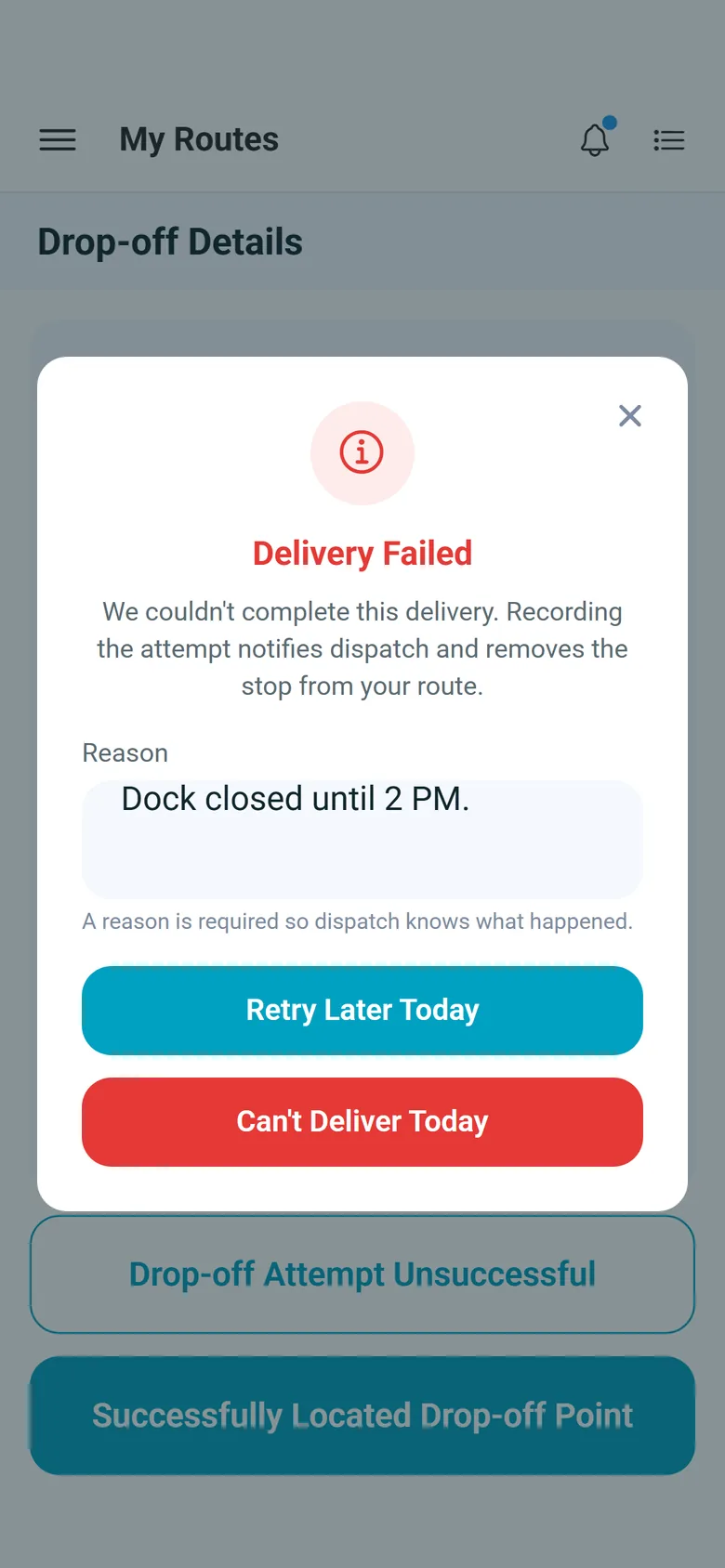
Put a hold on one delivery, or on every drop-off in the order, with an optional reason such as a site that isn't ready or a balance the contractor still owes. Until someone with permission resolves it, nobody can mark that delivery delivered: not the driver in the app and not a dispatcher in the portal. Pickups carry on as normal, so the load can still leave the yard. If the driver is already on site and can't unload, they tap Drop-off Attempt Unsuccessful, type the reason and choose Retry Later Today or Can't Deliver Today.
- Hold one drop-off or the entire order, from the order, the Orders list or a Dispatch stop card
- A held delivery can't be completed until the hold is resolved; pickups are not affected
- In the driver app a held drop-off has no address and no map pin, and tapping it says to contact dispatch
- Red HOLD badge on orders and Dispatch cards, and an On Hold filter on the Orders list
- Who placed and resolved each hold, and when, stays on the order; placing and resolving are separate permissions
- A failed attempt from the driver app saves the reason and the arrival and departure times, and the stop returns to Unassigned
Waiting time
Bill the waiting time you actually spent on site
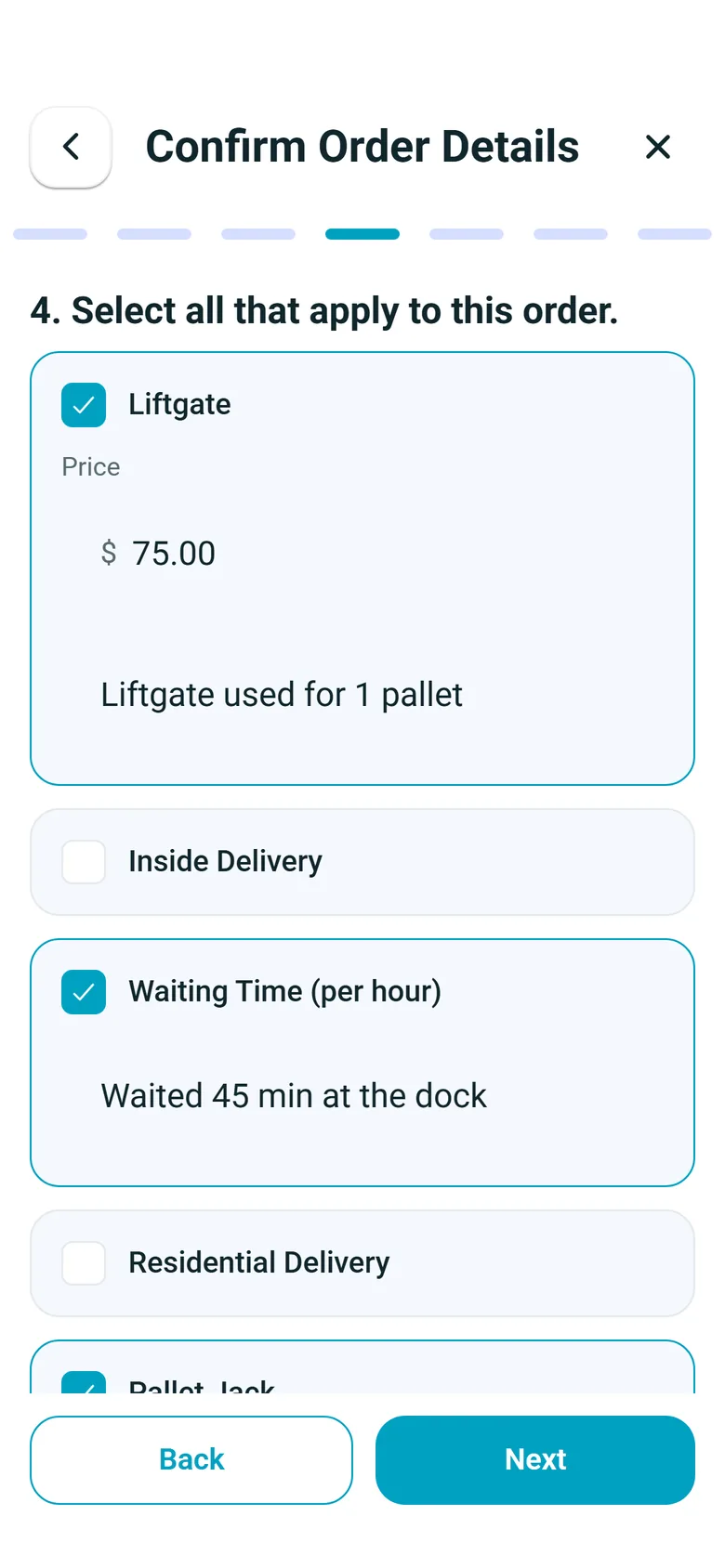
The driver's arrival and departure are stamped at the stop, and the office can correct them when confirming the stop. Free waiting time comes from your company default or from the stop's own override, and the time beyond it lands on the invoice as its own Billable Waiting Time line. If the site isn't ready, record a failed attempt with a reason and a re-attempt date: the stop goes back to the unassigned list and an attempt charge can be added.
- Arrival and departure stamped at the stop
- Free waiting time per company, overridden per stop
- Failed attempt with reason, re-attempt date and attempt charge
- Billable time is the time on site minus the free time, priced at the hourly rate of your Waiting time charge type
- Charge types you mark Attempt? are added to the stop automatically each time an attempt is recorded
Driver app
Signed and photographed at the drop
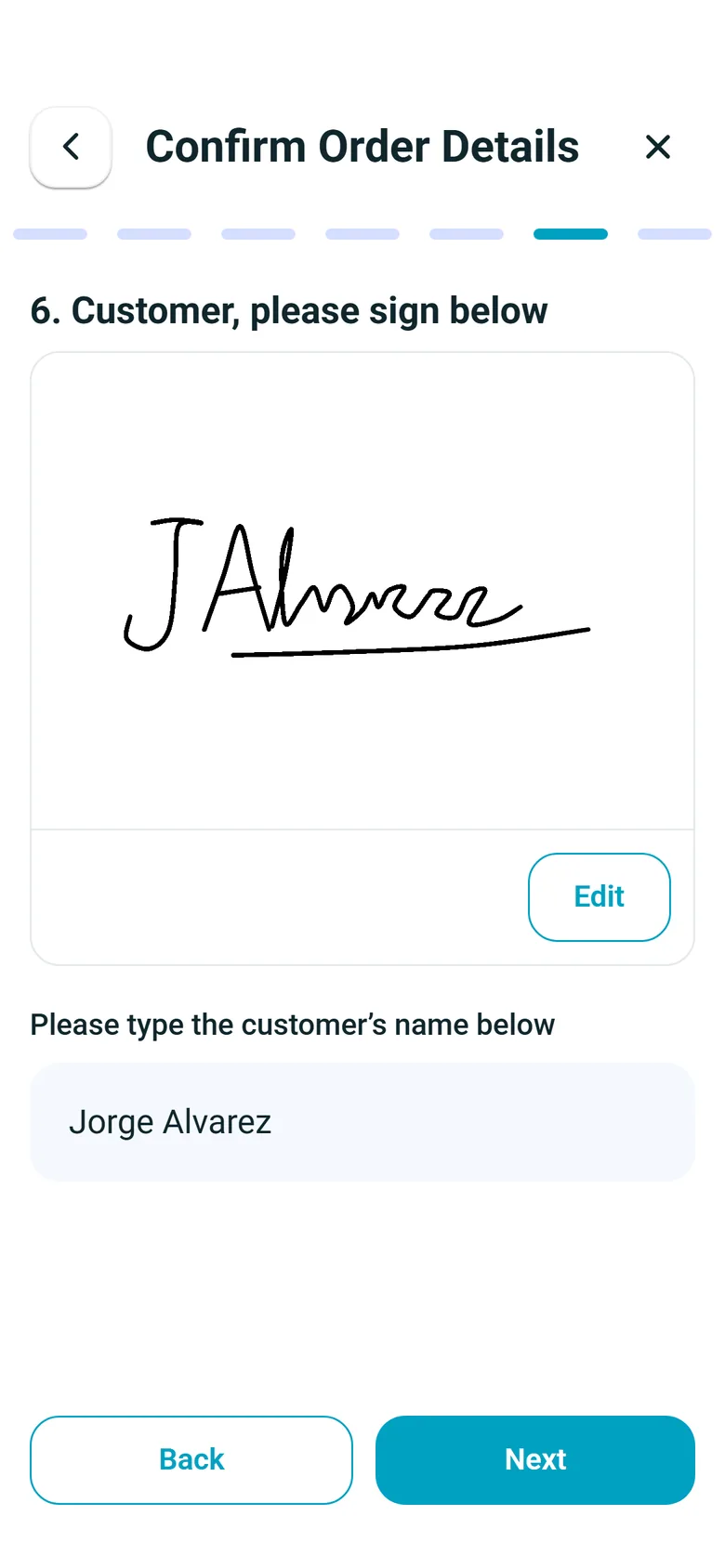
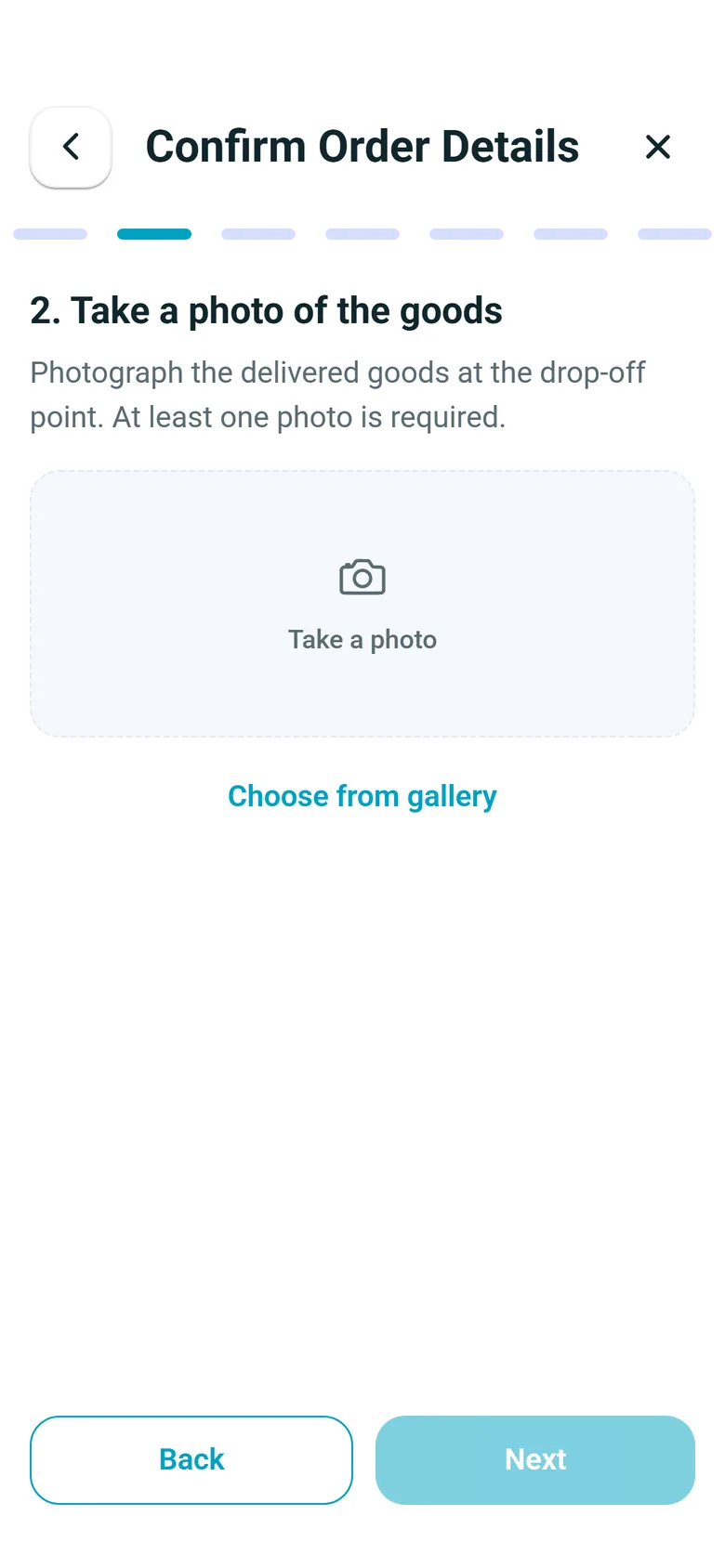
Drivers work the run in the RushHour Drivers app. At the drop, they photograph the materials and capture the receiver's signature with the receiver's typed name. Both are saved to the order for the office, and they go out with the invoice when you email it. A delivery photo and the signature are required steps by default, and you choose whether a missing one blocks the delivery or only warns the driver.
- Goods photos saved to the order
- Receiver's signature captured on the phone
- Required photos and signature in the app
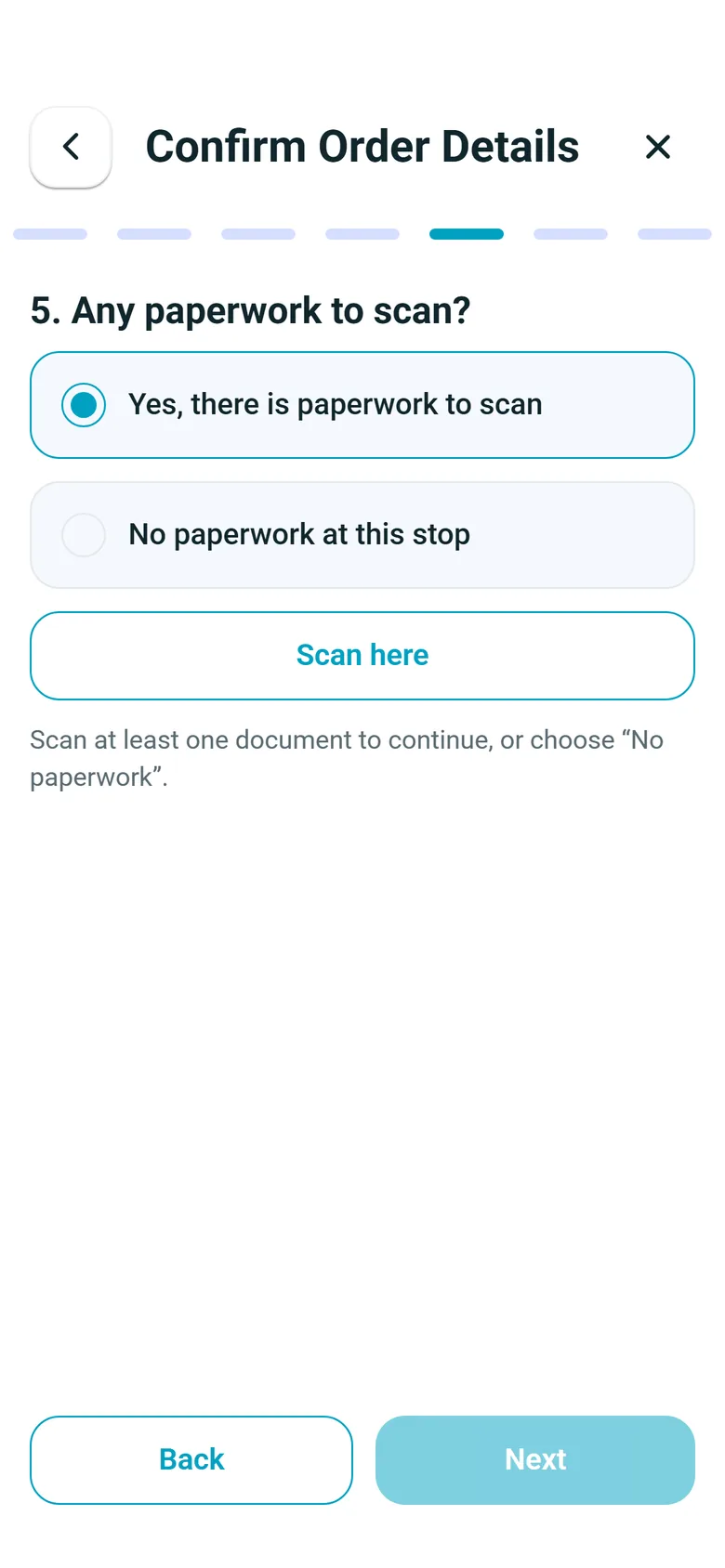
- Delivery tickets and other paperwork scanned at the stop
- A proof-of-delivery PDF with arrival and departure times, driver, truck and, when captured, GPS location, signature and photos, emailed to the customer when the driver completes the drop (off by default)New in the October 2026 release
BOL and labels
Paperwork the site crew can check against the truck
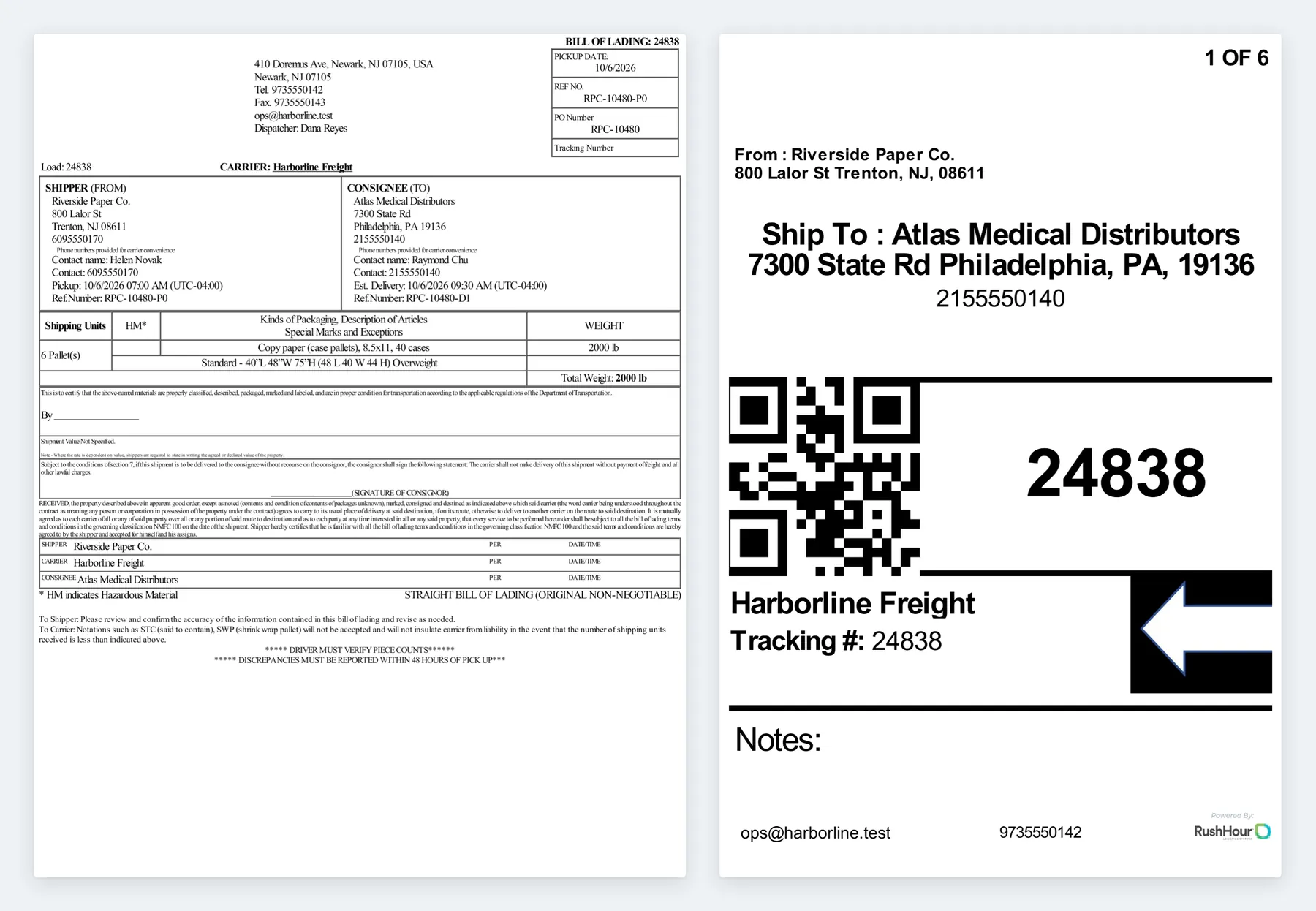
Open the BOL from the order to print, download or email it. It lists the shipper and the consignee with each contact's name and phone, the pickup and delivery reference numbers, the shipping units and the weight. 4 x 6 labels are numbered by unit, 1 OF 6 and so on, each with the order number as a QR code, and print on their own or together with the BOL. For a supplier drop-ship, tick Blind Shipping on the supplier's stop and enter a stand-in name and address: the BOL and labels you print for the delivery show those in place of the supplier, while your billing customer's own BOL keeps the real names. A separate field sets the name the driver sees in the app.
- BOL for the billing customer or for each delivery
- 4 x 6 labels numbered by unit, 1 OF 6 and so on, each with a QR code of the order number
- Print the BOL, the labels, or BOL & Labels together
- Blind Shipping for supplier drop-ships
- Your customer opens and downloads the BOL in the Customer Portal
- Print BOLs and labels for up to 50 orders at once from the Orders listNew in the October 2026 release
Invoicing
Close the load, invoice it, sync it to QuickBooks
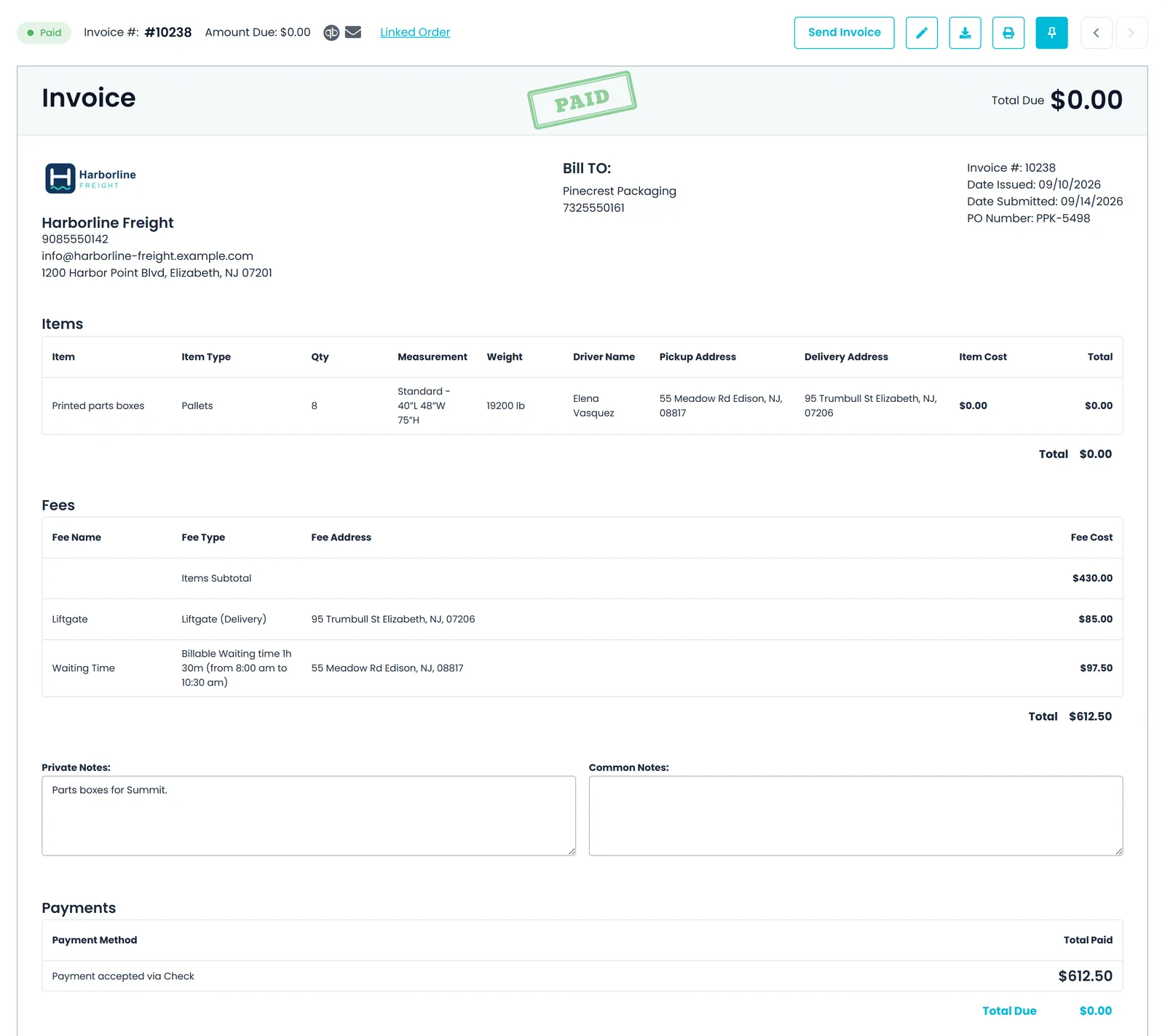
Settings → Billing decides when the invoice is created from the order: when the order is entered, when it is completed, or only when you create it. In each case it is built from the order, so the delivery price, accessorials, waiting time and attempt charges are already on it. Charge the customer's card on file through Cardknox, or let the customer pay in the Customer Portal, and send the invoice to QuickBooks Online automatically or when you choose.
- Invoice created from the order
- Card on file, or card payment in the Customer Portal, through Cardknox
- QuickBooks Online export
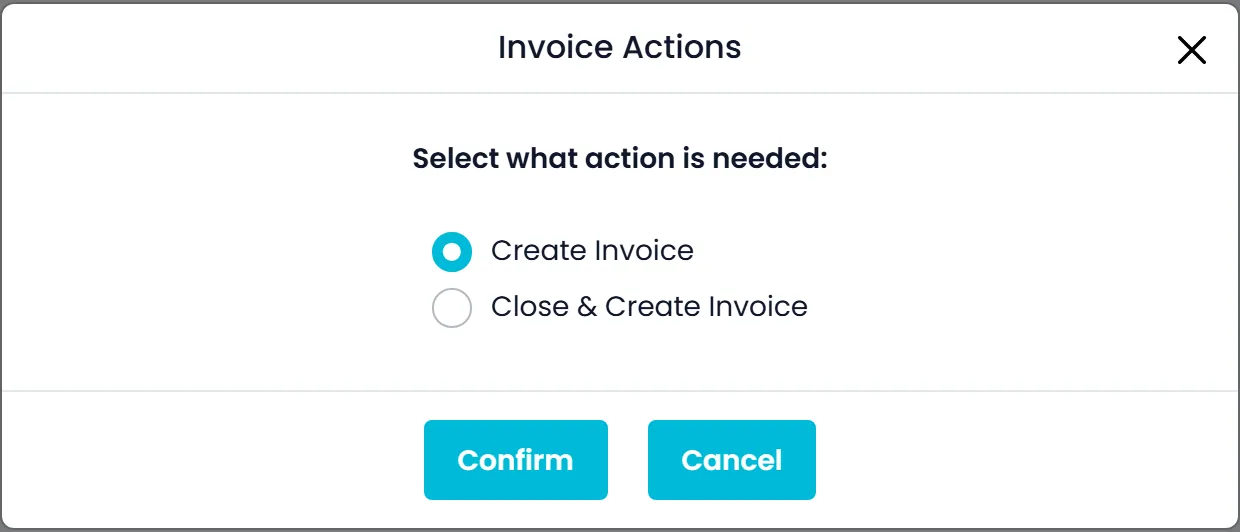
- Close & Create Invoice in one step from the Orders list
- Invoices are never emailed on their own: sending is always your call
In the driver app
What the driver does at the drop
Screens from the stop flow in version 2.x of the RushHour driver app. Your Company Portal settings decide which of the optional steps drivers see.
Recently added
New for the job site
These are in production now; the changelog lists every change.
Proof of delivery
A proof-of-delivery PDF for every dropNew in the October 2026 release
Open Proof of Delivery from a booked order's actions menu or a delivery stop's menu on the Dispatch board to print, download or email a PDF with arrival and departure times, driver, truck, delivered items and, when captured, GPS location, signature and photos. Turn on Email proof of delivery on completion in Settings → Driver App → Features to send it to the customer when a driver completes a delivery in the driver app.
- Arrival and departure times, the driver, the truck and the delivered items
- GPS location, signature and photos, when they were captured
- Print, download or email it from the order or from a delivery stop on the Dispatch board
- Automatic email on completion, off by default, for deliveries completed in the driver app
- The automatic email goes to the customer's Bill of Lading email addresses, or else its billing addresses, or else all its active addresses
Tracking links
A tracking link for the site superintendentNew in the October 2026 release
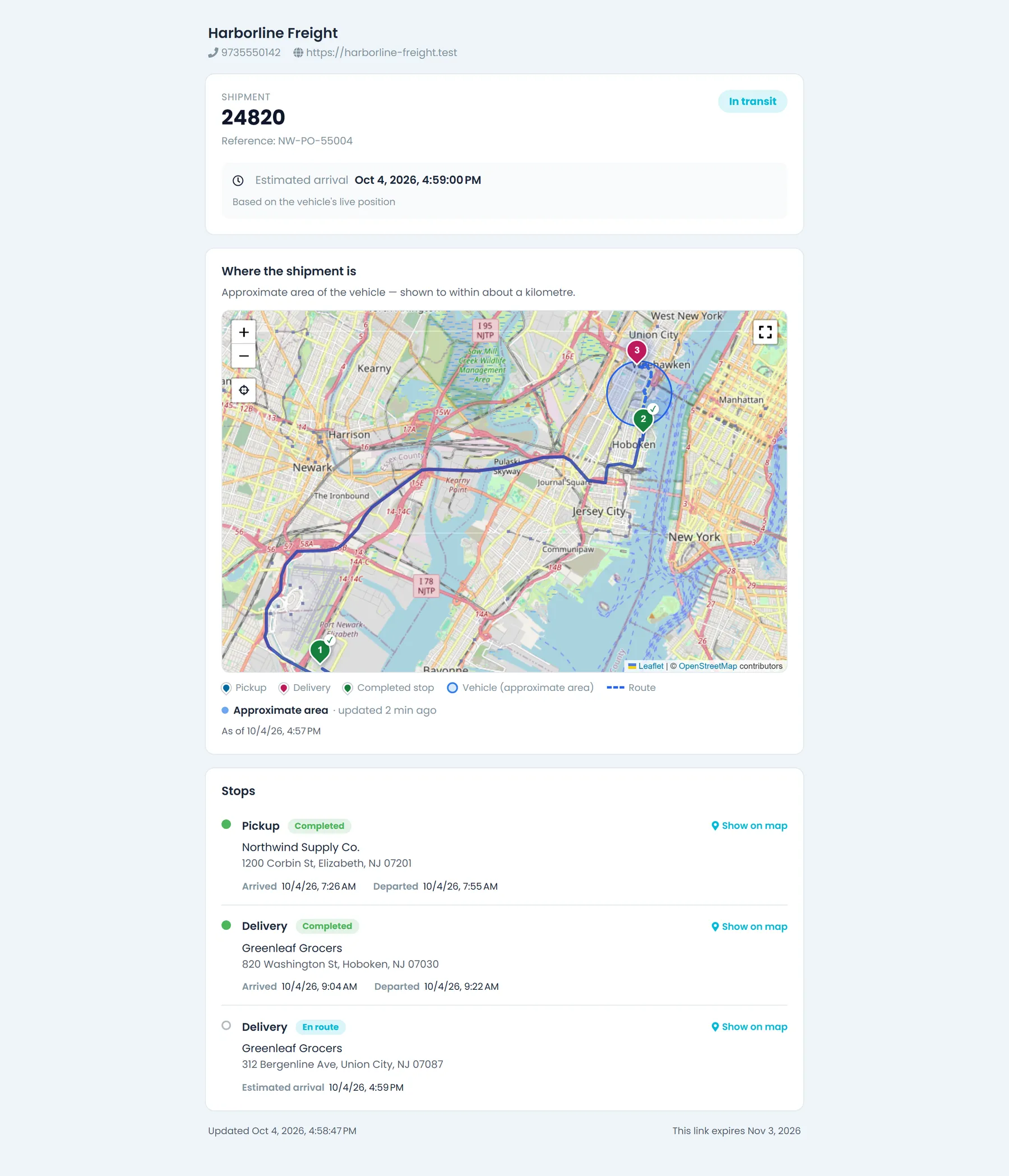
Turn on Settings → Tracking Links, then copy a link from an order or route menu, or email it from the order's Tracking tab, which also counts opens and lets you revoke it. The page shows your company details and each stop's status on a map, never prices. While the load is moving it adds the next stop's estimated arrival and, as you choose, the truck's approximate area, its live position on the way to the shipment, or only the last completed stop.
- No login: send the link to whoever is waiting on site
- Each stop's status on a map, and the next stop's estimated arrival while the load is moving
- Never shows prices
- Links expire after the lifetime you set, and you can revoke one at any time
- Optional automatic email of each order's tracking link, once, at driver assignment, booking or pickup
Receiving hours
Your customers' receiving hours on the delivery formNew in the October 2026 release
Customer records now hold work days and separate shipping and receiving hours, set when you create a customer or on its Company information tab. Existing customers start with Monday to Friday, and hours can run past midnight. Pickup stop forms show the customer's shipping hours and delivery stop forms their receiving hours, and hovering the customer name on an order stop shows all their hours.
- Work days for each customer, Monday to Friday to start
- Separate shipping and receiving hours, which can run past midnight
- Delivery stop forms show the receiving hours, pickup forms the shipping hours
- Hover the customer name on a stop to see all their hours
Built for job-site delivery work
Fewer "has it been delivered yet?" calls
Delivery windows and appointments
Morning, noon, evening or a set time on each stop, plus an appointment status with the site's confirmation code.
Contractors check for themselves
Your customers sign in to the Customer Portal to follow their orders, open the BOL and the files your office attaches to their orders, and pay invoices by card when you connect Cardknox.
Every order change on record
The order's audit log records who changed a stop, a date, the price or the job-site flag, with the old and new value.
FAQ
Questions from building-material haulers
Can we bill detention when a job site keeps the truck waiting?
Yes. Set your company's free waiting time in Settings → Billing → Waiting Time, and override it on any stop that needs more or less. The driver app stamps arrival and departure at the stop, and the office can correct them when confirming the stop. Time beyond the free time goes on the invoice as its own Billable Waiting Time line, priced at the hourly rate of your Waiting time charge type, and you can add or correct a stop's waiting time from the invoice.
Do one-off job-site addresses clutter our customer's saved locations?
No. Tick Temporary Location on the stop. The site address, its name and the site contact stay on that order instead of being added to your customer records as a new location, company or contact. The contact still prints on the BOL, and the order's audit log records the flag.
What happens when the site isn't ready for the delivery?
You have two options. Before the truck goes, put a hold on the delivery, with an optional reason: until the hold is resolved nobody can complete that delivery, and the driver app shows it without an address. If the driver is already there, they record a failed attempt with a required reason and choose Retry Later Today or Can't Deliver Today. The arrival and departure times are saved, the stop goes back to Unassigned for re-dispatch, and any charge types you marked Attempt? are added to the stop.
Can the contractor see the photos and the signature?
Yes. The photos and signature the driver captures are saved on the order stop, where your office can open and download them, and when you email the invoice from RushHour they go with it as one attached PDF. You can also send a proof-of-delivery PDF from the order, or have it emailed automatically when the driver completes the drop.
Can we deliver a supplier's order without showing the supplier's name?
Yes. Tick Blind Shipping on the supplier's stop and enter a stand-in name and address. The BOL and labels you print for the delivery show those in place of the supplier, while your billing customer's own BOL keeps the real names. A separate field sets the name the driver sees in the app.
Which phones does the driver app run on?
Android and iPhone. The driver-app screens on this page are from version 2.x of the RushHour driver app on Google Play and the App Store, and the app follows the settings you choose in the Company Portal.
Related products
See a job-site delivery run end to end, on your own freight.
From dispatch to signed proof of delivery to the invoice in QuickBooks. One workflow, one demo.