
One platform,
set up for the freight you move.
Carriers, forwarders, final-mile freight fleets, distributors and building-material haulers all take orders, dispatch drivers, collect proof of delivery and invoice in RushHour. Onboarding is hands-on: we import your customers, set up your pricing, zones and driver-app steps, connect QuickBooks and train your team.
Find your operation
Five ways fleets run on RushHour
Each operation prices, dispatches and proves its deliveries differently. Pick the one closest to yours.
Features by operation
What each operation leans on
The features that matter most to each kind of fleet, and what they look like on screen.
Final-mile freight · Distribution
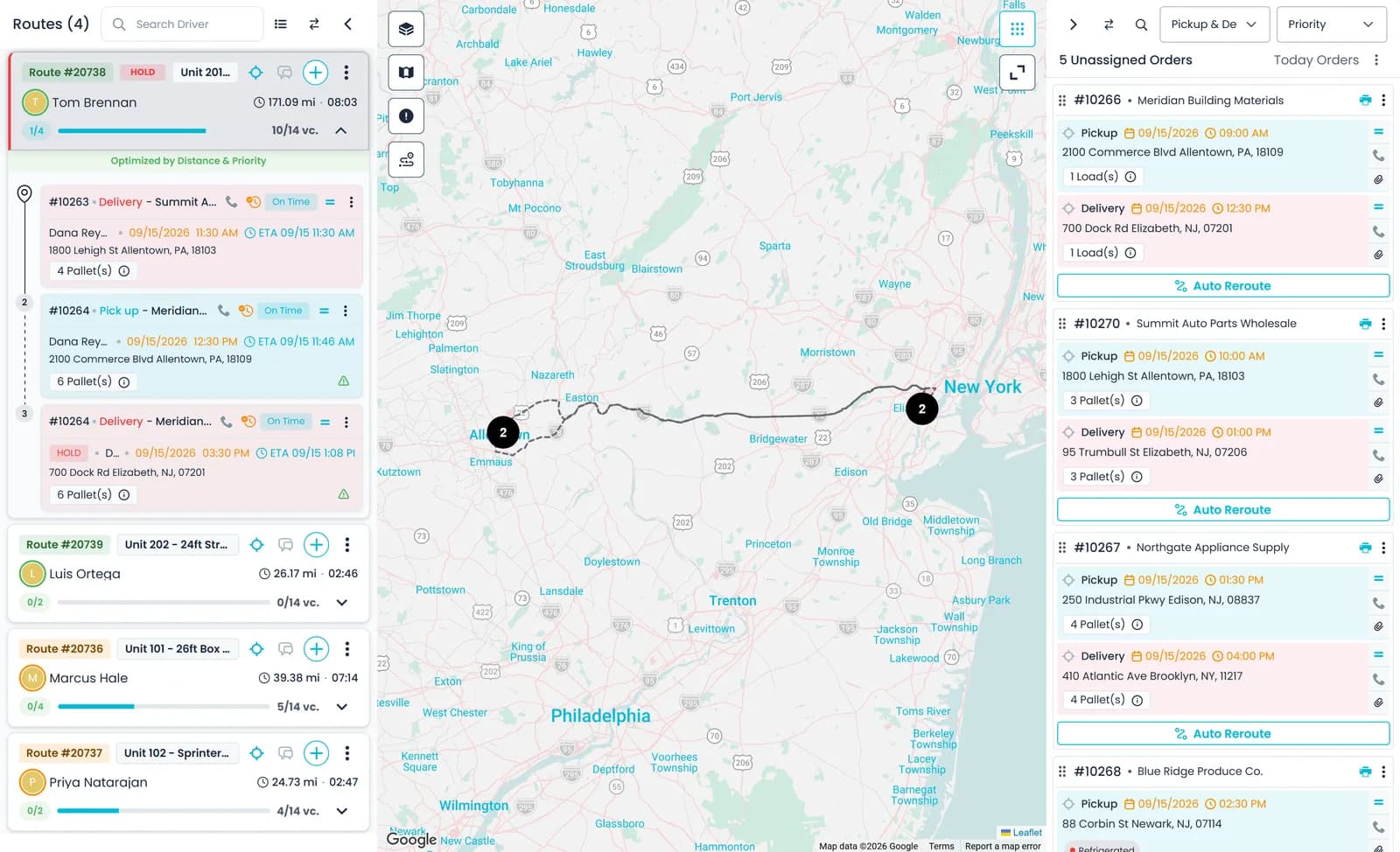
Put a new stop on the route that fits it best
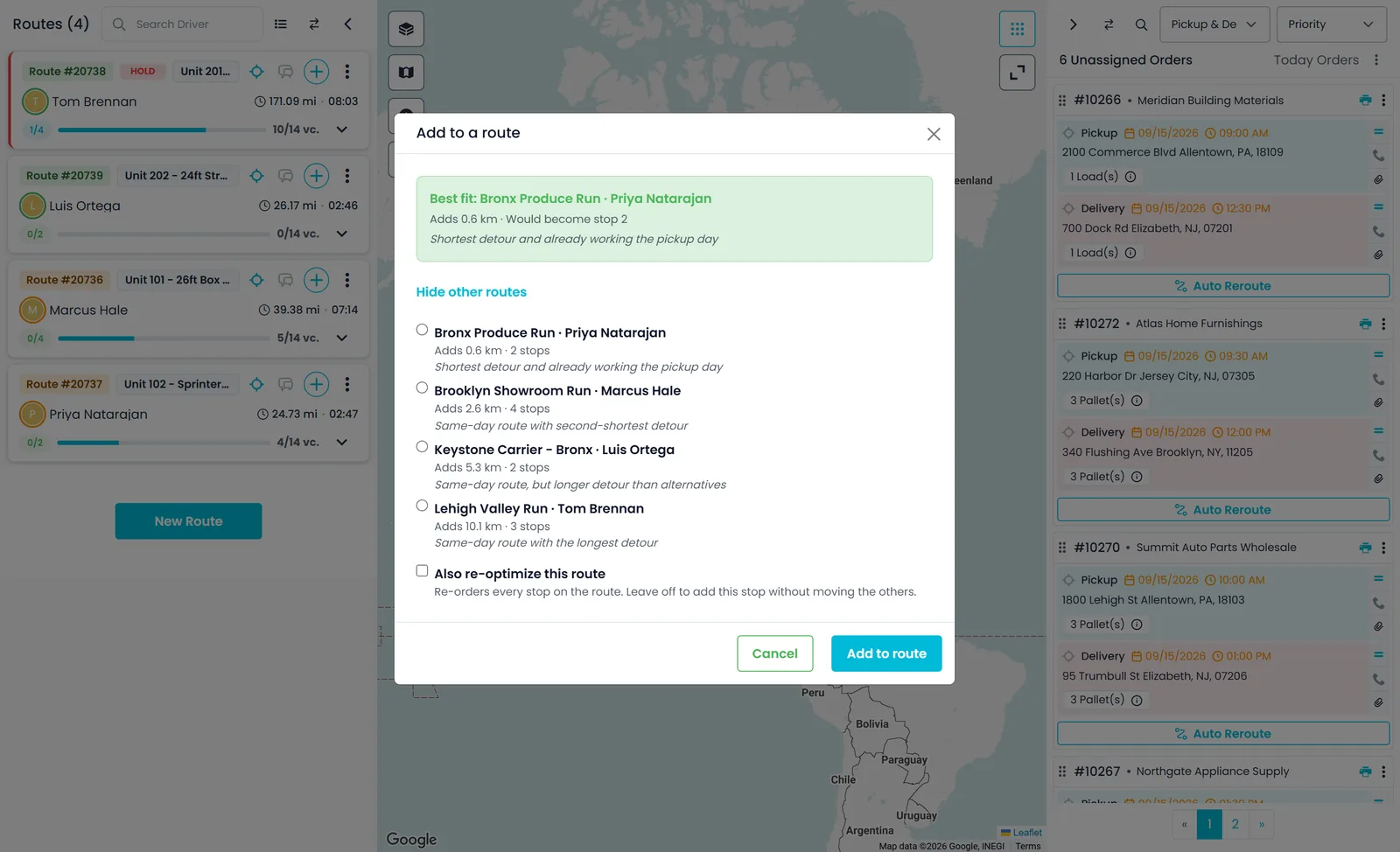
On the dispatch board, Find Route on an unassigned order opens Add to a route. It lists the active routes that can still take the stop, with the best fit on top and, when one is available, a short reason such as the shortest detour on a route already working that day.
- The best fit shows the distance it adds and the stop number the new stop would become; the other routes show the distance they add and their stop count
- Add only the new stop, or tick Also re-optimize this route to re-order every stop
- Add to route places the pickup and its delivery in one step
- The action is renamed Find RouteNew in the October 2026 release
Distribution · Logistics
Hand freight between drivers, or through your warehouse
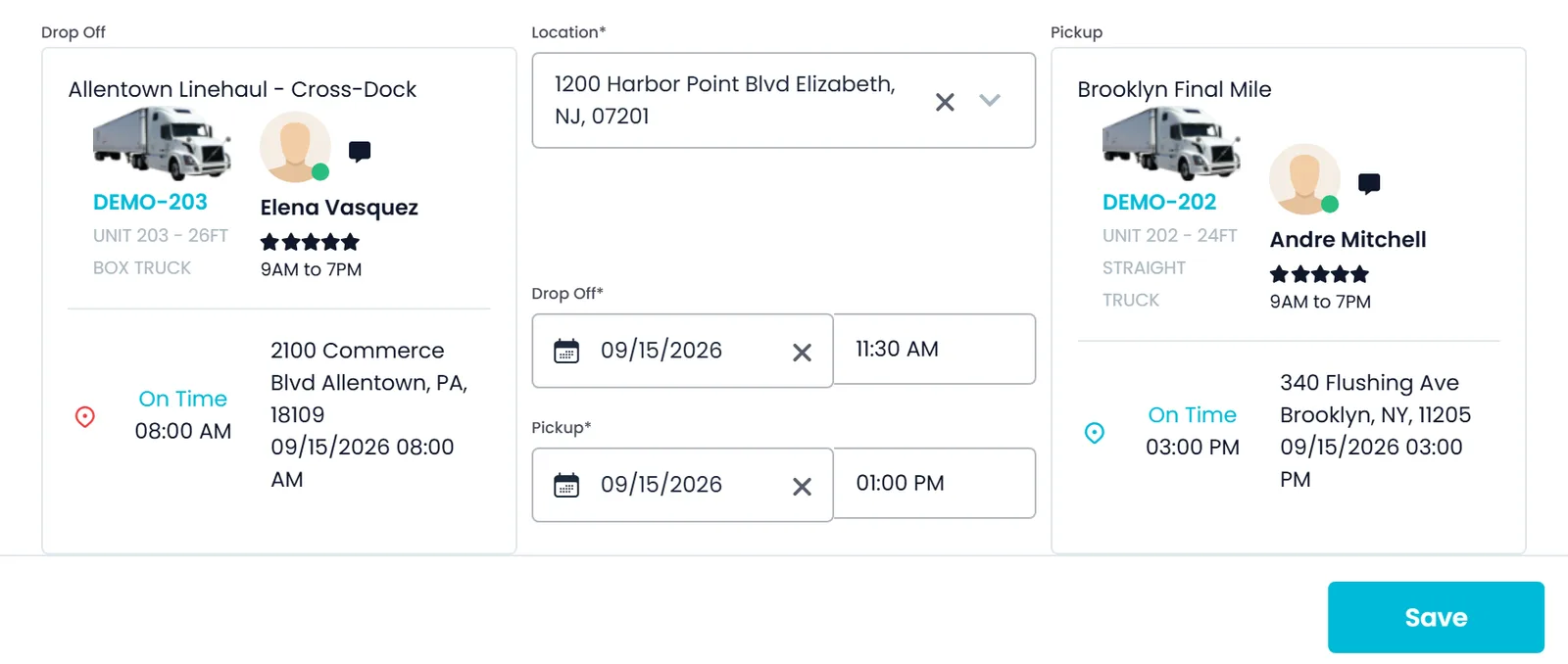
Assign Transfer pairs a Delivery To Transfer on one route with a Pickup From Transfer on another, at the location, dates and times you set. Each leg stays on its own route.
- Delete Transfer removes both paired stops, until the hand-off is confirmed
- Once part of a transfer is confirmed, it cannot be reassigned by mistake
- Transfer to warehouse, on the route card menu, moves picked-up freight into one of your warehouses
- That freight waits in the Unassigned panel under the Warehouse filter until another route takes it
Construction · Distribution · Freight forwarding
Stops that carry the site's own details
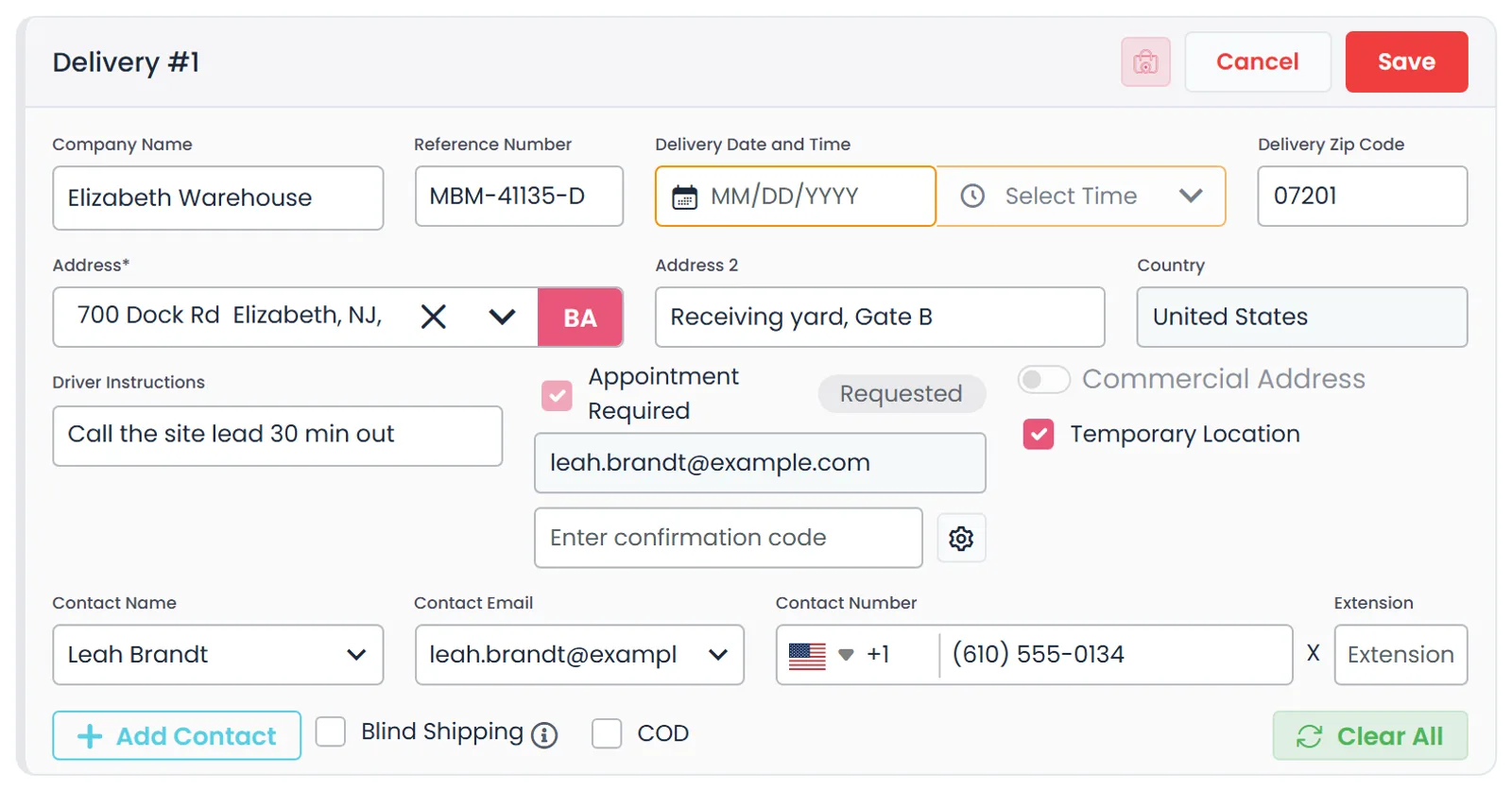
Each pickup and delivery has its own reference number, contact, driver instructions, and a date with a Morning, Noon, Evening or exact time. Temporary Location marks a one-off job site that should not be saved as a company.
- Appointment Required emails the location a reply form that needs no login, and the reply fills in the stop's date and time
- Save the appointment's confirmation code once it is accepted
- Blind Shipping puts a blind name and address on the BOL copies other parties receive
Construction · Final-mile freight
Bill waiting time and extra work at the stop
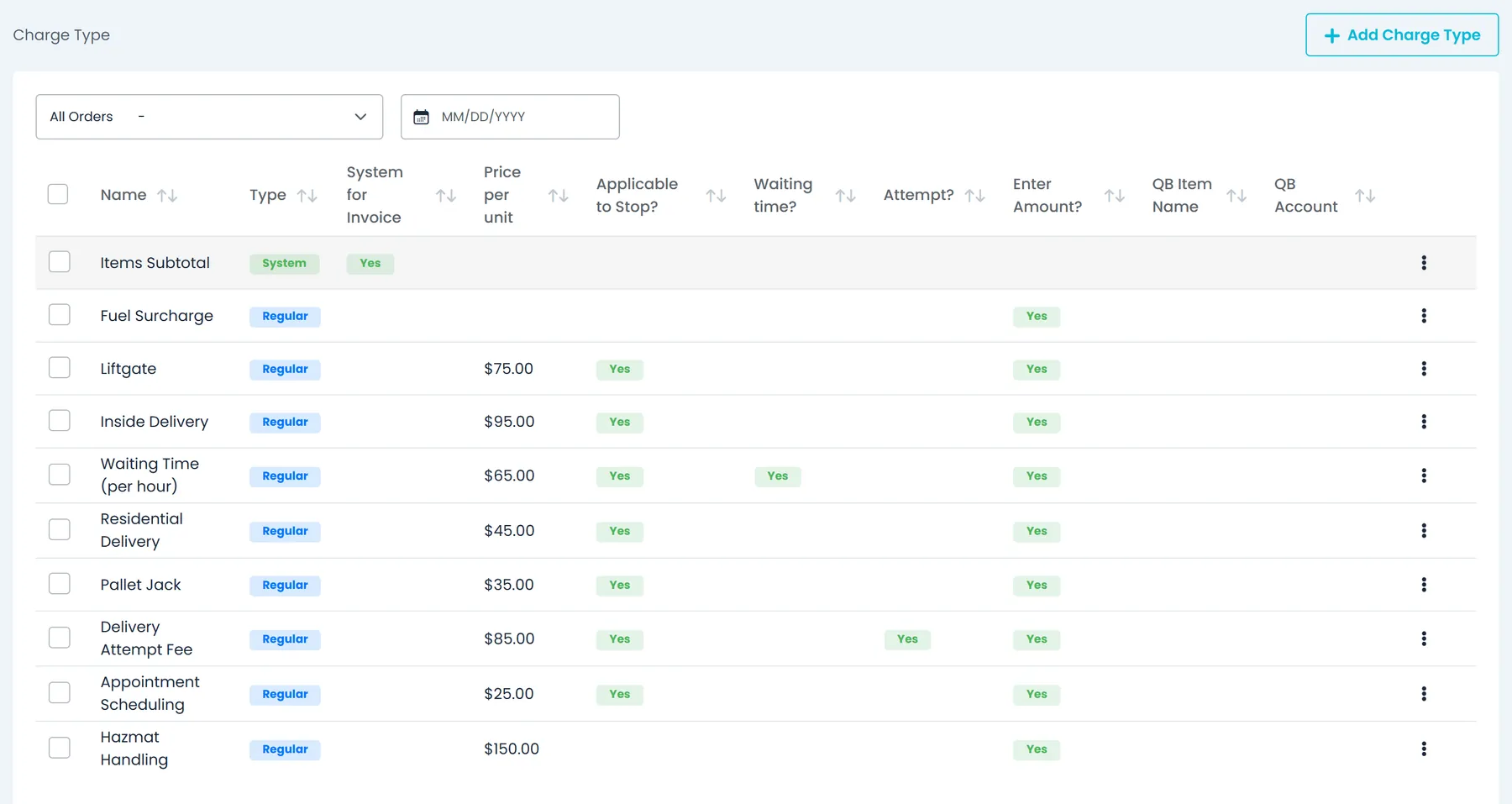
Arrival and departure are recorded on each stop, from the driver app or when the office confirms the stop. Time on site beyond your free waiting time can be billed at the hourly rate of your waiting-time charge.
- Set the free waiting time in Settings → Billing
- Add or correct a stop's waiting time straight from the invoice
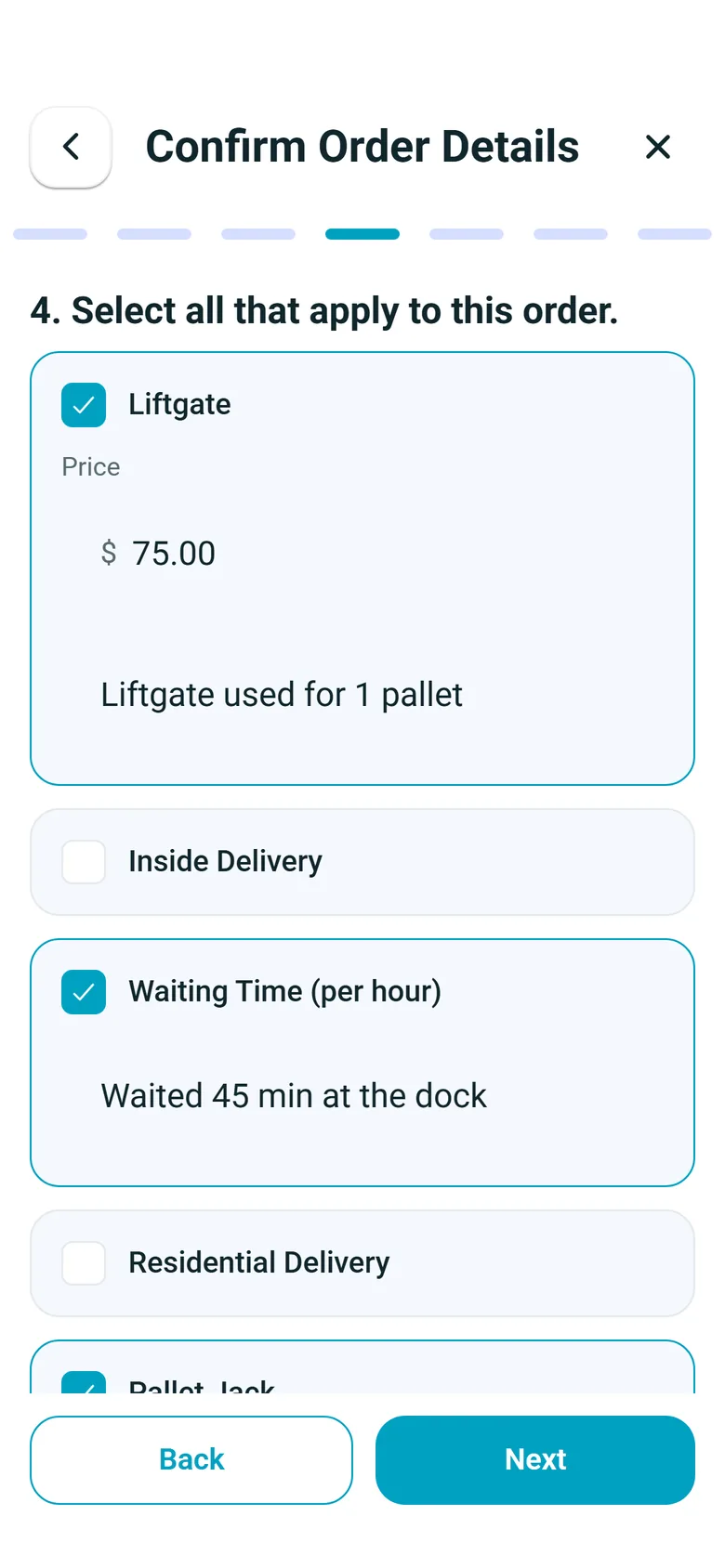
- Drivers tick the charges that apply, such as liftgate or inside delivery, from your own charge types
- Set Auto-billing to Apply automatically in Settings → Billing to add waiting time beyond the free time to orders as Auto charges
- Choosing a stop on the invoice fills in its recorded arrival and departureNew in the October 2026 release
Final-mile freight · Distribution
Collect freight payments at the stop
Put a COD on a delivery stop with its amount, payment type (Cardknox, Cash, Check, ACH or Other) and an email. For card payments, Request Payment emails a secure payment page and tracks it as Requested, Success or Failed.
- Card payments are charged on the billing customer's own Cardknox account, once it is authorized through an Accept Payments invite or keys you enter
- The payment link is valid for 24 hours, and Request again disables the previous one
- The order flags a freight payment that is required before unloading
- In the driver app, the driver photographs the front and back of a check, and records cash collected at a pickup
Freight forwarding · Logistics
International lanes, priced and invoiced in their currency
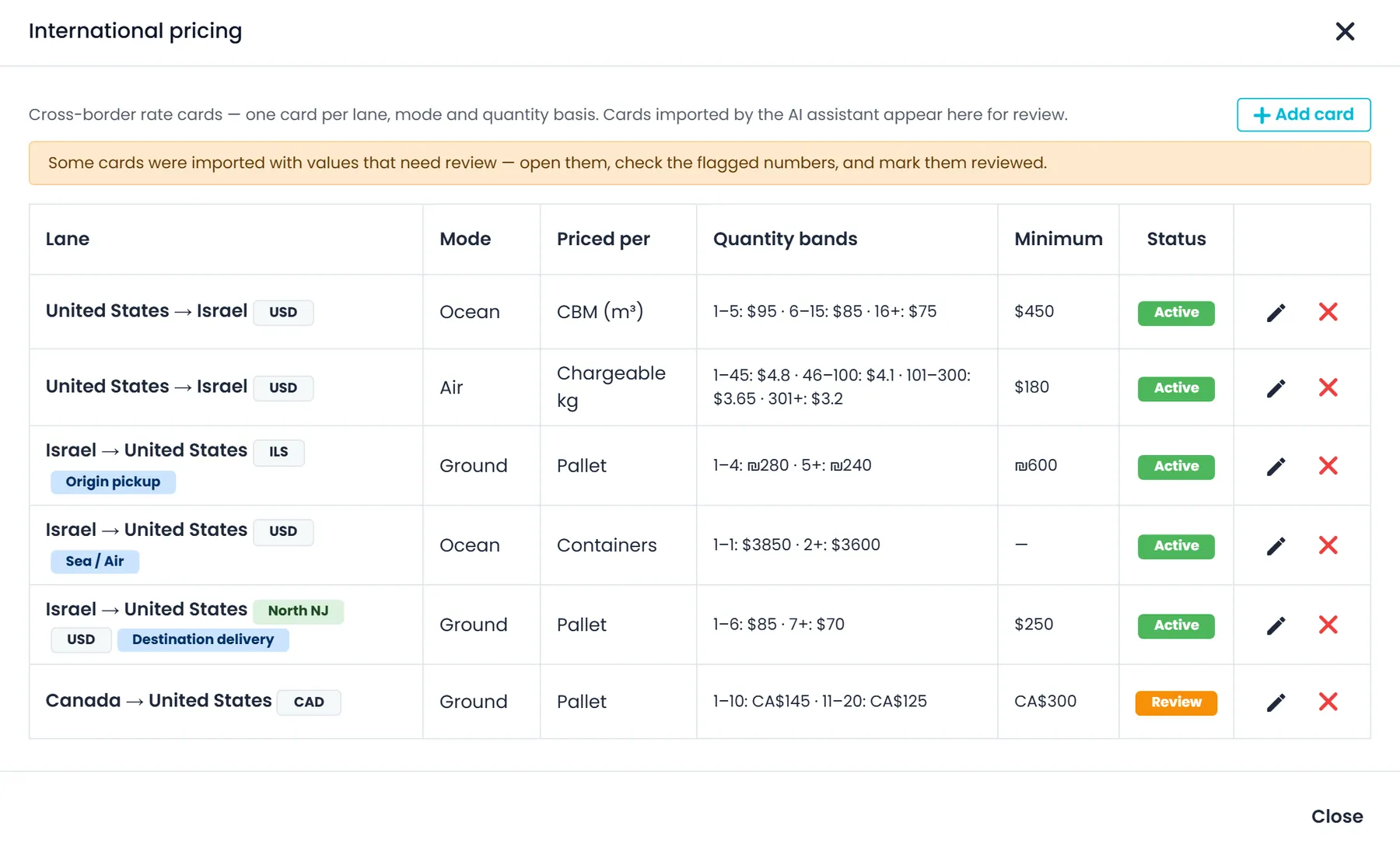
International rate cards price each country lane by Ocean, Air or Ground, per pallet, chargeable kg, piece, CBM or container, with quantity bands, a minimum charge and a fuel percentage.
- Price a lane door to door, or as separate origin pickup, sea or air, and destination delivery legs
- Valid-from and valid-to dates, so a card prices only orders dated inside its window
- Quotes, orders and invoices in USD, CAD, MXN, EUR, GBP or ILS once you turn those currencies on, with exchange rates you record yourself
- Orders with no drivable route still save with both stops flagged Assign HUB; pick a warehouse near each end and each leg runs separately
Driver app
At the stop, every operation follows the same steps
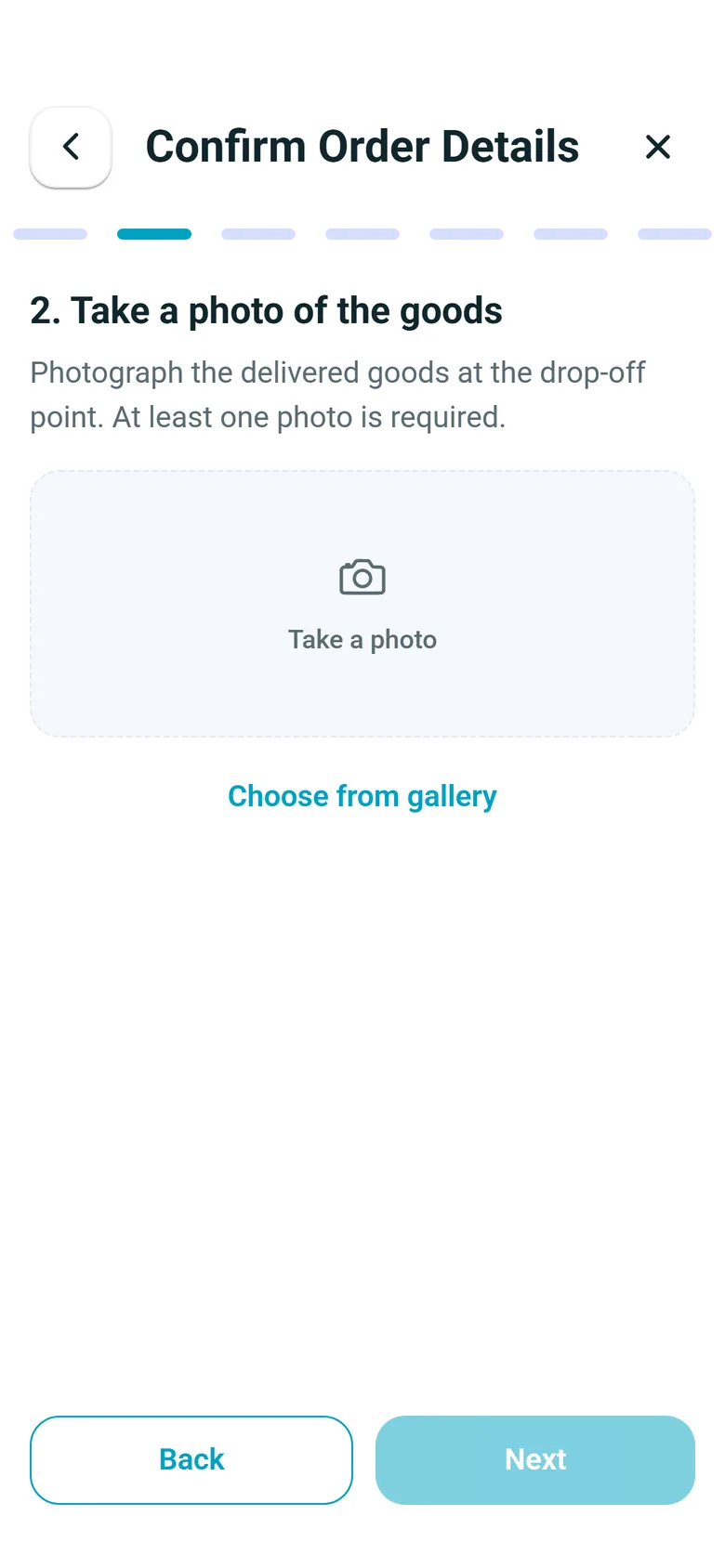
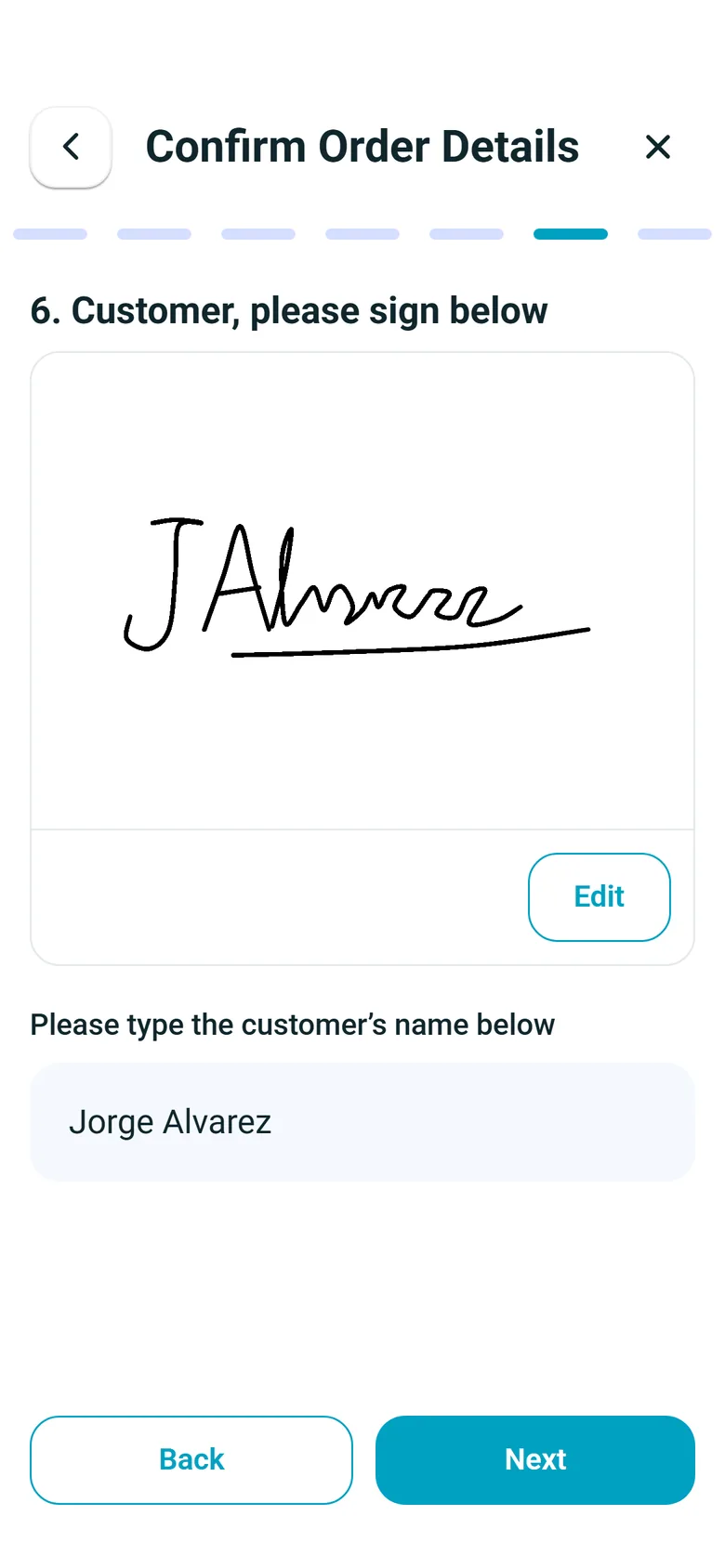
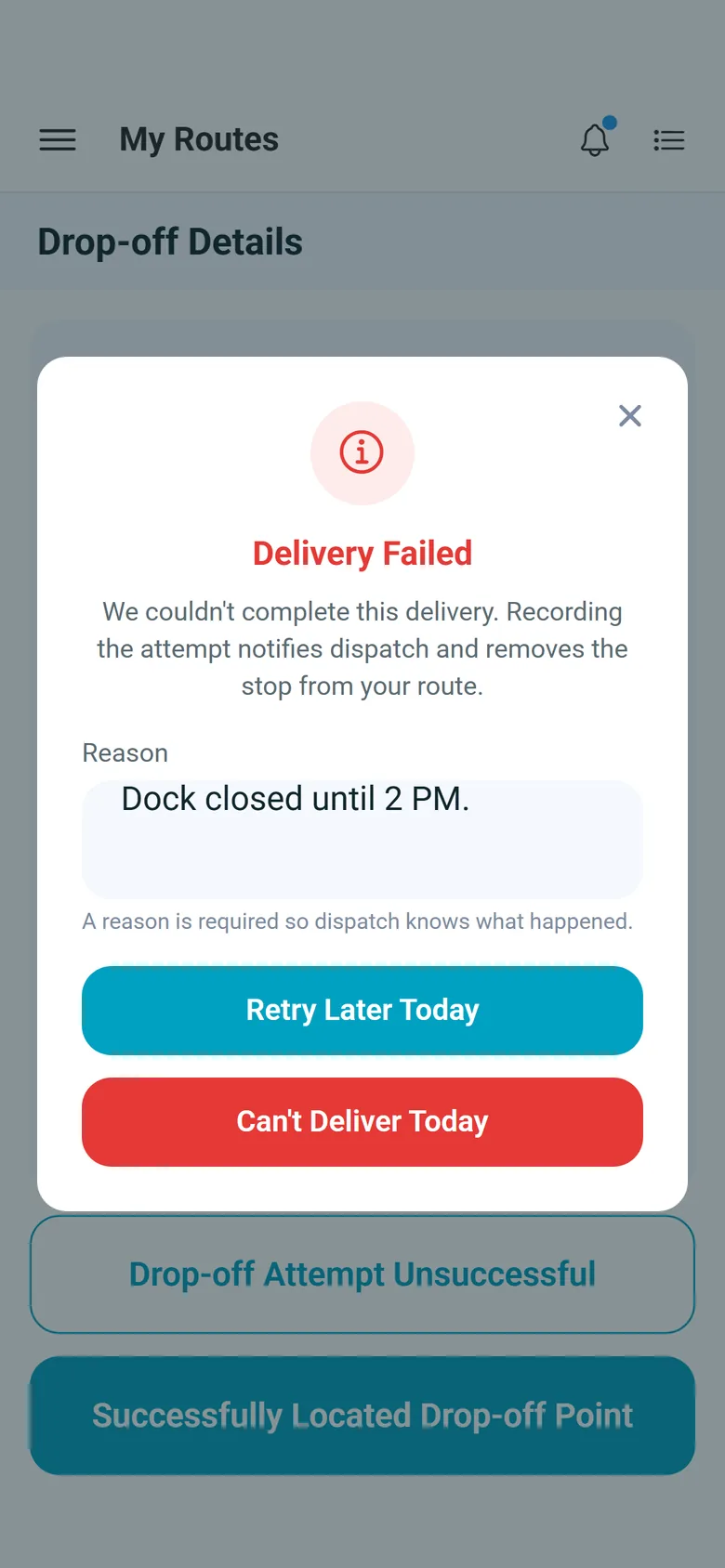
Drivers work each stop step by step in the RushHour Drivers app on iPhone and Android. Your Driver App settings decide which steps appear and which are required.
What every operation gets
One order, start to finish
The order becomes the route, the BOL, the proof of delivery and the invoice, without being re-typed.
A driver app on iPhone and Android
Drivers work their stops in the RushHour Drivers app, and the photos and signatures land on the order.
A portal for your customers
Customers place and follow orders, open delivery documents, and pay invoices by card when you connect Cardknox.
QuickBooks and card payments
Invoices go to QuickBooks Online, and card payments run through Cardknox.
Recently added
New in RushHour
These are in production now. Each links to its page, and the changelog lists every change.
Tracking linksNew in the October 2026 release
Turn on tracking links in Settings and share a page per order that needs no login: each stop's status on a map and, while the load is moving, the next stop's estimated arrival and the truck-position detail you choose. It never shows prices.
Arrival and departure emailsNew in the October 2026 release
Email the customer an order is billed to when the driver arrives at or leaves a stop, with the details you pick. Both emails stay off until you switch them on.
Proof-of-delivery PDFNew in the October 2026 release
Print, download or email a PDF with arrival and departure times, driver, truck, delivered items and, when captured, GPS location, signature and photos.
Invoice pay linksNew in the October 2026 release
Customers pay an approved invoice by card from a secure link, without logging in. Needs a connected Cardknox account.
Measured on the RushHour platform
Production figures from September 2026, rounded down. Almost all of this volume is our founding operator, Shimon's Express. Read their story
FAQ
Questions about fit
Our operation mixes several of these. Is that a problem?
No. Every operation runs on the same Company Portal for the office, the same driver app on iPhone and Android, and the same Customer Portal for your shippers. The industry pages only highlight the features each kind of fleet uses most.
Can we dispatch our own drivers and outside carriers together?
Yes. Choose the carrier in a driver's Organization field and the driver shows as Outsource in your driver list. On a new or edited route, switch Company Driver to Outsource Driver, then pick the carrier, its driver and a truck. Carrier drivers can be invited to the driver app and complete stops there, and their routes sit on the same dispatch board as yours.
Do you handle LTL, pallets and full truckloads?
Yes. An order can have several pickups and deliveries, with items entered as Boxes & Crates, Bags, Pallets, Full Load or Other. A Full Load item takes a truck type: 53' tractor trailer, 26' box truck or sprinter van. Shipment types you define, for example LTL or expedited, can carry their own markup, fees and rates, which set the Classic price once Use New Pricing is switched on in Settings → Billing (it is off by default).
Can drivers deliver to a job site that is not a saved address?
Yes. Tick Temporary Location on the stop to mark a one-off job site that should not be saved as a company. The stop still carries its contact, reference number and driver instructions, and the site contact prints on the BOL.
Do you support cross-border and overseas freight?
Yes. International rate cards price each country lane by Ocean, Air or Ground mode, and quotes, orders and invoices can be in USD, CAD, MXN, EUR, GBP or ILS once you turn those currencies on, with exchange rates you record yourself. An order with no drivable route between a pickup and its delivery still saves, and you assign a warehouse (hub) near each end so each leg runs separately.
How is the on-time delivery rate measured?
A delivered order counts as on time when every delivery stop that has a scheduled time and a recorded arrival arrived no more than 30 minutes after its scheduled time. The On-time delivery widget shows the rate for the last 7, 30 or 90 days, with the number of on-time orders out of the total. Anyone can add it to their own custom dashboard; adding it to a company dashboard needs the Manage Dashboards permission.
Can our customers track their shipments?
Shippers with a Customer Portal login follow their orders there, including a Track Live view with the route map and a shipment timeline. You can also send public tracking links that need no login.
Go deeper
The features behind each operation
Each one has its own page with the details.
Not sure which fits?
Tell us how you operate and we will show you the closest match on your own freight.