
Customers send spreadsheets.
You review, not re-type.
Order sheets, price lists, packing lists and invoices become real records in RushHour. The AI assistant reads the file and opens an editable preview, and nothing is saved until someone on your team with import permission confirms it.
How it works
Attach, review, import
Three steps, and no orders, rates or other records are created until the last one.
1. Attach the file
Drop up to 10 files into the AI assistant (up to 25 MB each), paste them, pick one from your Documents library, or click Import with AI on a stored document. Then say what you want, such as "import these orders".
2. Check the review canvas
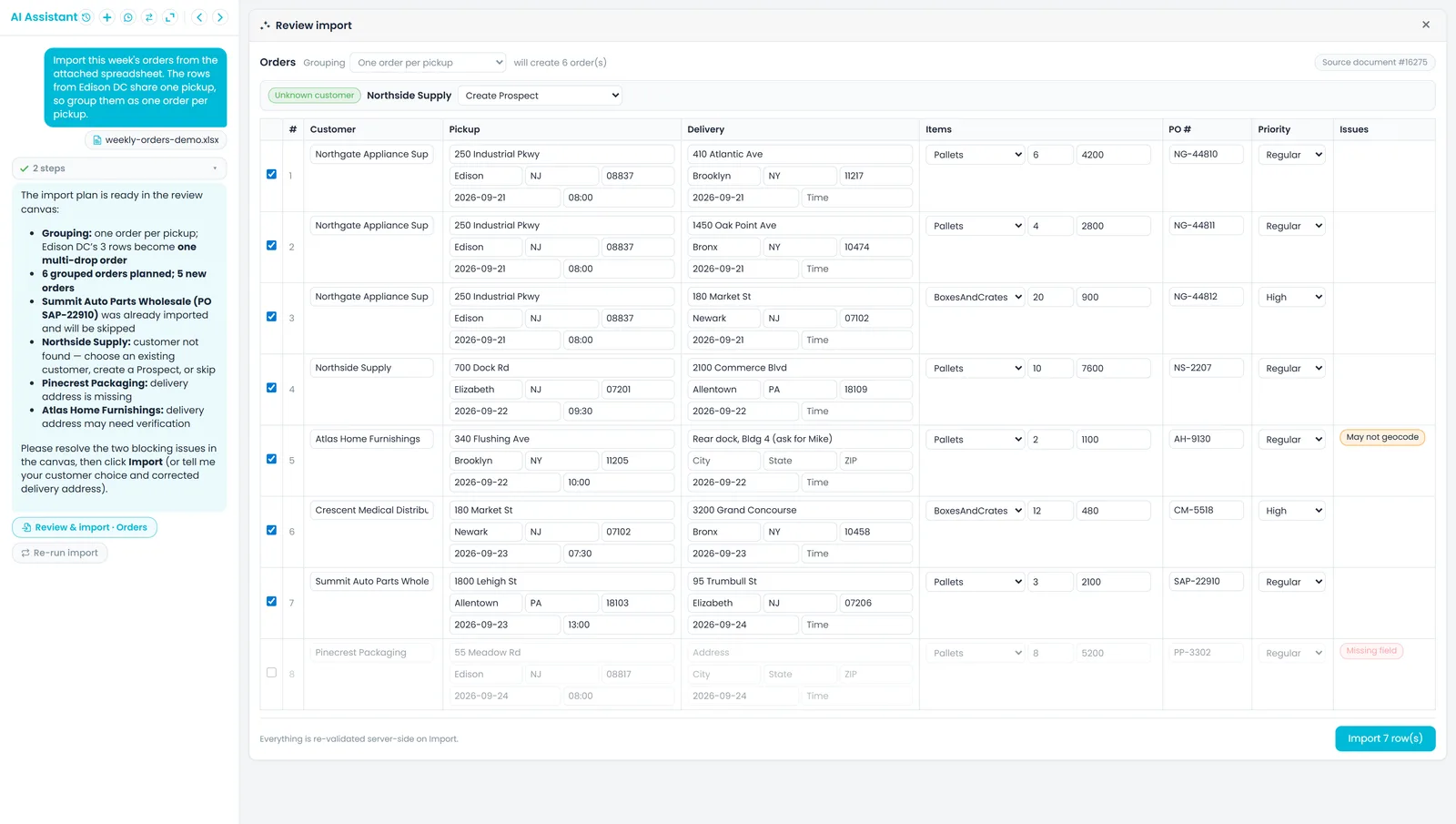
The assistant reads the file and opens Review import: an editable table with problem rows badged, and the grouping and customer choices above it. Fix cells, untick rows, or re-run the import for a fresh preview.
3. Import
Click Import, or approve in the chat. Every row is checked again on the server, and the result shows what was created, updated, skipped or failed, with a Retry failed button when some rows fail. The Import with AI permission is checked when you click Import, and each preview can be used once, within 30 minutes.
How an import runs
Read the file. Check the rows. Confirm.
Bring the file in
PDFs, Excel files and scans — not just clean CSVs
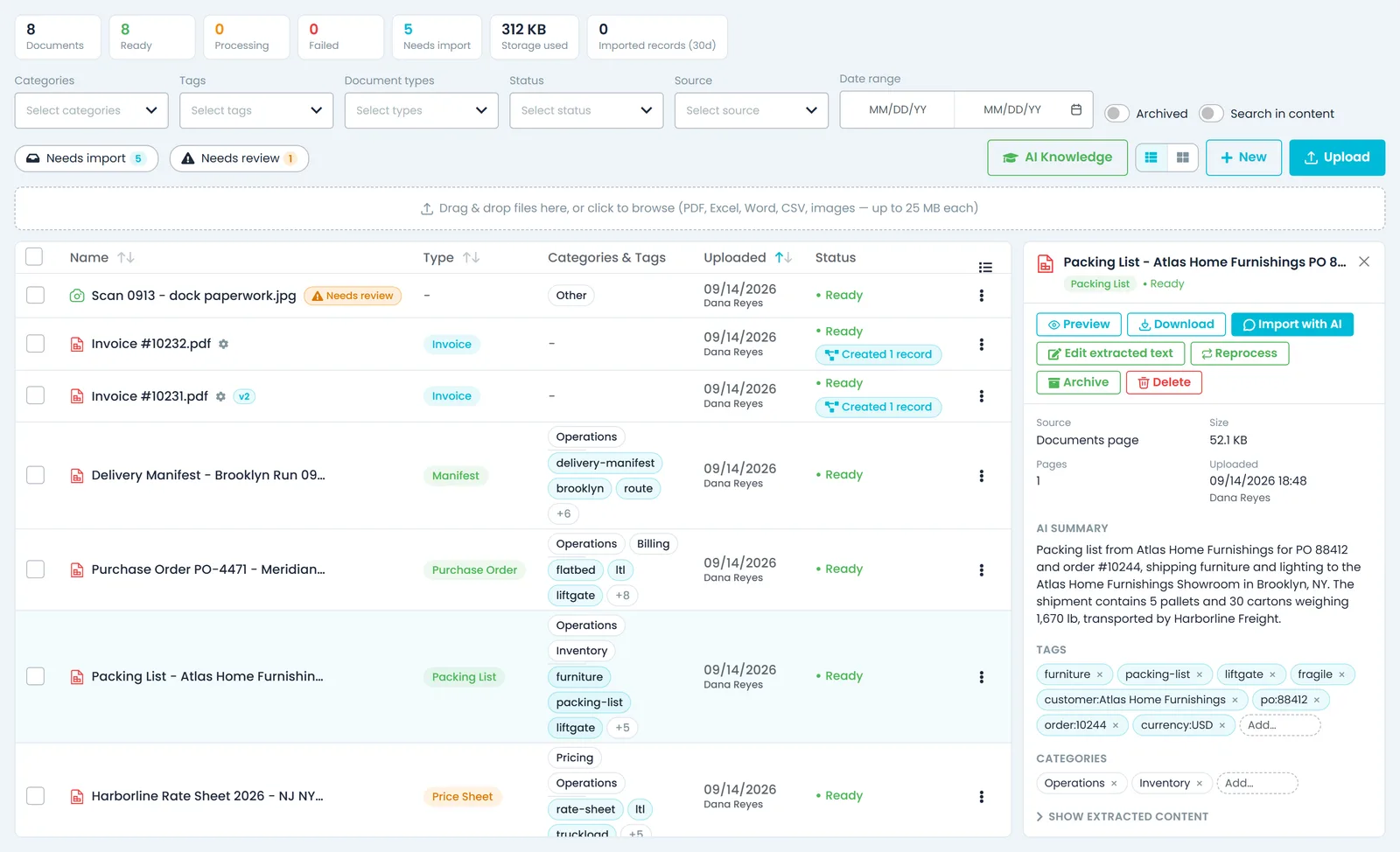
Attach up to 10 files at once in the assistant (PDF, Excel, Word, CSV or a photo of a paper sheet, up to 25 MB each), or open Import with AI on a document already in your library. Text is pulled out first. Photos and scanned PDFs are read with OCR, and a doubtful read is flagged for review so you can correct it before importing.
- PDF, Excel, Word, CSV and photos, up to 25 MB each
- Email documents to your company addressComing soon
- Start an import from any document in your library
- Each file shows Uploading, Processing, then Ready, and a message sent while a file is still processing goes out once it is ready
- Files attached in the chat are saved to your company's Documents library
Review before it lands
An editable preview you confirm, row by row
The import opens as a table you can work on. Pick how rows become orders: one per row, one multi-drop order, one pickup with several deliveries, or grouped by customer or by destination. Rows with a problem carry a badge, such as a missing address, a date that can't be read or an address that may not geocode. If a few rows fail when you commit, retry just those.
- Edit cells and uncheck rows before you commit
- Unknown customers: pick one, create a prospect, or skip — never guessed
- A PO already on file for that customer is skipped, not duplicated
- Retry only the rows that failed
- Every row is checked again on the server when you click Import
- Up to 200 order rows per import
More than orders
Orders, rate sheets, packing lists and invoices
The same preview-and-confirm step covers seven kinds of import: orders or quotes, customer records and contacts, price sheets (your pallet-by-mileage grid, pallet discounts, fuel surcharge and accessorial charges), international rate cards, packing lists as load units on an order, off-system invoices, and driver license scans. Imported orders are priced the same way as an order saved by hand, and a price sheet only adds or updates what it mentions.
- Order sheets become priced orders or quotes
- Price sheets update your rate cards without wiping them
- Packing lists become load units on the order
- Off-system invoices land as drafts, never sent or pushed to QuickBooks
No file needed
Describe rates or a single order in the chat
International rates don't need a sheet. Type them as a sentence, with the lane, the mode, a rate per pallet, a minimum and a fuel percentage, and the assistant lays them out as rate cards for you to check. You can also describe one order, with a pickup, one or more drop-offs and the items, and the assistant drafts it in the same review canvas before anything is created.
- Ask "what are my rates to Israel?" and the assistant answers from your saved international rate cards
- An order drafted in the chat keeps the PO number, priority, special instructions and tracking number, and can be saved as a quote
- Both go through the same review and confirm step, and nothing is saved until you approve
Files that repeat
RushHour remembers the layout of a file it has imported before
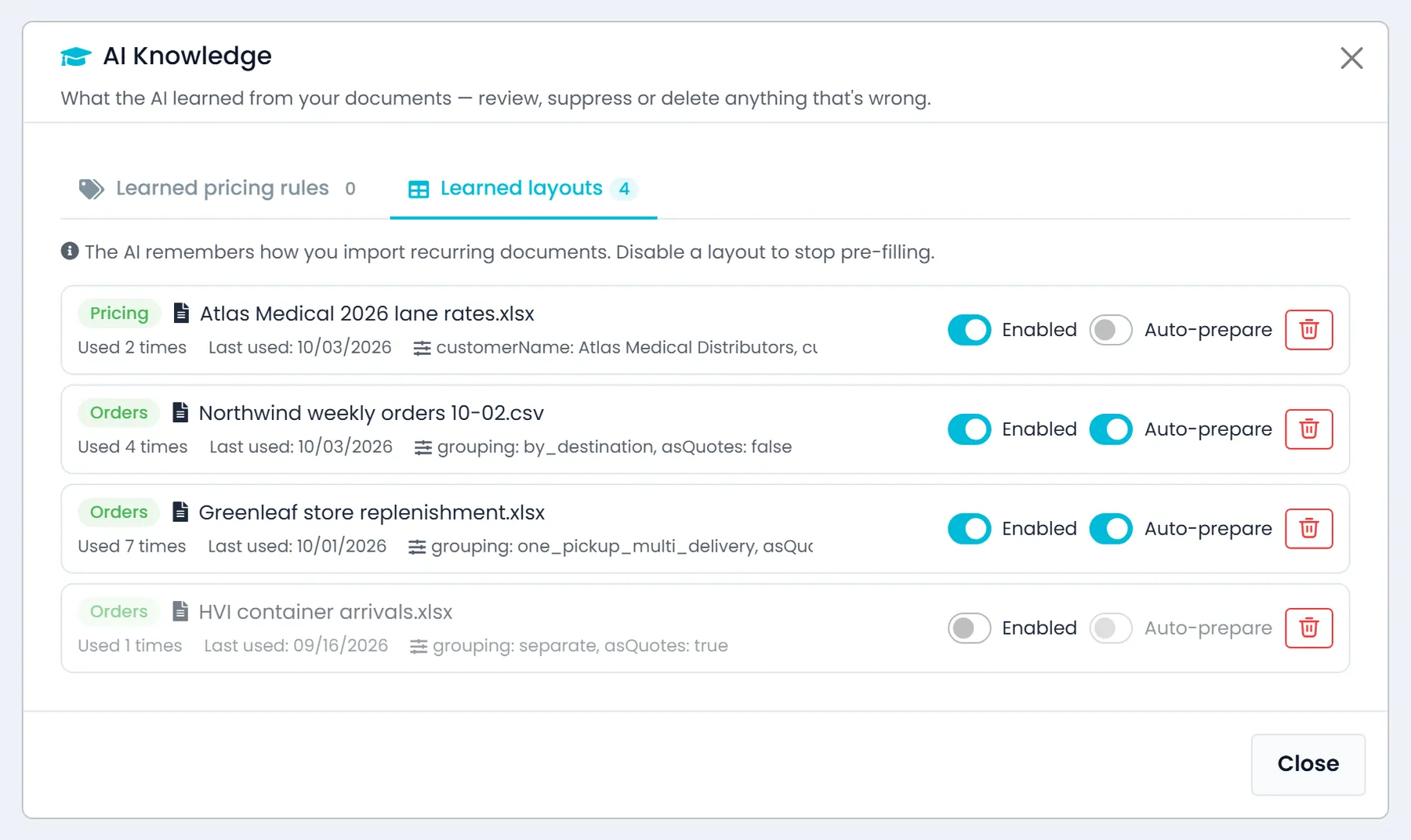
A confirmed import saves the column layout, not the freight, so next week's sheet from the same shipper still matches even though the loads changed. Once you have confirmed the same layout three times, the choices you made come back pre-filled on the review canvas. You can see what was applied, reset it in one click, or switch a layout off in Documents under AI Knowledge.
- Layouts saved from imports you confirmed
- A layout that repeats brings your choices back
- Files prepared before you askComing soon
- AI Knowledge also lists the pricing rules the AI learned from the price sheets and customer documents you upload, so you can suppress or delete any that are wrong
- The AI Knowledge window loads faster when the AI has learned hundreds of pricing rules or document layouts, and lane rate, accessorial rate and custom rule entries are labeled by name in English and HebrewNew in the October 2026 release
Seven kinds of import
What each import creates, and what it never does
All seven go through the same preview and confirm step. The limits below are enforced by RushHour when you import, not left to the AI.
A worked example
The import at the top of this page, row by row
One weekly sheet
Eight rows from a weekly order spreadsheet
A dispatcher attaches this week's spreadsheet and asks for the rows that share the Edison pickup to go on one order. Before anything is saved, the Review import canvas shows the plan.
- Grouping is One order per pickup, so the three rows from the same Edison pickup become one order with three deliveries
- PO 22910 is already on file for that customer, so the assistant says that row will be skipped
- Northside Supply is flagged above the table as an Unknown customer, and the dispatcher picks Create Prospect
- One delivery address is badged May not geocode, so it can be checked first
- A row with no delivery address is badged Missing field and left unticked
- Import 7 row(s) commits the rest
What keeps an import safe to run
Nothing writes unconfirmed
Every import stages a preview first, and a person approves it before a single record is created. Each preview can be committed once and expires after 30 minutes, so the same preview can't be imported twice by accident.
Permission-gated and logged
Importing with AI is its own permission, checked on every commit, and imports are recorded in the AI activity log and on the document's history.
Traced back to the file
Records created from a document stay linked to it. Open the document to see every record it created.
FAQ
Questions about importing
What files can I import, and how big?
PDF, Word, Excel, CSV, text files and images, including a phone photo of a paper sheet: up to 25 MB each and up to 10 files per chat message. One order import takes up to 200 rows, a customer import up to 100 customers, a packing list up to 100 rows, and an invoice up to 200 lines.
What if the AI misreads a scan?
Photos and scanned PDFs are read with OCR, and a doubtful read puts a Needs review flag on the document. You can correct the text with Edit extracted text or run Reprocess, and you can still fix any cell in the review canvas. Nothing is saved until someone confirms the import.
Can importing the same sheet twice create duplicates?
Each preview can be committed only once and expires after 30 minutes. A PO number already imported for that customer is skipped, and so is an outside invoice number already imported for that customer. In a customer import, Create only skips names that already exist.
Will a price sheet overwrite my existing rates?
No. A domestic price sheet only adds or updates the grid cells, discounts and charges it mentions, and everything else stays. An international import only touches the lanes it names: cards you don't mention stay as they are, and your domestic pricing is not affected.
Who can run an import?
Clicking Import in the review canvas takes the Import with AI permission, which is separate from Upload documents and is checked each time. The person's usual permissions still apply on top, such as creating orders or quotes, adding or editing customers, or editing charge types or drivers. Attaching files in the chat needs Upload documents.
Are imported orders priced?
Yes. Each new order is priced the same way as an order you save by hand. If you give the assistant an exact price for a row, the order is created at that custom price instead.
Where can I see what an import created?
Records created from a document stay linked to it, so the document's Linked records list shows them. The import is also recorded in the document's history and in the AI activity log.
Related
Send us the sheet your biggest customer emails you.
We'll run it through the import on the demo call and show you exactly what lands as orders — and what we'd still need to map.