
You already know the price.
It's buried in your orders.
RushHour rolls your priced orders into lane history and, together with your rate card and rate sheets, turns it into a suggested price one click away in the order and quote editor, before you commit a number.
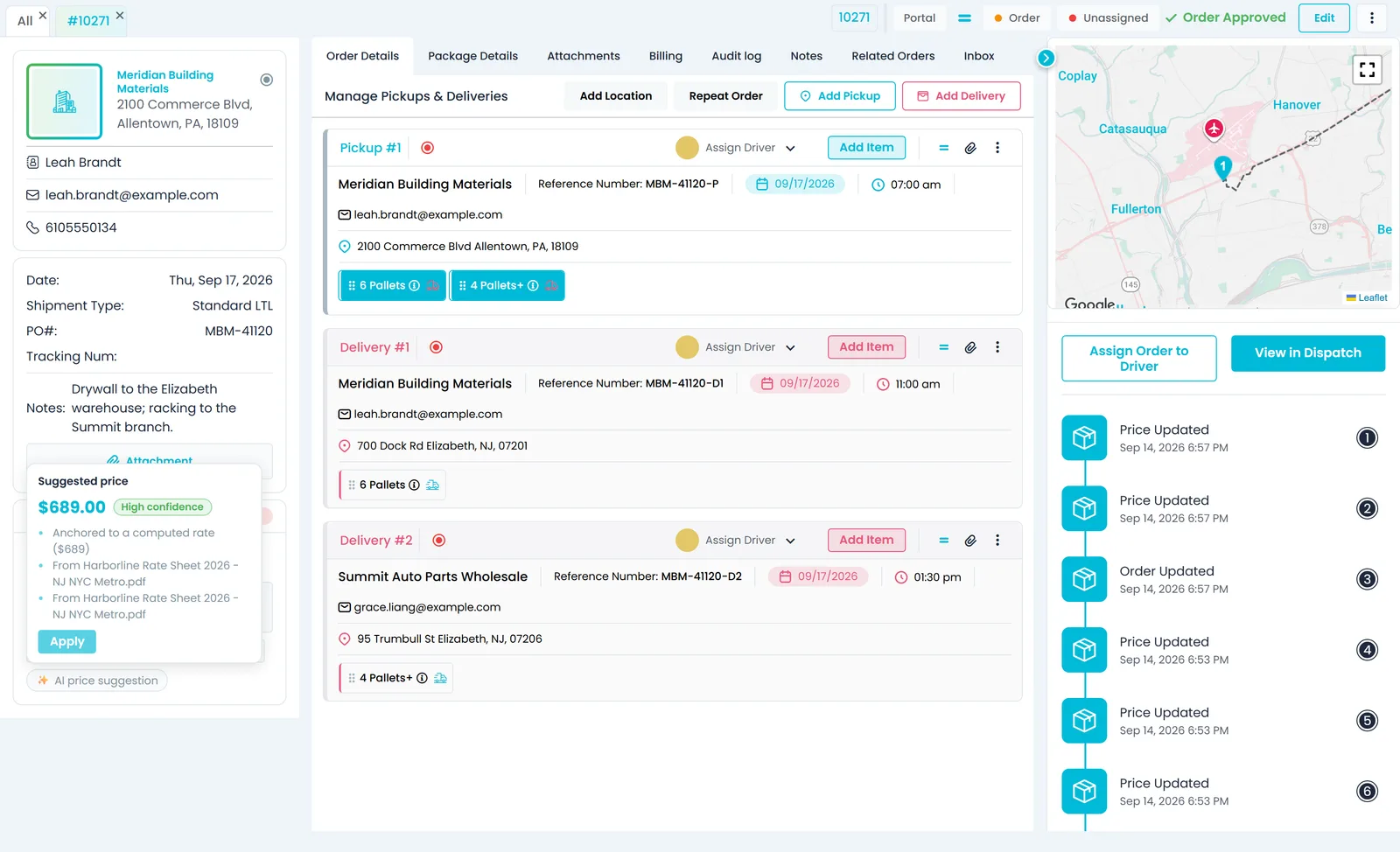
From your own freight
Priced on evidence, not on memory
Every number arrives with its basis: the rate, history or document behind it, how many loads it rests on, or how sure the AI is of it.
Quote and order screen
A suggested price with the reason attached
Once pickup and delivery are on the order or quote, click AI price suggestion. You get a price and a confidence level, with up to three lines saying where it came from: what it is anchored on (the rate your pricing model computes for the lane, your lane history or a learned pricing rule) and the rate sheets or agreements it drew on. On a saved order or quote, Apply switches the price to Custom at that amount; ignore it and nothing changes.
- Pricing model, lane history and learned rules
- Confidence on every answer, source named when a rule is used
- One click to apply, never automatic
- Nothing to base a price on for the lane? It says “No pricing signals yet for this lane” instead of inventing a number
- Reads the customer, pallets and weight already on the order, and is fetched only when someone clicks it
- Available to anyone whose role can edit quotes or orders
AI assistant
Ask what to charge, and see why
Ask the AI assistant something like “What should I quote Acme for 6 pallets from Newark to Albany?”. It looks up both addresses, works out the road miles and prices the lane from that customer's rate card, or your default pricing model when they have none. Then it checks that number against recent priced orders in the same currency, pricing rules learned from your documents and the relevant passages of the price sheets and agreements you uploaded. What comes back is a recommendation: you decide the price.
- A Why this price card: what the price is anchored on, High, Medium or Low confidence, the details it used and up to five source documents
- Cross-border lanes are priced from your international rate cards, never from the domestic mileage grid
- Ask for a same-day or rush price and the rate includes your same-day markup and fuel surcharge
- The answer can suggest accessorials your learned rules say might apply, for you to confirm
- Follows your role's permissions: pricing models and documents you cannot open stay out of the answer
Lane history
What your lanes actually earn, lane by lane
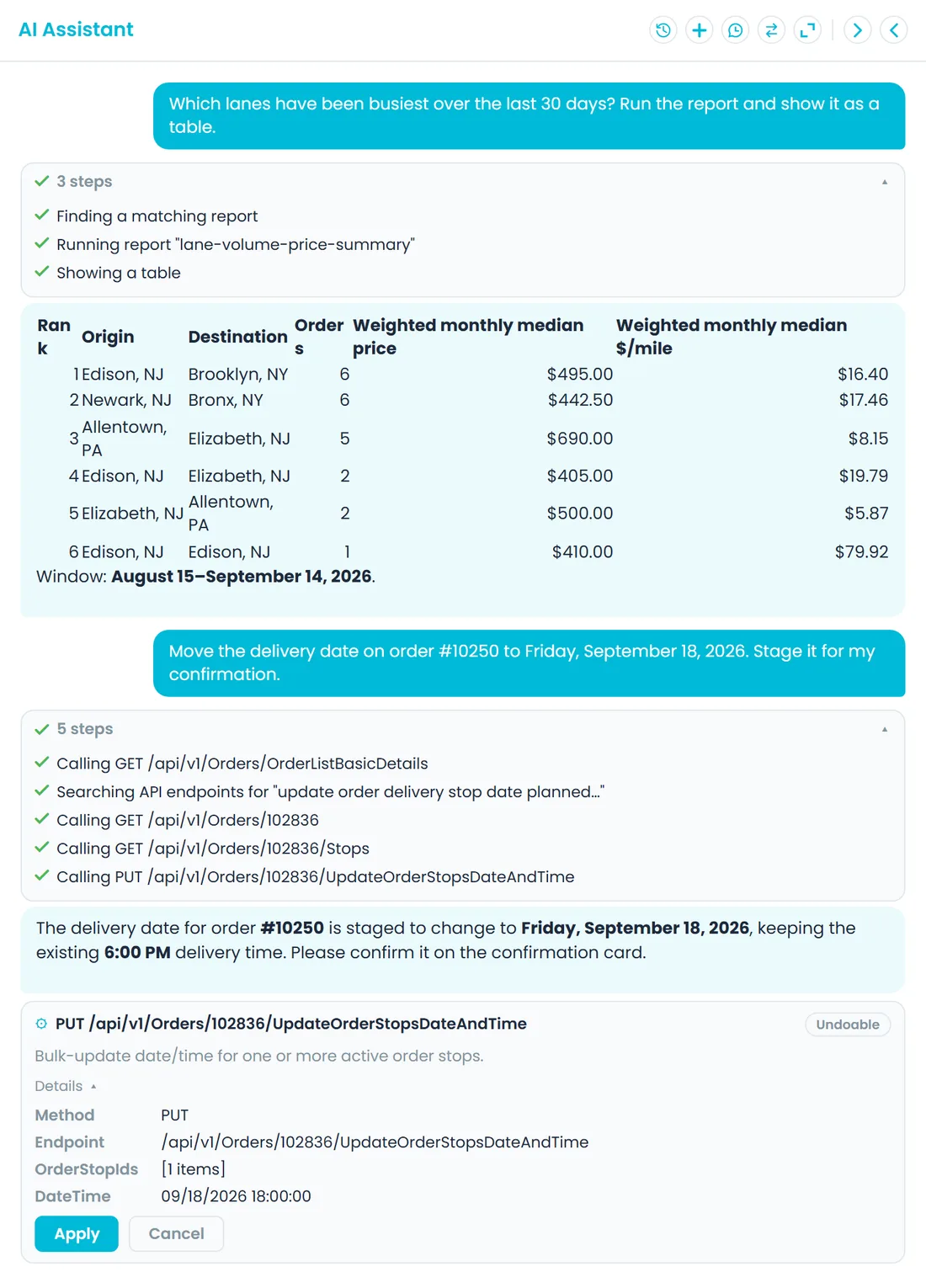
Priced orders (booked orders, not quotes) roll up city to city, month by month: how many loads, the median price and typical range, price per mile, price per pallet and average miles per load. The history is kept company-wide and for each customer, updated every 15 minutes as orders change and rebuilt each night over the last 24 months. You read it by asking the AI assistant, for example which lanes were busiest last quarter and what you charged.
- Loads and median price on every lane
- Price per mile and price per pallet
- Month by month, per customer or company-wide
- Company admins can ask for the lane volume report and get it back as a table
- Each currency kept on its own, never mixed or converted
- Company admins can run the lane volume and customer lane price history reports from a new Reports page and export them to CSVNew in the October 2026 release
Delivery promises
Promise transit times you have already hit
Median time from pickup to final delivery on a lane, from the departure and arrival times recorded on the stops, not a map guess. Ask the assistant how long a lane usually takes: it looks back over the last 12 months and names where the number came from, with the sample size and period, so you can tell a solid number from a thin one.
- Median transit from recorded stop times
- Sample size and period with every estimate
- No data behind an answer? It says so instead of guessing
- Trips recorded as longer than 45 days are left out as bad data
Cost floor
Know what a lane costs you before you quote it
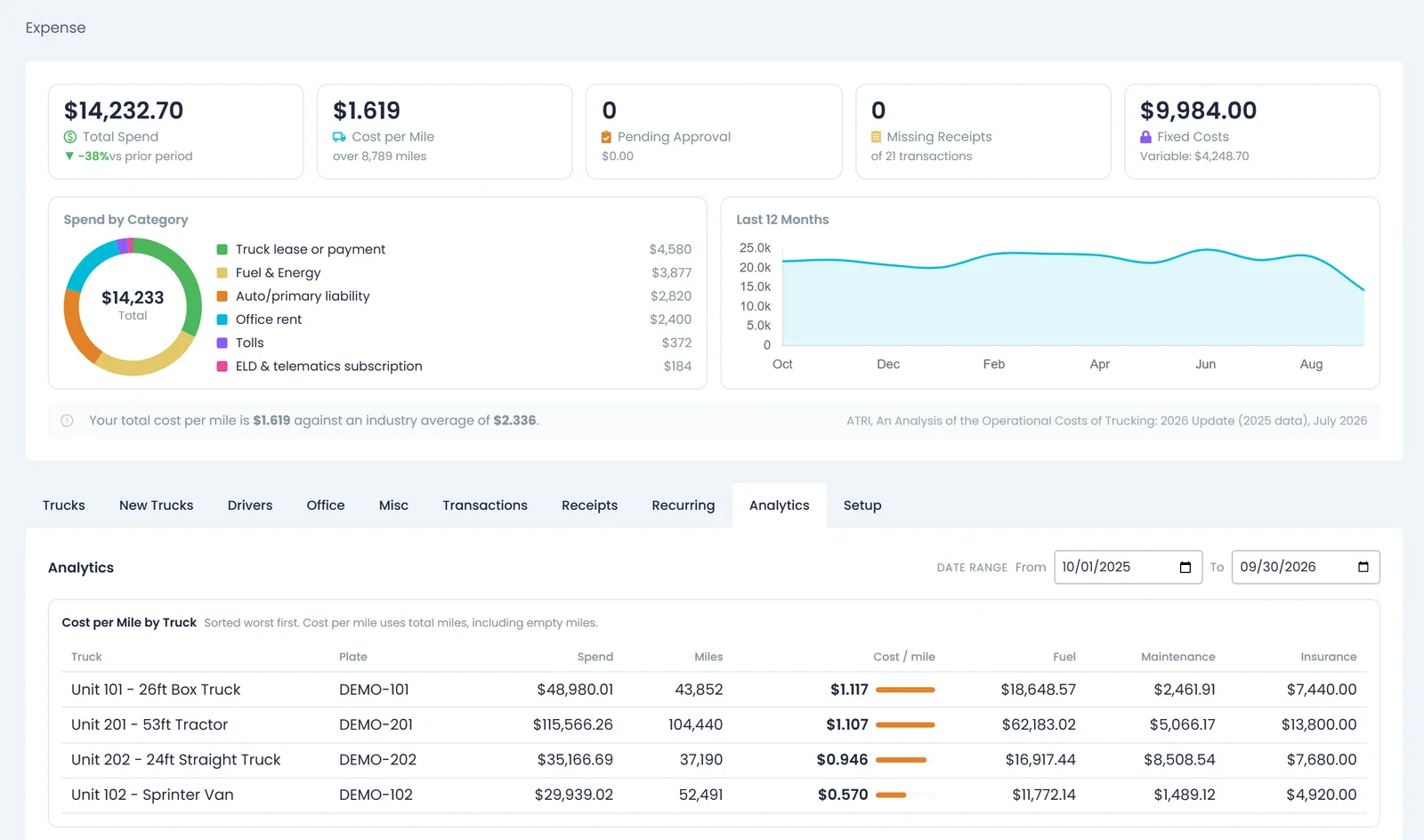
When you ask the assistant for a price and your role can see invoices and payments, it also builds a cost floor for the lane and sets the price it calculated against it, with the margin. Drive time is estimated at 45 mph plus an hour at each stop and paid at your default driver wage, fuel is the miles at 15 miles per gallon times the diesel price for the State for Gas Cost in Settings → Profile, and truck operating cost per mile is your monthly truck expenses divided by the truck miles per month you enter in Settings → Expenses.
- When truck receipts and mileage are recorded, a measured cost per mile from the last six months is added alongside
- Every figure labelled with its basis; a missing input is left out with a note, never counted as zero
- Monthly truck expenses filed as Gas, or named as driver pay or tolls, are kept out of the per-mile rate so fuel and driver time are not counted twice
- Tolls are not included
Rate sheets and contracts
Pricing rules read out of your own documents
Upload a price sheet or a customer agreement to Documents and RushHour reads the pricing rules out of it: lane rates, accessorial rates, discounts, minimum charges and custom rules that fit no fixed shape. The AI Knowledge window lists each rule with its amount, confidence, source document and effective date, filterable by kind, customer and document. Suppress a wrong rule and the AI stops using it, and it stays suppressed even if the document is processed again; Reactivate brings it back, and Delete removes it.
- Confidence score and source document
- Effective date kept when the document gives one
- Suppress one and it stays suppressed
- Learns from documents filed as Price Sheet or Customer Document, up to 100 rules each, tied to the customer the document is linked to
- A document that taught rules shows how many, with a link straight to them
- Optional: set Auto-billing in Settings → Billing to Apply automatically, and learned accessorial rules that match the order and that the AI is at least 60% sure of are added as charges when a booked order is saved, never on top of a charge already there and never once the order is invoiced; Preview — log only just records them
- The AI Knowledge window loads faster when the AI has learned hundreds of rules, and labels lane rate, accessorial rate and custom rule entries by name, in English and HebrewNew in the October 2026 release
In the AI assistant
Questions your team can ask today
Type them into the AI assistant from any page. Each answer says what it is based on.
“Which lanes were busiest last quarter, and what did we charge?”
Your top lanes by booked orders in that window, each with the median price and typical range, price per pallet, price per mile and median transit time. Name a customer to see only theirs.
“How long does Allentown to Elizabeth usually take?”
The median door-to-door time on that lane from recorded stop times over the last 12 months, with the number of loads behind it and the period they cover. With no data, it tells you so.
“What should I quote for 6 pallets from Newark to Albany?”
A recommended price with its Why this price card. If your role can see invoices and payments, the answer can also give the lane's cost floor and the margin at the price it calculated from your rates.
Where the numbers show up
Ask, and the numbers arrive
Busiest lanes, typical price and likely transit time, answered from the lane history when you ask the AI assistant.
Per-customer lane history
What one customer paid on one lane, month by month, as one of the built-in reports the assistant runs for company admins.
The floor before you quote
Ask the assistant for a price and, if your role can see invoices and payments, it checks the number against a cost floor: driver time, fuel at the state diesel price and truck cost per mile from your truck expenses, with the margin. Tolls are not included.
Margin on each load, if you want it
Turn on the cost ledger in Settings → Billing and each saved order in the New UI gets a Cost breakdown for roles that can see invoices and payments: the costs you record, charge by charge, next to what you bill, with profit, markup and a margin label, such as Against estimated costs, that says what the number rests on. It is reporting only and never changes a price or an invoice.
Buying price and line-haul marginNew in the October 2026 release
Company admins can record the buying price (what you pay whoever hauls the load) in the price box of a saved quote or an order that isn't closed, in the Old UI and the New UI. An info icon shows the line-haul margin: selling price minus buying price. Other users don't see the buying price.
Pricing intelligence questions
Where does the AI price suggestion come from?
It is anchored on one of three things and says which: the rate your pricing model computes for the lane, your lane history, or a pricing rule learned from one of your documents. Up to three lines under the price show that anchor and the rate sheets or agreements it drew on.
Do these suggestions ever change a price on their own?
No. The AI price suggestion is fetched only when someone clicks it and applied only when someone clicks Apply, the assistant's prices are recommendations, and the cost breakdown never changes a price, an invoice or a payout. Learned rules can add charges only if you turn on Auto-billing in Settings → Billing, which is off by default: set to Apply automatically, it adds automatic charges to orders, including accessorials from matching learned rules when an order is saved.
How much history does it use, and how fresh is it?
Lane history is built from booked orders with a price (quotes do not count), updated every 15 minutes as orders change and rebuilt each night over the last 24 months. Transit and price estimates look back 12 months. The busiest-lanes summary covers six months unless you ask for another window, up to 24. Each currency is kept separate.
Which documents does it learn pricing rules from?
Documents filed as Price Sheet or Customer Document on the Documents page, such as rate sheets and customer agreements. RushHour reads up to 100 rules from each one, keeps the exact wording each rule came from, and ties the rules to the customer the document is linked to, or to the whole company when it is not linked to one.
Who can see these numbers?
The AI price suggestion is there for anyone whose role can edit quotes or orders. Lane history and transit answers need permission to view orders, the cost floor needs permission to see invoices and payments, and suppressing or deleting learned rules needs permission to manage documents. Lane reports run through the assistant are for company admins.
Are tolls part of the cost floor?
No. The cost floor covers driver time, fuel and truck operating cost. Tolls are left out, and the estimate lists that among its assumptions.
Pricing, cost and the data behind them
Where the rates, costs and documents behind each number are kept.
What do you usually charge on that lane?
Book a demo, bring two lanes you argue about, and we will show you where their numbers would come from.