
Connect your other systems to RushHour,
through the API our own apps use.
RushHour's REST API is the one the Company Portal, the Customer Portal and the driver app run on, and it is documented for developers at docs.rushhourapp.com: 508 endpoints for quotes and orders, dispatch, customers, invoices, drivers, documents and more. Today a connected system signs in as a dedicated Company Portal user and can do only what that user's roles allow. API tokens, so a system no longer signs in with a password, come with the next release.
The API at a glance
Available today
The RushHour API today
A REST API over HTTPS that sends and receives JSON, at https://api.rushhourapp.com/api/v1. The Company Portal, the Customer Portal and the driver app all use it, so your own systems can do what your team does on screen, with the same permissions.
Documented
One documented API, the same one RushHour's apps run on
The public API reference at docs.rushhourapp.com/developers is generated from the API itself and describes the version that is live today. Each endpoint lists its parameters, request body and response and, where it always needs one, the permission or role it requires, using the names on the Company Portal Roles page. Guides cover sign-in, paging and filtering, dates and time zones, rate limits and keeping another system in sync.
- Base URL https://api.rushhourapp.com/api/v1, with JSON in and out
- The version is part of every path: v1, and v2 for global search
- Required access named with the permissions your admins already assign
Your permissions apply
Every request runs as a RushHour user
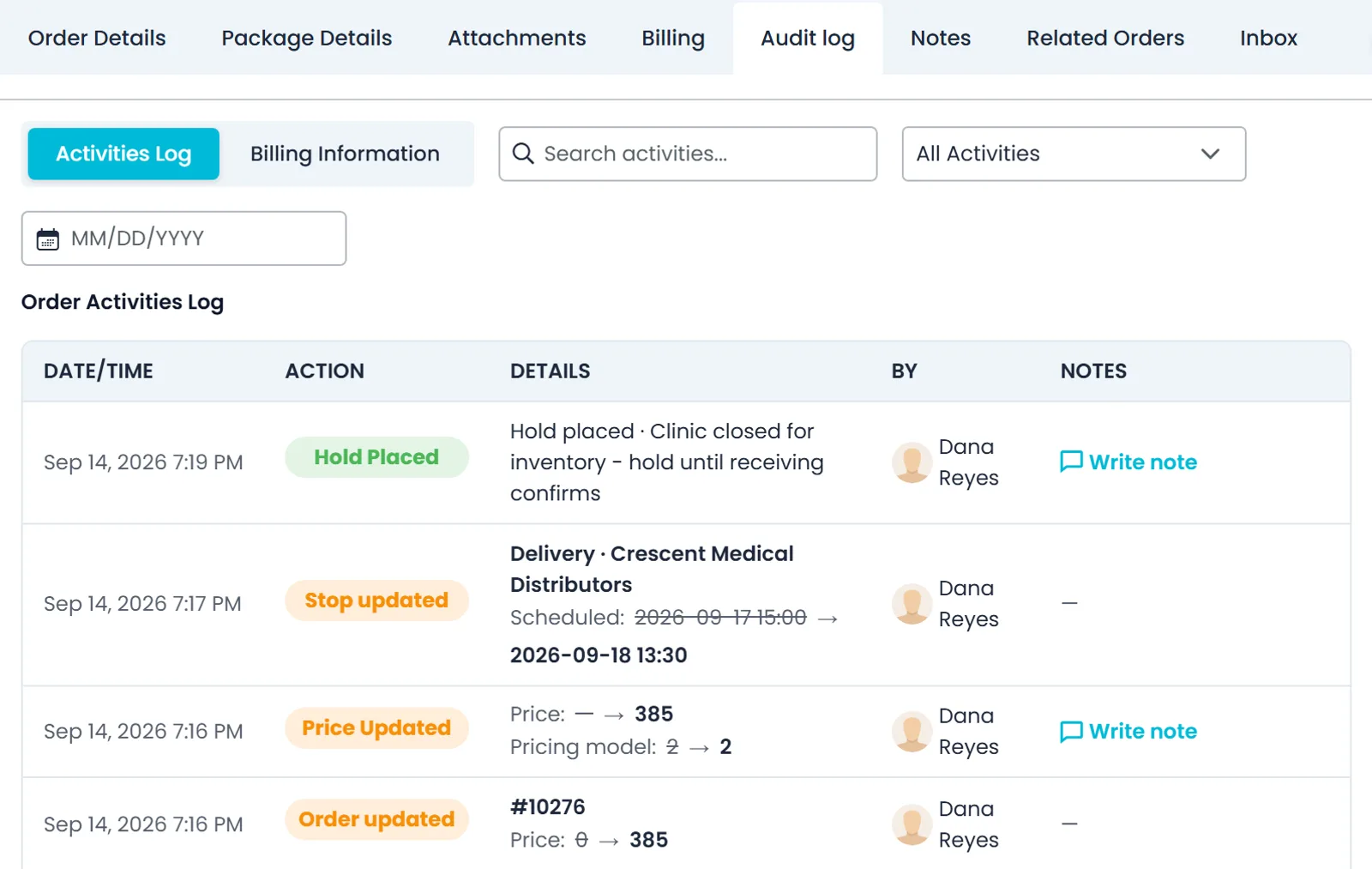
The API checks the user's roles and permissions on every request, exactly as the Company Portal does, and lists include only the records that user may see. A refused action answers 403, usually with the code meta.missing_permission and the name of the missing permission. Changes made through the API appear under the user's name in Settings > Activity Logs and in each order's audit log.
- Same roles, permissions and data visibility as on screen
- 403 with meta.missing_permission names the permission that is missing
- Changes recorded under the user's name in activity logs and audit history
Connect today
Sign in as a dedicated integration user
Create a Company Portal user for each integration in Settings > Users and give it only the roles it needs. Your system signs in with POST /api/v1/Auth/Login and that user's email and password, and gets a bearer token to send in the Authorization header. The token is valid for up to 30 days and stops working earlier if the user's password is changed or reset, or the user is disabled or deleted. There are no refresh tokens: when a request answers 401, sign in again.
- One user per integration, with only the roles it needs
- A password reset or disabling the user cuts the integration off
- GET /Permissions/CurrentRolesWithPermissions shows what it can do
Predictable
One response shape, paged lists and clear limits
Almost every endpoint wraps its answer in the same envelope: the data, a success flag, readable messages, machine-readable errors with a code such as auth.invalid_login, and warnings that did not stop the request. Lists come in pages of up to 1,000 items on most endpoints, with a total count. Expensive endpoints, such as document uploads, AI features and some map and address lookups, are limited per user and answer 429 when a user sends too many requests, so other users keep working.
- Machine-readable error codes; a 500 error carries a reference for support
- Timestamps in UTC, in ISO 8601 format
- Per-user 429 limits; the exact numbers are not published
No webhooks
No webhooks: a documented polling recipe instead
RushHour does not call your systems when a record changes, and list filters work on business dates and statuses, not on when a record was last edited. The developer docs give a step-by-step recipe instead: pick an interval that matches how fresh the data must be, re-read every record that can still change, compare by ID, and back off when the API answers 429 or 503.
- Every few minutes for dispatch data, hourly or daily for accounting
- Re-read open records, not only recent dates
- On 429 and 503, wait and retry with growing pauses
What the API covers
508 endpoints in 16 areas
Grouped as in the public API reference. Every endpoint runs with the permissions of the user who sends the request.
Quotes and orders
84 endpoints. Create and update quotes, approve them into orders, work with stops and holds, close orders and read order history.
Dispatch and routes
31 endpoints. Create and change routes, assign and unassign stops, set up transfers and look up addresses on the map.
Customers
70 endpoints. Customer accounts, contacts and addresses, support tickets, customer messages and Customer Portal access.
Accounting
43 endpoints. Search, create and update invoices, record payments and apply them to invoices, and manage charge types and deposit accounts.
Documents
44 endpoints. The documents library and attachments, plus quotes, bills of lading, labels and invoices as PDF or HTML, downloaded or emailed.
Drivers
23 endpoints. Add, update, invite, enable and disable drivers, manage license types, and read or change Driver App settings.
Fleet
14 endpoints. Your trucks and their costs, and vehicles from a connected Samsara account.
Carriers
30 endpoints. The outside carriers you work with, their contacts and finance profiles, and the truck types they run.
Pricing
23 endpoints. Pricing models, pricing zones, shipment types and exchange rates for other currencies.
Expenses
45 endpoints. Record and approve expenses, organize them by category and vendor, schedule recurring expenses and analyze costs.
Inbox and notifications
48 endpoints. Read and send email from the company Inbox, chat with drivers and work with in-app notifications.
Dashboard
11 endpoints. The figures behind the dashboard, and dashboard layouts.
Company settings
20 endpoints. Your locations, dispatch zones, non-working days, and terms and conditions.
Users and roles
10 endpoints. List Company Portal users, enable, disable or re-invite them, and read roles and permissions.
Account and company
6 endpoints. Sign in, see who is signed in, read your company's details and check the API version.
Reference data
6 endpoints. Look up countries, states, cities and postal codes.
Try it
A first request
Sign in with POST /api/v1/Auth/Login, take the token from data, and send it in the Authorization header of every request. This first call returns the user's roles and the permissions each role grants.
Today: with a sign-in token
curl "https://api.rushhourapp.com/api/v1/Permissions/CurrentRolesWithPermissions" \
  -H "Authorization: Bearer YOUR_TOKEN"
The sign-in token lasts up to 30 days. When a request answers 401, sign in again.
With an API tokenNext release
curl "https://api.rushhourapp.com/api/v1/App/WhoAmI" \
  -H "Authorization: Bearer YOUR_API_TOKEN"
An API token travels in the same Authorization header. The Create API token window shows this test call, and its answer says who the token acts as and which roles it has.
Developer documentation
Read the docs before you build
Public, in English, at docs.rushhourapp.com/developers.
In the next release
A separate token for every system you connect
API tokens are for your developers or integration partner. They are finished and ship with the next production release: a connected system then sends a token instead of signing in as a user, on the same API and endpoints described above, apart from the account and security actions listed below. Company admins create tokens in Settings > API Tokens.
Scoped by role
Give each token only the roles it needsNext release
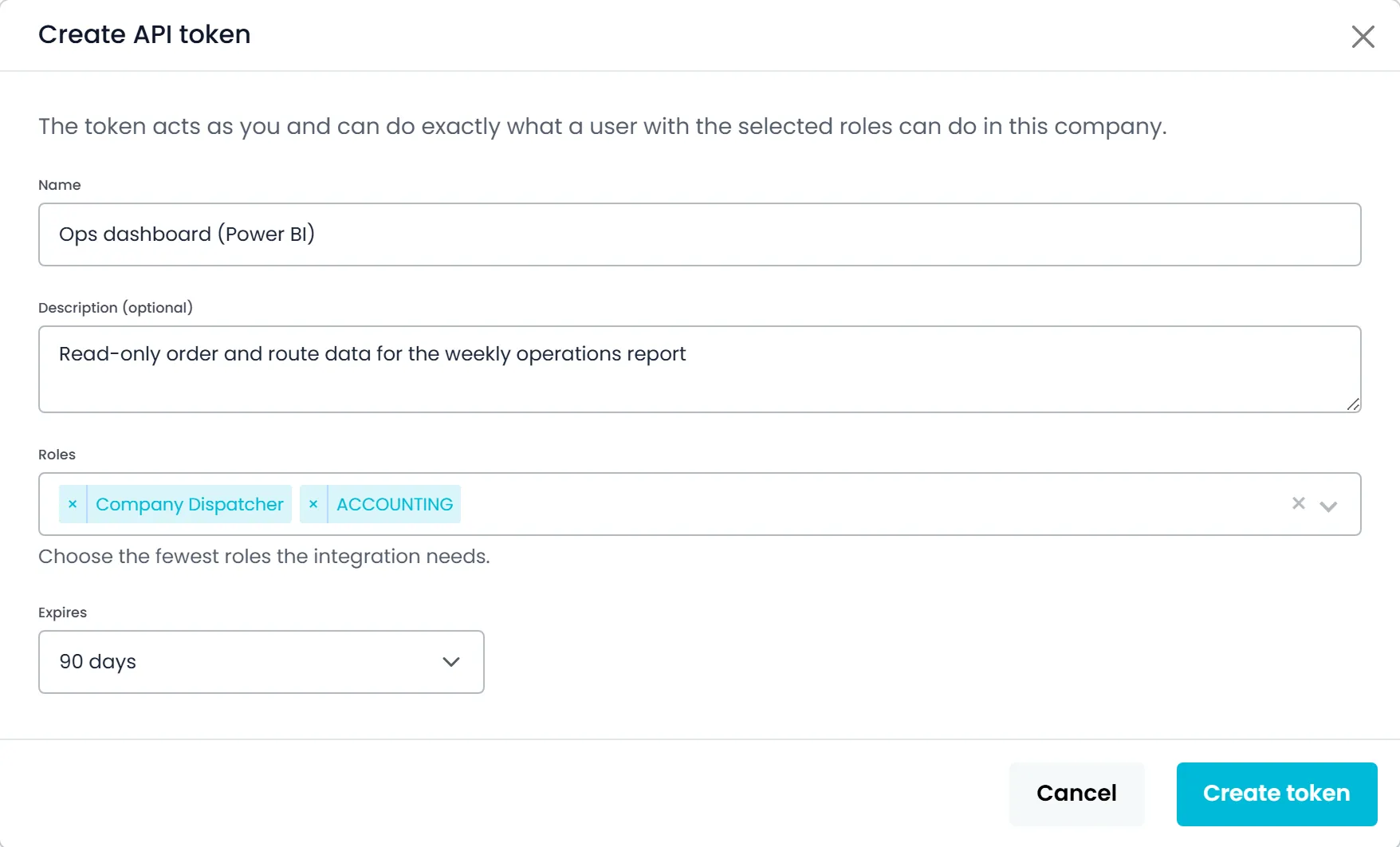
In the Create API token window, name the token, add an optional note on what will use it and pick one or more roles. The token can do what a user with those roles can do, and only in the company where it was created. A company admin can pick any built-in office role or any of the company's custom roles, while anyone else can pick only roles they hold themselves.
- One or more built-in or custom roles per token
- Works only in the company it was created in
- A warning if you pick Company Admin
Shown once
Set an expiry, then copy the token onceNext release
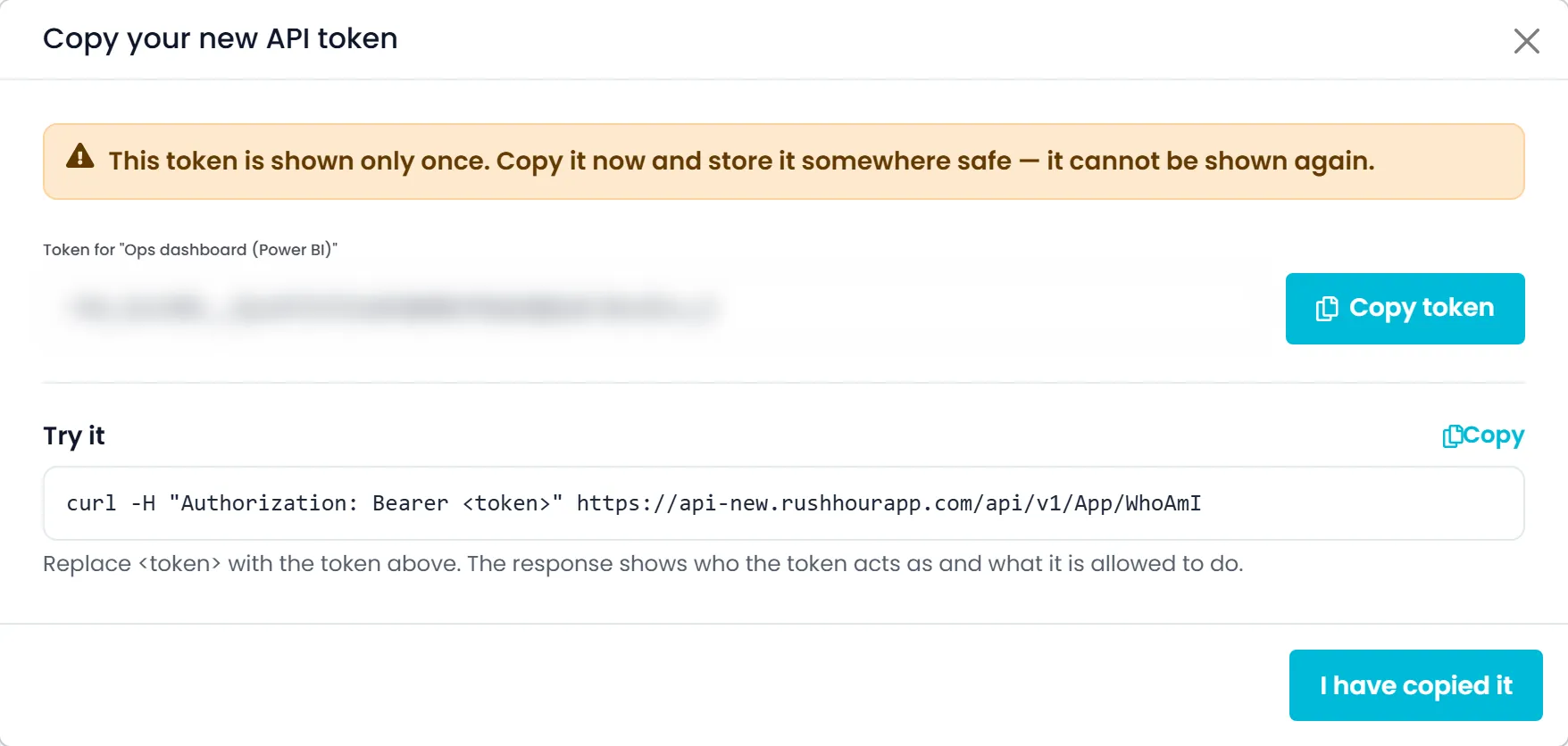
Choose 7, 30, 90 or 180 days or 1 year, with 90 days as the default, and picking No expiration shows a warning. The token is shown once, with a Copy token button, and RushHour never stores the full token, so it can't be shown again. The same window gives your developer a test command whose answer shows who the token acts as and its roles.
- Expiry of 7, 30, 90 or 180 days or 1 year (90 by default), or none
- Shown once, and the full token is never stored
- A test command to check the token works
Every token listed
See who each token acts as and when it was last usedNext release
Settings > API Tokens lists each token with its first characters, its roles, the user it acts as, who created it and when, and when it expires. Last used shows roughly how long ago the token was used, with the date and time on hover and an approximate IP address. Revoked tokens stay on record and appear when you tick Show revoked tokens.
- Roles, Acts as, Created and Expires for each token
- Last used, with an approximate IP address
- Active, Expired, Revoked or Suspended status
Revoke or pause
Cut off one system without changing anyone's passwordNext release
Revoke a token from its menu and the system using it stops working, while people keep signing in as before. A token also stops when it expires, and it is paused as Suspended while the user it acts as is disabled, removed from the company or left without roles it can use. An admin resetting another user's password revokes that user's tokens, while changing your own password keeps yours working.
- Revoke from the token's menu, after a confirmation
- Suspended while its user is disabled or removed
- An admin password reset revokes that user's tokens
Signed-in people only
What a token can never doNext release
Some actions always need a person signed in to the Company Portal. A token that tries one is refused with 403 and the code auth.interactive_session_required, so a token can never give itself, or anyone else, more access.
- Add, edit, disable or delete users, or change roles and permissions
- Change, set or reset passwords
- Create, list or revoke API tokens
- Save or change integration and payment keys
- Send invites to users, drivers or Customer Portal logins, or edit the company details
Admin controlled
Admins decide who can create tokensNext release
The API Tokens page has its own permission, which company admins have by default and can give to other roles in Settings > Users. A token acts as the person who created it, limited to the roles picked for it, so it never has more access than its creator. Creating or revoking a token is recorded in Settings > Activity Logs.
- Company admins by default, other roles when granted
- Each token acts as its creator, never with more access
- Up to 50 active tokens per company
Where API tokens help
No shared passwordsNext release
The connected system never holds a person's email and password, so a user changing their own password doesn't break it.
Only the access it needsNext release
Each token carries the roles you picked and works in one company, so a reporting job doesn't get rights it never uses.
Access you can account forNext release
Each token shows who it acts as, who created it and when it was last used, and one revoke ends it.
API questions
Can we connect to the RushHour API today?
Yes. Create a dedicated Company Portal user for the integration with only the roles it needs, sign in with POST /api/v1/Auth/Login, and send the token you get back in the Authorization header. The token lasts up to 30 days. API tokens, which let a system connect without a user's password, come with the next release.
What can an integration do through the API?
Whatever the user it signs in as can do: quotes and orders, dispatch and routes, customers, invoices and payments, pricing, drivers, trucks, carriers, expenses, documents, messages and company settings, across 508 documented endpoints. Lists include only the records that user may see.
Does RushHour send webhooks?
No. There is no way to register a URL that RushHour calls when an order, route, invoice or other record changes. Your integration checks the API on a schedule instead, and the developer docs give a step-by-step polling recipe.
Is there a sandbox or test environment?
No. There is no separate sandbox. An integration works with your own company's data, as a dedicated user limited to the roles it needs. Talk to our team before you build anything that writes data in bulk.
Is there an SDK or client library?
No. The API is plain REST over HTTPS with JSON, so any language that can send HTTP requests can call it. The API reference lists each endpoint's parameters, request body and response.
Are there rate limits?
Yes, on expensive endpoints such as document uploads, AI features and some map and address lookups. Limits count requests per user, and a request over the limit gets 429 with an empty body. The exact numbers are not published, so build in a wait and retry with growing pauses.
When do API tokens arrive?
API tokens are finished and ship with the next production release. Until then, use a dedicated integration user. When you switch, your requests stay the same: the system sends the API token in the same Authorization header instead of a sign-in token. Changes to users, roles, passwords and tokens still need a person signed in to the Company Portal.
Related
Bring the system you want to connect.
In the demo we open the API reference on the records your integration needs and work out the roles a dedicated integration user should have, so you know what to build before you start.