
RushHour vs Magaya
Trucks, hubs and billing, or forwarding, customs and a full WMS?
Magaya describes its Supply Chain product as a freight forwarding and warehouse management system for international forwarders, NVOCCs, couriers and warehouse providers, with built-in accounting, air and ocean documents, customs filings and a separately licensed customer portal. RushHour is an order-to-invoice platform for operators who run trucks: dispatch with route optimization and a driver app, rate cards, BOLs, invoicing and card payments on the same order, and, since November 2026, hubs with air, sea, truck and LCL manifests and warehouse inventory.
The short answer
Your core business is trucking and final-mile delivery, with freight that also moves between countries through your hubs: you dispatch your own drivers and outsource carriers from one board with route optimization, consolidate orders into air, sea, truck or LCL manifests, keep the freight in your warehouses in view, price door to door from international rate cards, bill and collect by card on the same order, and want a published price.
You are a freight forwarder, NVOCC or customs broker: you need air waybills and house and master bills of lading, AES, ISF and AMS filings or customs entries, bookings with ocean carriers and airlines, a full warehouse management system with put-away, picking and cycle counts, and double-entry accounting with multiple currencies inside the same system.
Where each one is stronger
Both handle international shipments, consolidation, warehouse receiving, rates and invoicing. They come at them from opposite ends: RushHour from the truck and the order, Magaya from the forwarding file and the warehouse.
- A dispatch board for your own drivers and outsource carriers: multi-stop routes, route optimization, stop ETAs and edits after dispatch that reach the driver by push notification. Magaya says Supply Chain is a freight forwarding and warehouse system rather than trucking dispatch; its Final Mile app gives drivers pickup and delivery tasks.
- Truck positions on the dispatch map for companies that connect Samsara, and stop ETAs from the driver app's location. We did not find a dispatcher's map of the forwarder's own drivers in Magaya's help center.
- A Payouts page that settles route pay for drivers and outsource carriers. Magaya's accounting covers vendor and carrier bills and salesperson commissions; we did not find driver pay settlements.
- A published price: Starter is $299 a month for up to 3 office users and 5 drivers, plus one-time onboarding. Magaya publishes no price list; its site says pricing depends on the solutions required and the number of users.
- A Customer Portal on every plan, where shippers book orders, track them, download documents and pay invoices by card. Magaya's Digital Freight Portal is a separately licensed product.
- Background AI agents that ask before they change anything, messenger channels for staff and customers and an MCP server for AI clients, next to an AI assistant in the office portal. Magaya describes AI document extraction in its Customs Compliance product; we found no assistant for Supply Chain, messenger agents or MCP server.New in the November 2026 release
- Company Portal and Customer Portal in Hebrew (right to left) as well as English. Magaya documents English, Spanish and Portuguese.
- Customs filings: AES export filings, ISF and AMS from Supply Chain, and customs entries from its Customs Compliance product. RushHour files nothing with customs.
- Forwarding documents created from the shipment: air waybills, house and master bills of lading, warehouse receipts, cargo releases and arrival notices. RushHour prints trucking BOLs and labels; a hub manifest records the air waybill, container or booking number but does not produce those documents.
- Bookings with ocean carriers through INTTRA, electronic air waybills with airlines, and container tracking across ocean carriers.
- A complete warehouse management system: receiving, put-away, locations, cycle counts, picking and warehouse billing, with a warehouse scanning app. RushHour's Warehouses menu tracks the freight you hold for orders; it is not a full warehouse management system.
- Built-in double-entry accounting: general ledger, receivables, payables, bank reconciliation, financial statements and multiple currencies. RushHour does invoicing, payments and AR, and sends them to QuickBooks Online.
- Rate management that links air, ocean, rail and road buying and selling rates, with a database of ocean surcharges. RushHour's international rate cards hold the selling prices you enter.
- Online invoice payments by card or bank transfer (ACH) through Veem or PayCargo. RushHour's online payments are card only.
- A SOAP and REST API, webhooks through Magaya Connect and ready-made connectors. RushHour documents its REST API and has API tokens, but no webhooks.
In RushHour
What RushHour's side looks like
RushHour's own screens behind the wins above. We never show Magaya's product.
Your drivers and carriers
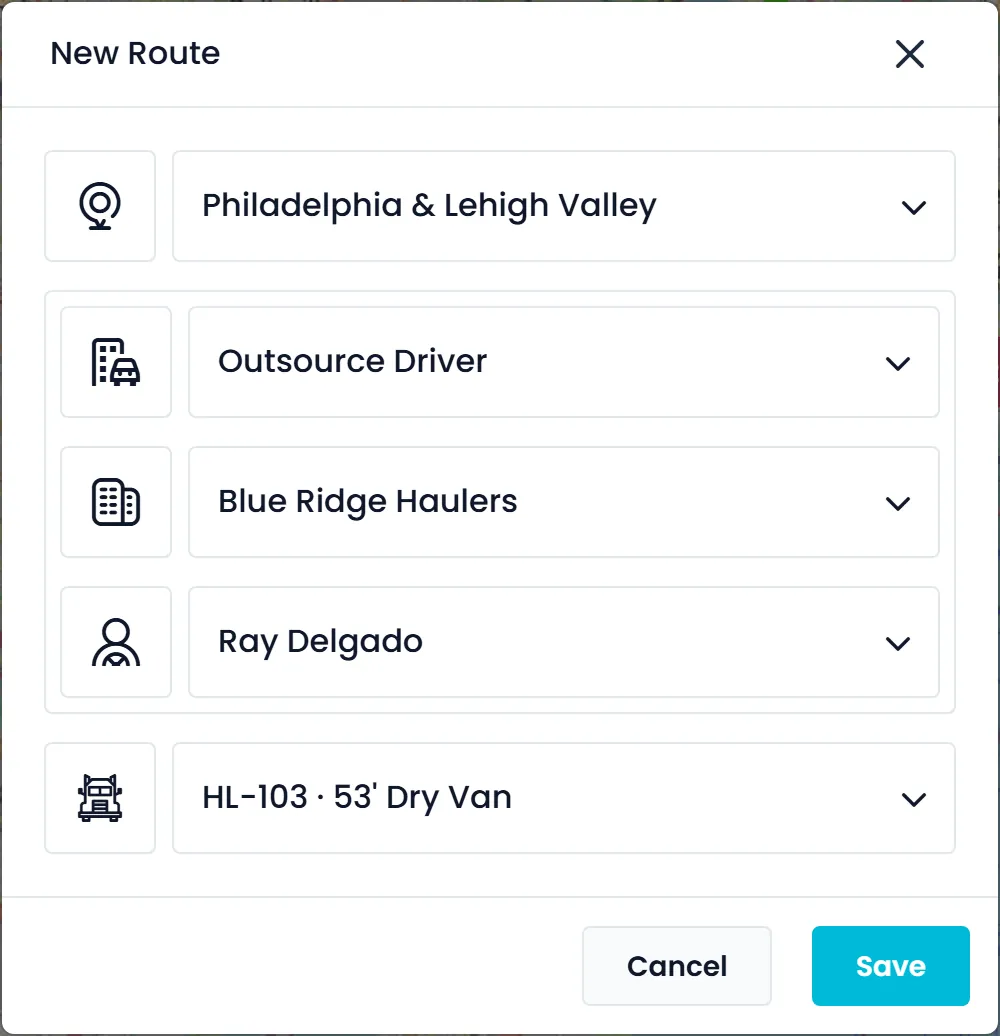
Your own drivers and outsource carriers on one dispatch board
Give a route to an outsource carrier's driver the same way as to your own, and hand freight between two routes at a hub with a transfer stop.
- New Route: switch from Company Driver to Outsource Driver, then pick the carrier, its driver and a truck
- Carrier drivers can be invited to the RushHour driver app and complete stops there
- Assign Transfer adds a drop-off to one route and a collection to the other for the same freight, with both times set up front
International pricing
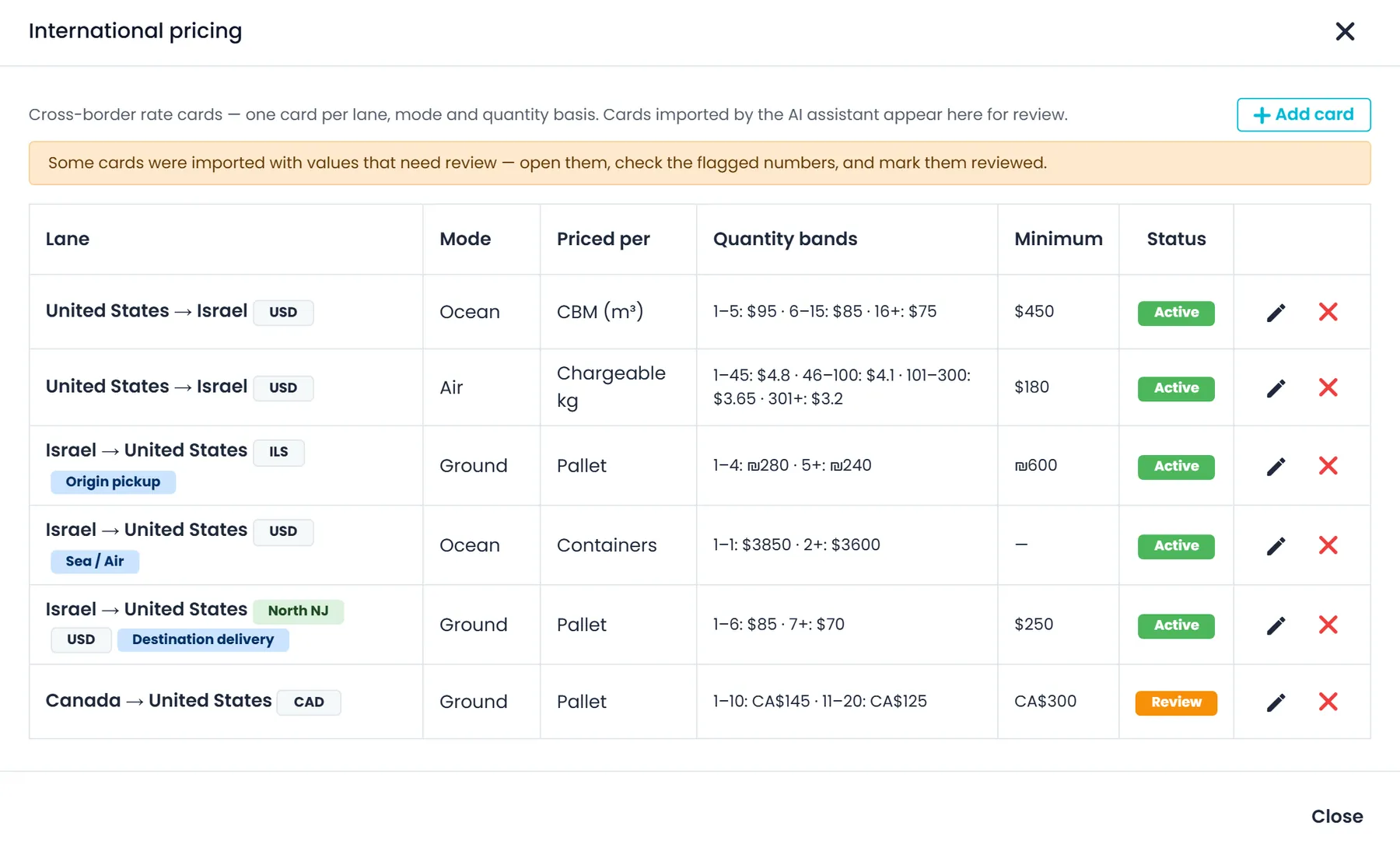
Price ocean, air and cross-border ground freight per lane
Each card covers one country lane, mode and quantity basis, and international cards are checked before your domestic zone rates and pallet grids. Split a lane into origin pickup, the sea or air leg and destination delivery, and RushHour adds the legs into one price.
- Ocean, Air or Ground, priced per pallet, chargeable kg, piece, CBM or container
- Quantity bands, a minimum charge, and a fuel percentage applied after the minimum
- Chargeable weight is the greater of actual and volumetric weight, with a divisor you set per card
- Valid-from and valid-to dates, and customer-specific cards next to your company defaults
Billing on the order
Invoice, payments and balance in one place
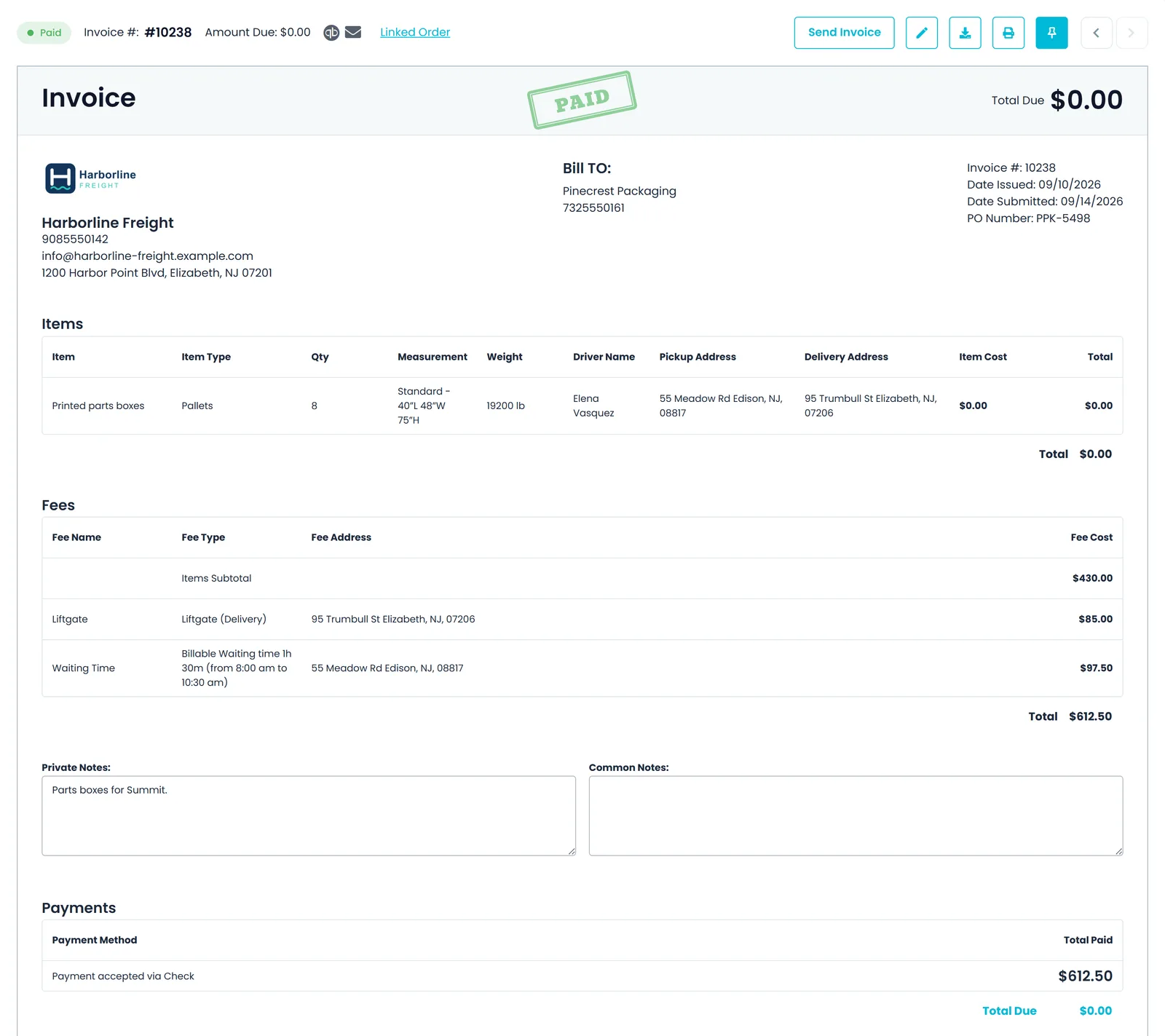
The invoice is built from the order with its items, accessorial fees and payments, on every RushHour plan.
- Item lines with type, quantity, size, weight, driver and the pickup and delivery addresses
- Fees such as liftgate and billable waiting time, each with the stop address it applies to
- Payments recorded against the invoice, with a Paid status once nothing is due
Recipient updates
Tracking links your customers open without logging in
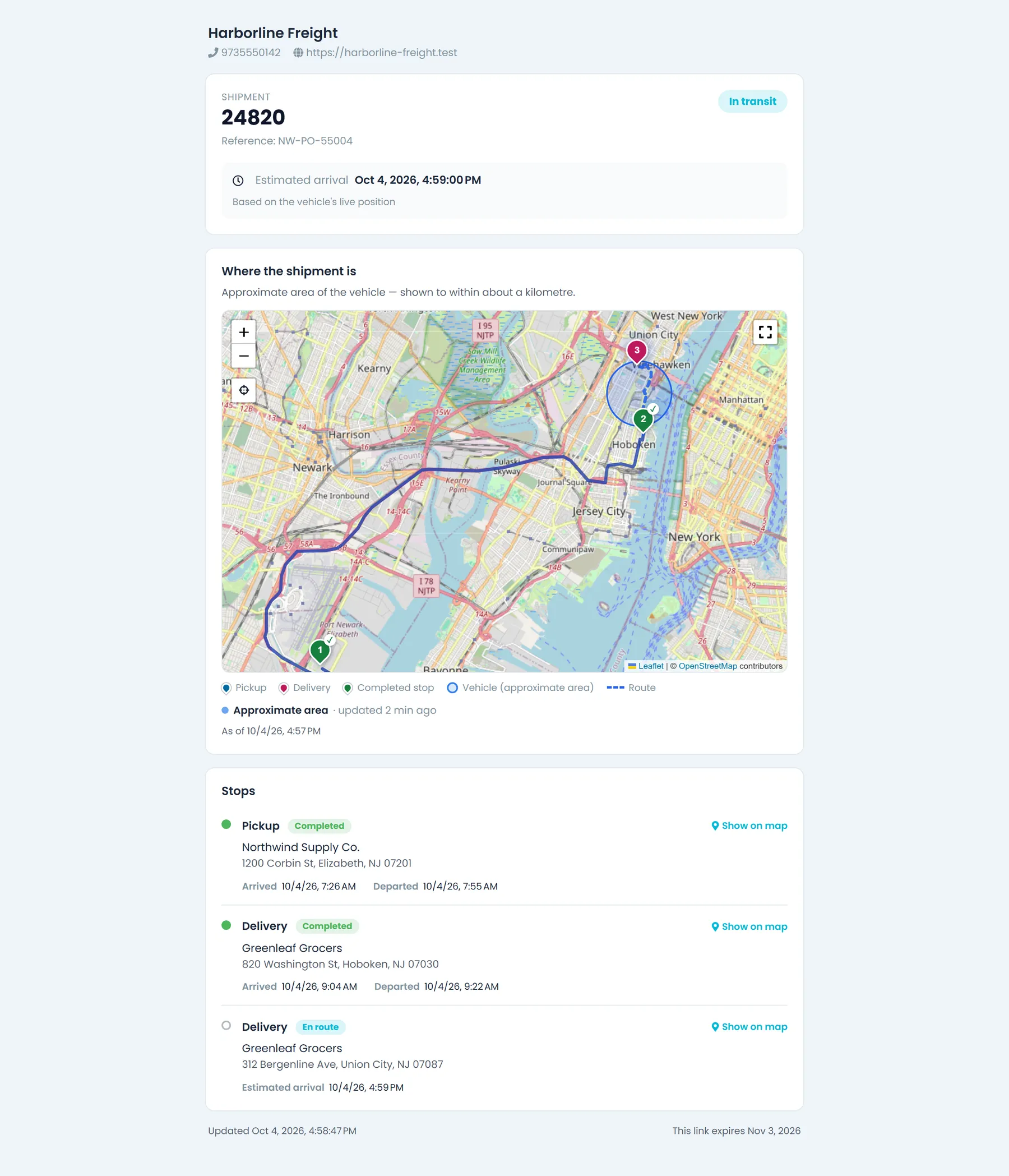
Turn on tracking links in Settings and share each order's link by hand or by automatic email. The page shows your company details and each stop's status on a map, adds the next stop's estimated arrival while the load is moving, and never shows prices.
- Truck position as an approximate area (the default), the last completed stop only, or the live position while the driver heads to this order's stops
- Links last from 1 to 365 days (30 by default) and can be revoked from the order's Tracking tab, which also counts opens
- Automatic arrival and departure emails with the details you pick, off until you switch them on
- Email only: RushHour does not send SMS
Row by row
RushHour marks reflect production today. Magaya marks come from its own site and help center, linked below.
Swipe sideways to see every column.
| Capability | RushHour | Magaya |
|---|---|---|
| Hubs and international manifests | Built inHubs menu: manifests for air, sea, truck or LCL shipments, container planning, receiving and driver pickupNew in the November 2026 release | Built inMaster and house consolidations by air, ocean and ground, with containers and cargo manifests |
| Warehouse inventory and receiving | Built inWarehouses menu: stock by order and place, receiving and repack; unit labels, scan check-in and pallet building when you switch them onNew in the November 2026 release | Built inA complete WMS: receiving, put-away, locations, cycle counts, picking and repacking |
| Customs filings | Not available or not foundNot available | Built inAES, ISF and AMS in Supply Chain; customs entries in Customs Compliance |
| Freight documents | Built inTrucking BOL, pallet labels with QR code and dispatch sheet; no air waybills or ocean bills of lading | Built inAir waybills, house and master bills of lading, warehouse receipts, cargo releases, labels |
| International multi-leg rate cards | Built inOcean, Air and Ground legs composed into one price | Built inMultimodal routes built from carrier segments; Rate Management links air, ocean, rail and road rates |
| Rate cards and quoting | Built inPallet grids, zone-to-zone rates, per-customer cards | Built inTariffs, customer and carrier rates, and quotations |
| Bookings with carriers | Not available or not foundNot available; you assign routes to the outsource carriers you already use | Built inOcean bookings through INTTRA; electronic air waybills with airlines |
| Route optimization | Built inRe-order a route's stops by distance or priority, on every plan | Limited, add-on or third-party integrationIts driver app suggests a route order; dispatcher-side optimization not found |
| Live location on the map | Limited, add-on or third-party integrationTruck pins for companies that connect Samsara; stop ETAs and customer tracking links also use the driver app's location | Not available or not foundA dispatcher's map of own drivers not found; container and air cargo tracking instead |
| Proof of delivery | Built inSignature and photos from the driver app | Built inFinal Mile driver app: photos and on-screen signature |
| Barcode scanning of freight | Limited, add-on or third-party integrationDrivers scan at pickup; warehouse staff scan labelled units in; no scan at delivery | Built inDriver app and warehouse app scan packages; a scanner for receiving and loading |
| SMS notifications and tracking links | Limited, add-on or third-party integrationNo SMS; tracking links without login, and arrival and departure emailsNext releaseArrival and departure notifications by SMS, WhatsApp and Telegram | Limited, add-on or third-party integrationEmail tracking links and app notifications; SMS not found |
| Customer portal | Built inBook orders, track, download documents, pay invoices by card | Limited, add-on or third-party integrationDigital Freight Portal, licensed separately: quotes, bookings, billing and online payments |
| Invoicing, payments and AR | Built inInvoices from the closed order, payments, AR aging | Built inBuilt-in accounting: invoices, bills, payments, deposits and financial statements |
| QuickBooks | Limited, add-on or third-party integrationOne way to QuickBooks Online; export file for QuickBooks Desktop | Limited, add-on or third-party integrationOne way to QuickBooks Online through an extension; file export for Desktop |
| Card payments | Built inYour Cardknox account: saved cards, Customer Portal and invoice pay links without login; per-stop COD requests on your customer's own Cardknox account | Built inOnline invoice payments through Veem or PayCargo, in its customer portal or from the invoice email |
| Bank transfer (ACH) | Not available or not foundOnline payments by card only | Built inACH through Veem or PayCargo |
| Driver and carrier settlements | Limited, add-on or third-party integrationPayouts page: route pay for drivers and outsource carriers, entered per route and settled in full or in part | Limited, add-on or third-party integrationVendor and carrier bills and salesperson commissions; driver pay settlements not found |
| Email linked to customers and orders | Built inCompany inbox with its own inbound address | Not available or not foundNot found; documents are emailed from the system |
| AI assistant | Built inReports, order drafts and spreadsheet or PDF imports you confirm | Limited, add-on or third-party integrationAI document extraction in its Customs Compliance product; none found for Supply Chain |
| Background AI agents and messenger channels | Built inBackground agents that keep working after you close the browser and ask before they change anything; staff and customers reach the assistant from messengers you connect with your own keysNew in the November 2026 release | Not available or not foundNot found; a customs compliance agent that answers questions is announced |
| EDI | Not available or not foundNot available | Limited, add-on or third-party integrationEDI converted to its XML format, with a set-up fee per document and a fee per transaction |
| Public API and webhooks | Limited, add-on or third-party integrationDocumented REST API and API tokens; no webhooks | Built inSOAP and REST API; webhooks through Magaya Connect |
| MCP server for AI clients | Built inMCP server at mcp.rushhourapp.com; you approve the connection in the Company Portal and it works within your own permissionsNew in the November 2026 release | Not available or not foundNot found on its API pages |
| Hebrew interface | Built inCompany and Customer Portals in Hebrew and English | Not available or not foundEnglish, Spanish and Portuguese documented; Hebrew not found |
| Published starting price | From $299/month plus one-time onboarding | No public price list found; quoted by solutions and number of users |
What we checked on Magaya's side
RushHour marks reflect production today. Competitor marks are based on the public pages below, checked in November 2026. Products change, so check the vendor's current pages before you decide.
- magaya.com: products and who they are for
- Magaya Supply Chain product page (pricing answer)
- Warehouse management software page
- Final Mile driver app page
- Digital Freight Portal page
- Magaya Rate Management page
- Magaya Customs Compliance page
- Carrier Connections page
- Magaya Connect page
- FAQ: interface languages
- Help center: Accounting overview
- Help center: QuickBooks Online extension
- Help center: Online payments
- Help center: Introduction to shipments
- Help center: Multimodal routes and segments
- Help center: AES and ACE filings
- Help center: Transaction Tracking
- Help center: EDI and API overview
Spotted something out of date? Email [email protected] and we will check it and correct the page.
Magaya or RushHour: common questions
Does RushHour file with customs?
No. RushHour has no AES, ISF, AMS or customs entry filing. Magaya files AES export information, ISF and AMS from Supply Chain, and customs entries from its Customs Compliance product.
Does RushHour create air waybills or ocean bills of lading?
No. RushHour generates the trucking bill of lading, pallet labels and dispatch sheets. A hub manifest records the air waybill, container, trailer or booking number of the shipment, but RushHour does not create the air waybill or the house and master bills of lading. Magaya creates them from the shipment.
What do RushHour's hubs do?
You create a hub as an origin, a destination or both. At a hub you consolidate orders into a manifest for an air, sea, truck or LCL shipment, plan how a sea manifest's pallets load into a container, mark the manifest when it departs and when it arrives, confirm the quantity received for each order, and see the consolidated shipments waiting for a driver. A Shipments view on the Dispatch board follows each manifest from pickup, through both hubs, to delivery.
Is RushHour a warehouse management system?
Not a full one. The Warehouses menu shows the freight held in your own warehouses with its order, customer, quantity and place, lists the freight on a route to the warehouse, takes in freight that arrives without an order and repacks it. With shipment unit labels switched on, it also prints a barcode label for each box or pallet, checks freight in by scanning and builds pallets. It has no put-away rules, picking waves or cycle counts. Magaya's WMS covers those.
How do the prices compare?
RushHour's Starter plan is $299 a month for up to 3 office users and 5 drivers, plus one-time onboarding. Magaya publishes no price list: its site says Supply Chain pricing is tailored to each organization, based on the solutions required and the number of users, and asks you to contact it for a quote (checked November 2026).
Set up with you, not handed a login
Onboarding is a one-time fee on every plan. It covers importing your customers, rates and drivers, configuring your pricing and billing, and training your team, done with you rather than handed over as a manual.
See both sides on your own orders
Bring a real order to the demo. We will dispatch it, change it after dispatch, invoice it, charge the card and send it to QuickBooks Online.