
Customer notifications by text message, WhatsApp and Telegram, driver invitations by WhatsApp or with a password, and an AI assistant that works with all of RushHour
This release lets you send the arrival and departure notifications to your customers by SMS, WhatsApp and Telegram as well as by email: in Settings → Customer Notifications you tick the channels you want, and each ticked channel says whether it is ready or what is still missing. The AI assistant now works with the newer parts of RushHour too, among them warehouses and hubs, expenses and payouts, card payments, the Inbox and tracking links, and it can open any page on the tab or with the filters you ask for. The search window (Ctrl+K) now opens any page and runs quick commands such as New order, and it finds documents, hubs, warehouse stock and more. Drivers and customer contacts can now be invited by WhatsApp, and an administrator can give a driver a sign-in with a password shown on screen to pass on.
Nuevo9
Demostración breve, sin sonido. settings
Customer notifications by text message, WhatsApp and Telegram
The arrival and departure notifications in Settings → Customer Notifications can now go out by SMS, WhatsApp and Telegram as well as by email. Tick the channels you want; each ticked channel says on the page whether it is ready or what is still missing. A text message goes to the mobile number of the customer's primary contact, or to the phone numbers you list on the customer's Notifications tab. WhatsApp messages are sent from the WhatsApp Business number you connect in Settings → AI Agents → Channels, through your approved message template. Telegram messages are sent by your bot for customers to the people at the customer who connected Telegram to it in the Customer Portal. The preview shows the message as each channel sends it, and the customer's Notifications tab shows who each channel reaches and lists the latest notifications with what became of each one. Text messages are switched on for your account by RushHour, and the page says when they are available. Customers connect Telegram in the Customer Portal while its AI assistant is switched on (Settings → Profile), and the page says so when it is off. When WhatsApp reports later that a message was not delivered, the customer's Notifications tab shows it as not delivered, with the reason WhatsApp gave.
Demostración breve, sin sonido. Plataforma
One search window for records, pages and commands
The search window of the Company Portal (Ctrl+K, or ⌘K on a Mac, or / on any page) now does more than find records. It opens any page, including every Settings page and each built-in report, and it runs quick commands: type "new order" or "dark theme" and press Enter. The chips under the search box, or a character typed first (# for orders, @ for customers, $ for invoices and payments, / for pages, > for commands), limit the window to one kind of result, and ? lists them all. Search now also finds documents, hubs, suppliers and brokers, expenses, driver issues, warehouse stock, pallets and warehouse units, users now appear in the results, and a route result opens that route on the Dispatch board. Outside the window, two-key shortcuts such as G then O (Orders) or C then O (new order) take you there directly; ? shows the full list, where you can also switch them off. Ctrl+Enter opens a result in a new browser tab. The window offers only the records, pages and commands your role may use, and a command such as New order is offered only when the page's own button would work. With nothing typed, the window lists your last ten searches, and they stay in view while you type the first character.
Demostración breve, sin sonido. Choferes y app de choferes
Invite drivers and customer contacts by WhatsApp, or with a password you pass on
Send Invite on a driver now asks how to invite when there is more than one way: by email, by WhatsApp, or with Email and password. WhatsApp opens on the driver's number with the invitation message ready, with the invite code and the link, and you press Send in WhatsApp. Email and password, for company administrators, creates the driver's sign-in straight away and shows you the email address and a new password once, with Copy buttons, so you can pass them on; for a driver who already has a sign-in, it replaces the password and signs the driver out of the app. A Send Invite button also sits next to the driver's Phone Number and Cell Number now. In a customer's Customer Portal access, Invite and Resend invitation ask the same for a contact with a phone number saved: Email or WhatsApp. Where RushHour has switched text messages on for your account, a text message is offered as well.
Demostración breve, sin sonido. settings
Plan each truck's services and see which one is due
Each truck in Settings → Fleet has a Maintenance page, opened from the truck's ⋮ menu. Add the services the truck needs, such as an oil change every 90 days or the annual DOT inspection: each one has a name, how many days apart it is done (1 to 3,650) and the day it was last done. The page lists the services soonest first, with the last and the next date and a status: due in a number of days, due today or tomorrow, or overdue, in red. Mark done moves the next due date forward from the day you enter, which can be neither later than today nor earlier than the last time the service was done. Services can also be edited and deleted. If you leave the last done day empty, the first due date counts from the day you add the service. Viewing the page needs the permission to view fleet data; adding, editing, marking done and deleting need the permission to edit the fleet.
Demostración breve, sin sonido. Plataforma
Attach a document from the Documents page to an order or quote
A document on the Documents page, for example a bill of lading, a commercial invoice or customs papers, can now be attached to an order or a quote. Open the document, choose Attach to an order or quote, and find the record by its order or quote number, customer or PO. The file is added to the order's Attachments tab, the same as an uploaded file, and the order or quote is listed under the document's Linked records. A document that is already attached is not added a second time, and a file larger than 100 MB cannot be attached. You need permission to view documents, and to attach files to or edit that order or quote. The AI assistant can attach a document too, and asks for your confirmation first.
Plataforma
Documents: an AI assistant section with next steps for each document
The details panel of a document that is ready now has an AI assistant section, for users who may import with AI: Analyze document, and the next steps that fit the type of document that was detected. After you upload a single document, the assistant now tells you what it found and asks which step to take, instead of starting the import by itself. Previews and downloads of PDF files and images are now loaded through RushHour, and when a preview cannot be shown you see the extracted text or a clear message. Receipts have their own type label.
Plataforma
IFTA: a company setting and a quarterly report
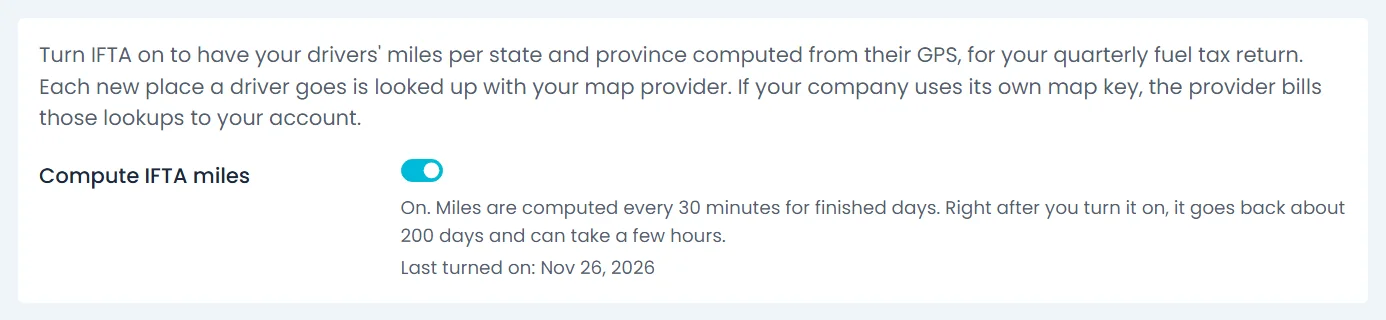
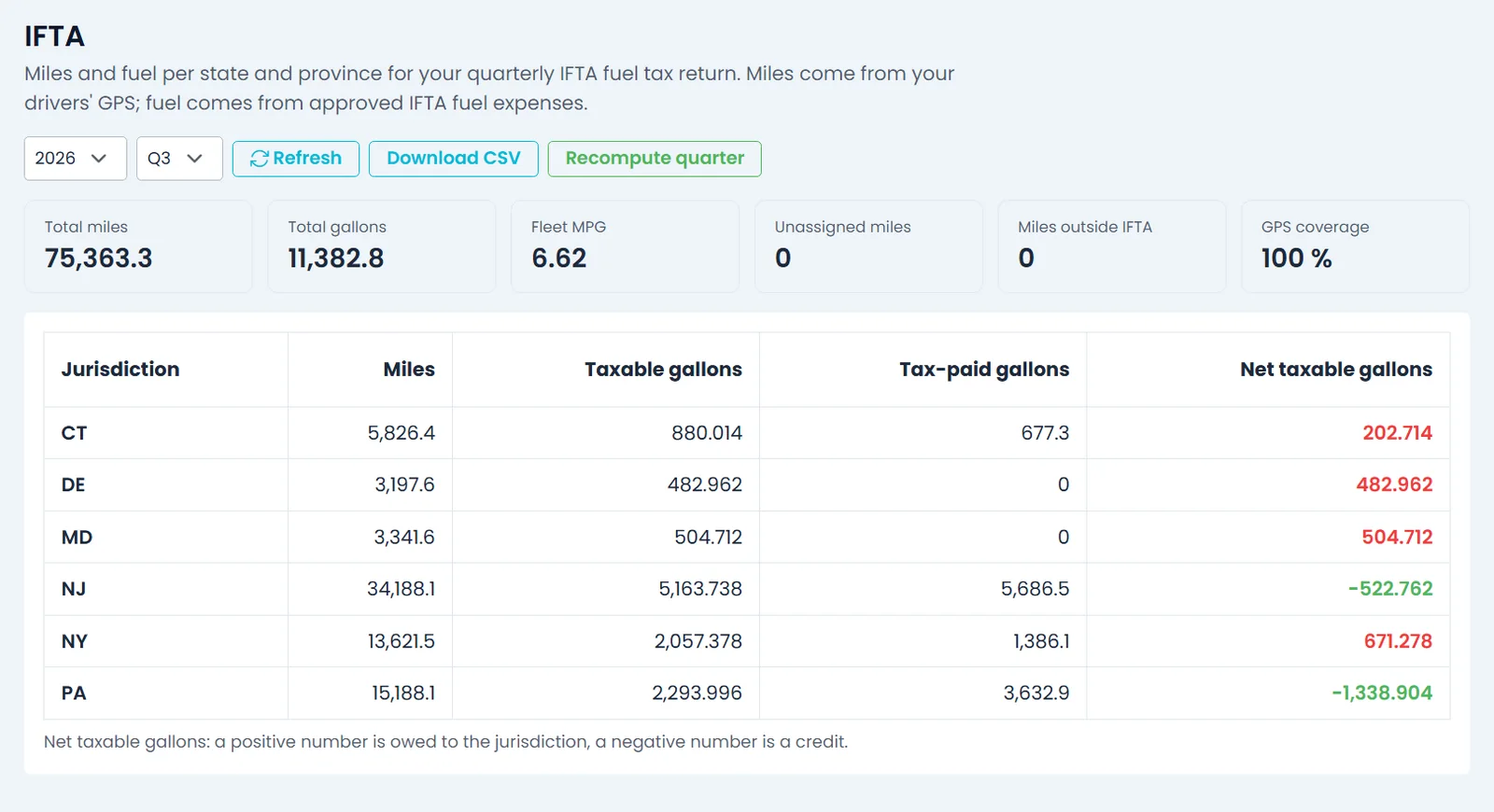
Accounting → Expenses → Setup has a new IFTA switch. It is off by default, and users who may not edit expenses see it without being able to change it. The quarterly IFTA report opens from Reports → Compliance (IFTA report), for users who may view expenses, and can be downloaded as a CSV file. Recomputing the report needs the permission to edit expenses and the IFTA switch turned on.
settings
A reminder before a truck's DOT number expires
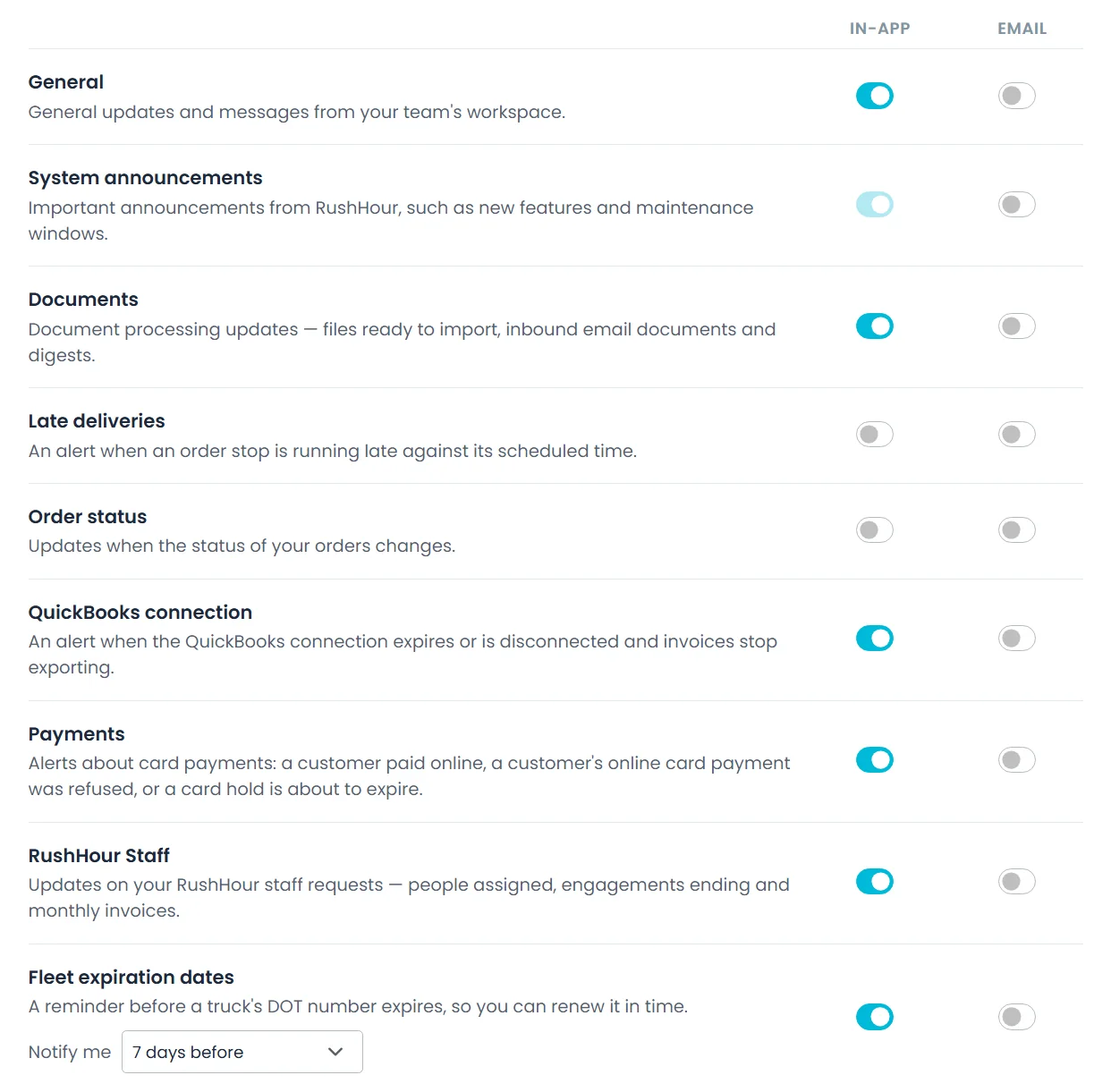
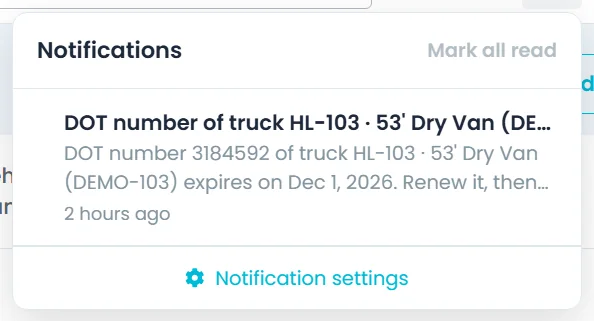
Settings → Notifications has a new Fleet expiration dates row. It reminds you before the DOT number of one of your fleet trucks expires, so you can renew it in time. The in-app reminder is on by default; email stays off until you turn it on, as on every other row. Under the row, Notify me sets how long before the expiration date you are reminded: 1, 3, 5, 7, 15 or 30 days (7 unless you change it). Each person is reminded once for each truck and expiration date, and a renewed date is reminded again when its time comes. The row is offered to users who may view Settings → Fleet, and the reminder covers active fleet trucks that have a DOT number expiration date. It opens Settings → Fleet.

Despacho y rutas
See when a driver has arrived at a pickup and not confirmed it yet
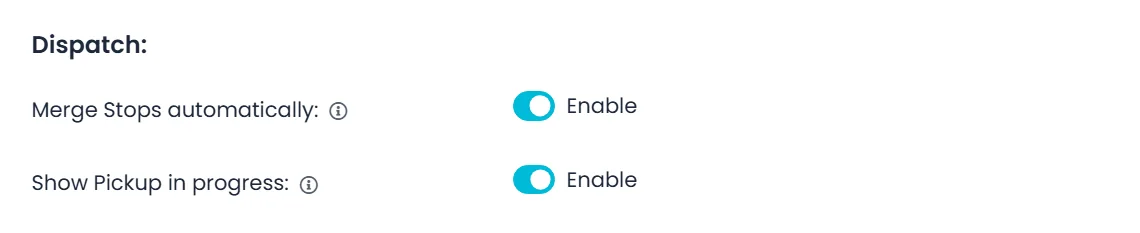
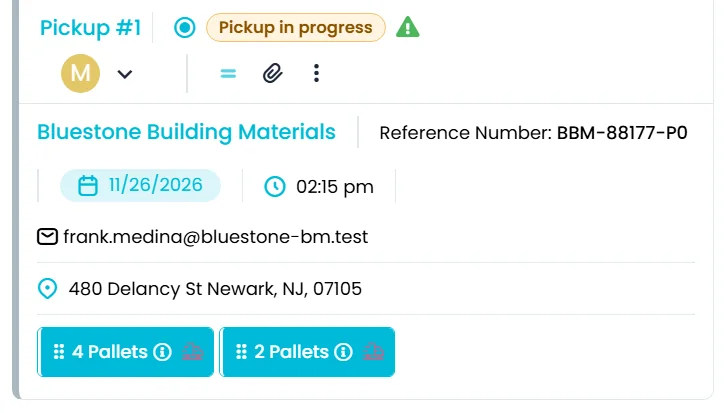
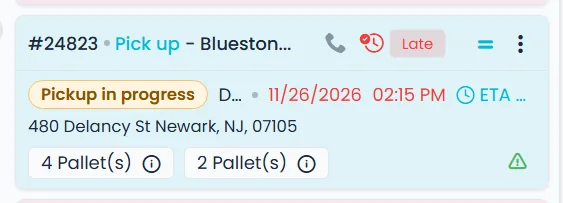
A new switch in Settings → Systems → Dispatch, Show Pickup in progress, is off by default. When it is on, a pickup the driver has marked Arrived in the Driver App and not yet confirmed shows a Pickup in progress badge on the order's stop, in the Trip Status column of the Orders list and on the Dispatch stop cards, in both the new and the classic screens. The badge only shows what the driver did: no order, trip or stop status changes. It goes away when the driver confirms the pickup or records an attempt, when the stop is unassigned, or when its route is completed or archived. The badge appears the next time the screen is loaded.
Mejorado9
Demostración breve, sin sonido. Plataforma
A more compact side menu
The rows of the Company Portal's side menu are closer together and the text is slightly smaller, so more of the menu fits on the screen. Every entry, icon and badge is still there, and the page you are on is still highlighted.
Demostración breve, sin sonido. Despacho y rutas
Move stops freely on a route's page, and see the route on its map
On a route's page (Edit Route, opened from a route on the Dispatch board), you can now drag a stop by its whole card to any place in its day, including between stops the driver has already confirmed. Drop it past a day divider to move it to that day; its time of day is kept. Stops the driver has confirmed show a lock and stay where they are. The map beside the list now shows the route, with a numbered pin for every stop and the line between them, also when the stop addresses have no saved coordinates. The map in Manage Route on the Dispatch board places its stops the same way. If a stop still cannot be placed, the page says how many stops are not shown on the map.
Demostración breve, sin sonido. Pedidos y cotizaciones
Change an item's quantity from its card on the order page
On the order page of the new interface, each item card on a pickup or a delivery stop now has [+] and [-] buttons beside it. A click changes the quantity and saves it; you do not need to press Edit or Save. Several quick clicks are saved together. On a pickup, [+] adds to what the order carries; on a delivery, [+] is available while the pickup holds some that no delivery carries yet. Taking a quantity down to 0 takes the item off that stop, and a pickup at 0 takes it off its deliveries too. The buttons are not shown on a stop that can no longer be changed, for a Full Load item, or for an item that passes through a hub or transfer stop, and they wait while the order is in edit mode or a save is on its way. Dragging item cards between stops works as before.
Plataforma
The AI assistant works with the newer parts of RushHour
The AI assistant can now answer questions about, and prepare changes in, the areas added to RushHour over the last months: warehouse stock and pallets, hubs and manifests, suppliers and brokers, the expenses ledger, driver and carrier payouts, card payments and payment requests, the company Inbox and route chats, tracking links, support tickets, Customer Portal logins, customer notifications, the hours of service board, IFTA reports, the Driver App settings, email templates, your plan and AI usage. It can open any page of the Company Portal on a particular tab or with filters set, for example the payouts page on its settlements view or the driver issues that are still open, and it can open a route, a hub, a document, a driver issue, a warehouse stock line, an Inbox email or a chat directly. It finds the right record and the right action more reliably, and "find this everywhere" uses Global Search. As before, anything that changes data, sends a message or moves money waits for your confirmation.
Pedidos y cotizaciones
Orders save faster when their stops name a company with many addresses
Saving a quote or an order is faster when its stops name a company that has many saved addresses and contacts. Each such stop used to add seconds to the save, so an order with many of them could take close to a minute.
Plataforma
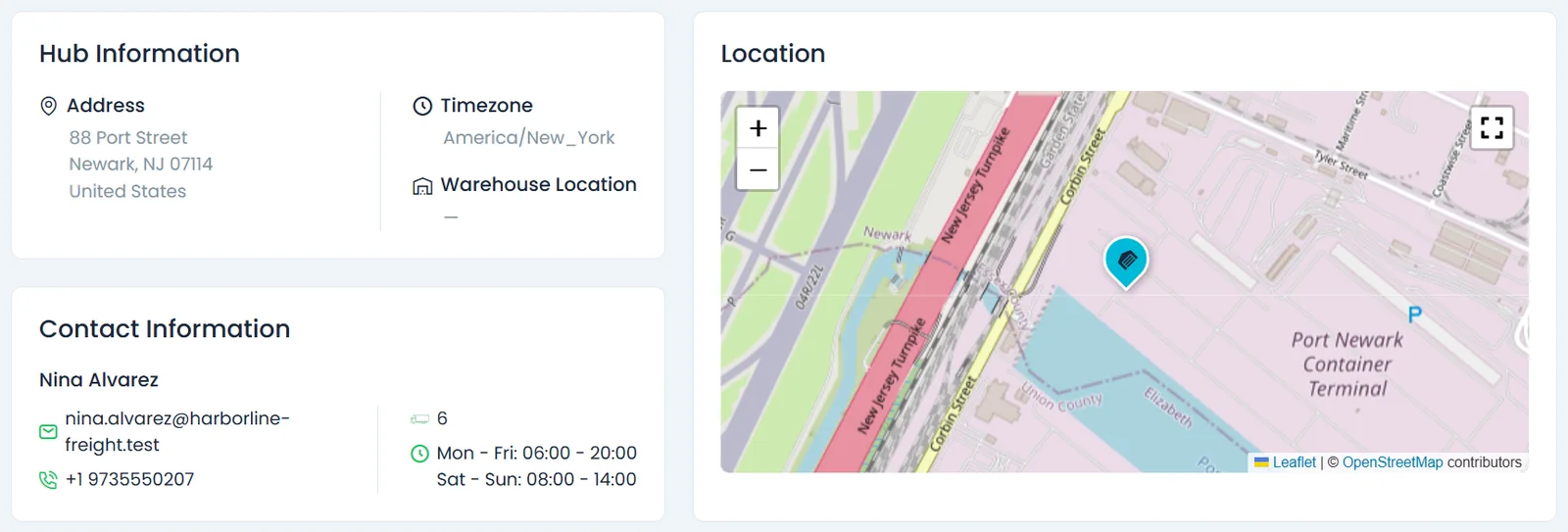
A HUB's details show the map beside the overview cards on wide screens
On the Overview of a HUB's details the map now sits beside the two cards when there is room for it, and under them on narrower screens.
Plataforma
Price sheet import: fixed rates between places, rates between pricing zones and the Classic cost per mile
When you give the AI assistant a price sheet, it can now also import fixed rates between two places (a price per pallet or a flat price, with optional minimum and maximum pallets), rates between your existing pricing zones, and the company's Classic cost per mile. The review window shows them in two editable tables, Fixed rates between places and Rates between pricing zones, and a Classic pricing: company cost per mile field. A rate that is incomplete or contradictory is highlighted, and Import stays unavailable until you fix the row or uncheck it. Rates for a pricing zone that does not exist, or for a name that more than one zone shares, are left out and listed, and no zone is created: create or rename the zone under Settings → Pricing Zones, then import the sheet again. If the sheet's prices are in another currency, the window says so, and they are saved as they are, without conversion. The Classic cost per mile applies to the whole company, must be more than 0, and needs permission to change it under Settings → Billing. A per-town surcharge on top of the normal price is not imported; the assistant tells you, and you can add it to the order as an extra charge. Also fixed: importing a domestic price sheet for a customer no longer resets the international pricing settings on that customer's pricing model, a customer's first pricing model now keeps the company default's rates between pricing zones, and a sheet whose rates were all left out no longer saves a pricing model.
Facturación y contabilidad
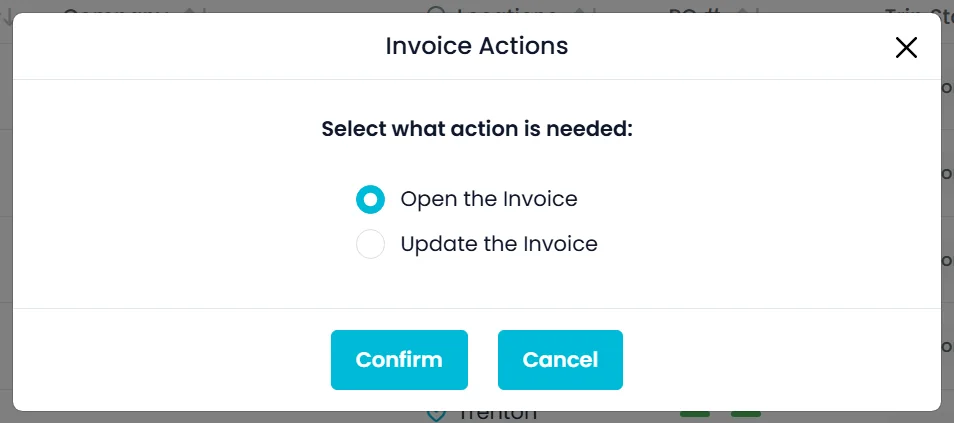
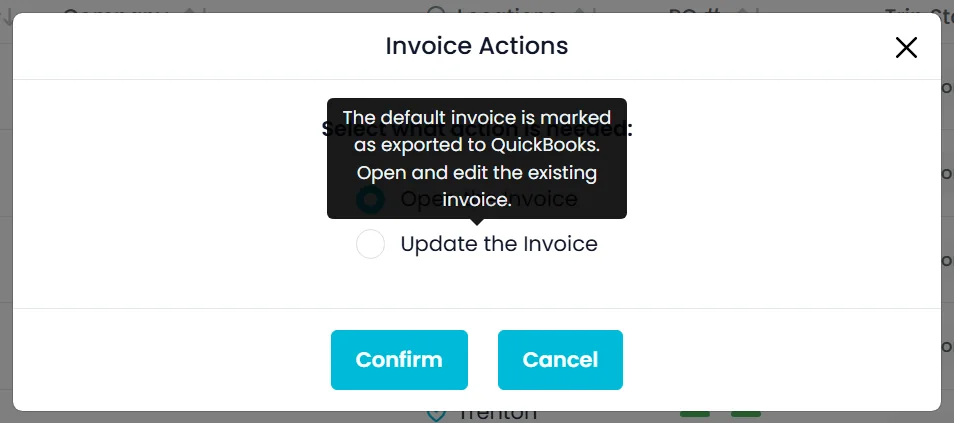
The invoice actions window says why Update the Invoice is unavailable
In the Orders list, in the New UI and the Old UI, the invoice actions window now shows Update the Invoice as unavailable, with a note explaining why, when the order's default invoice is marked as exported to QuickBooks: open and edit the existing invoice instead. In an order's Invoices list, the note on Set Default now says to use Enable Set Default in the settings menu to confirm changing an approved or emailed default invoice.
customers
A customer's message reaches your office when no AI agent answers
When a customer writes to your WhatsApp or Telegram line for customers, for example in reply to a delivery notification, and no AI agent answers your customers (the line's agent is switched off, or AI agents are turned off for your account), the message now reaches your office. From a person the line knows, it is saved in their name on a support request of their customer, and their next messages are added to the same request. Your office's answer on that request is also sent to them in the same chat, so the conversation goes on there. From a WhatsApp number that is not linked to a customer, your office is told who wrote, from which number, and what they wrote. The office's bell rings with a link to the customer's Support tickets tab, and the person is told that their message has been passed to the team, who will get back to them as soon as they can. Until now they were only told that the assistant is turned off.
Corregido10
Demostración breve, sin sonido. Pedidos y cotizaciones
Searching the Orders and Quotes lists can cover every date
When you search the Orders or Quotes list, the date range now counts as the applied filter. Clear Filter removes the date range and keeps what you typed, so the search covers every date. Before, Clear Filter emptied the search box and left the list on its default date range, so an older order could not be found from the list. When nothing is found, the list offers Search all dates, and emptying the search box afterwards brings the default date range back.
Despacho y rutas
The Dispatch map marks trucks whose GPS has stopped reporting
The Dispatch map draws each truck where its Samsara vehicle last reported. When a GPS unit is replaced, Samsara keeps the old vehicle with the last position it sent, and a truck still linked to that vehicle was shown there as if it were live, sometimes months or years out of date. The map now draws such a truck faded, with the date its GPS last reported and a pointer to Settings → Fleet. A parked truck is drawn faded with the time it was last seen. Arrival estimates and driver distances no longer use a position that is more than a day old. In Settings → Fleet, the truck dialog now says for each Samsara vehicle whether its GPS is reporting now, when it was last seen, or since when it has not reported, so two vehicles with the same name can be told apart. While Samsara is reporting, truck positions on the Dispatch board refresh about every 30 seconds instead of every 2 minutes.
Plataforma
The search window's filter chips keep their full height
In the search window (Ctrl+K), the row of chips under the search box (All, Orders, Quotes and the rest) was squeezed when the list under it was long, for example on the Dashboard before you type, so the chips' borders ran through their names. The chips now keep their full height, and only the list scrolls.
settings
The Activity Log no longer lists deleted users as having no activity
Settings → Activity Logs adds a row for every user who has no activity on the chosen day. A user or a Customer Portal login that had been deleted could still appear there on every later day, and in the users list on the Dashboard. A deleted login now appears only on the days it was active.
Pedidos y cotizaciones
A full route says why it cannot take a stop
When you assign a single stop of an order to a driver, a route that has reached your company's stop limit is marked Full and its assign button is disabled. The button now shows the reason when you point at it: "This route has reached the maximum stop limit — no more stops can be assigned".
Plataforma
Escape and the copy, paste and undo shortcuts work again in number fields
In number fields that do not accept a minus sign, the Escape key and the Ctrl / Cmd shortcuts (select all, copy, cut, paste and undo) did nothing. They work again.
Plataforma
Accounting opens on its list again after a visit that ended on the Filter tab
In the classic look, opening Accounting from the side menu after a visit that ended on the Filter tab showed the filter panel and a list that never loaded. Accounting now opens on its list. In the new look, the Type column of the Accounting customer list no longer offers sorting.
Plataforma
A zip code typed for a location whose address is already on file is saved
When you typed a zip code for a location whose address was already on file (Edit warehouse, and Settings → Locations), the zip code was not saved. It is saved now. Leaving the zip code empty changes nothing. In Settings → Locations, a zip code that starts with 0, such as 07102, keeps the 0.
Plataforma
Quotes created from a document are listed as quotes
When the AI assistant creates quotes from a document, the document's Linked records now list them as quotes and open them on the Quotes page. Before, they were listed as orders and opened on the Orders page.
settings
The Hebrew confirmation for cancelling a RushHour Staff request says that the request will be cancelled
In Hebrew, the confirmation shown when you cancel a request on Settings → RushHour Staff said that the request would go on. It now says that the request will be cancelled, as the dialog's title, its button and the English text already did.
Seguridad11
Pedidos y cotizaciones
Creating a quote or an order answers with that order only
After a quote or an order is created, the answer the Company Portal and the Customer Portal receive now holds that order only. It no longer includes the company's settings record or the records of other customers named on its stops. The answer is also much smaller, so creating an order for a customer with many saved addresses is faster.
Plataforma
The AI assistant asks before it invites a user, and can no longer open your billing page
Two actions of the AI assistant are now stricter. Adding a user, which emails an invitation, waits for your confirmation on a card like every other message the assistant sends. The page where your subscription's card is replaced or the subscription is cancelled can only be opened by a person: the assistant now points you to Settings → Subscription instead.
Plataforma
Two actions now ask for the permission their neighbours already ask for
Two actions could be reached without the permission that the actions next to them require, and are now checked. Emailing an appointment request to a customer from a stop's appointment status needs a company admin or a user who may edit that order or quote; recording the appointment status itself works as before. Rebuilding the estimated vendor costs of an order in the cost ledger needs the Add/Edit payment permission, like every other change to vendor costs. Nothing changes on the screens of the Company Portal: neither action is started from one.
customers
Passwords suggested in Customer Portal access come from a secure random generator
The initial password that Customer Portal access suggests for a new user, and the one it generates when you set a password, now come from the browser's cryptographic random generator.
Plataforma
Driver sign-ins are refused on office-only actions, and support tickets follow the customer's page
A driver's sign-in can no longer use four office actions that checked no permission: the company's default pricing models, a stop's appointment status, a stop's call outcome and an order's hold reasons. No Driver App screen uses them, and office users keep all of them. Support tickets now follow the rule of the customer's page: a user who may see only the customers they created can no longer open, answer, close or assign the tickets of a colleague's customer.
Plataforma
A refused new password no longer removes the old one
When a new password was refused because it did not meet the password rules, the account could be left with no password at all, so the old password stopped working too. This could happen when an administrator set their own password through the administrator's Set Password action, or through a set-password link. A refused password now changes nothing: the old password keeps working.
settings
Settings → Roles lists only your company's roles
The roles list and the role picker of a user showed every custom role on the platform, including roles other companies had created, and the platform administrator role. A company now sees the built-in roles, the ready-made Warehouse staff role and its own custom roles.
Plataforma
Load units of an order are protected from driver logins and from extra data in a request
The office's load-unit calls (the pallets and boxes of an order's stop) asked for no permission, so a driver login could read, change or delete the load units of any order of the company by id. They now refuse a driver login; the Driver App keeps its own load-unit calls. A request to add or update a load unit also keeps only the unit and its contents: photos and scan records can no longer be created through it. Duplicating a unit that has photos or scans now works.
Plataforma
The public contact and quote forms keep their request limit under every form of their address
The limit on how often the public Contact Us and quote request forms can be sent applied to one exact address only. The same forms reached through another spelling of the address (a trailing slash, another way of writing the version) were not limited. They now count against the same limit.
Plataforma
A request can no longer write records beyond the one it is about
Many calls take a whole record as the request (an order, a customer, a driver's inspection). Parts of such a request that the call was never about were saved with it: a new stop of an order could bring route assignments, driver ratings or warehouse stock; a driver's inspection or violation report could create a new driver, truck or route; a tenant or company record attached to a request became a new row. A record of another order, of another customer and even of another company could also be overwritten by naming its id, and was then moved to the caller. Now a request is saved with its own fields only, an order save that names a stop or an item of another order is refused, an email that belongs to another customer is saved as a new email, and a record of another company can no longer be changed or deleted by its id. Nothing changes on any screen or in the Driver App.
Plataforma
Office saves no longer write records beyond the one they are about
This extends the protection described in "A request can no longer write records beyond the one it is about" to the saves that an office permission opens. Creating a customer, an invoice, a driver, an outsource company, a route, a location, an expense, a vendor rate card or bill, a shipment type, a truck, a zone, a charge type or a payout saved the whole record the request carried, so a request could bring records of another kind along: a new customer could bring invoices, payments and saved cards; a new invoice could bring a payment that marked it paid; a new route could bring stops with charges, or a new driver beyond the plan's driver allowance; a new location could bring stock of any order. Editing a payment could overwrite a saved card of any customer of the company, and editing an invoice could take over a line of another invoice. Now each of these saves keeps its own record only: an invoice line whose id belongs to another invoice is saved as a new line, a payment is linked to the saved card it names without changing the card, and a route, an expense, a rate card or a charge type names the driver, truck, vendor or customer it belongs to by id. Nothing changes on any screen, in the Customer Portal or in the Driver App.